Codex CLI for Release Management: Changelog Generation, Semantic Versioning, and Automated Release Pipelines
Codex CLI for Release Management: Changelog Generation, Semantic Versioning, and Automated Release Pipelines
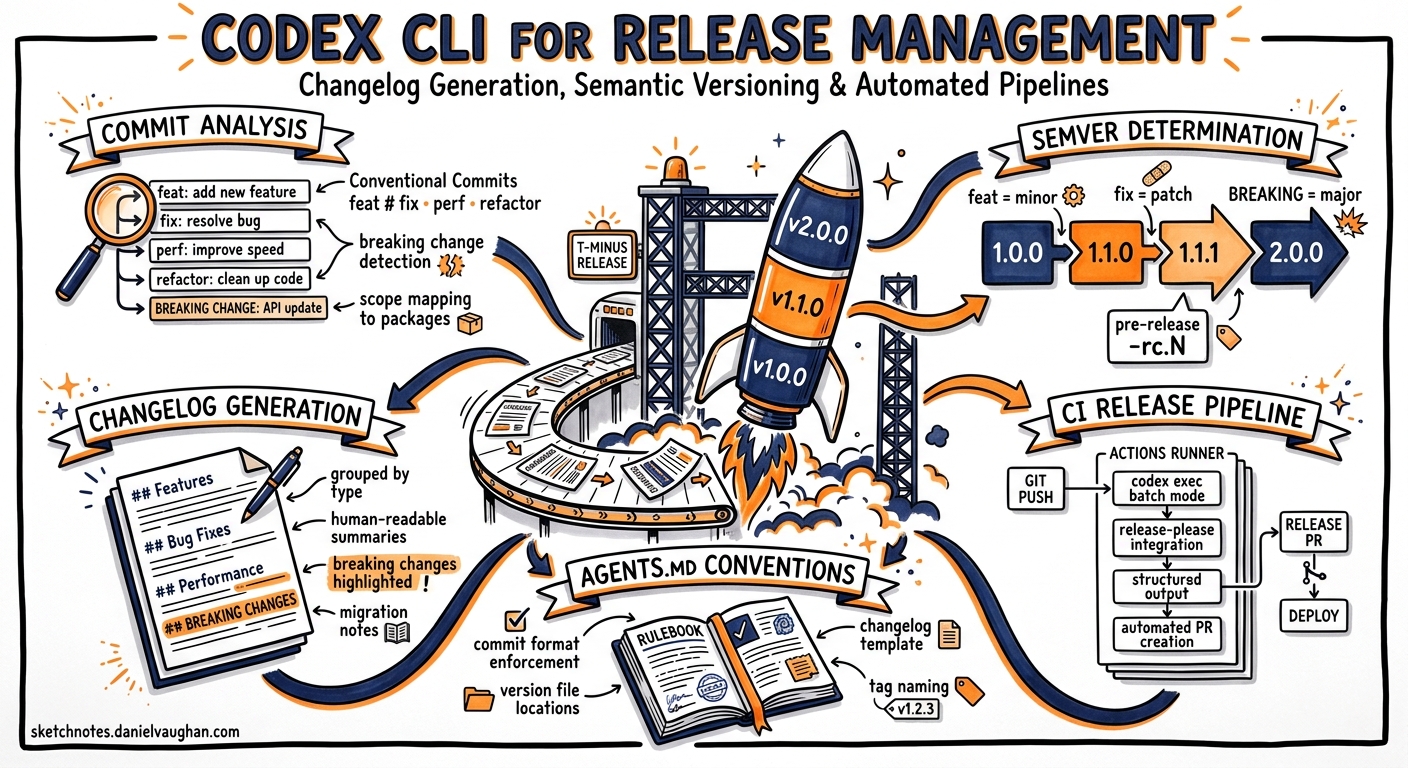
Release management remains one of the most error-prone manual processes in software engineering. Developers forget to bump versions, write vague changelog entries, or skip release notes entirely under deadline pressure. Codex CLI — OpenAI’s open-source terminal agent built in Rust 1 — can automate the entire pipeline from commit analysis through version determination to changelog generation, either interactively or in unattended CI runs via codex exec 2.
This article builds a complete release management workflow using Codex CLI, AGENTS.md conventions, reusable skills, and GitHub Actions integration.
The Release Pipeline
flowchart LR
    A[Commit History] --> B[Codex CLI Analyse]
    B --> C{Conventional Commits?}
    C -->|Yes| D[Determine SemVer Bump]
    C -->|No| E[Classify & Rewrite]
    E --> D
    D --> F[Generate Changelog]
    F --> G[Update Version Files]
    G --> H[Create Release PR]
    H --> I[Tag & Publish]
Encoding Release Standards in AGENTS.md
The foundation is an AGENTS.md file that encodes your project’s release conventions 3. Place this at the repository root so every Codex session — interactive or batch — inherits the rules:
# Release Management

## Commit Conventions
- All commits MUST follow Conventional Commits 1.0.0
- Types: feat, fix, perf, refactor, docs, test, chore, ci, build
- Breaking changes use `!` suffix or `BREAKING CHANGE:` footer
- Scopes match top-level package directories

## Versioning
- Follow Semantic Versioning 2.0.0
- feat → minor bump, fix/perf → patch bump, BREAKING → major bump
- Pre-release versions use `-rc.N` suffix

## Changelog
- Follow Keep a Changelog 1.1.0 format
- Sections: Added, Changed, Deprecated, Removed, Fixed, Security
- Each entry references the PR number and author
- Write entries for a technical audience — no marketing language
Interactive Changelog Drafting
For ad-hoc release preparation, pipe your commit log directly into Codex:
git log v1.4.2..HEAD --oneline --no-merges \
  | codex exec "Analyse these commits. Determine the correct SemVer \
    bump following our AGENTS.md conventions. Draft a Keep a Changelog \
    entry for the new version. Output the changelog section only."
Codex reads your AGENTS.md commit conventions, classifies each commit by type, determines whether the bump is patch, minor, or major, and produces a formatted changelog section 2. The key advantage over conventional-changelog-cli or release-please alone is that Codex understands context — it can identify that a refactor commit actually introduces a behavioural change warranting a fix classification, or that three related feat commits should be grouped under a single user-facing feature description.
Structured Output for CI Integration
For deterministic pipeline integration, define a JSON Schema and use --output-schema to constrain Codex’s response 4:
{
  "$schema": "https://json-schema.org/draft/2020-12/schema",
  "type": "object",
  "properties": {
    "current_version": { "type": "string" },
    "next_version": { "type": "string" },
    "bump_type": { "enum": ["major", "minor", "patch"] },
    "breaking_changes": {
      "type": "array",
      "items": { "type": "string" }
    },
    "changelog_markdown": { "type": "string" },
    "commits_analysed": { "type": "integer" }
  },
  "required": ["current_version", "next_version", "bump_type", "changelog_markdown"]
}
git log v1.4.2..HEAD --format="%H %s" \
  | codex exec \
    --output-schema ./release-schema.json \
    -o ./release-output.json \
    --sandbox workspace-write \
    "Analyse these commits against AGENTS.md conventions. \
     Read package.json for the current version. \
     Determine the SemVer bump and generate a changelog."
The --output-schema flag ensures the response validates against your schema before output, making downstream parsing reliable 4. Note that --output-schema cannot be combined with resume in the same invocation 2.
A Reusable Release Skill
Create $HOME/.agents/skills/release-manager/SKILL.md for a portable, repeatable workflow 5:
# Release Manager

Analyse the commit history since the last release tag and produce
a complete release preparation package.

## Steps
1. Find the latest release tag: `git describe --tags --abbrev=0`
2. Collect commits since that tag: `git log <tag>..HEAD --format="%H|%s|%b"`
3. Classify each commit per Conventional Commits 1.0.0
4. Flag any commits that violate conventions — suggest rewrites
5. Determine the SemVer bump (major/minor/patch)
6. Generate a Keep a Changelog 1.1.0 section
7. List any breaking changes with migration guidance
8. If package.json/Cargo.toml/pyproject.toml exists, state the version bump

## Output
Return the changelog section in markdown and a summary of the version bump.
Invoke with:
codex "Run the release-manager skill for this repository"
Or non-interactively:
codex exec "Run the release-manager skill" --sandbox workspace-write -o release-notes.md
Enforcing Conventional Commits with Hooks
Codex CLI hooks can validate commit messages before they reach your remote 6. Add a PostToolUse hook in your project’s .codex/config.toml that runs after any git commit operation:
[[hooks]]
event = "PostToolUse"
match_tool = "shell"
match_cmd = "git commit"
run = "git log -1 --format='%s' | grep -qE '^(feat|fix|perf|refactor|docs|test|chore|ci|build)(\\(.+\\))?!?:' || (echo 'ERROR: Commit message does not follow Conventional Commits' && exit 1)"
This ensures that even when Codex generates commit messages autonomously, they conform to your conventions 6.
GitHub Actions Integration
Wire the structured output into a release pipeline:
name: Release Preparation
on:
  workflow_dispatch:
    inputs:
      dry_run:
        description: 'Dry run without creating release'
        type: boolean
        default: true

jobs:
  prepare-release:
    runs-on: ubuntu-latest
    steps:
      - uses: actions/checkout@v4
        with:
          fetch-depth: 0  # Full history for tag analysis

      - name: Install Codex CLI
        run: npm install -g @openai/codex

      - name: Analyse commits and generate changelog
        env:
          CODEX_API_KEY: ${{ secrets.CODEX_API_KEY }}
        run: |
          git log $(git describe --tags --abbrev=0)..HEAD --format="%H %s" \
            | codex exec \
              --output-schema ./release-schema.json \
              -o ./release-output.json \
              --sandbox workspace-write \
              --ephemeral \
              "Analyse commits and generate a release changelog per AGENTS.md"

      - name: Parse release output
        id: release
        run: |
          echo "version=$(jq -r .next_version release-output.json)" >> "$GITHUB_OUTPUT"
          echo "bump=$(jq -r .bump_type release-output.json)" >> "$GITHUB_OUTPUT"

      - name: Create Release PR
        if: ${{ !inputs.dry_run }}
        env:
          GH_TOKEN: ${{ secrets.GITHUB_TOKEN }}
        run: |
          NEXT_VERSION="${{ steps.release.outputs.version }}"
          jq -r .changelog_markdown release-output.json > CHANGELOG_ENTRY.md
          gh pr create \
            --title "release: v${NEXT_VERSION}" \
            --body-file CHANGELOG_ENTRY.md \
            --label "release"
Use CODEX_API_KEY (a Codex access token) rather than account-based authentication for CI environments 7. The --ephemeral flag prevents session files from persisting on the runner 2.
Complementing release-please and semantic-release
Codex CLI does not replace tools like release-please 8 or semantic-release 9 — it complements them. These tools excel at deterministic version bumping and publish automation. Codex adds value in three areas:
- Commit classification under ambiguity — when a commit message says “update user service” without a conventional prefix, Codex can read the diff, determine it is a bug fix, and suggest the correct classification.
- User-facing changelog prose —
release-pleasegenerates changelogs from commit subjects verbatim. Codex can group related commits, rewrite terse subjects into readable descriptions, and add context about why a change matters. - Breaking change detection — Codex can analyse code diffs to identify API surface changes that developers forgot to mark as
BREAKING CHANGE.
A hybrid pipeline might use Codex to prepare and enrich the changelog, then hand off to release-please for the actual version bump and tag creation.
flowchart TD
    A[Push to main] --> B[release-please creates PR]
    B --> C[Codex exec enriches changelog]
    C --> D[Review & merge release PR]
    D --> E[release-please tags & publishes]
Model Selection
| Task | Recommended Model | Rationale |
|---|---|---|
| Commit classification | o4-mini |
Fast, low-cost; sufficient for structured parsing 10 |
| Changelog prose generation | o3 |
Better at natural language summarisation 10 |
| Breaking change analysis | o3 |
Needs code comprehension and reasoning 10 |
| CI batch analysis | o4-mini |
Cost-sensitive unattended runs 10 |
Override the model per invocation:
codex exec -m o3 "Generate user-facing release notes for v2.0.0"
Anti-Patterns
- Generating changelogs without human review — Codex may misjudge the significance of changes or hallucinate PR numbers. Always review generated changelogs before publishing.
- Skipping conventional commit enforcement — If upstream commits are unstructured, Codex must guess intent from diffs, reducing accuracy. Enforce conventions at commit time.
- Running version bumps in
danger-full-accesssandbox — Version file edits only needworkspace-write. Never grant broader permissions than necessary 2. - Treating Codex output as the source of truth for version numbers — Use Codex for recommendation; let deterministic tooling (
release-please,semantic-release) make the final bump decision.
Known Limitations
--output-schemaandresumeare mutually exclusive — you cannot resume a prior session with a schema constraint 2.- Context window limits — repositories with thousands of commits since the last release may exceed the context window. Filter commits to the relevant range before piping.
- Sandbox network isolation — in default sandbox mode, Codex cannot fetch remote changelog templates or publish to package registries. Use
--sandbox workspace-writefor local file operations and handle publishing in a separate pipeline step 2. - Non-deterministic output — two identical runs may produce slightly different changelog prose. Pin output via
--output-schemafor structural consistency; accept that natural language sections will vary.
Citations
-
OpenAI Codex CLI — GitHub repository — “Lightweight coding agent that runs in your terminal”, open-source Rust implementation. ↩
-
Non-interactive mode — Codex CLI documentation —
codex execreference including--output-schema,--ephemeral,--sandbox, pipe patterns, and limitations. ↩ ↩2 ↩3 ↩4 ↩5 ↩6 ↩7 -
Custom instructions with AGENTS.md — Codex documentation — AGENTS.md file format and inheritance for project-level conventions. ↩
-
Command line options — Codex CLI reference —
--output-schemaflag for JSON Schema-constrained structured output. ↩ ↩2 -
Agent Skills — Codex documentation — Skill definition, storage locations (
$HOME/.agents/skills), and cross-surface reuse. ↩ -
Features — Codex CLI documentation — Hooks system including
PostToolUselifecycle events andmatch_cmdfiltering. ↩ ↩2 -
Codex access tokens — Codex documentation — Access tokens for non-interactive CI/CD authentication, announced 5 May 2026. ↩
-
release-please — Google — Automated release PR creation from Conventional Commits with changelog generation. ↩
-
semantic-release — Fully automated version management and package publishing, updated 16 May 2026. ↩
-
Best practices — Codex documentation — Model selection guidance and automation best practices. ↩ ↩2 ↩3 ↩4