Codex CLI v0.132.0 Release Guide: Python SDK Authentication, exec resume --output-schema, and Performance Gains
Codex CLI v0.132.0 Release Guide: Python SDK Authentication, exec resume –output-schema, and Performance Gains
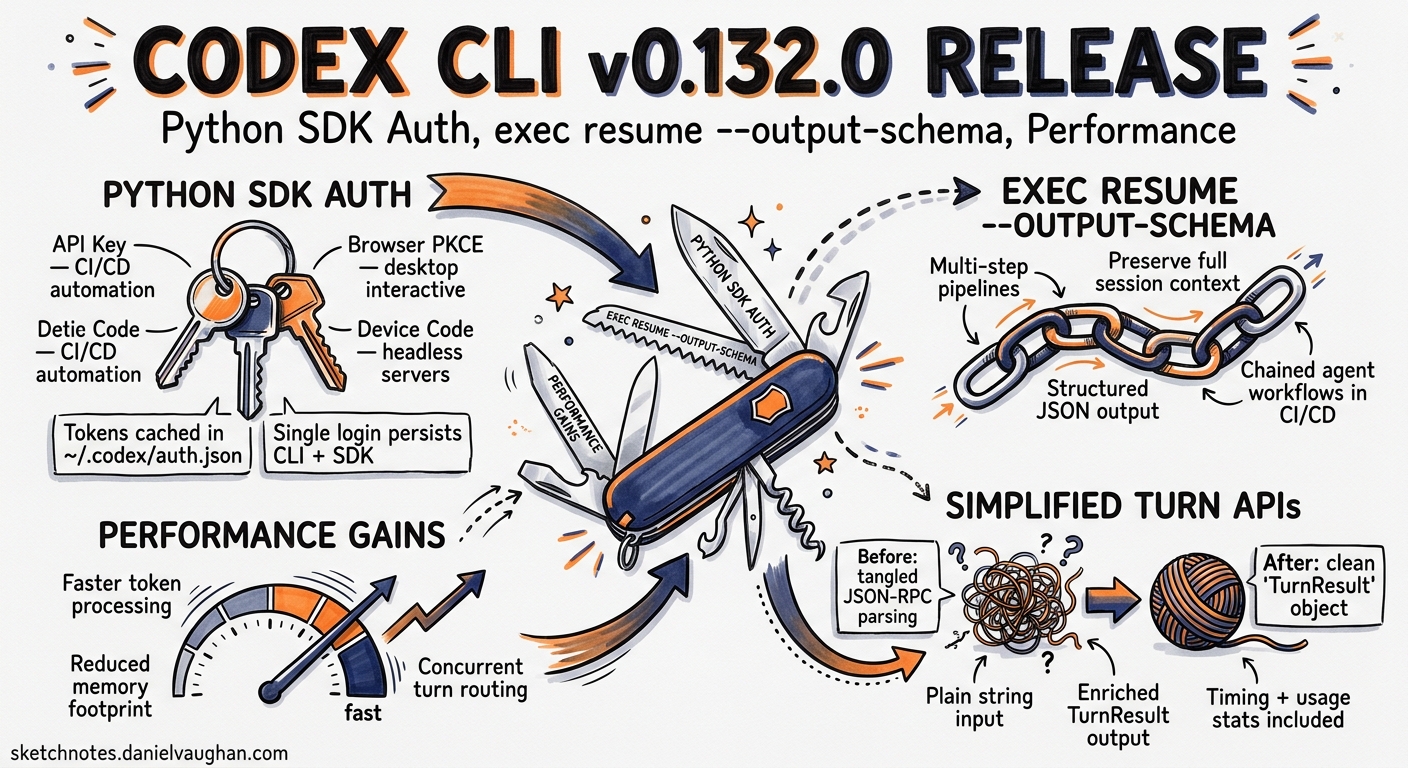
Codex CLI v0.132.0 shipped on 20 May 2026 with a release that prioritises two themes: making the Python SDK a proper first-class citizen for programmatic automation, and tightening the non-interactive pipeline story around resumed sessions with structured output 1. Below is a senior-developer walkthrough of every significant change, what it unlocks, and how to adopt it.
Python SDK: First-Class Authentication
Prior to v0.132.0, the Python SDK (openai-codex package, renamed from codex_app_server in v0.131.0 2) required users to pre-configure authentication externally — either by setting CODEX_ACCESS_TOKEN in the environment or by running codex login in a separate terminal session. The SDK itself had no awareness of credential flows.
v0.132.0 changes that. The SDK now supports three authentication methods natively 1 3:
API Key Login
The simplest path for CI/CD and server-side automation:
from openai_codex import Codex, AuthConfig

codex = Codex(auth=AuthConfig(api_key=os.environ["OPENAI_API_KEY"]))
This authenticates at standard OpenAI API rates rather than through a ChatGPT subscription 3.
ChatGPT Browser Flow
For interactive desktop use, the SDK can trigger the same browser-based OAuth PKCE flow that codex login uses:
from openai_codex import Codex, AuthConfig

codex = Codex(auth=AuthConfig(method="chatgpt"))
# Opens default browser for ChatGPT sign-in
Tokens are cached in the same credential store used by the CLI (~/.codex/auth.json or OS keyring), so a single login persists across both CLI and SDK sessions 3.
Device-Code Flow
For headless servers, SSH sessions, and containers where no browser is available:
from openai_codex import Codex, AuthConfig

codex = Codex(auth=AuthConfig(method="device_code"))
# Prints a URL and one-time code; user completes auth on any browser
This mirrors codex login --device-auth 3 and is the recommended path for CI runners that need ChatGPT-tier access without storing long-lived API keys.
Account Inspection and Logout
The SDK also exposes account lifecycle methods:
info = codex.account_info()
print(info.email, info.workspace_id, info.plan)

codex.logout()  # Revokes cached tokens
Simplified Turn APIs
Text-only workflows no longer need to construct structured input objects. Pass a plain string:
async with AsyncCodex(auth=AuthConfig(api_key=os.environ["OPENAI_API_KEY"])) as codex:
    thread = await codex.thread_start(model="gpt-5.4")
    result = await thread.run("Refactor the auth module to use dependency injection")

    print(result.final_response)      # Assistant's last message
    print(result.timing.wall_seconds) # Wall-clock duration
    print(result.usage.total_tokens)  # Token consumption
The TurnResult object now bundles collected items, timing breakdowns, and usage metrics — previously these required parsing raw JSON-RPC events 1.
exec resume with –output-schema
The codex exec non-interactive mode gained resume in v0.128.0 4, but until now resumed sessions could not enforce structured output. v0.132.0 closes that gap.
The Problem
Consider a CI pipeline that starts a long-running refactoring task:
codex exec "migrate all Jest tests to Vitest" \
  --output-schema vitest-migration.schema.json \
  -o result.json
If the session hits a token limit or needs human input, it pauses. Previously, resuming it dropped the schema constraint:
# Pre-v0.132.0: no --output-schema on resume
codex exec resume --last "continue the migration"
The resumed session would produce free-form text instead of the structured JSON the downstream pipeline expected.
The Fix
codex exec resume --last \
  --output-schema vitest-migration.schema.json \
  -o result.json \
  "continue the migration"
The schema is re-applied to the resumed session, and Codex validates the final output against it before writing to result.json 1 5.
Practical Pattern: Retry Loop with Schema Enforcement
#!/usr/bin/env bash
set -euo pipefail

SCHEMA="response.schema.json"
OUTPUT="result.json"
MAX_RETRIES=3

codex exec "analyse the codebase for security vulnerabilities" \
  --model gpt-5.5 \
  --output-schema "$SCHEMA" \
  -o "$OUTPUT" 2>/dev/null || true

for i in $(seq 1 $MAX_RETRIES); do
  if jq empty "$OUTPUT" 2>/dev/null; then
    echo "Valid JSON output on attempt $i"
    exit 0
  fi
  echo "Resuming (attempt $((i+1)))..."
  codex exec resume --last \
    --output-schema "$SCHEMA" \
    -o "$OUTPUT" \
    "continue and complete the analysis" 2>/dev/null || true
done

echo "Failed after $MAX_RETRIES retries" >&2
exit 1
Performance: Batched Terminal Capability Probes
A quiet but measurable improvement: TUI startup now batches terminal capability checks instead of running them sequentially 1.
Previously, Codex probed capabilities one at a time — colour depth, Unicode support, Kitty graphics protocol, sixel support, true-colour mode, and others. On slow terminal emulators or high-latency SSH connections, this added 200–400ms to startup.
v0.132.0 fires all probes in a single batch and collects responses asynchronously. The practical effect is a snappier launch, particularly noticeable on:
- Remote SSH sessions through jump hosts
- Windows Terminal with WSL2
- Older terminal emulators without instant response to escape sequences
No configuration change is required — the improvement is automatic.
Remote Executor: Unified Authentication
Remote executors (used by codex remote-control and registry-backed environments 6) previously required separate credential flows — a pattern that created friction when switching between local and remote workflows.
v0.132.0 unifies this: remote executor registration now uses the same Codex authentication stack as everything else 1. If you have authenticated via codex login, remote executors inherit those credentials automatically.
# config.toml — remote executor now uses standard auth
[remote]
executor = "registry.example.com/my-env:latest"
# No separate auth block needed; uses ~/.codex/auth.json
Image Fidelity in App-Server Turns
For teams using the app-server (JSON-RPC) path for multi-turn sessions, v0.132.0 preserves original image resolution across user inputs and tool outputs 1. Previously, images passed through the app-server were downsampled to reduce payload size. This caused issues for workflows involving:
- Screenshot-based UI testing via
view_image - Architecture diagram analysis
- Design review with pixel-level comparison
The fix maintains the original resolution whilst compressing transfer encoding, keeping WebSocket payload sizes manageable.
Goal Continuations: Smarter Halting
The /goal persistent objectives feature (introduced in v0.128.0 7) now halts automatically when it detects usage limits or repeated blockers 1. Previously, a goal continuation could burn through tokens retrying a fundamentally blocked action — for example, repeatedly attempting to install a package that requires root privileges in a sandboxed environment.
v0.132.0 detects these patterns and stops the continuation with a diagnostic message explaining why it halted, rather than exhausting the token budget.
Session Picker Improvements
Two quality-of-life fixes for the codex resume session picker 1:
- Renamed threads now display as
name (thread-id)rather than showing only the UUID - Paste support in the search field — previously, pasting a thread ID into the picker’s search was silently ignored on some terminal emulators
Upgrade Path
# npm global install
npm install -g @anthropic-ai/codex@0.132.0

# Or update via codex itself
codex update

# Verify
codex --version
# 0.132.0
For the Python SDK:
pip install --upgrade openai-codex
The release is backwards-compatible with existing config.toml files and AGENTS.md configurations. No migration steps are required 1.
What This Release Signals
graph LR
    A[v0.130<br/>Remote Control<br/>Bedrock Auth] --> B[v0.131<br/>Plugin Marketplace<br/>Python SDK Rename<br/>codex doctor]
    B --> C[v0.132<br/>SDK Auth Flows<br/>exec resume Schema<br/>Performance]
    C --> D[Next?<br/>Unified Platform<br/>SDK Parity]

    style A fill:#f0f0f0,stroke:#333
    style B fill:#f0f0f0,stroke:#333
    style C fill:#e6f3ff,stroke:#0066cc,stroke-width:2px
    style D fill:#fff3e6,stroke:#cc6600,stroke-dasharray: 5 5
The v0.130–v0.132 arc tells a clear story: OpenAI is systematically removing friction from programmatic Codex usage. The Python SDK is no longer a thin wrapper around a binary — it is becoming a proper automation platform with its own authentication, structured results, and session management 8. Combined with the Brockman memo’s unified platform direction 9, this positions the SDK as the stable interface that will survive the ChatGPT-Codex consolidation.
For teams building CI/CD integrations or embedding Codex in internal tools, v0.132.0 is the release where the SDK becomes production-ready for authentication-sensitive workflows.
Citations
-
Codex CLI Changelog — v0.132.0, OpenAI Developers, 20 May 2026. ↩ ↩2 ↩3 ↩4 ↩5 ↩6 ↩7 ↩8 ↩9 ↩10
-
Codex CLI v0.131.0 Changelog, OpenAI Developers, 18 May 2026. ↩
-
Authentication — Codex CLI, OpenAI Developers. ↩ ↩2 ↩3 ↩4
-
Command Line Options — Codex CLI Reference, OpenAI Developers. ↩
-
Features — Codex CLI, OpenAI Developers. ↩
-
Codex CLI v0.130 Reference, Blake Crosley, May 2026. ↩
-
Codex /goal: What It Does, How to Use It, LaoZhang AI Blog, 2026. ↩
-
SDK — Codex, OpenAI Developers. ↩
-
OpenAI’s Unified Agentic Platform, OpenAI Blog, May 2026. ↩