Google Agents CLI vs Codex CLI: Two Visions of Agent Development from the Terminal
Published: 2026-05-20. Sources: Google Developers Blog, GitHub google/agents-cli, Google Cloud I/O agent developer blog, InfoQ coverage, OpenAI Codex CLI docs, OpenAI Python SDK docs, OpenAI Plugins docs, OpenAI Skills docs.
The Core Distinction
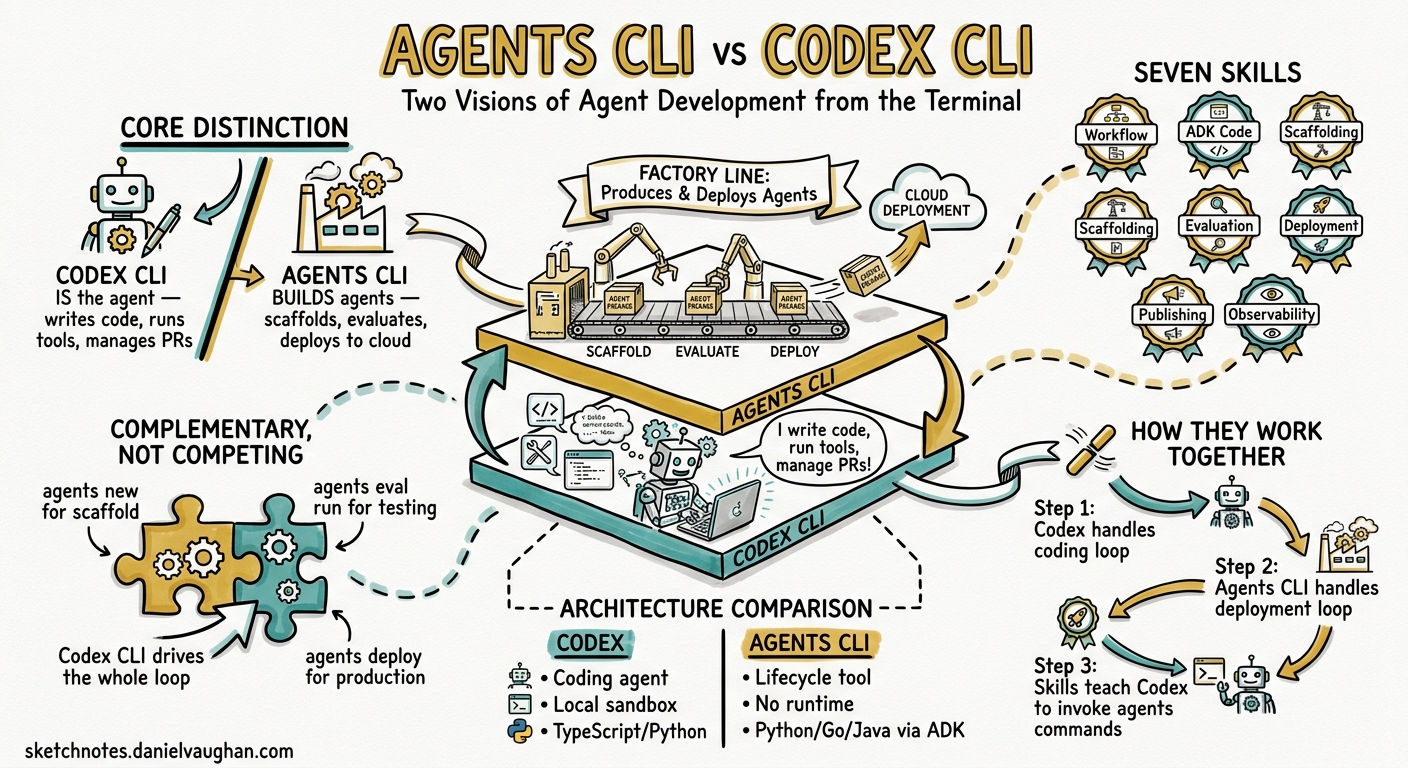
This comparison hinges on a single architectural insight: Codex CLI IS the coding agent; Google Agents CLI builds agents ON Google Cloud. They occupy different layers of the stack, and understanding where they overlap and where they complement each other is essential for teams evaluating both.
- Codex CLI — a terminal-native coding agent that writes code, runs tools, manages PRs, and orchestrates subagents. It is the agent.
- Google Agents CLI — a scaffold/eval/deploy lifecycle tool for the Agent Development Kit (ADK). It is the factory line that coding agents drive to ship agents to Google Cloud.
Architecture Comparison
| Dimension | Codex CLI | Google Agents CLI |
|---|---|---|
| Role | Coding agent (writes, tests, deploys code) | Agent lifecycle tool (scaffolds, evaluates, deploys agents) |
| What it produces | Code changes, PRs, automated workflows | ADK agent projects deployed to Google Cloud |
| Runtime | Local terminal with kernel-level sandbox | No runtime — invoked by a coding agent or human |
| Model | GPT-5.5, codex-mini, o3-pro (OpenAI models) | Model-agnostic (used by any coding agent) |
| Language | TypeScript (CLI), Python (SDK) | Python, TypeScript, Go, Java (via ADK) |
| Installation | npm install -g @openai/codex |
uvx google-agents-cli setup or npx skills add google/agents-cli |
How They Work Together
Google Agents CLI was explicitly designed to work WITH Codex CLI, not replace it. The integration path:
- Codex CLI handles the coding loop — writing agent code, implementing tools, debugging
- Agents CLI handles the deployment loop — scaffolding ADK projects, running evaluations, deploying to Google Cloud
- Agents CLI ships as skills (Markdown skill files) that teach Codex CLI how to invoke its commands
In practice, you tell Codex CLI:
- “Scaffold a new ADK agent” → Codex invokes
agents new - “Run evaluations against the eval set” → Codex invokes
agents eval run - “Deploy this agent to Cloud Run” → Codex invokes
agents deploy
Google Agents CLI: Core Workflow
Seven Bundled Skills
Agents CLI packages seven specialised skills covering the full agent lifecycle:
- Workflow — development lifecycle rules and code preservation
- ADK Code — Python API patterns for agents, tools, and orchestration
- Scaffolding —
agents newproject creation and enhancement - Evaluation —
agents eval run,agents eval compare, LLM-as-judge scoring - Deployment — Cloud Run, GKE, CI/CD pipeline automation
- Publishing — Gemini Enterprise registration and distribution
- Observability — Cloud Trace integration and structured logging
Dual Operating Modes
- Agent Mode — AI assistants execute CLI commands autonomously
- Human Mode — developers run commands directly for manual oversight
Deployment Targets
- Google Cloud Run (managed containers)
- Google Kubernetes Engine (GKE)
- Agent Engine (managed agent hosting)
- Gemini Enterprise (enterprise distribution)
Codex CLI: Agent Development Story
Codex CLI’s own agent development capabilities have expanded significantly:
openai-codex Python SDK
The openai-codex / openai_codex package (migrated in v0.131.0) provides:
- App-server JSON-RPC protocol for multi-turn agent threads
- Concurrent turn routing
- Approval mode APIs
- Pinned runtime-generated types
codex exec
Non-interactive execution for CI/CD pipelines:
--output-schemafor structured JSON output- Sandbox isolation for safe automation
- Integration with GitHub Actions and CI runners
Plugin Marketplace
v0.131.0 introduced marketplace CLI commands:
- Version-aware plugin sharing
- Share checkout workflows
- Default-enabled plugin hooks
- Shared-workspace buckets
Skills Directory
SKILL.md files with YAML frontmatter:
- Discoverable via unified mentions (@)
- Composable with hooks and plugins
- Community-shareable
Where They Compete
Despite the complementary positioning, competition exists at the platform level:
1. Agent Deployment Surface
- Agents CLI pulls deployment toward Google Cloud (Agent Platform, Cloud Run, Gemini Enterprise)
- Codex CLI pulls toward OpenAI infrastructure (Codex Cloud, cloud VM tasks,
codex exec) - Teams must choose where their agents run in production
2. Evaluation Frameworks
- Agents CLI provides
agents eval runandagents eval comparewith ground-truth datasets - Codex CLI relies on custom hooks, test suites, and CI/CD integration for evaluation
- Google’s eval framework is more opinionated; Codex’s is more flexible
3. Enterprise Governance
- Agents CLI leverages Google Cloud IAM, VPC Service Controls, and Agent Platform governance
- Codex CLI provides enterprise config layers, approval policies, sandbox modes, and the Dell AI Factory on-premises option
- Different governance models for different compliance requirements
4. Skill/Plugin Ecosystems
- Agents CLI ships skills that teach coding agents Google Cloud patterns
- Codex CLI has its own skills directory and plugin marketplace
- The ecosystems don’t interoperate — skills are agent-specific
When They Complement
The strongest use case is combining both:
Developer → Codex CLI (write agent code)
              ↓
         Agents CLI skills (scaffold ADK project)
              ↓
         Agents CLI eval (validate against eval sets)
              ↓
         Agents CLI deploy (ship to Google Cloud)
This gives you Codex CLI’s coding intelligence with Google Cloud’s deployment infrastructure.
Decision Framework
| If you need… | Use… |
|---|---|
| A coding agent to write and test code | Codex CLI |
| To deploy agents to Google Cloud | Agents CLI (via Codex CLI) |
| To deploy agents to OpenAI infrastructure | Codex Cloud / codex exec |
| End-to-end agent lifecycle on Google Cloud | Both together |
| On-premises agent deployment | Codex CLI + Dell AI Factory |
| Multi-cloud agent deployment | Codex CLI + Agents CLI + provider-specific tools |
Enterprise Deployment Comparison
| Aspect | Codex CLI + OpenAI | Agents CLI + Google Cloud |
|---|---|---|
| Compute | Codex Cloud VMs, local sandbox | Cloud Run, GKE, Agent Engine |
| Governance | Enterprise config layers, approval policies | IAM, VPC Service Controls |
| On-premises | Dell AI Factory partnership | Anthos / GKE Enterprise |
| Model lock-in | OpenAI models only | Model-agnostic (ADK) |
| Billing | OpenAI API usage | Google Cloud billing |
| CI/CD | codex exec, GitHub Actions | agents deploy, Cloud Build |
Practical Recommendation
For Daniel’s agentic pod architecture:
- Use Codex CLI as the primary coding agent — it handles the inner loop of code generation, testing, and PR management
- Add Agents CLI skills when deploying to Google Cloud — a dedicated “deployer” agent role in the pod can use Agents CLI for all GCP deployment tasks
- Keep deployment-surface flexibility — don’t lock into a single cloud provider’s agent hosting
- Watch the ecosystem convergence — as Google expands A2A (Agent-to-Agent) protocol integration and OpenAI expands its plugin marketplace, the interoperability story will evolve
What Changed at Google I/O 2026
The I/O 2026 announcements (19 May) strengthened Agents CLI’s position:
- Antigravity 2.0 now supports dynamic subagents and scheduled tasks, giving Google a more complete agent platform
- Managed Agents in Gemini API provides agent-as-a-service execution, competing with codex exec
- Android CLI 1.0 reached stability, showing Google’s commitment to CLI-based agent tooling
- Agents CLI gained broader visibility as the unifying deployment tool across Google’s agent ecosystem
The key competitive nuance remains: Google Agents CLI is designed to work WITH Codex CLI, but it competes at the platform level by pulling agent deployment toward Google Cloud versus OpenAI’s own infrastructure.