Codex Labs and the GSI Network: What Enterprise-Scale Codex Deployment Means for CLI Power Users
Codex Labs and the GSI Network: What Enterprise-Scale Codex Deployment Means for CLI Power Users
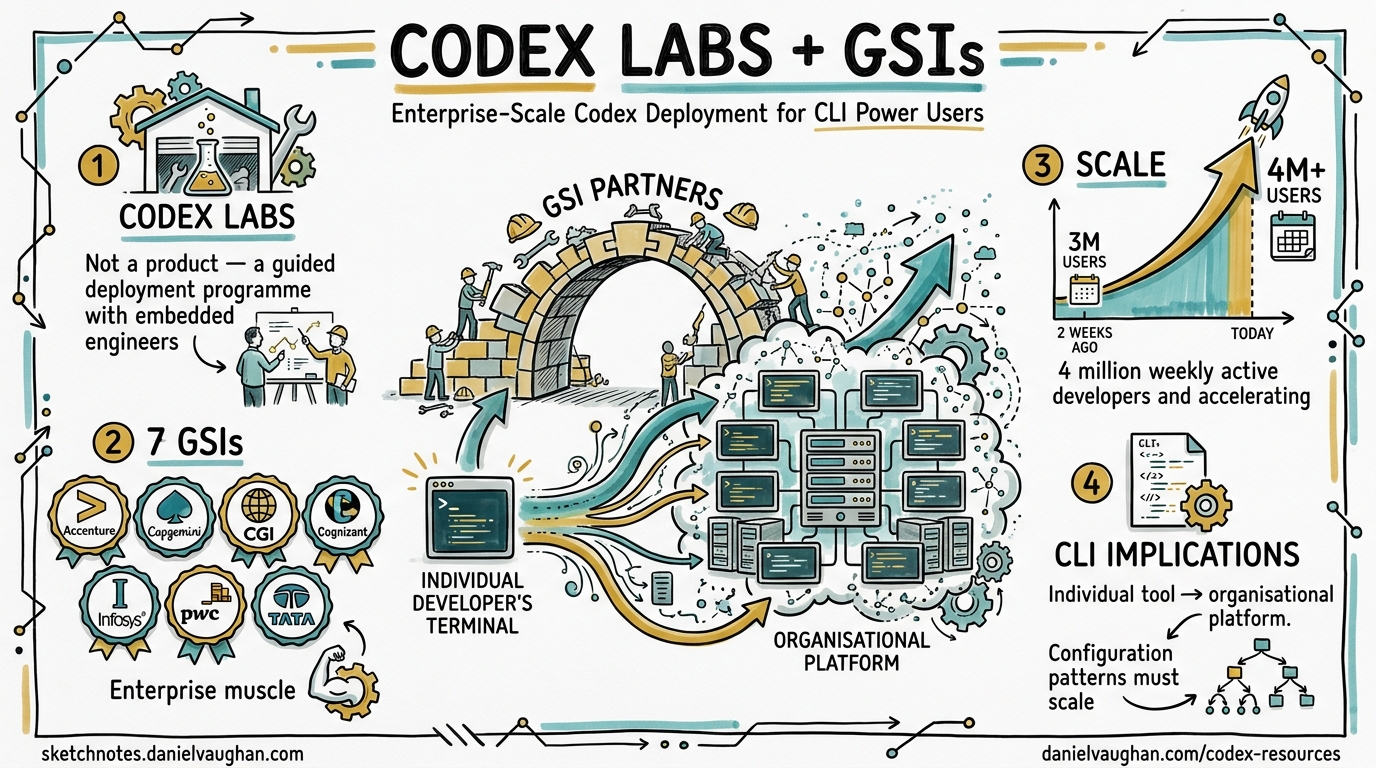
On 21 April 2026, OpenAI announced Codex Labs alongside partnerships with seven Global Systems Integrators (GSIs) — Accenture, Capgemini, CGI, Cognizant, Infosys, PwC, and Tata Consultancy Services 1. The initiative arrives as Codex’s weekly active developer base surged from three million to over four million in just two weeks 2. For CLI power users already running codex exec in CI pipelines and orchestrating multi-agent workflows locally, the enterprise push raises practical questions: what changes when your individual tool becomes an organisational platform?
This article unpacks the Codex Labs programme, maps the enterprise deployment model onto CLI-centric workflows, and identifies the configuration patterns teams will need as adoption scales from individual engineers to hundreds of seats.
What Codex Labs Actually Is
Codex Labs is not a product — it is a guided deployment programme 2. OpenAI embeds its own engineers and certified partner consultants directly inside customer organisations to run hands-on workshops, identify high-value use cases, and build repeatable deployment playbooks 3. The programme targets enterprises that have moved past experimentation but struggle with the gap between “one developer using Codex” and “two hundred developers using Codex consistently.”
The GSI partners — Accenture, Capgemini, CGI, Cognizant, Infosys, PwC, and TCS — bring enterprise integration expertise: procurement, compliance, change management, and the organisational muscle to roll out tooling across thousands of engineers 1. Cognizant, for instance, is already applying Codex across its Software Engineering Group for AI/ML model development, code refactoring, legacy modernisation, vulnerability detection, and agentic solution development 4.
graph TB
    subgraph "Codex Labs Deployment Model"
        A[OpenAI Experts] --> B[Workshops & Working Sessions]
        C[GSI Partners] --> B
        B --> D[Use Case Identification]
        D --> E[Pilot Teams]
        E --> F[Configuration Templates]
        F --> G[Organisation-Wide Rollout]
        G --> H[Repeatable Playbooks]
    end

    subgraph "GSI Partner Network"
        C1[Accenture]
        C2[Capgemini]
        C3[CGI]
        C4[Cognizant]
        C5[Infosys]
        C6[PwC]
        C7[TCS]
    end

    C1 & C2 & C3 & C4 & C5 & C6 & C7 --> C
The Three-Layer Codex Platform
Enterprise adoption now spans three distinct surfaces, each with different governance requirements:
| Layer | Interface | Governance Model | Typical User |
|---|---|---|---|
| CLI | codex / codex exec |
Local config.toml + AGENTS.md | Individual engineers, CI pipelines |
| App/Desktop | Codex desktop app | Workspace-level admin controls | Product teams, design-to-code |
| Cloud/Slack | @Codex in Slack, cloud tasks | Organisation-wide RBAC, audit logs | Cross-functional teams, managers |
For CLI users, the critical implication is that your local configuration now participates in a managed hierarchy. Enterprise admins can push managed requirements.toml files that enforce minimum sandbox policies, deny-read glob patterns, and approved model lists 5. Your personal ~/.codex/config.toml still works, but managed requirements take precedence and cannot be overridden locally 6.
Configuration Patterns for Scaled Deployment
Managed Requirements
Enterprise deployments use requirements.toml to enforce organisation-wide policies. This file lives alongside or above project-level configuration and sets floors that individual developers cannot weaken 6:
# requirements.toml — pushed by enterprise admin
[sandbox]
sandbox_mode = "workspace-write"

[permissions.enterprise.filesystem]
deny_read = [
    "**/.env",
    "**/.env.*",
    "**/secrets/**",
    "**/credentials/**",
]

[permissions.enterprise.network]
# Only allow API and registry access
allow = ["api.openai.com", "registry.npmjs.org", "ghcr.io"]
Profile-Based Environment Switching
At scale, teams need multiple configuration profiles — development, staging, security review, and production deployment each require different sandbox modes, model selections, and approval policies 6:
# config.toml — team-level configuration
default_profile = "dev"

[profiles.dev]
model = "o4-mini"
approval_policy = "on-failure"
sandbox_mode = "workspace-write"

[profiles.security-review]
model = "gpt-5.5"
approval_policy = "unless-allow-listed"
sandbox_mode = "workspace-write"

[profiles.security-review.hooks.pre_tool_use]
command = "security-gate.sh"

[profiles.ci]
model = "o4-mini"
approval_policy = "full-auto"
sandbox_mode = "workspace-write"
Switch profiles at invocation time:
# Local development
codex --profile dev "refactor the auth module"

# Security-focused review
codex --profile security-review "audit this PR for vulnerabilities"

# CI pipeline
codex exec --profile ci "run the test suite and fix any failures"
Hierarchical AGENTS.md
In enterprise monorepos, nested AGENTS.md files let teams maintain local context without bloating the global instruction set. The agent picks the nearest file in the directory hierarchy 7:
mycompany-monorepo/
  AGENTS.md                    # Organisation-wide conventions
  services/
    payments/
      AGENTS.md                # Payment team patterns, PCI-DSS rules
    auth/
      AGENTS.md                # Auth team patterns, session handling
  shared/
    AGENTS.md                  # Shared library conventions
Enterprise Pricing and CLI Access
The pricing model directly affects how CLI users operate at enterprise scale 8:
- Plus ($20/month): Full CLI access, latest models including GPT-5.5, 15-80 local messages per 5-hour window
- Pro (from $100/month): 5x-20x higher rate limits, GPT-5.3-Codex-Spark access; currently doubled usage through 31 May 2026
- Business (pay-as-you-go): Credit-based, with standard or usage-based seats, larger cloud VMs, admin controls, SAML SSO
- Enterprise: Priority processing, SCIM, EKM, RBAC, audit logs, data retention and residency controls
Credit rates for Business and Enterprise customers 8:
| Model | Input (credits/1M tokens) | Output (credits/1M tokens) |
|---|---|---|
| GPT-5.5 | 125 | 750 |
| GPT-5.4 | 62.50 | 375 |
| GPT-5.4-mini | 18.75 | 112.50 |
| GPT-5.3-Codex | 43.75 | 262.50 |
For CLI-heavy teams, the API key path charges at standard API rates with usage-based billing — often more cost-effective for CI/CD pipelines running dozens of codex exec calls per hour 8.
What the Early Adopters Are Doing
The enterprises already using Codex at scale reveal the patterns that Codex Labs will formalise 23:
- Virgin Atlantic: Code review acceleration and codebase comprehension for distributed teams
- Cisco: Incident response automation and technical debt reduction
- Ramp: Feature velocity acceleration with integrated test generation
- Notion: Repository reasoning and cross-service understanding
- Rakuten: Multi-language codebase modernisation
These use cases align with what Cognizant describes as the core enterprise value proposition: “The best engineering organisations of the next decade will not be defined by how many engineers they have, but by how effectively human judgement and AI capability work as one” 4.
graph LR
    subgraph "Enterprise Codex Adoption Maturity"
        direction LR
        L1["Level 1<br/>Individual Use<br/>Ad-hoc prompting"] --> L2["Level 2<br/>Team Standards<br/>AGENTS.md + profiles"]
        L2 --> L3["Level 3<br/>Pipeline Integration<br/>codex exec in CI"]
        L3 --> L4["Level 4<br/>Managed Deployment<br/>requirements.toml + hooks"]
        L4 --> L5["Level 5<br/>Platform Operation<br/>Codex Labs + GSI support"]
    end
What This Means for CLI Power Users
Your Workflows Will Not Break
Codex Labs does not change the CLI itself. The codex and codex exec commands, the TUI, hooks, plugins, and MCP integrations all work identically. What changes is the governance layer above your configuration 6.
Expect Managed Policies
If your organisation adopts Codex through a Codex Labs engagement, expect to see:
- Managed
requirements.tomlenforcing sandbox floors and deny-read patterns - Approved model catalogues restricting which models are available (particularly relevant for data residency requirements)
- Hook policies — enterprise-mandated hooks for MCP tool observation, apply_patch auditing, and auto-review workflows 9
- Plugin allowlists restricting which marketplace plugins can be installed
Prepare Your Team’s AGENTS.md
The single most impactful preparation for an enterprise Codex rollout is investing in high-quality AGENTS.md files. These documents become the institutional knowledge that makes Codex effective across an organisation, not just for the one developer who wrote the original prompt 7.
Audit Your CLI Configuration
Run codex config show to see your effective configuration after all layers merge. When managed requirements arrive, this command becomes essential for understanding which settings you control and which are enforced 6:
# Show effective config including managed requirements
codex config show

# Show which profile is active
codex config show --profile ci

# Override specific settings for one run
codex --config sandbox_workspace_write.network_access=true \
      --config 'shell_environment_policy.include_only=["PATH","HOME"]' \
      "deploy the staging build"
The Competitive Context
The Codex Labs launch does not happen in a vacuum. Anthropic’s Claude Code is gaining traction in regulated sectors, Microsoft Copilot is deeply embedded in enterprise toolchains, and Google’s Gemini and Amazon Bedrock are aggressively positioning for enterprise AI workloads 3. OpenAI’s GSI strategy mirrors the playbook that Salesforce and ServiceNow used to build enterprise lock-in — deep organisational integration through consulting partners creates switching costs that pure product features cannot 3.
For CLI users, this means Codex’s enterprise features will likely accelerate. The recent v0.124.0 release already added stable hooks with inline config, Amazon Bedrock provider support, and multi-environment app-server sessions 10 — all features driven by enterprise demand.
Practical Recommendations
- Standardise your configuration now. Create team-level
config.tomlwith profiles before managed requirements force a structure on you - Invest in AGENTS.md. This is the highest-leverage preparation for any enterprise rollout — it encodes institutional knowledge the agent needs
- Move CI pipelines to
codex exec. Enterprise deployments will expect automation; get ahead of it - Test with
--profileswitching. Build muscle memory for profile-based workflow changes before they become mandatory - Understand the pricing model. API key billing versus credit-based plans can differ by 3-5x depending on usage patterns — model the costs before your team scales
Citations
-
OpenAI, “Scaling Codex to enterprises worldwide,” openai.com, 21 April 2026. https://openai.com/index/scaling-codex-to-enterprises-worldwide/ ↩ ↩2
-
StartupHub.ai, “OpenAI Launches Codex Labs for Enterprise,” startuphub.ai, April 2026. https://www.startuphub.ai/ai-news/artificial-intelligence/2026/openai-launches-codex-labs-for-enterprise ↩ ↩2 ↩3
-
Influencer Magazine, “OpenAI Expands Codex Into the Enterprise Through Global Consulting Partnerships and the Launch of Codex Labs,” influencermagazine.uk, April 2026. https://influencermagazine.uk/2026/04/openai-expands-codex-into-the-enterprise-through-global-consulting-partnerships-and-the-launch-of-codex-labs/ ↩ ↩2 ↩3 ↩4
-
Cognizant, “Cognizant and OpenAI Partner to Reshape Enterprise Software Engineering with Codex,” prnewswire.com, 21 April 2026. https://www.prnewswire.com/news-releases/cognizant-and-openai-partner-to-reshape-enterprise-software-engineering-with-codex-302748608.html ↩ ↩2
-
OpenAI, “Advanced Configuration,” developers.openai.com. https://developers.openai.com/codex/config-advanced ↩
-
OpenAI, “Configuration Reference,” developers.openai.com. https://developers.openai.com/codex/config-reference ↩ ↩2 ↩3 ↩4 ↩5
-
OpenAI, “Features — Codex CLI,” developers.openai.com. https://developers.openai.com/codex/cli/features ↩ ↩2
-
OpenAI, “Pricing — Codex,” developers.openai.com. https://developers.openai.com/codex/pricing ↩ ↩2 ↩3
-
OpenAI, “Codex CLI v0.124.0 Release Notes,” github.com/openai/codex, 23 April 2026. https://github.com/openai/codex/releases/tag/rust-v0.124.0 ↩
-
Releasebot, “Codex by OpenAI — Release Notes — April 2026 Latest Updates,” releasebot.io. https://releasebot.io/updates/openai/codex ↩