Codex CLI Prompt Engineering in the GPT-5.5 Era: Outcome-First Patterns, Anti-Patterns, and the Prompts That Ship Code on the First Turn
Codex CLI Prompt Engineering in the GPT-5.5 Era: Outcome-First Patterns, Anti-Patterns, and the Prompts That Ship Code on the First Turn
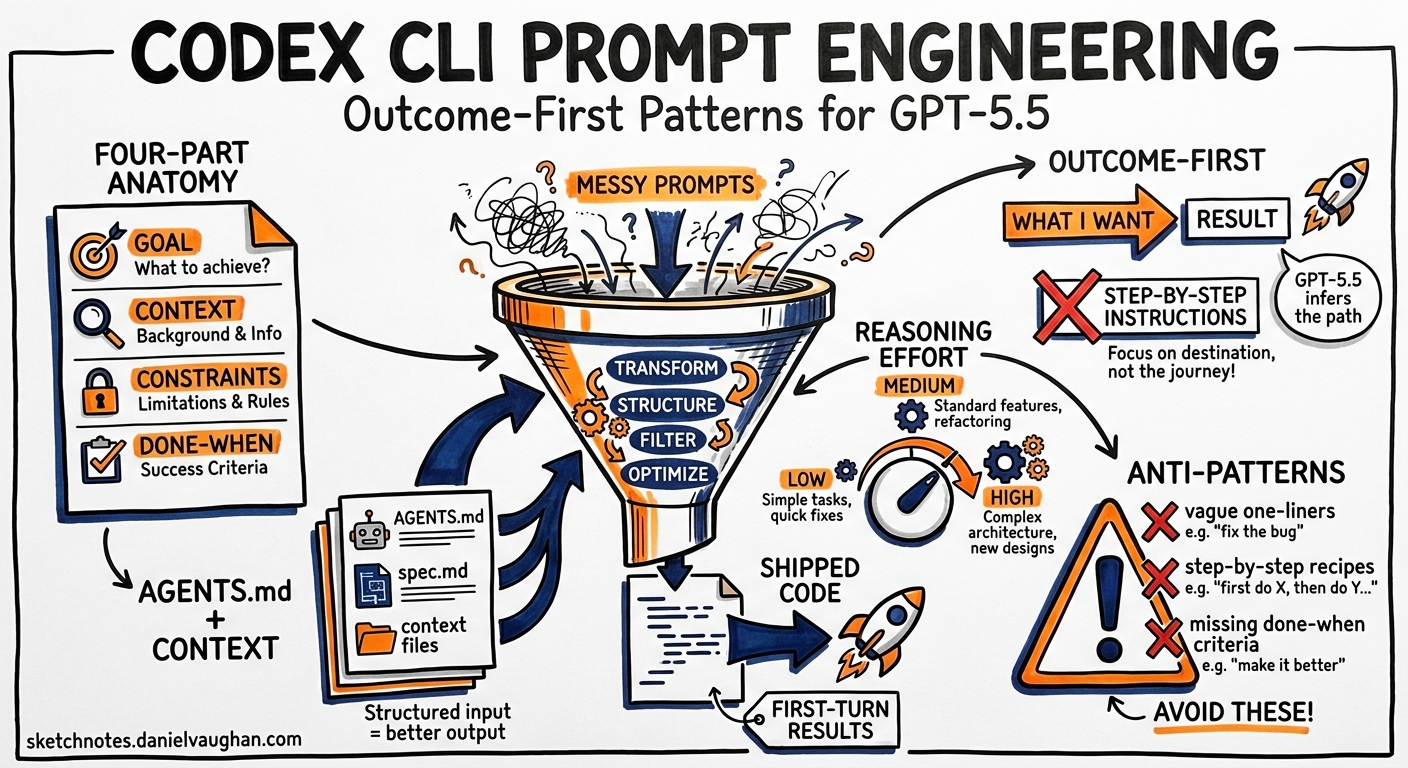
The single most common question in the OpenAI developer forum is some variation of “Why does Codex produce garbage for me but magic for everyone else?” 1. The answer is almost never the model. It is the prompt. Codex CLI v0.133, released today, runs the same GPT-5.5 engine whether you write a one-liner or a structured four-part directive — but the output quality diverges dramatically depending on how you frame the work 2.
This article codifies the prompting patterns that consistently produce first-turn results for senior developers, drawing on OpenAI’s official prompting guide 3, the Codex Cookbook’s GPT-5 prompting notebook 4, community workflows that have matured since GPT-5.5 shipped on 23 April 2026 5, and hard-won lessons from production Codex deployments.
The Four-Part Prompt Anatomy
OpenAI’s best practices page distils the effective Codex prompt into four elements 1:
- Goal — the outcome you want, not the steps to get there
- Context — relevant files, folders, docs, examples, or error output
- Constraints — conventions, architecture rules, safety requirements
- Done when — the verifiable end state
This is not a suggestion. It is the structure the model’s preamble is tuned to expect. Omit any section and GPT-5.5 fills the gap with assumptions — assumptions that cost tokens and often produce rework.
A Concrete Example
Weak prompt:
Add JSON output to the CLI.
Strong prompt:
Goal: Add a --json flag to the transform command that outputs
results as JSON instead of plain text.

Context: The CLI entry point is src/cli.ts. The transform module
is src/transform/index.ts. See the existing --verbose flag
implementation for the pattern to follow.

Constraints: Use the existing OutputFormatter interface. Do not
add new dependencies. Conform to the project's strict TypeScript
config (no explicit any).

Done when: `cargo test` passes, `./cli transform --json input.txt`
produces valid JSON to stdout, and the help text includes the new
flag.
The difference is not verbosity for its own sake. Every line in the strong prompt eliminates a decision the model would otherwise make autonomously — and possibly incorrectly 3.
Outcome-First Prompting for GPT-5.5
GPT-5.5 represents a shift from instruction-following to outcome-oriented reasoning 5. Earlier models needed step-by-step directions. GPT-5.5 performs best when you describe what good looks like and let the model choose the implementation path 4.
flowchart LR
    A[Define outcome] --> B[Provide context<br/>via @ mentions]
    B --> C[State constraints<br/>and invariants]
    C --> D[Specify done-when<br/>criteria]
    D --> E[GPT-5.5 plans<br/>and executes]
    E --> F{Verification<br/>passes?}
    F -->|Yes| G[Done]
    F -->|No| E
In practice this means:
- Do write: “Reduce the home page time-to-interactive below 1 second.”
- Don’t write: “First, open src/pages/Home.tsx. Then find the useEffect on line 42. Replace it with useMemo…”
The model has been trained to plan before acting 4. When you pre-specify the plan, you override its internal planner and often produce worse results because your plan omits context the model would have gathered autonomously.
The AGENTS.md Boundary
A recurring anti-pattern is stuffing durable rules into the prompt. Every project-wide convention — build commands, test runners, code style, architectural constraints — belongs in AGENTS.md, not in your prompt 1 6.
# AGENTS.md (project root)

## Build & Test
- Build: `pnpm build`
- Test: `pnpm test`
- Lint: `pnpm lint --fix`

## Code Conventions
- TypeScript strict mode, no `any`
- Errors propagate; no silent catches
- New components go in src/components/<Name>/

## Verification
- All changes must pass `pnpm test` before completion
- Run `pnpm lint` after every file edit
The prompt then shrinks to task-specific intent:
Refactor the PaymentForm component to use the new
PaymentIntent API. Done when existing tests pass and
the Stripe test-mode checkout flow works end-to-end.
AGENTS.md is loaded automatically at session start and survives context compaction 6. Prompt text does not. Anything you need the agent to remember across turns belongs in the file, not the prompt.
Hierarchical AGENTS.md
Codex supports global (~/.codex/AGENTS.md), repository-level (.codex/AGENTS.md), and subdirectory-specific overrides 1. Use this hierarchy to layer concerns:
| Level | Contains |
|---|---|
| Global | Personal preferences, shell environment, default model |
| Repository | Build commands, conventions, architecture rules |
| Subdirectory | Module-specific constraints (e.g., packages/api/AGENTS.md for API-specific rules) |
Reasoning Effort: When to Turn the Dial
Codex CLI exposes four reasoning levels — Low, Medium, High, and Extra High — tuneable via Alt+, and Alt+. in the TUI 7. The OpenAI prompting guide recommends Medium as the default for interactive coding 4. But the choice should match the task:
| Task type | Reasoning | Why |
|---|---|---|
| Renaming variables, formatting | Low | Mechanical transformation, no planning needed |
| Feature implementation, bug fixes | Medium | Balanced speed and intelligence |
| Architecture decisions, complex refactoring | High | Needs multi-step planning |
| Cross-codebase migrations, security audits | Extra High | Requires deep analysis across many files |
Anti-pattern: Running every prompt at Extra High reasoning. The token cost scales roughly 3× from Medium to Extra High 4, and the model spends more time thinking about simple tasks, which can introduce unnecessary complexity.
Verification Steps: The Highest-ROI Prompt Investment
OpenAI’s prompting page states it plainly: “Codex produces higher-quality outputs when it can verify its work.” 3. Include explicit verification commands in your prompt or AGENTS.md:
Done when:
1. `pytest tests/ -x` passes
2. `mypy src/ --strict` reports zero errors
3. The /api/health endpoint returns 200
Without verification criteria, the model declares victory after the last apply_patch. With them, it runs the checks and self-corrects on failures — often across multiple cycles — before presenting the result. This single pattern eliminates the majority of rework in typical Codex sessions.
The Plan-First Decision
Not every prompt benefits from planning. The official guidance 1 is:
- Skip planning for clear, bounded tasks: “Fix the off-by-one error in pagination”
- Use
/planfor ambiguous or multi-step tasks: “Migrate our auth system from JWT to session cookies”
Plan Mode (/plan or Shift+Tab) prevents the model from writing code until you approve the approach 1. For complex work, this is not optional — it is the difference between a productive session and a context-exhausting spiral.
flowchart TD
    A[New task] --> B{Clear scope<br/>and approach?}
    B -->|Yes| C[Direct prompt<br/>with done-when]
    B -->|No| D[/plan first]
    D --> E[Review plan]
    E --> F{Approve?}
    F -->|Yes| G[Execute]
    F -->|No| D
    C --> G
    G --> H[Verify]
For tasks that span more than one session, combine /plan with /goal:
/goal Migrate the authentication system from JWT to session
cookies. Done when: all auth tests pass, the login flow works
in the staging environment, and no JWT references remain in
the codebase.
Goals persist across sessions and survive process restarts as of v0.133 2. The model will resume where it left off, checking its progress against your done-when criteria.
Context Injection: @ Mentions and Beyond
GPT-5.5’s million-token context window 5 does not mean you should dump your entire repository into the prompt. Targeted context produces better results:
@src/auth/middleware.ts— attach specific files to the conversation 8@src/auth/— attach an entire directory listing@CHANGELOG.md— provide project history for migration context/ide— include files open in your IDE
The @ mention picker (unified in v0.131 8) searches files, directories, plugins, and skills in a single fuzzy-search interface. Use it liberally — every file you attach explicitly is one fewer file the model has to guess about.
Anti-pattern: Attaching dozens of files “just in case”. Each file consumes context tokens. Attach only what is directly relevant to the task. For exploration tasks, let the model use its built-in file search tools instead.
Five Anti-Patterns That Waste Tokens
1. The Step-by-Step Micromanager
First open file X. Then find line Y. Then change Z to W.
Then save. Then run tests.
This overrides the model’s planner and prevents it from discovering better approaches. State the outcome; let the model plan.
2. The Kitchen-Sink Prompt
Implement the feature, write tests, update docs, refactor
the adjacent module, fix the linting errors, and update
the changelog.
Each sub-task deserves its own turn or subagent. Overloaded prompts produce partial completions and context exhaustion 1.
3. The Missing Verification
Add the new endpoint.
No done-when criteria means the model stops after writing code. Add: “Done when curl localhost:3000/api/new-endpoint returns 200 and the integration test passes.”
4. The AGENTS.md Bypass
Repeating project conventions in every prompt instead of committing them to AGENTS.md. The model’s context compaction may discard your inline rules mid-session; AGENTS.md content is preserved 6.
5. The Static Reasoning Level
Using the same reasoning effort for every task. Toggle with Alt+,/Alt+. based on task complexity. Simple renames do not need Extra High reasoning 7.
Prompt Templates for Common Workflows
Bug Fix
Bug: [describe the symptom and how to reproduce]
Context: @src/module/file.ts, error output from `pnpm test`
Constraints: Do not change the public API. Minimal diff.
Done when: The reproduction case no longer triggers the bug
and `pnpm test` passes.
Feature Implementation
Goal: [describe the feature outcome]
Context: @src/relevant/files, @docs/spec.md
Constraints: Follow existing patterns in @src/similar/feature.
No new dependencies without justification.
Done when: [specific test commands] pass and [user-visible
behaviour] works as described.
Code Review
/review

Focus on: security implications, error handling completeness,
and conformance to our TypeScript strict config. Flag any
changes that affect the public API.
Refactoring
/plan Refactor [module] to [target architecture].
Preserve all existing tests. Add new tests for any
extracted components. Done when: `pnpm test` passes,
no increase in cyclomatic complexity per function,
and the module's public API is unchanged.
The Compound Pattern: AGENTS.md + Prompt + /goal
The highest-performing Codex workflows combine all three layers:
- AGENTS.md handles durable project context — build commands, conventions, architecture rules
- The prompt provides task-specific intent — what to build, what context to use, what “done” means
/goalpersists the objective across turns and sessions — ensuring the model tracks progress towards completion
flowchart TB
    subgraph Durable["Durable Context"]
        A[AGENTS.md<br/>Conventions, build, test]
        B[Global AGENTS.md<br/>Personal preferences]
    end
    subgraph Task["Task Context"]
        C[Prompt<br/>Goal + context + constraints + done-when]
        D["@ mentions<br/>Attached files"]
    end
    subgraph Persistence["Session Persistence"]
        E["/goal<br/>Cross-session objective tracking"]
        F["Goal DB<br/>~/.codex/goals.db"]
    end
    A --> G[Codex Agent]
    B --> G
    C --> G
    D --> G
    E --> G
    F --> E
When these layers are properly separated, your prompts become short and focused — because the durable context is already loaded, and the goal tracker handles multi-session continuity. The prompt’s only job is to direct this turn’s work.
What GPT-5.5 Changed About Prompting
Two concrete shifts since GPT-5.5 replaced GPT-5.4 as the default Codex model 5:
-
Shorter prompts work better. GPT-5.5’s improved instruction following means you can often omit explicit steps. “Migrate the auth module to Supabase” works where GPT-5.4 needed a paragraph of instructions.
-
Anti-patterns in constraints are more effective. GPT-5.5 reliably honours negative constraints like “Do not add string-matching patches to pass one test. If a test exposes a bad loop, fix the underlying evaluator.” 4. This single-line constraint prevents the model from gaming test suites.
The model also benefits from the phase parameter in its response protocol — separating commentary from tool calls from final answers 4. This means well-structured prompts produce cleaner, more predictable output sequences.
Summary
Effective Codex CLI prompting in v0.133 comes down to five principles:
- State outcomes, not steps — let GPT-5.5’s planner do its job
- Always include done-when criteria — verification is not optional
- Separate durable context into AGENTS.md — prompts are for task-specific intent
- Match reasoning effort to task complexity — Medium for most work, High/Extra High for hard problems
- Use
/planfor ambiguity, direct prompts for clarity — the wrong mode wastes tokens either way
The developers who ship the most with Codex CLI are not the ones with the longest prompts. They are the ones who wrote AGENTS.md once, wired up the right MCP servers, and keep their prompts focused on what they want — not how to get there 1.
Citations
-
Best Practices — Codex, OpenAI Developers — Official best practices covering prompt structure, AGENTS.md, planning, and common mistakes. ↩ ↩2 ↩3 ↩4 ↩5 ↩6 ↩7 ↩8
-
Codex CLI v0.133.0 Release — GitHub — v0.133.0 stable release notes, 21 May 2026, including goals enabled by default. ↩ ↩2
-
Prompting — Codex, OpenAI Developers — Official prompting guidance covering verification steps and task decomposition. ↩ ↩2 ↩3
-
Codex Prompting Guide — OpenAI Cookbook — GPT-5-era prompting patterns covering autonomy, phase parameters, reasoning effort, and apply_patch format. ↩ ↩2 ↩3 ↩4 ↩5 ↩6 ↩7
-
Introducing GPT-5.5 — OpenAI — GPT-5.5 capabilities announcement, 23 April 2026, including outcome-first reasoning and million-token context. ↩ ↩2 ↩3 ↩4
-
AGENTS.md — Codex, OpenAI Developers — Official documentation on the AGENTS.md instruction file, hierarchical loading, and context compaction survival. ↩ ↩2 ↩3
-
Codex CLI Changelog — v0.126.0 — Alt+, and Alt+. reasoning effort controls introduced. ↩ ↩2
-
Codex CLI Changelog — v0.131.0 — Unified @ mention picker searching files, directories, plugins, and skills. ↩ ↩2