Codex CLI in GitHub Actions: Best Practices, Limitations, and Gotchas
Codex CLI in GitHub Actions: Best Practices, Limitations, and Gotchas
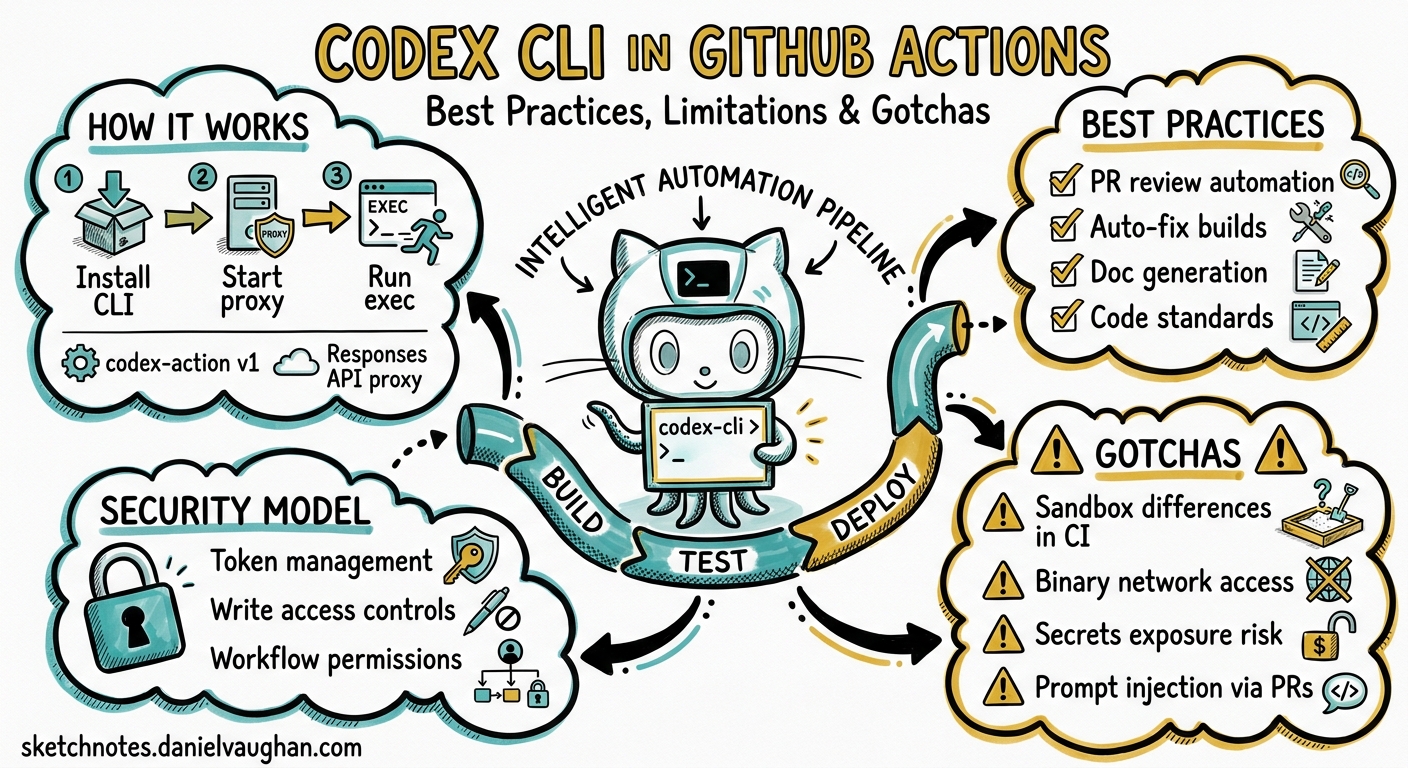
The openai/codex-action@v1 GitHub Action transforms Codex CLI from an interactive developer tool into a CI/CD workhorse — reviewing pull requests, auto-fixing broken builds, generating documentation, and enforcing code standards, all without human intervention. But running an AI coding agent inside a CI pipeline introduces constraints that do not exist on a developer’s laptop. Sandbox modes behave differently, network access is binary rather than granular, secrets management requires careful choreography, and a single misconfigured workflow can expose your GitHub tokens to prompt injection.
This article covers the complete integration surface: how codex-action works under the hood, the patterns that production teams rely on, the limitations that will bite you if you are not prepared, and the security model you must understand before granting an AI agent write access to your repository.
How codex-action Works
The openai/codex-action@v1 action performs three operations in sequence 1:
- Installs Codex CLI — downloads the specified version (or latest) and adds it to
PATH. - Starts the Responses API proxy — when you provide
openai-api-key, the action launches a local proxy that authenticates requests to the OpenAI Responses API. This proxy is the only network path Codex uses. - Runs
codex exec— executes your prompt in non-interactive mode with the sandbox and safety strategy you specify.
After the Codex step completes, the CLI remains installed. Subsequent workflow steps can invoke codex exec directly, sharing the same proxy configuration.
Core Parameters
| Parameter | Purpose | Default |
|---|---|---|
openai-api-key |
OpenAI API authentication | Required |
prompt / prompt-file |
Task instructions (mutually exclusive) | One required |
sandbox |
Sandbox mode | workspace-write |
safety-strategy |
Privilege restriction method | drop-sudo |
model |
Model selection | API default |
effort |
Reasoning effort level | API default |
output-file |
File path for final message capture | — |
output-schema / output-schema-file |
JSON Schema for structured output | — |
codex-args |
Extra CLI flags (JSON array or string) | — |
codex-version |
Pin to a specific release | Latest |
codex-home |
CLI home directory for config/MCP reuse | — |
working-directory |
Directory for codex exec --cd |
Repo root |
allow-users |
GitHub usernames permitted to trigger | — |
allow-bots |
Allow github-actions[bot] bypass |
false |
allow-bot-users |
Specific bot usernames allowed | — |
The action exposes one output: final-message, containing the complete response from codex exec 1.
Sandbox Modes in CI
Codex CLI’s sandbox controls what the agent can do to the filesystem and network. In GitHub Actions, three modes are available 2:
workspace-write — The agent can read and modify files within the repository checkout. Network access is restricted to the Responses API proxy. This is the correct default for most CI tasks: code review, auto-fix, documentation generation.
read-only — The agent can inspect files but cannot modify the filesystem or access the network (except the API proxy). Use this for analysis-only tasks such as code review comments or security audits where you want zero side effects.
danger-full-access — Unrestricted filesystem and network access. The agent can install packages, run arbitrary commands, and reach external services. Use this only when absolutely necessary (e.g. running integration tests that require network access) and always pair it with mandatory git diff inspection and automated test suites in subsequent steps.
The Network Access Problem
This is the single most misunderstood aspect of Codex in CI. Network access in the sandbox is binary, not granular 3. You cannot allow access to npmjs.org whilst blocking everything else. Either the sandbox blocks all outbound connections (except the API proxy), or danger-full-access opens everything.
The practical consequence: install all dependencies before the Codex step. If your project needs npm ci, pip install, or apt-get, run those in a preceding step. Codex in workspace-write mode cannot fetch packages itself.
steps:
  - uses: actions/checkout@v5
  - uses: actions/setup-node@v4
    with:
      node-version: 20
      cache: npm
  - run: npm ci                          # Dependencies BEFORE Codex
  - uses: openai/codex-action@v1
    with:
      openai-api-key: ${{ secrets.OPENAI_API_KEY }}
      prompt-file: .github/prompts/review.md
      sandbox: workspace-write
Safety Strategies
Safety strategies control how the action restricts the privileges of the Codex process, independent of the sandbox mode 1:
drop-sudo (default) — Irreversibly removes the runner user from the sudo group before Codex executes. This is the correct choice for most workflows. However, be aware that subsequent steps in the same job also lose sudo access. If you need privileged operations after Codex, run them in a separate job.
unprivileged-user — Runs Codex as a specified non-root user account (set via codex-user). Requires the account to exist on the runner and have read access to the repository checkout. More isolation than drop-sudo but requires setup.
unsafe — No privilege reduction. Codex runs with the runner’s default privileges. Required on Windows runners (which lack the sandboxing support available on Linux/macOS). Never use on shared or public runners with sensitive secrets.
Platform Matrix
| Runner OS | drop-sudo |
unprivileged-user |
unsafe |
|---|---|---|---|
| Ubuntu (GitHub-hosted) | Yes | Yes | Yes |
| macOS (GitHub-hosted) | Yes | Yes | Yes |
| Windows (GitHub-hosted) | No | No | Required |
| Self-hosted Linux | Yes | Yes | Yes |
On GitHub-hosted Linux runners, the action automatically enables unprivileged namespaces and clears AppArmor gates to prevent sandbox failures 1.
Production Workflow Patterns
Pattern 1: PR Code Review
The most common pattern. Codex reviews pull request diffs and posts comments.
name: Codex Review
on:
  pull_request:
    types: [opened, synchronize]

permissions:
  contents: read
  pull-requests: write

jobs:
  review:
    runs-on: ubuntu-latest
    steps:
      - uses: actions/checkout@v5
        with:
          fetch-depth: 0
      - uses: openai/codex-action@v1
        id: review
        with:
          openai-api-key: ${{ secrets.OPENAI_API_KEY }}
          prompt-file: .github/prompts/review.md
          sandbox: read-only
          safety-strategy: drop-sudo
      - uses: actions/github-script@v7
        with:
          script: |
            github.rest.issues.createComment({
              issue_number: context.issue.number,
              owner: context.repo.owner,
              repo: context.repo.repo,
              body: `${{ steps.review.outputs.final-message }}`
            })
Key decisions: read-only sandbox because the agent should not modify files during review. fetch-depth: 0 gives Codex the full commit history for meaningful diff analysis.
Pattern 2: CI Autofix
When tests fail, Codex diagnoses the failure and opens a fix PR. This uses the workflow_run trigger to activate after CI completion 4.
name: Codex Autofix
on:
  workflow_run:
    workflows: ["CI"]
    types: [completed]

permissions:
  contents: write
  pull-requests: write

jobs:
  autofix:
    if: github.event.workflow_run.conclusion == 'failure'
    runs-on: ubuntu-latest
    env:
      FAILED_RUN_URL: ${{ github.event.workflow_run.html_url }}
      FAILED_HEAD_BRANCH: ${{ github.event.workflow_run.head_branch }}
      FAILED_HEAD_SHA: ${{ github.event.workflow_run.head_sha }}
    steps:
      - uses: actions/checkout@v5
        with:
          ref: ${{ env.FAILED_HEAD_SHA }}
          fetch-depth: 0
      - uses: actions/setup-node@v4
        with:
          node-version: 20
          cache: npm
      - run: npm ci
      - uses: openai/codex-action@v1
        with:
          openai-api-key: ${{ secrets.OPENAI_API_KEY }}
          prompt: |
            The CI run at ${{ env.FAILED_RUN_URL }} failed.
            Identify the minimal change needed to make all tests pass.
            Do not refactor unrelated code.
          sandbox: workspace-write
          safety-strategy: drop-sudo
      - run: npm test --silent
      - uses: peter-evans/create-pull-request@v6
        with:
          branch: autofix/${{ env.FAILED_HEAD_BRANCH }}
          title: "fix: autofix for ${{ env.FAILED_HEAD_BRANCH }}"
          body: "Automated fix generated by Codex CLI"
          commit-message: |
            fix: autofix for CI failure

            [skip ci]
Critical detail: The [skip ci] in the commit message prevents the autofix PR from re-triggering the CI workflow and creating an infinite loop 5.
Pattern 3: Scheduled Maintenance
Run Codex on a schedule for tasks like dependency updates, documentation refresh, or code quality sweeps.
name: Weekly Docs Refresh
on:
  schedule:
    - cron: '0 6 * * 1'   # Monday 06:00 UTC

permissions:
  contents: write
  pull-requests: write

jobs:
  docs:
    runs-on: ubuntu-latest
    steps:
      - uses: actions/checkout@v5
      - uses: openai/codex-action@v1
        with:
          openai-api-key: ${{ secrets.OPENAI_API_KEY }}
          prompt-file: .github/prompts/docs-refresh.md
          sandbox: workspace-write
      - run: |
          if git diff --quiet; then
            echo "No changes detected"
            exit 0
          fi
      - uses: peter-evans/create-pull-request@v6
        with:
          branch: docs/weekly-refresh
          title: "docs: weekly documentation refresh"
Gotcha: Always check git diff --quiet before creating a PR. If Codex finds nothing to change, you do not want empty commits or PRs.
Pattern 4: Structured Output for Downstream Steps
Use output-schema to get machine-parseable results from Codex that subsequent steps can consume.
- uses: openai/codex-action@v1
  id: analysis
  with:
    openai-api-key: ${{ secrets.OPENAI_API_KEY }}
    prompt: "Analyse this codebase for security issues"
    sandbox: read-only
    output-schema: |
      {
        "type": "object",
        "properties": {
          "severity": { "type": "string", "enum": ["low", "medium", "high", "critical"] },
          "issues": { "type": "array", "items": { "type": "string" } }
        },
        "required": ["severity", "issues"]
      }
    output-file: /tmp/analysis.json
- run: |
    SEVERITY=$(jq -r '.severity' /tmp/analysis.json)
    if [ "$SEVERITY" = "critical" ]; then
      echo "::error::Critical security issues found"
      exit 1
    fi
Prompt Management
Store Prompts in Version Control
Never inline complex prompts in YAML. Store them in .github/prompts/ and reference via prompt-file 6:
.github/
  prompts/
    review.md
    autofix.md
    docs-refresh.md
    security-audit.md
This approach gives you:
- Version history — prompts evolve with the codebase
- PR review — prompt changes get the same review as code changes
- Reuse — multiple workflows reference the same prompt
- Separation of concerns — YAML defines when and how; prompts define what
Leverage AGENTS.md
Codex CLI reads AGENTS.md (or .codex/AGENTS.md) at the repository root as persistent context 7. In CI, this is your “constitution” — the rules the agent always follows regardless of the prompt:
# AGENTS.md

## Repository Context
This is a TypeScript monorepo using pnpm workspaces.
Test runner: vitest. Linter: eslint with @typescript-eslint.

## Rules
- Never modify files outside src/ and tests/
- All new functions must have JSDoc comments
- Run `pnpm test` before declaring any fix complete
- Prefer minimal, targeted changes over broad refactors
Variable Injection
GitHub Actions expressions are evaluated before Codex receives the prompt. Use this to inject dynamic context:
prompt: |
  Review PR #${{ github.event.pull_request.number }}
  by @${{ github.event.pull_request.user.login }}.
  Focus on changes in: ${{ github.event.pull_request.changed_files }} files.
Warning: This is also the primary prompt injection vector. See the Security section below.
The Gotchas
1. drop-sudo Is Irreversible Within a Job
Once drop-sudo removes sudo privileges, they cannot be restored for subsequent steps in the same job. If you need sudo after Codex:
jobs:
  codex:
    runs-on: ubuntu-latest
    steps:
      - uses: openai/codex-action@v1
        with:
          safety-strategy: drop-sudo
          # ...

  deploy:                            # Separate job retains sudo
    needs: codex
    runs-on: ubuntu-latest
    steps:
      - run: sudo apt-get install ...
2. AppArmor on Newer Ubuntu Runners
GitHub periodically updates runner images. Newer Ubuntu versions ship with stricter AppArmor profiles that can break Codex’s internal sandbox. The action attempts to clear AppArmor gates automatically on GitHub-hosted Linux runners, but self-hosted runners may need manual configuration 1:
- run: |
    sudo sysctl -w kernel.apparmor_restrict_unprivileged_userns=0
    sudo sysctl -w kernel.apparmor_restrict_unprivileged_unconfined=0
  if: runner.os == 'Linux'
3. Network Access Is All-or-Nothing
As covered above, there is no domain-level allowlist. A feature request for “file-restricted but network-open” sandbox mode was closed as “not planned” 3. Your options:
workspace-write: no network (except API proxy)danger-full-access: full network
If your task requires selective network access (e.g. fetching a schema from an API), run the fetch in a preceding step and pass the result as a file.
4. Windows Requires unsafe Mode
Windows runners have no supported sandbox mechanism. The action validates this and fails if you specify any other safety strategy on Windows 1. If you must run Codex on Windows:
- uses: openai/codex-action@v1
  if: runner.os == 'Windows'
  with:
    safety-strategy: unsafe
    # Use only with trusted prompts and limited secrets
5. gh CLI Does Not Work Inside the Sandbox
The gh CLI requires network access and authenticated tokens — both restricted by default in Codex’s sandbox. Do not expect Codex to create issues, comment on PRs, or interact with the GitHub API directly 8. Instead, delegate those operations to subsequent workflow steps using actions/github-script or direct gh calls with GITHUB_TOKEN.
6. Infinite Loop Risk with Autofix Workflows
If Codex commits a fix that triggers the same CI workflow, which fails again, you get an infinite loop of failing builds and autofix attempts. Mitigations 5:
- Add
[skip ci]to autofix commit messages - Use
workflow_runtriggers (which do not re-trigger themselves) - Set a maximum retry counter in your workflow
- Use branch naming conventions and
paths-ignorefilters
7. Empty Commits and Ghost PRs
If Codex decides no changes are needed, git diff shows nothing, but peter-evans/create-pull-request may still create an empty PR. Always gate PR creation:
- run: |
    if git diff --quiet && git diff --staged --quiet; then
      echo "skip_pr=true" >> $GITHUB_OUTPUT
    fi
  id: check
- uses: peter-evans/create-pull-request@v6
  if: steps.check.outputs.skip_pr != 'true'
8. Cost Accumulation
Each codex exec invocation consumes Responses API tokens. In a busy repository with frequent PRs, costs can accumulate rapidly. Best practices:
- Monitor the OpenAI Usage dashboard after deploying any Codex workflow
- Use
effortparameter to reduce reasoning depth for simple tasks - Gate expensive workflows behind labels or specific file paths
- Set concurrency limits to prevent parallel runs on the same PR
concurrency:
  group: codex-${{ github.event.pull_request.number }}
  cancel-in-progress: true
9. Residual State Between Retries
If a Codex step fails and the workflow retries, uncommitted changes from the previous attempt remain in the workspace. Clean up before re-running:
- run: git checkout -- . && git clean -fd
  if: failure()
10. prompt and prompt-file Are Mutually Exclusive
Specifying both causes the action to fail. Use prompt for simple one-liners and prompt-file for anything longer than a sentence 1.
Security
The Branch Name Injection Vulnerability
In March 2026, BeyondTrust’s Phantom Labs disclosed a critical command injection vulnerability in Codex’s cloud environment. Attackers could inject shell commands through a branch name parameter, which was passed unsanitised into container setup scripts, allowing theft of GitHub OAuth tokens 9. OpenAI classified this as Priority 1 and remediated it by February 2026 (following responsible disclosure from December 2025). The fix included improved input validation, proper shell escaping, tighter token scope, and reduced token lifetimes.
The lesson for CI/CD: never trust external input. Branch names, PR titles, commit messages, and issue bodies are all attacker-controlled strings that can reach your Codex prompt via GitHub Actions expressions.
Prompt Injection Defences
- Sanitise dynamic inputs — If you inject PR titles or commit messages into prompts, escape or validate them first:
- run: |
    SAFE_TITLE=$(echo "${{ github.event.pull_request.title }}" | tr -cd '[:alnum:] [:space:]._-')
    echo "SAFE_TITLE=$SAFE_TITLE" >> $GITHUB_ENV
- uses: openai/codex-action@v1
  with:
    prompt: "Review PR: ${{ env.SAFE_TITLE }}"
- Restrict trigger permissions — Use
allow-usersto limit who can trigger Codex workflows. For public repositories, this is essential:
- uses: openai/codex-action@v1
  with:
    allow-users: "danielvaughan,trustedbot"
-
Minimise token scope — Grant only the permissions the workflow needs. A review workflow needs
contents: readandpull-requests: write, notcontents: write. -
Avoid
danger-full-accesson public repos — A malicious PR could craft prompt content that instructs Codex to exfiltrate secrets via network access. -
Run Codex as the final step — Prevents the agent from influencing subsequent steps’ environment variables or secrets.
Secrets Hygiene
The OpenAI API key flows through the local proxy, meaning Codex could theoretically access it via process memory. Mitigations:
- Use
drop-sudoto restrict privilege escalation - Never store additional secrets in environment variables accessible to the Codex step
- For cross-repo operations, expose capabilities through MCP servers rather than passing tokens directly 6
codex exec vs codex-action
You can run Codex in CI without the action by installing the CLI manually and calling codex exec directly. Here is when to choose each approach:
| Aspect | codex-action@v1 |
Manual codex exec |
|---|---|---|
| Setup complexity | Minimal — action handles installation and proxy | You manage installation, proxy, and environment |
| Version pinning | Built-in codex-version parameter |
Manual via npm install -g @openai/codex@x.y.z |
| Safety strategies | Built-in drop-sudo, unprivileged-user |
You implement privilege restriction |
| AppArmor handling | Automatic on GitHub-hosted runners | Manual sysctl commands |
| Access control | allow-users, allow-bots parameters |
You implement gating logic |
| Flexibility | Constrained to action parameters | Full CLI flag access |
For most teams, codex-action is the right choice. Use manual codex exec only when you need flags or configurations the action does not expose, or when integrating with non-GitHub CI systems (GitLab CI, Jenkins, CircleCI).
GitLab CI Example
codex-review:
  image: node:20
  stage: review
  script:
    - npm install -g @openai/codex
    - codex exec --full-auto --sandbox workspace-write
        --prompt-file .codex/prompts/review.md
  variables:
    OPENAI_API_KEY: $OPENAI_API_KEY
  rules:
    - if: $CI_PIPELINE_SOURCE == "merge_request_event"
Checklist: Before You Ship a Codex Workflow
- Dependencies first — Install all build dependencies before the Codex step
- Prompt in version control — Store prompts in
.github/prompts/, not inline YAML - AGENTS.md configured — Repository rules the agent always follows
- Sandbox mode justified — Default to
workspace-write; escalate only with documented reason - Safety strategy set —
drop-sudounless Windows or you need sudo later - Access control configured —
allow-usersset for public repositories - Loop prevention —
[skip ci]in autofix commits,workflow_runtriggers - Empty change guard —
git diff --quietbefore PR creation - Cost monitoring — OpenAI Usage dashboard reviewed, concurrency limits set
- Prompt injection review — All dynamic inputs sanitised before reaching Codex
References
-
OpenAI, “Codex GitHub Action”, openai/codex-action README, May 2026. github.com/openai/codex-action ↩ ↩2 ↩3 ↩4 ↩5 ↩6 ↩7
-
OpenAI, “GitHub Action — Codex”, OpenAI Developers, May 2026. developers.openai.com/codex/github-action ↩
-
GitHub Issue #13361, “A sandbox mode that restricts file access but allows free network access”, openai/codex, 2026. github.com/openai/codex/issues/13361 ↩ ↩2
-
OpenAI, “Use Codex CLI to automatically fix CI failures”, OpenAI Cookbook, 2026. developers.openai.com/cookbook/examples/codex/autofix-github-actions ↩
-
SmartScope, “Codex CLI Automation: 3 Workflow Patterns for GitHub Actions, Cron & CI”, May 2026. smartscope.blog ↩ ↩2
-
SmartScope, “How to Run Codex CLI Safely inside GitHub Actions”, May 2026. smartscope.blog ↩ ↩2
-
OpenAI, “Agent approvals & security — Codex”, OpenAI Developers, 2026. developers.openai.com/codex/agent-approvals-security ↩
-
SmartScope, “Why
ghCLI won’t run in Codex and how to handle it”, May 2026. smartscope.blog ↩ -
CybersecurityNews, “OpenAI Codex Vulnerability Allows Attackers to Steal GitHub Access Tokens”, April 2026. cybersecuritynews.com ↩