Codex CLI for Nix Development: MCP-NixOS, Reproducible Environments, and Flake-Native Agent Workflows
Codex CLI for Nix Development: MCP-NixOS, Reproducible Environments, and Flake-Native Agent Workflows
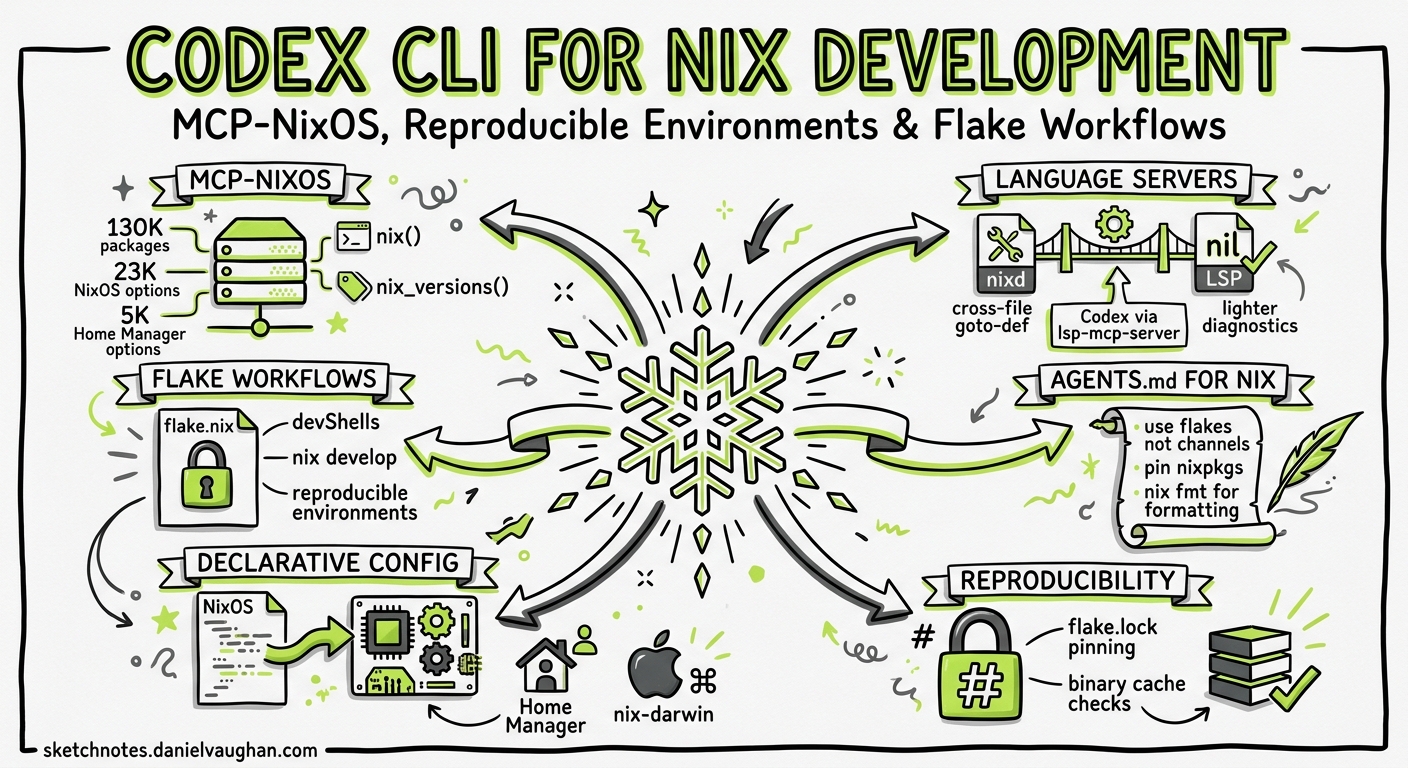
Nix sits at the intersection of package management, environment reproducibility, and system configuration — a domain where the learning curve is steep and the documentation is notoriously fragmented across the NixOS Wiki, nix.dev, Discourse threads, and nixpkgs source code. Codex CLI, paired with the MCP-NixOS server and a well-crafted AGENTS.md, can dramatically reduce that friction. This article covers the tooling landscape, practical configuration, and workflow patterns that make Codex a productive companion for Nix development.
The Nix MCP Ecosystem
Two MCP servers currently target Nix workflows, each with a distinct scope.
MCP-NixOS
MCP-NixOS is the more comprehensive option, exposing over 130,000 NixOS packages, 23,000 NixOS configuration options, 5,000 Home Manager options, 1,000 nix-darwin settings, 5,000 Nixvim options, 600+ FlakeHub flakes, and 2,000+ Nix built-in functions via Noogle 1. It requires no local Nix installation — queries run against indexed data sources, making it suitable for teams where not every developer has Nix on their machine.
The server exposes two consolidated MCP tools:
nix()— a unified query tool supporting actions:search,info,stats,options,channels,flake-inputs, and binarycachechecks across all data sources 1.nix_versions()— returns package version history with metadata, platform availability, and commit hashes for pinning reproducible builds 1.
nix-mcp-server
The alternative nix-mcp-server from Amarbel focuses on local Nix operations — evaluating expressions, building derivations, and querying the local store 2. It is more useful when you need Codex to interact with your actual Nix installation rather than querying documentation.
Configuration
Add either server to your Codex CLI configuration:
# ~/.codex/config.toml — MCP-NixOS via Docker (no local Nix needed)
[mcp_servers.mcp-nixos]
command = "docker"
args = ["run", "--rm", "-i", "ghcr.io/utensils/mcp-nixos:latest"]
enabled = true
tool_timeout_sec = 30

# Alternative: MCP-NixOS via uvx (Python)
[mcp_servers.mcp-nixos]
command = "uvx"
args = ["mcp-nixos"]
enabled = true
For project-scoped configuration, drop this into .codex/config.toml at the repository root and mark the project as trusted.
Language Server Integration
Nix has two mature language servers that Codex CLI can leverage through the LSP-MCP bridge pattern 3:
- nixd (nix-community) — built on the official Nix evaluation libraries, providing cross-file goto-definition into nixpkgs, attribute-set completion, and option-system awareness for NixOS, Home Manager, and flake-parts 4. Current stable release is 2.0.2 5.
- nil (oxalica) — a lighter, incremental analysis server focused on diagnostics, formatting, and rename refactoring without requiring a full Nix evaluation 6.
If you already use the lsp-mcp-server bridge (written in Zig), you can expose either language server as MCP tools:
[mcp_servers.nixd-lsp]
command = "lsp-mcp-server"
args = ["--", "nixd"]
enabled = true
tool_timeout_sec = 15
This gives Codex access to goto-definition, diagnostics, and completion data without parsing Nix files itself — particularly valuable when navigating deeply nested nixpkgs module structures.
AGENTS.md for Nix Projects
Nix’s declarative model and functional idioms require specific guardrails. A minimal AGENTS.md for a flake-based project:
# AGENTS.md

## Build System
- This project uses Nix flakes. The entrypoint is `flake.nix`.
- Run `nix flake check` before committing. Run `nix build` to verify derivations.
- Never modify `flake.lock` manually. Use `nix flake update` or `nix flake lock --update-input <name>`.

## Conventions
- Pin nixpkgs to a release branch (e.g., `nixos-25.11`), never `nixpkgs-unstable`.
- Use `lib.mkOption` with explicit types for all module options. No `lib.mkDefault` without comment.
- Overlay definitions go in `overlays/`. Do not inline overlays in `flake.nix`.
- Prefer `pkgs.callPackage` over raw `import` for derivations.

## Testing
- `nix flake check` runs all checks including NixOS test VMs.
- For module tests, use `pkgs.nixosTest` with `testScript` assertions.
- Run `nix develop .#ci` for the CI-equivalent shell.

## Restrictions
- Do not add `--impure` flags to any Nix command.
- Do not use `builtins.fetchTarball` without a `sha256` hash.
- Do not modify files outside the project directory.
Subdirectory-level AGENTS.md files work well for NixOS configurations with per-host or per-module overrides — place an AGENTS.md in hosts/ that specifies hardware-specific constraints, or in modules/ with module authoring conventions.
Practical Workflow Patterns
Pattern 1: Package Discovery and Adoption
When evaluating whether a package exists in nixpkgs and how to add it to a devShell:
Search nixpkgs for a package providing the `wrangler` CLI tool,
show me available versions, and add it to my flake.nix devShell
with the correct attribute path.
With MCP-NixOS connected, Codex queries the package index, checks binary cache availability, and generates the correct flake.nix modification — avoiding the common trap of guessing attribute paths in the 130,000-package namespace.
Pattern 2: NixOS Module Authoring
NixOS modules follow a rigid structure (options, config, imports) that is easy to get wrong:
Create a NixOS module in modules/services/backup.nix that:
- Defines options for backup schedule, paths, and retention
- Uses lib.mkOption with proper types (str, listOf path, int)
- Implements a systemd timer and service in the config block
- Includes a nixosTest that verifies the timer is active
The AGENTS.md conventions ensure Codex uses lib.mkOption with explicit types rather than falling back to lib.mkDefault or untyped lib.mkForce patterns that create maintenance debt.
Pattern 3: Flake Input Auditing with exec
For CI pipelines, use codex exec to audit flake inputs for staleness:
codex exec \
  --model gpt-5.4-mini \
  --output-schema flake-audit-schema.json \
  "Evaluate flake.lock. For each input, check if a newer \
   commit exists on the tracked branch using the MCP-NixOS \
   flake-inputs action. Flag inputs more than 30 days behind \
   HEAD. Output a JSON verdict with input name, current rev, \
   latest rev, and days behind."
The structured output feeds into CI dashboards or Slack notifications, giving teams visibility into dependency drift without manual nix flake update experiments.
Pattern 4: Cross-Platform devShell Generation
Nix flakes support multiple systems, but getting the devShells attribute set right across x86_64-linux, aarch64-linux, x86_64-darwin, and aarch64-darwin is fiddly:
Add a devShell to flake.nix that includes rustc, cargo, rust-analyzer,
pkg-config, and openssl for all four standard platforms.
Use flake-utils.lib.eachDefaultSystem. Ensure the darwin shell
includes the Security framework via buildInputs.
Codex handles the platform-conditional logic (lib.optionals stdenv.isDarwin [ darwin.apple_sdk.frameworks.Security ]) that trips up developers unfamiliar with cross-platform Nix packaging.
Pattern 5: Home Manager Configuration
Home Manager configurations are verbose and option-discovery is the primary bottleneck. With MCP-NixOS providing access to 5,000+ Home Manager options:
Add git configuration to my Home Manager config:
- Set user name and email from the values in secrets/git.age
- Enable delta as the pager with side-by-side mode
- Add aliases for co, br, st, lg
- Use programs.git, not raw dotfile management
Installing Codex CLI via Nix
Codex CLI itself ships with an official flake.nix in the OpenAI repository 7, and two community flakes provide pre-built binaries:
# flake.nix — add Codex CLI to your devShell
{
  inputs = {
    nixpkgs.url = "github:NixOS/nixpkgs/nixos-25.11";
    codex-cli-nix.url = "github:sadjow/codex-cli-nix";
  };

  outputs = { nixpkgs, codex-cli-nix, ... }:
    let
      system = "x86_64-linux";
      pkgs = nixpkgs.legacyPackages.${system};
    in {
      devShells.${system}.default = pkgs.mkShell {
        packages = [
          codex-cli-nix.packages.${system}.default
        ];
      };
    };
}
The codex-cli-nix flake from sadjow provides hourly-updated pre-built binaries with multi-platform caching 8. The codex-nix flake from SecBear targets NixOS, nix-darwin, and Home Manager declarative installation 9. Note that building from the official flake.nix has had intermittent issues since v0.92.0 due to Cargo workspace changes 10, so pre-built binary flakes are the more reliable path.
Model Selection for Nix Tasks
Nix’s functional, lazily-evaluated language benefits from higher reasoning effort. Recommended profiles:
# ~/.codex/config.toml
[profiles.nix-module]
model = "gpt-5.5"
model_reasoning_effort = "high"

[profiles.nix-quick]
model = "gpt-5.4-mini"
model_reasoning_effort = "medium"
Use nix-module for module authoring, overlay design, and cross-platform derivations where Codex needs to reason about lazy evaluation, fixed-point combinators (lib.fix), and the module system’s merge semantics. Use nix-quick for package searches, devShell modifications, and flake.lock audits where the task is well-defined 11.
Limitations
- Training data lag: Nix language features and nixpkgs attribute paths change frequently. Codex’s training data may not reflect the latest nixpkgs unstable channel. Always verify attribute paths against the MCP-NixOS search tool rather than trusting the model’s parametric knowledge 11.
- Evaluation complexity: Nix’s lazy evaluation and infinite recursion potential mean that some module interactions cannot be predicted without actually running
nix eval. Codex can generate plausible code that fails at evaluation time — always runnix flake checkas a verification step. - MCP-NixOS coverage: While comprehensive, MCP-NixOS queries indexed data rather than your local nixpkgs checkout. Custom overlays and local packages are not visible to the MCP server. ⚠️
- flake.lock conflicts: In teams, concurrent
nix flake updateoperations create merge conflicts inflake.lock. The AGENTS.md restriction against manual lock-file edits helps, but coordinating updates remains a human responsibility. - No Nix REPL integration: Neither MCP server currently provides a Nix REPL tool for interactive expression evaluation within the agent session. ⚠️