Codex CLI for Pulumi Infrastructure-as-Code: MCP Server, Neo Delegation, and Agent-Native Workflows
Codex CLI for Pulumi Infrastructure-as-Code: MCP Server, Neo Delegation, and Agent-Native Workflows
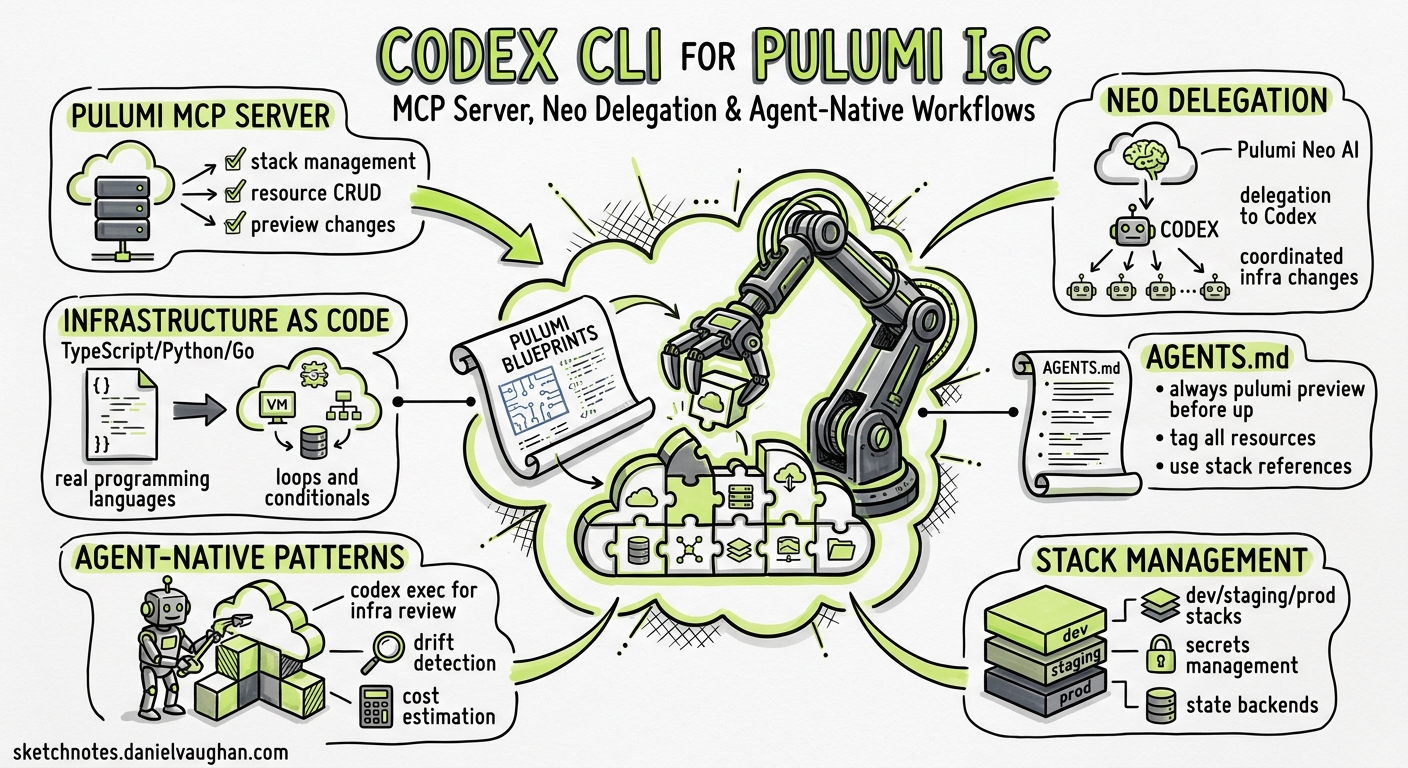
Terraform dominated the infrastructure-as-code conversation for a decade, but Pulumi’s bet on real programming languages — TypeScript, Python, Go, C# — makes it a natural fit for LLM-driven workflows. As of May 2026, over 20% of infrastructure deployments on the Pulumi platform are handled by LLMs1. This article covers the three integration surfaces between Codex CLI and Pulumi: the hosted MCP server, the pulumi neo CLI agent, and the agent skills system — plus practical AGENTS.md patterns and workflow recipes for shipping infrastructure from your terminal.
The Pulumi MCP Server
Pulumi’s MCP server is hosted at https://mcp.ai.pulumi.com/mcp and uses HTTP transport with OAuth authentication2. Unlike stdio-based MCP servers that run locally, this is a remote service — no local installation required beyond configuring Codex CLI to connect.
Configuration
Add the following to your project-scoped .codex/config.toml (or ~/.codex/config.toml for global access):
[mcp_servers.pulumi]
url = "https://mcp.ai.pulumi.com/mcp"
bearer_token_env_var = "PULUMI_ACCESS_TOKEN"
On first connection, Pulumi triggers a browser-based OAuth flow where you select your organisation2. Set PULUMI_ACCESS_TOKEN in your shell environment to skip the interactive prompt in CI or codex exec pipelines.
Available Tools
The MCP server exposes four tool categories2:
| Category | Tools | Purpose |
|---|---|---|
| Cloud | get-stacks, resource-search, get-policy-violations, get-users |
Query live infrastructure state |
| Neo | neo-bridge, neo-get-tasks, neo-continue-task, neo-reset-conversation |
Delegate to Pulumi’s autonomous agent |
| Registry | get-type, get-resource, get-function, list-resources, list-functions |
Look up provider schemas and documentation |
| Deployment | deploy-to-aws |
Generate deployment code |
The resource-search tool accepts Lucene query syntax, allowing Codex to search across all stacks by resource type, name, tags, or properties2. This is particularly powerful for drift detection and audit workflows.
Pulumi Neo: The Delegated Infrastructure Agent
The pulumi neo command brings Pulumi’s autonomous infrastructure agent to your terminal1. Neo can run the full Pulumi CLI — including stack imports, state management, and plugin operations — plus kubectl, Helm, AWS CLI, GCP CLI, and Oracle Cloud CLI3.
Operating Modes
Neo offers three autonomy levels3:
flowchart TD
    A[Choose Operating Mode] --> B{Risk Level?}
    B -->|Low: dev environments| C[Auto Mode]
    B -->|Medium: staging| D[Balanced Mode]
    B -->|High: production| E[Review Mode]
    C --> F[Neo runs without stopping]
    D --> G[Neo plans + previews\nYou approve mutations]
    E --> H[You approve plan,\npreview, and PR]
- Review Mode — approval required at every stage: task plan, preview, and pull request
- Balanced Mode — Neo handles planning and previews; you approve only mutating operations
- Auto Mode — Neo operates independently without interruption
Neo via MCP
From within a Codex CLI session, you can delegate to Neo through the neo-bridge MCP tool rather than spawning a separate process. This is useful when Codex identifies an infrastructure task mid-workflow:
# Codex CLI prompt example
"Search for all Lambda functions with runtime python3.9 across our stacks,
then use neo-bridge to create a migration plan upgrading them to python3.13"
Neo returns a link to track progress in the Pulumi Console, and you can check status via neo-get-tasks2.
The pulumi do Command
The new pulumi do verb enables imperative CRUD operations on individual cloud resources without scaffolding a full Pulumi project1:
# Create an EKS cluster with built-in best practices
pulumi do create eks:Cluster

# Update a Cloudflare R2 bucket's tags
pulumi do update cloudflare:r2:Bucket --tags '{ "env": "staging" }'

# List all S3 buckets
pulumi do list aws:s3:Bucket
Operations are stateful and subject to the same policy framework as a regular pulumi up, but they skip project structure entirely1. This is ideal for codex exec one-liners:
codex exec "List all our AWS RDS instances and check which ones are running
outdated engine versions" | pulumi do list aws:rds:Instance --json
As complexity grows, you can eject from pulumi do into a full IaC project1.
Agent Skills
Pulumi ships 10 agent skills in two plugins4:
Authoring Plugin (6 skills): best-practices, component, automation-api, esc, upgrade-provider, upstream-patches
Migration Plugin (4 skills): terraform-to-pulumi, cloudformation-to-pulumi, cdk-to-pulumi, arm-to-pulumi
Install all skills for Codex CLI:
npx skills add pulumi/agent-skills --skill '*'
Or install selectively:
npx skills add pulumi/agent-skills/migration --skill '*'
npx skills add pulumi/agent-skills/authoring --skill '*'
Skills activate automatically based on context4. When Codex detects you are working with Terraform files and you ask to migrate, the terraform-to-pulumi skill provides the conversion patterns an experienced practitioner would follow.
AGENTS.md for Pulumi Projects
An AGENTS.md file in your repository root teaches Codex the idioms and constraints of your infrastructure codebase. Here is a template for Pulumi TypeScript projects:
# AGENTS.md — Pulumi TypeScript Infrastructure

## Stack Architecture
- Stacks follow the pattern: {project}-{environment} (e.g. api-staging, api-production)
- All stacks use the same Pulumi program with per-environment config in Pulumi.{stack}.yaml

## Coding Conventions
- All resources MUST have explicit `name` properties derived from the stack name
- Use ComponentResource for any grouping of 3+ related resources
- Never hardcode AWS account IDs, regions, or secrets — use Pulumi Config or ESC
- Export all resource identifiers needed by downstream stacks via `pulumi.export()`
- Use `dependsOn` explicitly when resource ordering matters; do not rely on implicit ordering

## Secret Handling
- All secrets MUST use `pulumi.secret()` or ESC environment references
- Never pass secrets as plain-text Config values
- Rotate secrets via ESC, not by editing stack config directly

## Safety Rules
- Never run `pulumi destroy` without explicit human approval
- Always run `pulumi preview` before `pulumi up`
- State imports require Review Mode in Neo
- Tag all resources with: project, environment, managed-by: pulumi, team

## Testing
- Unit tests use @pulumi/pulumi/runtime mocking
- Integration tests run against a dedicated test stack with TTL
- Policy packs enforce tagging, encryption, and public-access rules
Practical Workflows
Pattern 1: Resource Audit via MCP
Use the Pulumi MCP server’s resource-search to audit infrastructure without leaving Codex:
codex exec "Connect to the Pulumi MCP server and search for all
EC2 instances without the 'team' tag. Output a markdown table
with instance ID, stack, and region."
The resource-search tool’s Lucene query syntax makes this a single MCP call rather than iterating through stacks manually.
Pattern 2: Terraform Migration Pipeline
Combine Codex CLI’s codex exec with Pulumi’s migration skills for batch conversion:
find modules/ -name "*.tf" -path "*/main.tf" | while read f; do
  dir=$(dirname "$f")
  codex exec "Convert the Terraform module in $dir to Pulumi TypeScript.
  Follow the terraform-to-pulumi skill guidance. Write output to
  pulumi-$(basename $dir)/index.ts"
done
The migration skill handles provider mapping, state resource correspondence, and idiomatic Pulumi patterns4.
Pattern 3: Policy Violation Remediation Loop
flowchart LR
    A[get-policy-violations] --> B[Parse violations]
    B --> C[Generate fix for\neach violation]
    C --> D[pulumi preview]
    D --> E{Preview clean?}
    E -->|Yes| F[Create PR]
    E -->|No| C
codex exec "Use the Pulumi MCP server to fetch all policy violations
for the api-production stack. For each violation, generate a fix,
run pulumi preview, and output a summary of changes."
Pattern 4: Ephemeral Environment Scaffolding
Pulumi now offers ephemeral agent accounts — agents can use free Pulumi Cloud accounts directly from Codex without manual signup1. Combined with npx pulumi for zero-install operation, this enables fully autonomous environment creation:
codex exec "Create a new Pulumi TypeScript project for a staging
environment with: VPC, ECS Fargate cluster, RDS Postgres, and
ALB. Use ComponentResource for each logical group. Include
a TTL tag of 7 days on all resources."
Model Selection
For Pulumi work with Codex CLI:
| Task | Recommended Model | Rationale |
|---|---|---|
| Multi-service architecture design | GPT-5.5 | Complex dependency graphs, cross-stack references5 |
| Single-resource creation, config changes | GPT-5.4-mini | Straightforward, lower cost5 |
| Terraform migration | GPT-5.5 | Provider mapping requires broad knowledge |
| Policy violation fixes | GPT-5.4-mini | Pattern-matching against known rules |
Sandbox Configuration
Pulumi operations require network access to both the Pulumi Cloud API and your cloud provider. Configure your permission profile accordingly:
[permission_profiles.pulumi]
network_access = ["api.pulumi.com", "*.amazonaws.com", "registry.npmjs.org"]
file_write = ["Pulumi.*", "*.ts", "*.py", "*.go"]
For codex exec pipelines that call pulumi preview or pulumi up, you will also need the Pulumi CLI binary available in $PATH — or use npx pulumi which handles installation automatically1.
Composing MCP Servers
The Pulumi MCP server works well alongside other infrastructure MCP servers. A typical DevOps configuration might compose:
[mcp_servers.pulumi]
url = "https://mcp.ai.pulumi.com/mcp"
bearer_token_env_var = "PULUMI_ACCESS_TOKEN"

[mcp_servers.context7]
command = "npx"
args = ["-y", "@upstash/context7-mcp"]

[mcp_servers.github]
command = "npx"
args = ["-y", "@modelcontextprotocol/server-github"]
This gives Codex simultaneous access to infrastructure state (Pulumi), live documentation (Context7), and repository context (GitHub)6.
Limitations
- OAuth flow requires a browser — headless CI environments need a pre-generated
PULUMI_ACCESS_TOKENrather than the interactive OAuth flow - Neo delegation is asynchronous —
neo-bridgereturns a task ID, not immediate results; complex deployments may take minutes pulumi dois stateful but separate — resources created viapulumi dolive in their own state; migrating to a full project requires a state import- MCP server is remote — latency depends on network; no offline operation unlike stdio-based MCP servers
- Agent skills require
npx— the skills CLI depends on Node.js; pure Python or Go Pulumi projects still need Node.js installed for skill management ⚠️ - Training data lag — GPT-5.5 and GPT-5.4-mini may not know the latest Pulumi providers or resource schemas; the Registry MCP tools (
get-resource,get-type) mitigate this by providing live schema lookups2
Citations
-
Pulumi Blog, “The Agentic Infrastructure Era”, May 2026. https://www.pulumi.com/blog/the-agentic-infrastructure-era/ ↩ ↩2 ↩3 ↩4 ↩5 ↩6 ↩7
-
Pulumi Docs, “Pulumi MCP Server — AI-Assisted Infrastructure as Code”. https://www.pulumi.com/docs/ai/mcp-server/ ↩ ↩2 ↩3 ↩4 ↩5 ↩6
-
Pulumi Blog, “Neo Gets Smarter: New Modes, CLI Access & Sonnet 4.5”. https://www.pulumi.com/blog/neo-levels-up/ ↩ ↩2
-
Pulumi Docs, “Pulumi Agent Skills”. https://www.pulumi.com/docs/ai/skills/ ↩ ↩2 ↩3
-
OpenAI, “Models — Codex”. https://developers.openai.com/codex/models ↩ ↩2
-
OpenAI, “Model Context Protocol — Codex CLI”. https://developers.openai.com/codex/mcp ↩