Codex CLI for Terraform and OpenTofu Teams: MCP Servers, Safety Hooks, and AGENTS.md Patterns for Infrastructure as Code
Codex CLI for Terraform and OpenTofu Teams: MCP Servers, Safety Hooks, and AGENTS.md Patterns for Infrastructure as Code
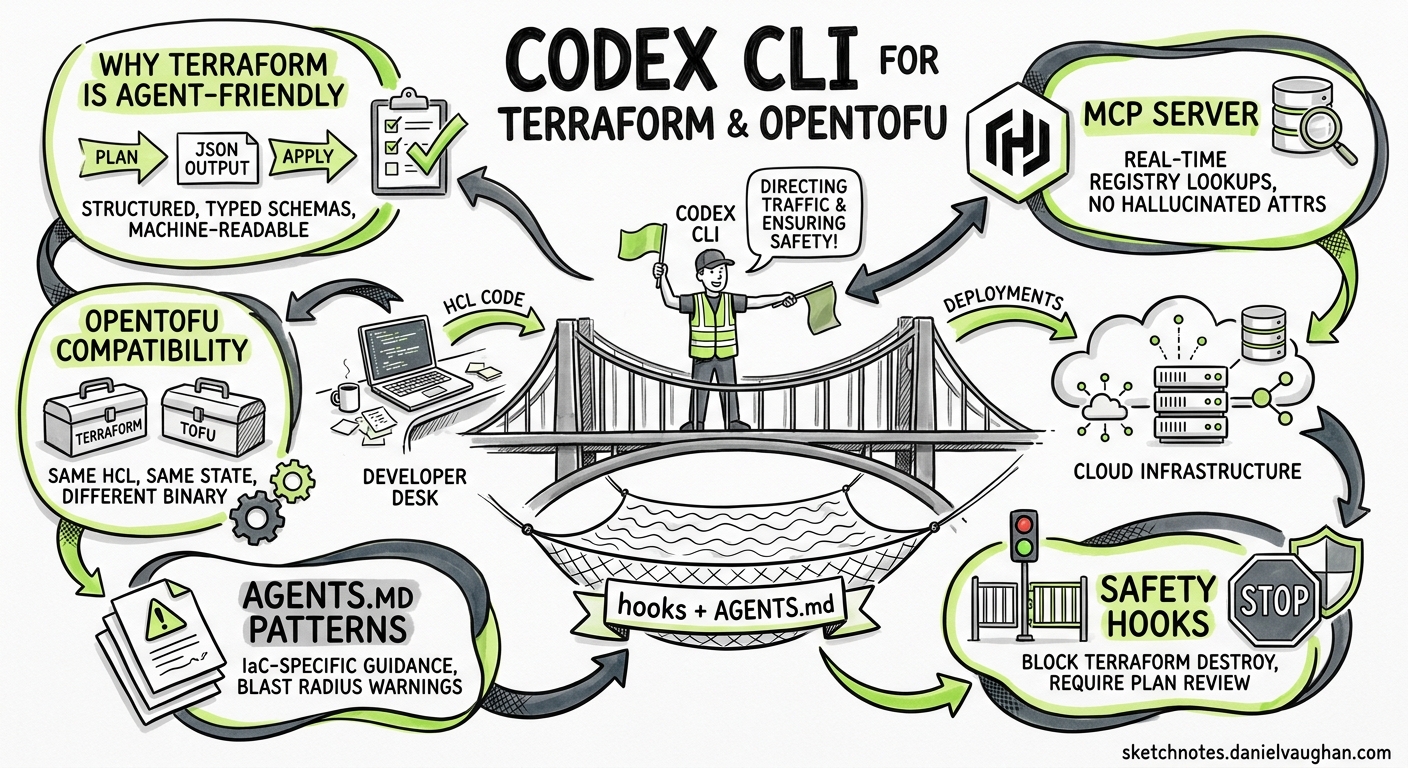
Infrastructure as code occupies an unusual position in the AI-assisted coding landscape. The blast radius of a bad change is not a failing test or a broken UI — it is a misconfigured security group, a deleted database, or a billing spike that compounds by the hour. That asymmetry makes IaC teams the most cautious adopters of coding agents, and rightly so. Yet Terraform’s -json output, its explicit plan-then-apply lifecycle, and its declarative HCL syntax make it one of the most agent-friendly toolchains available1. This article shows how to configure Codex CLI as a safe, productive partner for Terraform and OpenTofu workflows using the official MCP server, lifecycle hooks, AGENTS.md layering, and the community Terraform skill.
Why Terraform Is Agent-Friendly
Terraform’s plan-apply separation maps directly onto the plan-review-execute loop that Codex CLI encourages2. Every terraform plan produces a machine-readable JSON change set. Every terraform validate returns structured diagnostics. Every provider publishes a typed schema. These properties give an agent far more to work with than a raw imperative script.
sequenceDiagram
    participant Dev as Developer
    participant Codex as Codex CLI
    participant TF as terraform CLI
    participant State as Remote State

    Dev->>Codex: "Add a CloudFront distribution for the S3 bucket"
    Codex->>Codex: Read AGENTS.md, activate Terraform skill
    Codex->>TF: terraform validate (syntax check)
    TF-->>Codex: Validation result JSON
    Codex->>TF: terraform plan -json -out=tfplan
    TF->>State: Read current state
    TF-->>Codex: Plan JSON (additions, changes, destructions)
    Codex-->>Dev: Show plan summary, request approval
    Dev->>Codex: Approve
    Codex->>TF: terraform apply tfplan
    TF->>State: Write new state
    TF-->>Codex: Apply result
    Codex-->>Dev: Done — 3 resources added, 0 changed, 0 destroyed
OpenTofu follows the same pattern — same HCL syntax, same provider ecosystem, same state format — differing only in the binary name (tofu vs terraform)3. Everything in this article applies equally to both.
The HashiCorp Terraform MCP Server
HashiCorp ships an official MCP server that gives Codex CLI real-time access to the Terraform Registry4. It provides tools for searching provider documentation, retrieving module inputs and outputs, finding Sentinel policies, and listing HCP Terraform workspaces. The server supports both stdio and Streamable HTTP transports5.
Registration
Add the server to your project-scoped config.toml:
[mcp_servers.terraform]
command = "npx"
args    = ["-y", "@hashicorp/terraform-mcp-server"]
Or for a Streamable HTTP deployment shared across a team:
[mcp_servers.terraform]
url = "http://localhost:8080/mcp"
What It Unlocks
With the MCP server active, Codex can look up the correct resource arguments for any provider without hallucinating attribute names. Ask it to “create an aws_cloudfront_distribution with an S3 origin” and it will query the registry for the current aws provider schema rather than relying on training data that may reference deprecated arguments4.
Restrict the tool surface if you want tighter control:
[mcp_servers.terraform]
command      = "npx"
args         = ["-y", "@hashicorp/terraform-mcp-server"]
allowed_tools = ["resolveProviderDocID", "getProviderDocs", "resolveModuleDocID", "getModuleDocs"]
This keeps workspace management tools out of the agent’s reach whilst still providing documentation access6.
The Community Terraform Skill
Anton Babenko’s terraform-skill packages Terraform and OpenTofu best practices into the SKILL.md format that Codex auto-discovers7. It covers module naming conventions (terraform-<PROVIDER>-<NAME>), testing strategy decision matrices, state management patterns, and CI/CD integration templates.
Installation
git clone https://github.com/antonbabenko/terraform-skill.git \
  ~/.agents/skills/terraform-skill
Codex discovers it automatically from ~/.agents/skills/7. The skill activates when it detects .tf files in the working directory. It enforces patterns drawn from terraform-best-practices.com and the terraform-aws-modules collection.
AGENTS.md for Infrastructure Repositories
A well-structured AGENTS.md is the single most important safety mechanism for IaC work. Place it at the repository root:
# AGENTS.md

## Working Agreements

- All infrastructure changes MUST go through `terraform plan` before apply.
- Never run `terraform apply` without the `-auto-approve` flag being explicitly
  approved by the developer. Default to `terraform apply tfplan` using a saved
  plan file.
- Use the `terraform-<PROVIDER>-<NAME>` module naming convention.
- Pin provider versions with pessimistic constraints: `~> 5.0`.
- All resources MUST have a `tags` block including `ManagedBy = "terraform"`.

## Testing Requirements

- Run `terraform validate` before every plan.
- Run `tflint --recursive` after generating or modifying HCL.
- For modules, include at least one native test in `tests/`.

## Review Guidelines

- P0 (block merge): Security group rules open to 0.0.0.0/0, IAM policies
  with `*` resource, unencrypted storage resources, hardcoded credentials.
- P1 (require justification): Resources without lifecycle rules,
  count/for_each without description, missing variable descriptions.
- P2 (suggestion): Naming inconsistencies, missing outputs.

## Forbidden Patterns

- Never use `terraform taint` — use `terraform apply -replace` instead.
- Never store secrets in `.tfvars` files. Use a secrets manager reference.
- Never use `local-exec` provisioners for configuration management.
For monorepos with multiple environments, use directory-scoped overrides. Codex walks from the repository root to the current working directory, concatenating instructions at each level8:
infrastructure/
  AGENTS.md                  # Root: global conventions
  modules/
    AGENTS.md                # Modules: "Always include README.md with examples"
    networking/
      AGENTS.md              # Networking: "Use CIDR /24 minimum for subnets"
  environments/
    production/
      AGENTS.md              # Production: "NEVER auto-approve. Always diff against staging state."
    staging/
      AGENTS.md              # Staging: "Auto-approve for non-destructive changes is acceptable."
Safety Hooks: The Plan-Gate Pattern
The highest-risk moment in IaC work is terraform apply. Codex CLI hooks let you intercept dangerous commands before they execute9. The plan-gate pattern uses a PreToolUse hook to block any apply that was not preceded by a reviewed plan:
[[hooks]]
event   = "PreToolUse"
tool    = "shell"
command = ".codex/hooks/terraform-plan-gate.sh"
The hook script:
#!/usr/bin/env bash
# .codex/hooks/terraform-plan-gate.sh
# Blocks `terraform apply` unless a saved plan file is referenced.

COMMAND="$CODEX_TOOL_INPUT"

if echo "$COMMAND" | grep -qE 'terraform\s+apply' && \
   ! echo "$COMMAND" | grep -qE 'terraform\s+apply\s+\S+\.tfplan'; then
  echo '{"status": "reject", "reason": "terraform apply must reference a saved plan file (.tfplan). Run terraform plan -out=change.tfplan first."}' >&2
  exit 1
fi

echo '{"status": "approve"}' >&2
exit 0
Add a second hook to block terraform destroy outright in production directories:
[[hooks]]
event   = "PreToolUse"
tool    = "shell"
command = ".codex/hooks/block-destroy.sh"
#!/usr/bin/env bash
# .codex/hooks/block-destroy.sh

COMMAND="$CODEX_TOOL_INPUT"

if echo "$COMMAND" | grep -qE 'terraform\s+destroy' && \
   echo "$PWD" | grep -q '/production/'; then
  echo '{"status": "reject", "reason": "terraform destroy is blocked in production directories. Use a PR-based workflow."}' >&2
  exit 1
fi

echo '{"status": "approve"}' >&2
exit 0
These hooks work alongside the sandbox’s built-in network restrictions. For IaC work, you will typically need workspace-write access and selective network access to your Terraform state backend and provider APIs10.
Configuration Profiles for IaC Workflows
Named profiles let you switch between IaC tasks without editing config.toml every time6:
[profile.tf-plan]
model                    = "o3"
sandbox                  = "workspace-write"
approval_policy          = "unless-allow-listed"
developer_instructions   = "You are a Terraform planning assistant. Generate HCL, validate, and produce saved plan files. Never apply."

[profile.tf-review]
model                    = "o3"
sandbox                  = "read-only"
developer_instructions   = "Review the terraform plan output. Flag security risks, cost implications, and state drift. Use the Terraform MCP server for schema validation."

[profile.tf-module]
model                    = "o3"
sandbox                  = "workspace-write"
developer_instructions   = "You are building a reusable Terraform module. Follow terraform-aws-modules conventions. Include README, examples/, tests/, and complete variable descriptions."
Launch with:
codex --profile tf-plan
codex --profile tf-review
codex --profile tf-module
A Practical Workflow: Module Development
Here is a complete module development session using the configuration above:
flowchart TD
    A[Start: codex --profile tf-module] --> B[Prompt: Create an S3 bucket module<br/>with versioning, encryption, lifecycle rules]
    B --> C[Codex queries Terraform MCP<br/>for aws_s3_bucket schema]
    C --> D[Codex generates module structure:<br/>main.tf, variables.tf, outputs.tf,<br/>README.md, examples/, tests/]
    D --> E[Codex runs terraform validate]
    E --> F{Valid?}
    F -->|No| G[Codex fixes errors] --> E
    F -->|Yes| H[Codex runs tflint --recursive]
    H --> I{Clean?}
    I -->|No| J[Codex fixes lint warnings] --> H
    I -->|Yes| K[Codex runs terraform test]
    K --> L[Module ready for PR]
The key insight is that Codex handles the iterative validate-lint-test loop automatically. Each tool invocation produces structured output that the agent can parse and act on without human intervention. The hooks ensure it never accidentally runs apply during module development.
State Backend and Network Configuration
IaC workflows require network access that the default Codex sandbox blocks. Configure requirements.toml to allow only the endpoints your backend needs10:
# requirements.toml — for AWS S3 backend + DynamoDB locking
[network]
allowed_domains = [
  "s3.eu-west-1.amazonaws.com",
  "dynamodb.eu-west-1.amazonaws.com",
  "registry.terraform.io",
  "releases.hashicorp.com",
]
For HCP Terraform (formerly Terraform Cloud) backends:
[network]
allowed_domains = [
  "app.terraform.io",
  "registry.terraform.io",
  "releases.hashicorp.com",
]
Keep the allow-list as narrow as possible. If your provider needs to reach cloud APIs during plan (e.g., AWS, GCP, Azure for data source reads), add only the specific regional endpoints rather than wildcarding the entire cloud domain.
CI/CD Integration with codex exec
For automated IaC review in pull requests, use codex exec in your CI pipeline11:
# .github/workflows/terraform-review.yml
name: Terraform PR Review
on:
  pull_request:
    paths: ['infrastructure/**']

jobs:
  review:
    runs-on: ubuntu-latest
    steps:
      - uses: actions/checkout@v4
      - uses: openai/codex-action@v1
        id: review
        with:
          openai-api-key: ${{ secrets.OPENAI_API_KEY }}
          model: o3
          sandbox: read-only
          prompt-file: .codex/prompts/terraform-review.md
          output-file: review.json
          output-schema-file: .codex/schemas/terraform-review.json
          codex-home: .codex
      - uses: actions/github-script@v7
        with:
          script: |
            const review = JSON.parse(require('fs').readFileSync('review.json', 'utf8'));
            await github.rest.pulls.createReview({
              owner: context.repo.owner,
              repo: context.repo.repo,
              pull_number: context.issue.number,
              body: review.summary,
              event: review.verdict === 'approve' ? 'APPROVE' : 'REQUEST_CHANGES',
            });
Current Limitations
- State file sensitivity: Terraform state can contain secrets. Running
codex execwithworkspace-writein CI means the agent can read state files. Use remote backends with encryption and restrict the agent toread-onlywhen reviewing10. - Provider authentication: The agent needs cloud credentials for
planto resolve data sources. Use short-lived tokens (OIDC federation) rather than long-lived keys, and scope IAM permissions to read-only for planning. - MCP server maturity: The HashiCorp Terraform MCP server is currently in beta and not recommended for production use5. It provides registry documentation lookups but does not yet expose plan or apply operations through MCP tools.
- OpenTofu MCP gap: There is no official OpenTofu MCP server. OpenTofu teams rely on the community
tfmcpproject or configure the HashiCorp server against compatible registries12.
Decision Framework
| Scenario | Profile | Sandbox | MCP Server | Hooks |
|---|---|---|---|---|
| Generate new module | tf-module |
workspace-write |
Terraform Registry | Plan gate, destroy block |
| Review plan output | tf-review |
read-only |
Terraform Registry | None needed |
| Fix failing CI | tf-plan |
workspace-write |
Terraform Registry | Plan gate |
| Refactor existing HCL | tf-module |
workspace-write |
Terraform Registry | Plan gate |
| Production change | Manual only | N/A | N/A | N/A |
The golden rule for IaC: Codex CLI generates, validates, plans, and reviews. A human approves and applies to production. No exceptions.
Citations
-
Terraform Latest Trends 2026: Infrastructure as Code in a Fractured Ecosystem — Clanker Cloud, 2026 ↩
-
Best Practices — Codex CLI — OpenAI Developers, 2026 ↩
-
OpenTofu vs Terraform in 2026: Is the Fork Finally Worth It? — DEV Community, 2026 ↩
-
Terraform MCP Server Overview — HashiCorp Developer, 2026 ↩ ↩2
-
Deploy the Terraform MCP Server — HashiCorp Developer, 2026 ↩ ↩2
-
Configuration Reference — Codex CLI — OpenAI Developers, 2026 ↩ ↩2
-
terraform-skill: Terraform & OpenTofu Skill for AI Agents — Anton Babenko, GitHub, 2026 ↩ ↩2
-
Custom Instructions with AGENTS.md — Codex — OpenAI Developers, 2026 ↩
-
Hooks — Codex CLI — OpenAI Developers, 2026 ↩
-
Agent Approvals & Security — Codex — OpenAI Developers, 2026 ↩ ↩2 ↩3
-
GitHub Action — Codex — OpenAI Developers, 2026 ↩
-
tfmcp: Terraform Model Context Protocol Tool — GitHub, 2026 ↩