What Is Codex CLI? A Short History of AI-Assisted Coding
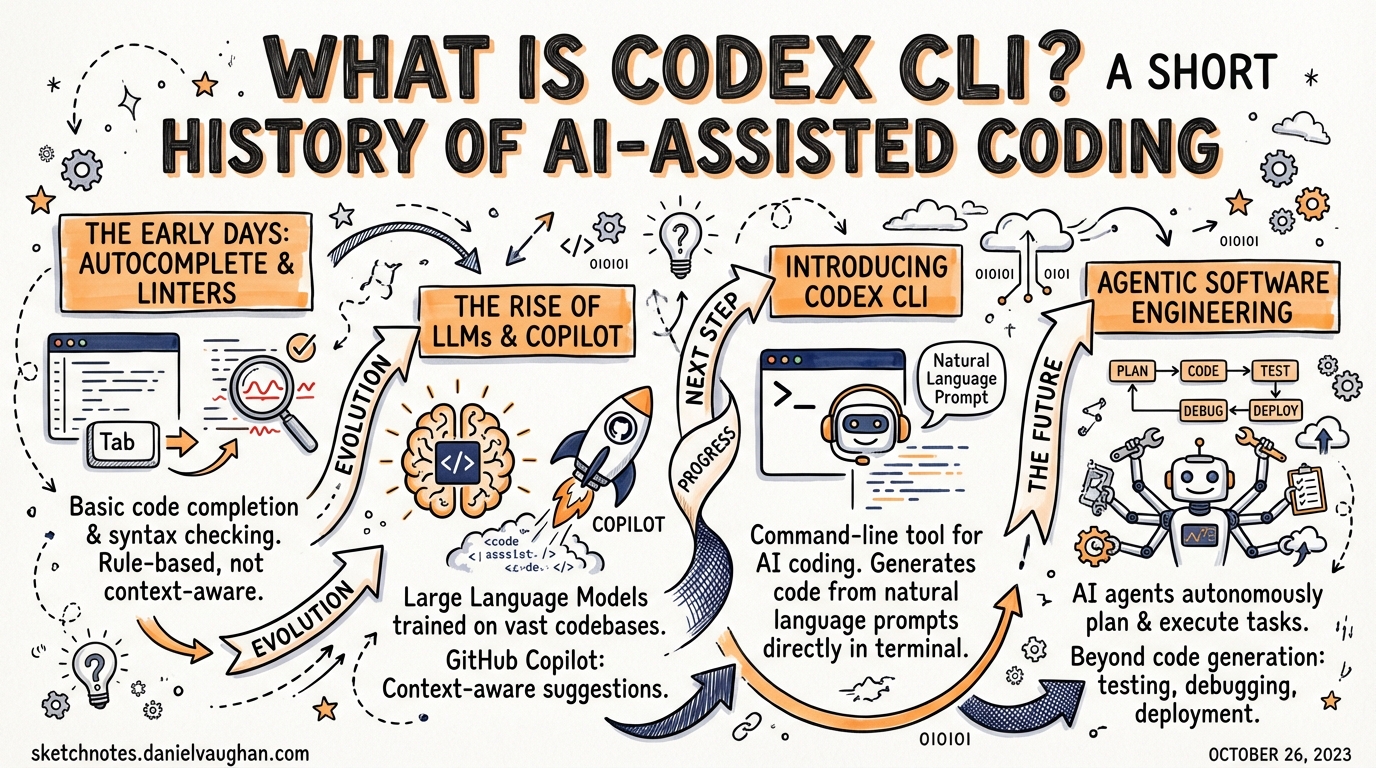
What Is Codex CLI? A Short History of AI-Assisted Coding
Codex CLI is a terminal-first, open-source AI coding agent released by OpenAI in April 2025. But understanding what it is requires understanding the four years of model research, product experiments, and community tooling that preceded it — from a fine-tuned GPT trained on GitHub code to the agentic tool you run in your terminal today.
The Original Codex Model (2021)
The name “Codex” predates the CLI tool by four years. In July 2021, OpenAI published a paper — arXiv:2107.03374, authored by Mark Chen and colleagues — describing a family of GPT-language models fine-tuned on publicly available code from GitHub.1 The largest variant was fine-tuned on 159 gigabytes of Python code alone. The paper demonstrated that a sufficiently large model, trained on enough code, could solve a non-trivial fraction of competitive programming problems from docstring descriptions alone.
The evaluation benchmark the team introduced — HumanEval, consisting of 164 hand-written programming problems — became the reference benchmark for code generation that dominated the field for the next several years.1 A model that could pass 28.8% of HumanEval in 2021 felt extraordinary. That number now reads as a historical curiosity; modern frontier models routinely exceed 90%.
Two properties of the original Codex model shaped everything that came after. First, it was generative, not retrieval-based: the model produced code token-by-token from a prompt, which meant it could complete partial functions, translate between languages, and explain its own output. Second, it was designed around a specific interaction mode — you gave it a natural-language docstring and it gave you an implementation. That completion metaphor would define the first era of AI-assisted coding.
GitHub Copilot: The Autocomplete Paradigm (June 2021)
On 29 June 2021, GitHub launched GitHub Copilot as a technical preview, powered by the Codex model.2 The product interaction was elegant in its simplicity: as you typed in your editor, a ghost text suggestion appeared. Tab to accept; keep typing to ignore. The model had enough context from your file — the function name, the docstring, the surrounding code — to produce useful completions surprisingly often.
Copilot spread through the developer community faster than almost any previous developer tool. Within a year of its general availability launch in June 2022, GitHub reported more than one million users.3 The autocomplete paradigm — AI that watches over your shoulder and finishes your sentences — had arrived.
The limitation embedded in that paradigm was not immediately obvious. Autocomplete is fundamentally reactive and line-scoped. The model sees what you have typed and predicts what comes next. It does not read your test suite, understand your architecture, know about your build system, or care whether its suggestion will pass CI. It finishes lines. For boilerplate, trivial functions, and well-understood patterns, that is often enough. For anything involving multi-file reasoning, architectural constraints, or iterative feedback from tests, autocomplete runs out of road very quickly.
The Codex API and Its Deprecation (2022–2023)
Between 2021 and early 2023, the Codex model was available via the OpenAI API as its own model family — code-davinci-002, code-cushman-001, and related variants. Developers built experimental tools on top of it: code search, commit message generators, documentation writers, early agents.
OpenAI deprecated the dedicated Codex API models on 23 March 2023.4 By then, the underlying GPT-3.5 and GPT-4 models had subsumed Codex’s capabilities and significantly exceeded them. There was no longer a reason to maintain a separate code-specialized model family when the general models had caught up. The Codex name entered a quiet period.
The Chat Shift: ChatGPT (November 2022)
Before the Codex API was deprecated, a more significant event reshaped how developers interacted with AI. ChatGPT launched on 30 November 2022.5 Within five days it had one million users. Within two months it had one hundred million, making it the fastest-growing consumer application in history at that point.
For developers, ChatGPT changed the dominant interaction mode from autocomplete to conversation. Instead of watching ghost text appear in your editor, you described a problem in natural language, received a response, asked a follow-up question, and iterated. The feedback loop was slower than tab-completion but dramatically more powerful for complex problems. You could describe a bug, paste a stack trace, ask for an explanation, request a fix, and ask why the fix worked — all in one thread.
ChatGPT was not designed as a coding tool; it was a general-purpose conversational assistant. But developers adopted it immediately for coding tasks, and the chat interface revealed something the autocomplete paradigm had obscured: the model was capable of multi-step reasoning, constraint application, and task decomposition — it just needed the right interface to surface those capabilities.
The Agentic Turn (2023–2024)
The period from 2023 to early 2025 saw a proliferation of tools that pushed AI assistance beyond both autocomplete and chat, toward genuine agency: tools that could read files, run commands, iterate on failures, and complete multi-step tasks without requiring a human to remain in the loop.
Aider arrived in 2023, created by Paul Gauthier as an open-source, model-agnostic terminal tool.6 Aider connected an LLM to your git repository, letting it read files, propose changes, and commit results. Its key innovation was the edit format: rather than streaming raw code, the model produced structured diffs that Aider could apply deterministically. It remains in active development today and supports over 500 LLM providers.
Cursor, built by Anysphere, emerged as the dominant IDE-integrated agent by revenue. Rather than building on top of VS Code, Cursor forked it and embedded AI into every surface: multi-file edits, inline completions, and autonomous “Background Agents” that could work in parallel while you continued typing elsewhere.7 By 2026 it would reportedly reach $2 billion in annual recurring revenue.
Cline (originally Claude-Dev) took a different approach: an open-source VS Code extension that gave the model access to tools — file reads, shell execution, browser control — and let it plan and execute multi-step tasks inside the editor without switching context.8
GitHub Copilot Workspace, previewed in April 2024, was GitHub’s attempt to bring agentic capability to the full development lifecycle: from issue to implementation, with the agent spinning up in a GitHub Actions sandbox, pushing commits to a draft PR, and requesting review.9 It represented the platform owner’s response to the agent wave — rather than replacing Copilot with a new product, extending it into asynchronous, issue-level autonomy.
Devin, announced on 12 March 2024 by Cognition Labs, made the most ambitious claims of the era.10 Devin was marketed as the first “AI software engineer” — a fully autonomous agent capable of completing entire software engineering tasks including browsing the web, writing and running code, and debugging over extended sessions. The announcement generated enormous attention. The subsequent reality was more complicated: independent evaluations found significant gaps between the marketing demonstrations and the tool’s actual capabilities on standardized benchmarks, and a debate about AI “engineer” framing became one of the defining conversations of 2024.
Codex CLI: A Different Bet (April 2025)
On 16 April 2025, OpenAI released Codex CLI — an open-source, MIT-licensed terminal agent built by Fouad Matin and Michael Bolin.11 The release was not framed as a breakthrough product launch. It was framed as a tool for developers who want to work in the terminal, with the full power of their operating system, without giving up control.
The design decisions that distinguish Codex CLI from its contemporaries are not accidental. Each one reflects a deliberate position:
Terminal-first, not editor-first. Codex CLI runs in your shell. It is not a VS Code extension, not a desktop application with a visual interface (though a companion macOS app exists for multi-session management), and not a web service. This means it composes with the Unix tool ecosystem: pipes, redirects, scripts, cron jobs, and CI pipelines. A tool that lives in the terminal can be orchestrated by anything that runs shell commands.
Headless and scriptable. The codex exec command runs the agent non-interactively, accepting a prompt on stdin or as an argument and returning when the task is complete. This is the interface that makes Codex viable in automated pipelines: a GitHub Actions job can invoke Codex the same way it invokes any other command-line tool.12
Sandboxed at the kernel layer. On macOS, Codex uses Apple Seatbelt to restrict file system and network access. On Linux, it uses Landlock and seccomp. The agent operates in a constrained environment by default — file writes outside the project directory are blocked, network access is restricted, and the enforcement happens at the OS level, not the application layer.13 You can expand these constraints deliberately. You cannot accidentally bypass them.
AGENTS.md-aware. Codex CLI reads AGENTS.md files from your repository root — and from subdirectories as you work deeper in the tree — to load project-specific instructions: which test command to run, which toolchain to use, which conventions to follow.14 The format is now an open standard stewarded by the Agentic AI Foundation under the Linux Foundation, and most major agentic tools have adopted it.
Open source under MIT. The Codex CLI codebase is publicly available on GitHub and accepts community contributions. This matters for trust in a tool that executes shell commands on your behalf, and it enables the growing ecosystem of community extensions, skills, and configurations.
The Core Proposition
What Codex CLI offers, at its core, is this: you describe a task, and the agent reads your repository, runs your tests, makes commits, and tells you when it is done.
That sentence contains four distinct capabilities that distinguish Codex CLI from the autocomplete era:
- Reads your repository — not just the file you have open, but any file it needs. With a 1 million token context window available on opt-in, the entire codebase of most projects can fit in a single context.
- Runs your tests — the agent can invoke your test suite, observe the results, and use failure output to guide its next action. This feedback loop — write code, run tests, observe failures, revise — is how experienced developers work. Codex can now participate in that loop autonomously.
- Makes commits — with your permission, the agent commits its work to git. The result is a proper, reviewable history, not a pile of unsaved changes in your editor.
- Follows AGENTS.md — the agent respects the project-specific instructions you have written, which means it uses the right toolchain, follows your conventions, and avoids the footguns you have already identified.
The combination amounts to a qualitative shift from assistive tool to collaborative agent. Autocomplete helps you type faster. Codex CLI helps you ship faster — by handling the execution of well-defined tasks while you focus on the decisions that require judgment.
Where This Leaves Us
The history of AI-assisted coding runs from a fine-tuned GPT that completed Python functions in 2021 to a terminal agent that reads repositories, runs tests, and makes commits in 2025. The progression has not been linear. It has been a series of paradigm shifts — from completion to chat to agency — each enabled by better models and mediated by better interfaces.
Codex CLI occupies a specific position in the landscape that has resulted from that progression: the terminal-native, composable, sandboxed, open-source option. It is not the right tool for every task. But for developers who live in the terminal, work in CI pipelines, and want an agent that composes with the Unix ecosystem rather than replacing it, it represents the most coherent current answer to the question of what AI-assisted coding looks like when you take the developer’s existing environment seriously.
The chapters that follow assume you have that context. Now you can build on it.
Notes
-
Chen, M. et al., “Evaluating Large Language Models Trained on Code,” arXiv:2107.03374, July 2021. https://arxiv.org/abs/2107.03374, accessed March 2026. ↩ ↩2
-
GitHub, “GitHub Copilot · Your AI pair programmer,” technical preview announcement, 29 June 2021. https://github.blog/news-insights/product-news/introducing-github-copilot-ai-pair-programmer/, accessed March 2026. ↩
-
GitHub, “GitHub Copilot is generally available to all developers,” June 2022. https://github.blog/news-insights/product-news/github-copilot-is-generally-available-to-all-developers/, accessed March 2026. ↩
-
OpenAI, “Codex models deprecation,” March 2023. https://platform.openai.com/docs/deprecations, accessed March 2026. ↩
-
OpenAI, “Introducing ChatGPT,” 30 November 2022. https://openai.com/blog/chatgpt, accessed March 2026. ↩
-
Gauthier, P., “Aider — AI pair programming in your terminal,” https://aider.chat/, accessed March 2026. ↩
-
Anysphere, “Cursor — The AI Code Editor,” https://cursor.com/, accessed March 2026. ↩
-
Cline, open-source VS Code extension, https://github.com/cline/cline, accessed March 2026. ↩
-
GitHub, “GitHub Copilot Workspace: Technical Preview,” April 2024. https://github.blog/news-insights/product-news/github-copilot-workspace/, accessed March 2026. ↩
-
Cognition Labs, “Introducing Devin, the first AI software engineer,” 12 March 2024. https://www.cognition.ai/blog/introducing-devin, accessed March 2026. ↩
-
Matin, F. and Bolin, M., “Codex CLI — open-source terminal agent,” OpenAI, 16 April 2025. https://github.com/openai/codex, accessed March 2026. ↩
-
OpenAI, “Codex CLI for CI/CD: codex exec and non-interactive mode,” https://developers.openai.com/codex/guides/non-interactive, accessed March 2026. ↩
-
OpenAI, “Agent approvals and security — Codex CLI,” https://developers.openai.com/codex/agent-approvals-security, accessed March 2026. ↩
-
OpenAI, “Custom instructions with AGENTS.md — Codex CLI,” https://developers.openai.com/codex/guides/agents-md, accessed March 2026. ↩