Codex CLI Hooks: Complete Guide to Events, Policy Engines and Production Patterns
Codex CLI Hooks: Complete Guide
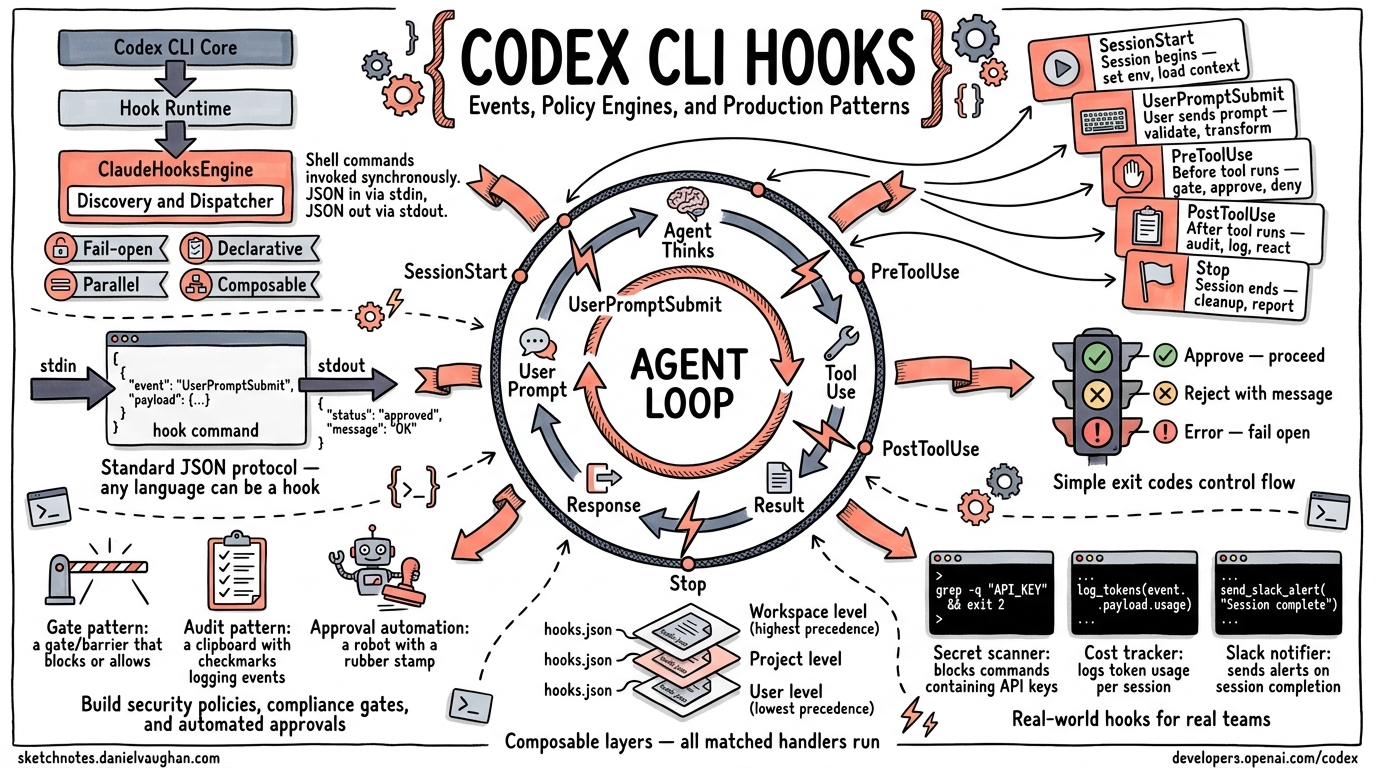
This article consolidates and supersedes the earlier individual articles on hooks deep-dive, the hooks engine, PreToolUse/PostToolUse hooks, and PermissionRequest policy-engine hooks. It is the single authoritative reference for the Codex CLI hooks system.
Table of Contents
- Architecture Overview
- Hook Event Types
- JSON Wire Protocol
- Configuration Reference
- Matcher Patterns
- Exit-Code Protocol
- Policy Engine Patterns
- Production Examples
- Lifecycle Sequence Diagram
- Quick-Reference Tables
Architecture Overview
Codex CLI hooks let you intercept and react to events in the agent loop without modifying Codex itself. Every hook is a shell command that Codex invokes synchronously, passing a JSON payload on stdin and reading a JSON response from stdout.
flowchart TD
    core["Codex CLI Core<br/>(codex-rs/core)"]
    hr["Hook Runtime<br/>(hook_runtime.rs)"]
    che["ClaudeHooksEngine<br/>(codex-rs/hooks/src/engine)"]
    dd["Discovery → Dispatcher<br/>reads hooks.json<br/>selects matching handlers<br/>runs commands in parallel<br/>parses JSON output"]
    core -->|"EventMsg::HookStarted / HookCompleted"| hr
    hr --> che
    che --> dd
Key Design Principles
| Principle | Implementation |
|---|---|
| Fail-open | If a hook process crashes, times out, or returns invalid JSON, the operation proceeds. The hook is marked Failed but never silently blocks. |
| Declarative configuration | Hooks are declared in hooks.json files discovered through the config layer stack. No code changes to Codex required. |
| Parallel execution | All matched handlers for a given event run concurrently via join_all. Results are aggregated after all complete. |
| Composable layers | Multiple hooks.json files can exist at different config levels (user, project, workspace). Lower-precedence layers run first; all matched handlers contribute. |
| Deterministic ordering | Handlers maintain a display_order counter across all config layers, preserving declaration order. |
Config Layer Stack
Hooks are discovered by walking the Codex config layer stack (lowest precedence
first). Each layer can have a hooks.json file in its config folder:
~/.codex/hooks.json              ← user-level (lowest precedence)
/project/.codex/hooks.json       ← project-level
/project/.codex/hooks.json       ← workspace-level (highest precedence)
All matching handlers from all layers execute for each event. The layer
precedence affects discovery order and display_order numbering.
Hook Event Types
Codex CLI supports five hook event types, each firing at a different point in the agent loop:
sequenceDiagram
    participant User
    participant Codex
    participant Hooks

    User->>Codex: Start session
    Codex->>Hooks: SessionStart
    Hooks-->>Codex: additional context / stop

    User->>Codex: Submit prompt
    Codex->>Hooks: UserPromptSubmit
    Hooks-->>Codex: context / block / stop

    Codex->>Codex: Model generates tool call
    Codex->>Hooks: PreToolUse
    Hooks-->>Codex: deny / allow

    Codex->>Codex: Execute tool
    Codex->>Hooks: PostToolUse
    Hooks-->>Codex: context / feedback / stop

    Codex->>Codex: Agent decides to stop
    Codex->>Hooks: Stop
    Hooks-->>Codex: block (continue) / accept stop
Hook Scope
Each event type has a scope that determines its lifecycle boundary:
| Event | Scope | Description |
|---|---|---|
SessionStart |
Thread |
Once per session (startup, resume, or clear) |
UserPromptSubmit |
Turn |
Each time the user submits a prompt |
PreToolUse |
Turn |
Before each tool call execution |
PostToolUse |
Turn |
After each tool call execution |
Stop |
Turn |
When the agent decides to stop |
SessionStart
Fires when a Codex session begins, resumes, or is cleared.
When it fires: Once per session lifecycle event.
Matcher: Matches against the source field: "startup", "resume", or "clear".
Input JSON (stdin):
{
  "session_id": "uuid-string",
  "transcript_path": "/path/to/transcript.jsonl",
  "cwd": "/working/directory",
  "hook_event_name": "SessionStart",
  "model": "o4-mini",
  "permission_mode": "default",
  "source": "startup"
}
| Field | Type | Description |
|---|---|---|
session_id |
string |
UUID identifying the session |
transcript_path |
string \| null |
Path to the session transcript file |
cwd |
string |
Working directory |
hook_event_name |
"SessionStart" |
Constant discriminator |
model |
string |
Model slug (e.g. o4-mini) |
permission_mode |
enum |
One of: default, acceptEdits, plan, dontAsk, bypassPermissions |
source |
enum |
One of: startup, resume, clear |
Output JSON (stdout):
{
  "continue": true,
  "stopReason": null,
  "suppressOutput": false,
  "systemMessage": null,
  "hookSpecificOutput": {
    "hookEventName": "SessionStart",
    "additionalContext": "Inject this text as a developer message"
  }
}
Capabilities:
- Inject context: Write
additionalContextto inject a developer message into the conversation. Plain-text stdout (non-JSON) is also accepted as additional context. - Stop the session: Set
"continue": falsewith an optional"stopReason". - Warn the user: Set
"systemMessage"to display a warning in the TUI.
UserPromptSubmit
Fires each time the user submits a prompt, before the model processes it.
When it fires: Every user message submission.
Matcher: Matchers are ignored for this event type. All registered handlers fire.
Input JSON (stdin):
{
  "session_id": "uuid-string",
  "turn_id": "turn-uuid",
  "transcript_path": "/path/to/transcript.jsonl",
  "cwd": "/working/directory",
  "hook_event_name": "UserPromptSubmit",
  "model": "o4-mini",
  "permission_mode": "default",
  "prompt": "Fix the login bug"
}
| Field | Type | Description |
|---|---|---|
prompt |
string |
The user’s submitted prompt text |
turn_id |
string |
UUID identifying this turn |
| (common fields) | Same as SessionStart |
Output JSON (stdout):
{
  "continue": true,
  "decision": null,
  "reason": null,
  "hookSpecificOutput": {
    "hookEventName": "UserPromptSubmit",
    "additionalContext": "Note: the user is working on auth module"
  }
}
Capabilities:
- Inject context:
additionalContextor plain-text stdout. - Block the prompt: Set
"decision": "block"with a"reason". The prompt is rejected and the reason is shown to the user. - Stop processing: Set
"continue": falsewith optional"stopReason". - Exit code 2: Write a blocking reason to stderr. The prompt is blocked.
PreToolUse
Fires before a tool call is executed. This is the primary gate for policy enforcement.
When it fires: Before each Bash command execution.
Matcher: Matches against the tool_name field using regex. Currently, the
tool name is always "Bash" in Codex CLI.
Input JSON (stdin):
{
  "session_id": "uuid-string",
  "turn_id": "turn-uuid",
  "transcript_path": "/path/to/transcript.jsonl",
  "cwd": "/working/directory",
  "hook_event_name": "PreToolUse",
  "model": "o4-mini",
  "permission_mode": "default",
  "tool_name": "Bash",
  "tool_input": {
    "command": "rm -rf /tmp/build"
  },
  "tool_use_id": "call-uuid"
}
| Field | Type | Description |
|---|---|---|
tool_name |
"Bash" |
The tool being called |
tool_input |
object |
Contains command (the shell command string) |
tool_use_id |
string |
Unique identifier for this tool call |
turn_id |
string |
Active turn identifier |
Output JSON (stdout) – Permission Decision style (preferred):
{
  "hookSpecificOutput": {
    "hookEventName": "PreToolUse",
    "permissionDecision": "deny",
    "permissionDecisionReason": "rm -rf is not allowed in production"
  }
}
Output JSON (stdout) – Legacy Decision style (deprecated but supported):
{
  "decision": "block",
  "reason": "rm -rf is not allowed in production"
}
Permission decisions:
| Decision | Effect |
|---|---|
"deny" |
Block the tool call. The permissionDecisionReason is fed back to the model. |
"allow" |
Not supported in Codex CLI. Returns a Failed status. Hooks can only deny, never grant permissions. |
"ask" |
Not supported in Codex CLI. Returns a Failed status. |
Exit code 2 shortcut: Exit with code 2 and write the blocking reason to
stderr. This is equivalent to returning "decision": "block".
Important: PreToolUse hooks do NOT support additionalContext. If a hook
returns additionalContext, it is treated as an error and the hook fails open.
PostToolUse
Fires after a tool call completes. Provides access to both the command and its output.
When it fires: After each Bash command execution completes.
Matcher: Matches against tool_name using regex (same as PreToolUse).
Input JSON (stdin):
{
  "session_id": "uuid-string",
  "turn_id": "turn-uuid",
  "transcript_path": "/path/to/transcript.jsonl",
  "cwd": "/working/directory",
  "hook_event_name": "PostToolUse",
  "model": "o4-mini",
  "permission_mode": "default",
  "tool_name": "Bash",
  "tool_input": {
    "command": "npm test"
  },
  "tool_response": {
    "output": "3 tests passed, 1 failed",
    "exit_code": 1
  },
  "tool_use_id": "call-uuid"
}
| Field | Type | Description |
|---|---|---|
tool_response |
any |
The JSON response from the tool execution |
| (other fields) | Same as PreToolUse |
Output JSON (stdout):
{
  "continue": true,
  "hookSpecificOutput": {
    "hookEventName": "PostToolUse",
    "additionalContext": "Test failure in auth module -- check fixtures"
  }
}
Capabilities:
- Inject context:
additionalContextinjects a developer message that the model sees on subsequent turns. - Provide feedback: Set
"decision": "block"with"reason"to surface feedback to the model without stopping execution. - Stop the session: Set
"continue": falsewith optional"stopReason"and"reason"(fed to model). - Exit code 2: Write feedback text to stderr. This is surfaced to the model as a feedback message.
Not supported: updatedMCPToolOutput is defined in the schema but not supported in Codex CLI. Returning it causes a Failed status.
Stop
Fires when the agent decides it has completed its work and wants to stop. This hook can prevent the agent from stopping, forcing it to continue with a new prompt.
When it fires: When the model signals completion.
Matcher: Matchers are ignored. All registered handlers fire.
Input JSON (stdin):
{
  "session_id": "uuid-string",
  "turn_id": "turn-uuid",
  "transcript_path": "/path/to/transcript.jsonl",
  "cwd": "/working/directory",
  "hook_event_name": "Stop",
  "model": "o4-mini",
  "permission_mode": "default",
  "stop_hook_active": false,
  "last_assistant_message": "I've completed the refactoring."
}
| Field | Type | Description |
|---|---|---|
stop_hook_active |
boolean |
true if the Stop hook has already fired and forced a continuation (prevents infinite loops) |
last_assistant_message |
string \| null |
The agent’s final message text |
Output JSON (stdout):
{
  "decision": "block",
  "reason": "Please also run the test suite before finishing."
}
Capabilities:
- Block stopping (force continuation): Set
"decision": "block"with a"reason". The reason becomes a continuation prompt injected as the next user message. Thestop_hook_activeflag is set totrueon the next stop attempt. - Accept the stop: Return empty stdout or
{}. - Force stop: Set
"continue": falseto force an immediate stop regardless of other hooks. - Exit code 2: Write a continuation prompt to stderr. Equivalent to
"decision": "block".
Important: "decision": "block" requires a non-empty "reason". Without it, the hook fails.
JSON Wire Protocol
All hooks communicate using a JSON-over-stdio protocol:
- Codex serializes the input payload as a single-line JSON string.
- The JSON is piped to the hook command’s stdin.
- The hook writes its response JSON to stdout.
- Codex parses the stdout and applies the result.
Universal Output Fields
Every hook event type supports these common output fields:
{
  "continue": true,
  "stopReason": null,
  "suppressOutput": false,
  "systemMessage": null
}
| Field | Type | Default | Description |
|---|---|---|---|
continue |
boolean |
true |
Set to false to halt the agent loop |
stopReason |
string? |
null |
Reason displayed when continue is false |
suppressOutput |
boolean |
false |
Reserved for future use |
systemMessage |
string? |
null |
Warning message displayed in the TUI |
Empty or Non-JSON Output
- Empty stdout: The hook is treated as a no-op success.
- Plain text stdout (non-JSON): Behavior depends on event type:
SessionStartandUserPromptSubmit: treated asadditionalContextPreToolUseandPostToolUse: ignored (no-op)Stop: treated as a failure (Stop requires valid JSON)
- Malformed JSON-like stdout (starts with
{or[but fails to parse): treated as a failure.
Configuration Reference
Hooks are configured in hooks.json files, which are discovered through the
config layer stack.
File Location
~/.codex/hooks.json
<project>/.codex/hooks.json
Schema
{
  "hooks": {
    "SessionStart": [
      {
        "matcher": "startup",
        "hooks": [
          {
            "type": "command",
            "command": "python3 ~/hooks/session_init.py",
            "timeout": 30,
            "statusMessage": "Initializing session..."
          }
        ]
      }
    ],
    "PreToolUse": [
      {
        "matcher": "^Bash$",
        "hooks": [
          {
            "type": "command",
            "command": "python3 ~/hooks/policy_gate.py",
            "timeout": 10,
            "statusMessage": "Checking policy..."
          }
        ]
      }
    ],
    "PostToolUse": [
      {
        "matcher": "^Bash$",
        "hooks": [
          {
            "type": "command",
            "command": "python3 ~/hooks/audit_log.py",
            "timeout": 5
          }
        ]
      }
    ],
    "UserPromptSubmit": [
      {
        "hooks": [
          {
            "type": "command",
            "command": "python3 ~/hooks/prompt_guard.py"
          }
        ]
      }
    ],
    "Stop": [
      {
        "hooks": [
          {
            "type": "command",
            "command": "python3 ~/hooks/quality_gate.py",
            "timeout": 60
          }
        ]
      }
    ]
  }
}
Handler Configuration Fields
| Field | Type | Default | Description |
|---|---|---|---|
type |
"command" |
required | Handler type. Only "command" is supported. ("prompt" and "agent" are defined but not yet implemented.) |
command |
string |
required | Shell command to execute. Receives JSON on stdin. |
timeout |
integer |
600 |
Timeout in seconds (minimum: 1) |
timeoutSec |
integer |
600 |
Alias for timeout |
statusMessage |
string? |
null |
Status text shown in the TUI while the hook runs |
async |
boolean |
false |
Reserved; async hooks are not yet supported |
Matcher Group Fields
| Field | Type | Description |
|---|---|---|
matcher |
string? |
Regex pattern to match against the relevant input. Meaning depends on event type. |
hooks |
array |
List of handler configurations |
Matcher Patterns
Matchers are regex patterns that filter which handlers run for a given event. The semantics differ by event type:
| Event Type | Matcher Input | Behavior |
|---|---|---|
PreToolUse |
tool_name (e.g. "Bash") |
Regex matched against the tool name |
PostToolUse |
tool_name |
Same as PreToolUse |
SessionStart |
source (e.g. "startup") |
Regex matched against the source string |
UserPromptSubmit |
(ignored) | All handlers fire regardless of matcher |
Stop |
(ignored) | All handlers fire regardless of matcher |
Special Matcher Values
null/ omitted: Matches everything (catch-all)."*": Treated as match-all (not a regex star)."^Bash$": Exact match for tool name “Bash”."Edit|Write": Matches either “Edit” or “Write”.- Invalid regex for UserPromptSubmit/Stop: Silently ignored (matcher is dropped).
- Invalid regex for PreToolUse/PostToolUse/SessionStart: Warning emitted, handler skipped.
Exit-Code Protocol
For hooks that do not need the full JSON output, a simpler exit-code protocol is available:
| Exit Code | Effect |
|---|---|
| 0 | Success. Parse stdout for JSON output (or treat as no-op if empty). |
| 2 | Block/feedback. The content of stderr is used as the reason. Behavior depends on event type: |
- PreToolUse: blocks the tool call (stderr = blocking reason) |
|
- PostToolUse: surfaces feedback to model (stderr = feedback message) |
|
- UserPromptSubmit: blocks the prompt (stderr = blocking reason) |
|
- Stop: blocks the stop, forces continuation (stderr = continuation prompt) |
|
| Other | Hook failure. The hook is marked Failed and the operation proceeds. |
This enables minimal hooks written as simple shell scripts:
#!/bin/bash
# PreToolUse: block any rm -rf commands
INPUT=$(cat)
COMMAND=$(echo "$INPUT" | jq -r '.tool_input.command')

if echo "$COMMAND" | grep -q 'rm -rf'; then
  echo "Destructive rm -rf commands are not allowed" >&2
  exit 2
fi

exit 0
Policy Engine Patterns
Pattern 1: Command Allowlist/Blocklist
The most common pattern. A PreToolUse hook inspects the command and blocks dangerous operations.
#!/usr/bin/env python3
"""PreToolUse policy gate: block dangerous shell commands."""
import json
import sys
import re

BLOCKED_PATTERNS = [
    r'\brm\s+(-[a-zA-Z]*f|-[a-zA-Z]*r|--force|--recursive)',
    r'\bchmod\s+777\b',
    r'\bcurl\b.*\|\s*(sh|bash)\b',
    r'\bsudo\b',
    r'\b(mkfs|fdisk|dd)\b',
    r'\bgit\s+push\s+.*--force\b',
]

def main():
    payload = json.load(sys.stdin)
    command = payload["tool_input"]["command"]

    for pattern in BLOCKED_PATTERNS:
        if re.search(pattern, command):
            # JSON output approach
            result = {
                "hookSpecificOutput": {
                    "hookEventName": "PreToolUse",
                    "permissionDecision": "deny",
                    "permissionDecisionReason": f"Blocked: command matches policy rule '{pattern}'"
                }
            }
            json.dump(result, sys.stdout)
            return

    # Allow by producing no output (no-op)

if __name__ == "__main__":
    main()
Pattern 2: Audit Logging
A PostToolUse hook that logs every command execution for compliance.
#!/usr/bin/env python3
"""PostToolUse audit hook: log all command executions."""
import json
import sys
import datetime

def main():
    payload = json.load(sys.stdin)

    log_entry = {
        "timestamp": datetime.datetime.utcnow().isoformat(),
        "session_id": payload["session_id"],
        "turn_id": payload["turn_id"],
        "command": payload["tool_input"]["command"],
        "model": payload["model"],
        "permission_mode": payload["permission_mode"],
    }

    # Append to audit log
    with open("/var/log/codex-audit.jsonl", "a") as f:
        f.write(json.dumps(log_entry) + "\n")

    # No output = no-op, command proceeds normally

if __name__ == "__main__":
    main()
Pattern 3: Quality Gate on Stop
A Stop hook that ensures tests pass before the agent can finish.
#!/usr/bin/env python3
"""Stop hook: require tests to pass before the agent finishes."""
import json
import sys
import subprocess

def main():
    payload = json.load(sys.stdin)

    # Avoid infinite loops -- if we already forced a continuation, let it stop
    if payload.get("stop_hook_active", False):
        return

    # Run the test suite
    result = subprocess.run(
        ["npm", "test", "--", "--reporter=json"],
        capture_output=True, text=True, cwd=payload["cwd"],
        timeout=120,
    )

    if result.returncode != 0:
        output = {
            "decision": "block",
            "reason": f"Tests failed. Please fix them before finishing.\n\nTest output:\n{result.stdout[-500:]}"
        }
        json.dump(output, sys.stdout)

if __name__ == "__main__":
    main()
Pattern 4: Session Initialization with Context Injection
A SessionStart hook that injects project-specific context.
#!/usr/bin/env python3
"""SessionStart hook: inject project context."""
import json
import sys
import os

def main():
    payload = json.load(sys.stdin)

    # Only run on fresh startup
    if payload["source"] != "startup":
        return

    # Read project notes
    notes_path = os.path.join(payload["cwd"], ".codex", "project-notes.md")
    if os.path.exists(notes_path):
        with open(notes_path) as f:
            notes = f.read()

        output = {
            "hookSpecificOutput": {
                "hookEventName": "SessionStart",
                "additionalContext": f"Project notes:\n{notes}"
            }
        }
        json.dump(output, sys.stdout)

if __name__ == "__main__":
    main()
Pattern 5: Prompt Guardrail
A UserPromptSubmit hook that blocks prompts matching unsafe patterns.
#!/usr/bin/env python3
"""UserPromptSubmit hook: block prompts with sensitive content."""
import json
import sys
import re

BLOCKED_PROMPT_PATTERNS = [
    r'(?i)delete\s+(all|every|the\s+entire)\s+(database|production)',
    r'(?i)push\s+to\s+main\s+without',
    r'(?i)disable\s+(all\s+)?security',
]

def main():
    payload = json.load(sys.stdin)
    prompt = payload["prompt"]

    for pattern in BLOCKED_PROMPT_PATTERNS:
        if re.search(pattern, prompt):
            output = {
                "decision": "block",
                "reason": f"Prompt blocked by guardrail policy: matches pattern '{pattern}'"
            }
            json.dump(output, sys.stdout)
            return

if __name__ == "__main__":
    main()
Pattern 6: PostToolUse Context Injection
A PostToolUse hook that injects guidance when specific tool outputs are observed.
#!/usr/bin/env python3
"""PostToolUse hook: inject context based on tool output."""
import json
import sys

def main():
    payload = json.load(sys.stdin)
    response = json.dumps(payload.get("tool_response", {}))

    # If tests failed, remind the model about the test fixtures
    if "FAIL" in response and "test" in payload["tool_input"]["command"]:
        output = {
            "hookSpecificOutput": {
                "hookEventName": "PostToolUse",
                "additionalContext": "Test failures detected. Check if test fixtures need updating in __fixtures__/ before modifying source code."
            }
        }
        json.dump(output, sys.stdout)

if __name__ == "__main__":
    main()
Lifecycle Sequence Diagram
The full hook lifecycle in a typical Codex session:
sequenceDiagram
    participant U as User
    participant C as Codex Core
    participant D as Discovery
    participant E as Dispatcher
    participant H as Hook Commands

    Note over C,D: Startup
    C->>D: discover_handlers(config_layer_stack)
    D->>D: Walk config layers, parse hooks.json files
    D-->>C: Vec<ConfiguredHandler> + warnings

    Note over U,C: Session begins
    C->>E: select_handlers(SessionStart, source="startup")
    E->>H: pipe JSON to stdin (parallel)
    H-->>E: JSON responses
    E-->>C: SessionStartOutcome{contexts, should_stop}
    C->>C: Inject additional contexts as developer messages

    Note over U,C: User submits prompt
    U->>C: "Fix the login bug"
    C->>E: select_handlers(UserPromptSubmit)
    E->>H: pipe JSON with prompt
    H-->>E: JSON responses
    E-->>C: UserPromptSubmitOutcome{contexts, should_stop}

    Note over C: Model generates tool call
    C->>E: select_handlers(PreToolUse, tool_name="Bash")
    E->>H: pipe JSON with command
    H-->>E: JSON with deny/allow
    alt Hook denies
        E-->>C: should_block=true, block_reason
        C->>C: Feed block_reason to model as error
    else Hook allows (or no output)
        E-->>C: should_block=false
        C->>C: Execute the command
    end

    Note over C: Tool execution complete
    C->>E: select_handlers(PostToolUse, tool_name="Bash")
    E->>H: pipe JSON with command + tool_response
    H-->>E: JSON with context/feedback/stop
    E-->>C: PostToolUseOutcome{contexts, feedback, should_stop}

    Note over C: Agent wants to stop
    C->>E: select_handlers(Stop)
    E->>H: pipe JSON with last_assistant_message
    alt Hook blocks stop
        H-->>E: decision=block, reason="run tests first"
        E-->>C: should_block=true, continuation_fragments
        C->>C: Inject continuation prompt as user message
        C->>C: Continue agent loop
    else Hook accepts stop
        H-->>E: empty or {}
        E-->>C: should_block=false
        C->>C: End session
    end
Quick-Reference Tables
Event Type Summary
| Event | Scope | Matcher Target | Can Block? | Can Inject Context? | Can Stop? |
|---|---|---|---|---|---|
SessionStart |
Thread | source |
No | Yes | Yes |
UserPromptSubmit |
Turn | (ignored) | Yes | Yes | Yes |
PreToolUse |
Turn | tool_name |
Yes (deny) | No | No |
PostToolUse |
Turn | tool_name |
Yes (feedback) | Yes | Yes |
Stop |
Turn | (ignored) | Yes (continue) | No | Yes |
Hook Output Decision Matrix
| Output | PreToolUse | PostToolUse | UserPromptSubmit | Stop | SessionStart |
|---|---|---|---|---|---|
| Empty stdout | No-op | No-op | No-op | No-op | No-op |
| Plain text | Ignored | Ignored | Context | Fail | Context |
{"continue":false} |
N/A | Stop session | Stop processing | Force stop | Stop session |
{"decision":"block","reason":"..."} |
Block tool | Feedback to model | Block prompt | Force continuation | N/A |
permissionDecision: "deny" |
Block tool | N/A | N/A | N/A | N/A |
additionalContext: "..." |
Fail | Inject context | Inject context | N/A | Inject context |
| Exit code 2 + stderr | Block tool | Feedback | Block prompt | Force continuation | N/A |
| Exit code != 0,2 | Fail (open) | Fail (open) | Fail (open) | Fail (open) | Fail (open) |
| Invalid JSON-like | Fail (open) | Fail (open) | Fail (open) | Fail (open) | Fail (open) |
Legacy vs Preferred API
The hooks system supports two output styles for PreToolUse:
| Style | Field | Values | Status |
|---|---|---|---|
| Preferred | hookSpecificOutput.permissionDecision |
"deny" |
Current |
| Deprecated | decision |
"approve", "block" |
Legacy; "approve" fails open |
Common Hook Run Statuses
| Status | Meaning |
|---|---|
Running |
Hook is currently executing |
Completed |
Hook finished successfully (no-op or valid output) |
Blocked |
Hook actively blocked an operation |
Stopped |
Hook stopped the agent loop (continue: false) |
Failed |
Hook errored, timed out, or returned invalid output. Operation proceeds (fail-open). |
Appendix: Generated JSON Schemas
The canonical JSON schemas for all hook inputs and outputs are auto-generated
from the Rust type definitions and stored in codex-rs/hooks/schema/generated/.
Available schemas:
session-start.command.input.schema.jsonsession-start.command.output.schema.jsonpre-tool-use.command.input.schema.jsonpre-tool-use.command.output.schema.jsonpost-tool-use.command.input.schema.jsonpost-tool-use.command.output.schema.jsonuser-prompt-submit.command.input.schema.jsonuser-prompt-submit.command.output.schema.jsonstop.command.input.schema.jsonstop.command.output.schema.json
These schemas follow JSON Schema draft-07 and are the source of truth for the wire format. See the hooks schema directory for the full definitions.
Appendix: Legacy Notification Hooks
Codex CLI also supports a legacy notification hook system (--notify CLI flag
or notify config field) that fires AfterAgent and AfterToolUse events
using a different payload format. This system predates the hooks.json
configuration and is maintained for backward compatibility.
The legacy payload uses a top-level hook_event field with event_type
discriminator:
{
  "session_id": "uuid",
  "cwd": "/working/dir",
  "triggered_at": "2025-01-01T00:00:00Z",
  "hook_event": {
    "event_type": "after_agent",
    "thread_id": "uuid",
    "turn_id": "turn-1",
    "input_messages": ["hello"],
    "last_assistant_message": "hi"
  }
}
New integrations should use the hooks.json system instead.
Source code references:
- Hook engine:
codex-rs/hooks/src/ - Runtime integration:
codex-rs/core/src/hook_runtime.rs - Config format:
codex-rs/hooks/src/engine/config.rs - Schema definitions:
codex-rs/hooks/src/schema.rs