Codex CLI Plugin-Bundled Hooks: Distributing Reusable Quality Gates Through the Marketplace
Codex CLI Plugin-Bundled Hooks: Distributing Reusable Quality Gates Through the Marketplace
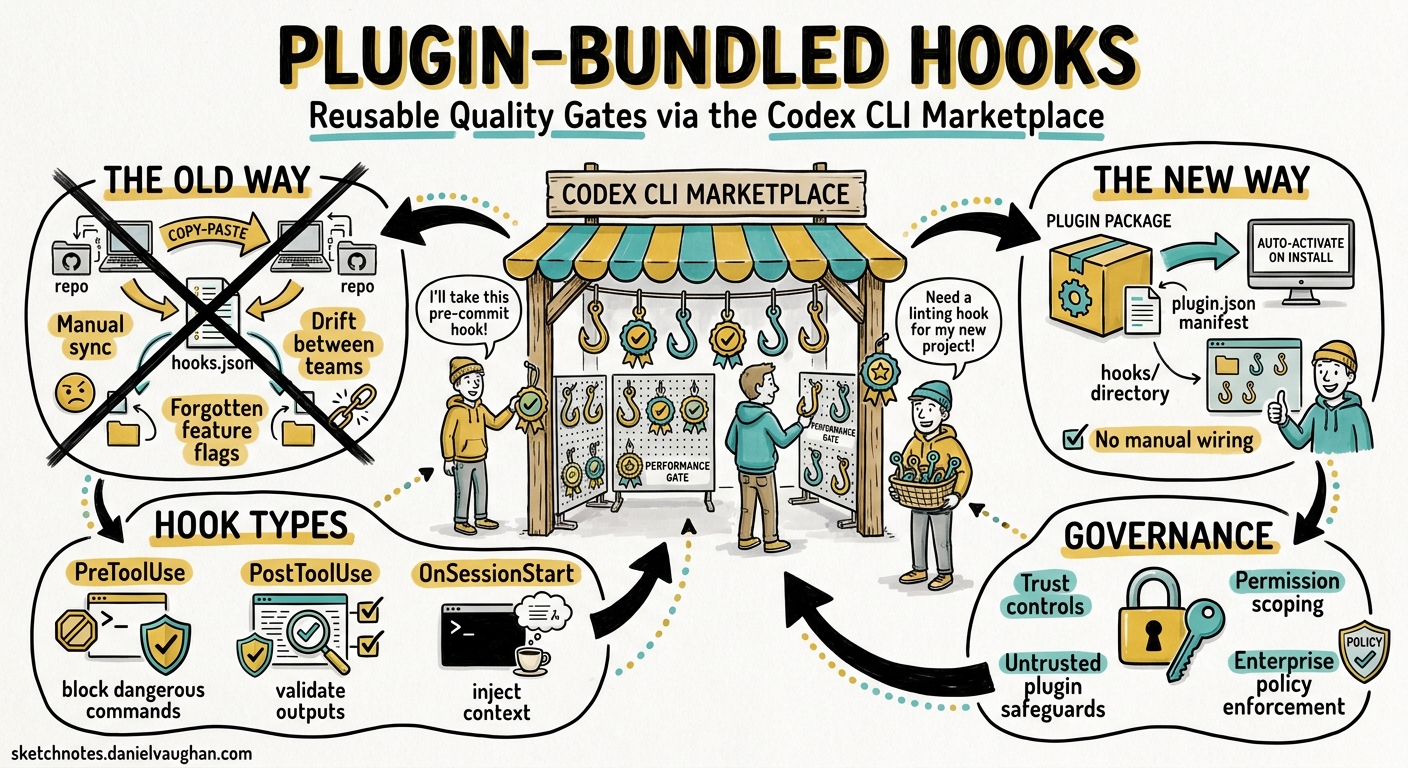
Codex CLI’s hook system has matured steadily since its graduation to stable status in v0.1241. Hooks let you intercept agent actions — blocking dangerous shell commands, validating file edits, injecting context at session start — using scripts that run at well-defined lifecycle points. The trouble, until recently, was distribution. Every team that wanted the same quality gate had to copy hooks.json files between repositories, keep them synchronised, and hope nobody forgot to enable the feature flag.
Version 0.128.0, released on 30 April 2026, changes that equation with plugin-bundled hooks2. Plugins can now ship their own lifecycle configurations alongside skills, MCP servers, and app connectors. Install a plugin from the marketplace, and its hooks activate automatically — no manual wiring required. This article explains the mechanism, walks through building a plugin that bundles hooks, and covers the governance controls that prevent untrusted plugins from silently injecting policy.
How Plugin-Bundled Hooks Work
The Plugin Directory Layout
A Codex plugin is a directory with a .codex-plugin/plugin.json manifest at its root3. Hooks live in a hooks/ directory alongside skills and other components:
my-quality-gate/
├── .codex-plugin/
│   └── plugin.json
├── skills/
│   └── lint-check/
│       └── SKILL.md
├── hooks/
│   └── hooks.json
├── scripts/
│   ├── block-force-push.py
│   └── post-edit-lint.sh
└── assets/
    └── icon.png
The manifest references the hooks file with a relative path3:
{
  "name": "quality-gate",
  "version": "1.0.0",
  "description": "PreToolUse and PostToolUse guards for team coding standards",
  "skills": "./skills/",
  "hooks": "./hooks/hooks.json",
  "interface": {
    "displayName": "Quality Gate",
    "category": "Governance",
    "capabilities": ["Read"]
  }
}
When Codex installs the plugin, it copies the entire bundle — including hooks/ and scripts/ — into ~/.codex/plugins/cache/$MARKETPLACE/$PLUGIN_NAME/$VERSION/ and merges the hook definitions into the active session configuration3.
Hook Discovery Order
Codex discovers hooks from multiple sources, evaluated in this order4:
flowchart TD
A["~/.codex/config.toml<br/>(global hooks)"] --> E["Merged Hook\nConfiguration"]
B["<repo>/.codex/config.toml<br/>(project hooks)"] --> E
C["~/.codex/hooks.json<br/>(legacy JSON)"] --> E
D["Plugin-bundled hooks<br/>(hooks.json per plugin)"] --> E
E --> F["Session Runtime"]
Plugin-bundled hooks merge alongside user-defined and project-defined hooks. When multiple hooks match the same event and tool, they run concurrently — one hook cannot prevent another from executing4.
The Six Hook Events
Plugin-bundled hooks can target any of the six lifecycle events4:
| Event | Fires When | Common Plugin Use |
|---|---|---|
SessionStart |
Session begins or resumes | Inject team context, check environment |
PreToolUse |
Before a tool call executes | Block dangerous commands, enforce policy |
PermissionRequest |
Before approval is needed | Auto-approve trusted patterns |
PostToolUse |
After a tool returns output | Run linters, validate edits |
UserPromptSubmit |
User submits a prompt | Filter sensitive input |
Stop |
Conversation turn ends | Trigger follow-up actions |
Building a Plugin with Hooks: A Worked Example
Consider a team that wants two quality gates distributed via the marketplace:
- PreToolUse: Block
git push --forceandrm -rf /patterns - PostToolUse: Run the project linter after every
apply_patchedit
Step 1: Define the Hooks
Create hooks/hooks.json:
{
  "hooks": {
    "PreToolUse": [
      {
        "matcher": "^Bash$",
        "hooks": [
          {
            "type": "command",
            "command": "python3 \"$PLUGIN_DIR/scripts/block-force-push.py\"",
            "timeout": 10,
            "statusMessage": "Checking command safety"
          }
        ]
      }
    ],
    "PostToolUse": [
      {
        "matcher": "^apply_patch$",
        "hooks": [
          {
            "type": "command",
            "command": "bash \"$PLUGIN_DIR/scripts/post-edit-lint.sh\"",
            "timeout": 30,
            "statusMessage": "Running lint check"
          }
        ]
      }
    ]
  }
}
Step 2: Write the Guard Scripts
The PreToolUse script receives JSON on stdin with the tool_input field containing the command to be executed4:
#!/usr/bin/env python3
"""Block destructive git and filesystem commands."""
import json, sys, re

data = json.load(sys.stdin)
command = data.get("tool_input", {}).get("command", "")

BLOCKED = [
    r"git\s+push\s+.*--force",
    r"git\s+reset\s+--hard",
    r"rm\s+-rf\s+/",
    r"chmod\s+777",
]

for pattern in BLOCKED:
    if re.search(pattern, command):
        result = {
            "hookSpecificOutput": {
                "hookEventName": "PreToolUse",
                "permissionDecision": "deny",
                "permissionDecisionReason": f"Blocked by quality-gate plugin: matches '{pattern}'"
            }
        }
        json.dump(result, sys.stdout)
        sys.exit(0)

# Allow the command
json.dump({}, sys.stdout)
The PostToolUse linter script runs after every file edit:
#!/usr/bin/env bash
# Run project linter on changed files after apply_patch edits.
set -euo pipefail

INPUT=$(cat)
TOOL_RESPONSE=$(echo "$INPUT" | python3 -c "import json,sys; print(json.load(sys.stdin).get('tool_response',''))")

# Extract file paths from the apply_patch response
FILES=$(echo "$TOOL_RESPONSE" | grep -oP '(?<=Edited: ).*' || true)

if [ -n "$FILES" ]; then
  # Attempt to lint — report but don't block
  if command -v npx &>/dev/null && [ -f "package.json" ]; then
    npx eslint --no-error-on-unmatched-pattern $FILES 2>&1 | head -20
  elif command -v ruff &>/dev/null; then
    ruff check $FILES 2>&1 | head -20
  fi
fi
Step 3: Create the Plugin Manifest
{
  "name": "quality-gate",
  "version": "1.0.0",
  "description": "Blocks destructive commands and runs post-edit linting.",
  "author": {
    "name": "Platform Engineering",
    "email": "platform@example.com"
  },
  "license": "MIT",
  "keywords": ["governance", "linting", "safety"],
  "hooks": "./hooks/hooks.json",
  "interface": {
    "displayName": "Quality Gate",
    "shortDescription": "Guard rails for safe agent coding",
    "category": "Governance",
    "capabilities": ["Read"]
  }
}
Step 4: Publish to a Marketplace
For a team-internal marketplace, create .agents/plugins/marketplace.json at the repository root3:
{
  "name": "team-plugins",
  "interface": {
    "displayName": "Platform Engineering Plugins"
  },
  "plugins": [
    {
      "name": "quality-gate",
      "source": {
        "source": "git-subdir",
        "url": "https://github.com/example/codex-plugins.git",
        "path": "./plugins/quality-gate",
        "ref": "main"
      },
      "policy": {
        "installation": "AVAILABLE",
        "authentication": "ON_INSTALL"
      },
      "category": "Governance"
    }
  ]
}
Team members then run:
codex plugin marketplace add example/codex-plugins --ref main
Hook Enablement and Toggle Controls
Version 0.128 added hook enablement state — the ability to enable or disable hooks from specific plugins without uninstalling the entire plugin2. This is configured in config.toml:
# Disable hooks from a specific plugin without removing it
[plugins."quality-gate@team-plugins"]
enabled = true
hooks_enabled = false

# Or disable the entire plugin
[plugins."quality-gate@team-plugins"]
enabled = false
This separation matters for debugging. When a session behaves unexpectedly, you can temporarily disable plugin hooks to isolate whether the plugin’s policy scripts are causing the issue, without losing access to the plugin’s skills or MCP servers.
Enterprise Governance: Managed Configuration
For organisations requiring mandatory quality gates across all developers, Codex’s managed configuration system (requirements.toml) provides enforcement5:
# requirements.toml — deployed by IT/platform team
[required_plugins]
"quality-gate@company-plugins" = { min_version = "1.0.0", hooks_enabled = true }

[features]
codex_hooks = true
When requirements.toml mandates a plugin with hooks_enabled = true, individual developers cannot disable those hooks through their personal config.toml. This creates a layered governance model:
flowchart TB
A["requirements.toml<br/>(IT-managed, immutable)"] --> D["Effective Configuration"]
B["~/.codex/config.toml<br/>(user preferences)"] --> D
C["<repo>/.codex/config.toml<br/>(project-level)"] --> D
D --> E["Plugin hooks active<br/>in every session"]
Practical Patterns for Plugin Hooks
Pattern 1: Credential Leak Prevention
A PreToolUse hook that scans Bash commands and apply_patch diffs for secret patterns:
{
  "hooks": {
    "PreToolUse": [
      {
        "matcher": "Bash|apply_patch",
        "hooks": [
          {
            "type": "command",
            "command": "python3 \"$PLUGIN_DIR/scripts/secret-scanner.py\"",
            "timeout": 15,
            "statusMessage": "Scanning for credentials"
          }
        ]
      }
    ]
  }
}
Pattern 2: SessionStart Context Injection
A plugin that injects team-specific context at the start of every session:
{
  "hooks": {
    "SessionStart": [
      {
        "matcher": "startup",
        "hooks": [
          {
            "type": "command",
            "command": "bash \"$PLUGIN_DIR/scripts/inject-context.sh\"",
            "timeout": 10,
            "statusMessage": "Loading team context"
          }
        ]
      }
    ]
  }
}
The script’s stdout feeds directly into the model’s context, making it ideal for injecting sprint goals, deployment freezes, or architecture decision records4.
Pattern 3: Post-Edit Test Runner
A PostToolUse hook that runs relevant tests after every file edit, providing immediate feedback to the agent:
{
  "hooks": {
    "PostToolUse": [
      {
        "matcher": "^apply_patch$",
        "hooks": [
          {
            "type": "command",
            "command": "python3 \"$PLUGIN_DIR/scripts/affected-tests.py\"",
            "timeout": 120,
            "statusMessage": "Running affected tests"
          }
        ]
      }
    ]
  }
}
Current Limitations
Plugin-bundled hooks inherit the same constraints as standalone hooks4:
- PreToolUse can only
denycommands — it cannot modify the tool input (updatedInputis parsed but rejected) - PostToolUse cannot modify tool output (
updatedMCPToolOutputis parsed but not applied) - Multiple matching hooks run concurrently; one cannot prevent another from executing
- WebSearch and non-MCP tool calls are not yet interceptable
$PLUGIN_DIRpath resolution depends on the plugin’s cache location, which may vary across installations
⚠️ The $PLUGIN_DIR environment variable behaviour for hook commands within plugins is not yet formally documented. The examples above assume Codex resolves plugin-relative paths, which is consistent with how skills reference plugin-local files but may require verification in your specific version.
What This Means for Teams
Plugin-bundled hooks shift quality gates from a per-repository configuration burden to a distributable, versionable artefact. The practical implications:
- Platform teams can publish governance plugins that enforce coding standards, block dangerous patterns, and inject team context — and update them centrally
- Open source maintainers can ship contribution-quality plugins that run linters and convention checks for new contributors
- Enterprise IT can mandate plugins via
requirements.toml, ensuring hooks run in every session regardless of individual developer preferences
Combined with v0.128’s marketplace installation improvements and remote bundle caching2, the distribution friction for team-wide quality gates has dropped significantly. The gap that remains is input/output modification — hooks can block and observe, but cannot yet transform — which limits patterns like automatic import rewriting or output sanitisation. That capability is likely on the roadmap, given that the fields are already parsed.
Citations
-
OpenAI, “Codex CLI v0.124.0 Changelog — Hooks Graduate to Stable”, OpenAI Developers, 23 April 2026. https://developers.openai.com/codex/changelog ↩
-
OpenAI, “Codex CLI v0.128.0 Release Notes”, GitHub Releases, 30 April 2026. https://github.com/openai/codex/releases/tag/rust-v0.128.0 ↩ ↩2 ↩3
-
OpenAI, “Build Plugins — Codex”, OpenAI Developers, 2026. https://developers.openai.com/codex/plugins/build ↩ ↩2 ↩3 ↩4
-
OpenAI, “Hooks — Codex”, OpenAI Developers, 2026. https://developers.openai.com/codex/hooks ↩ ↩2 ↩3 ↩4 ↩5 ↩6
-
OpenAI, “Advanced Configuration — Codex”, OpenAI Developers, 2026. https://developers.openai.com/codex/config-advanced ↩