Codex CLI Hooks Graduate to Stable: MCP Observation, Inline Config, and Auto-Review in v0.124
Codex CLI Hooks Graduate to Stable: MCP Observation, Inline Config, and Auto-Review in v0.124
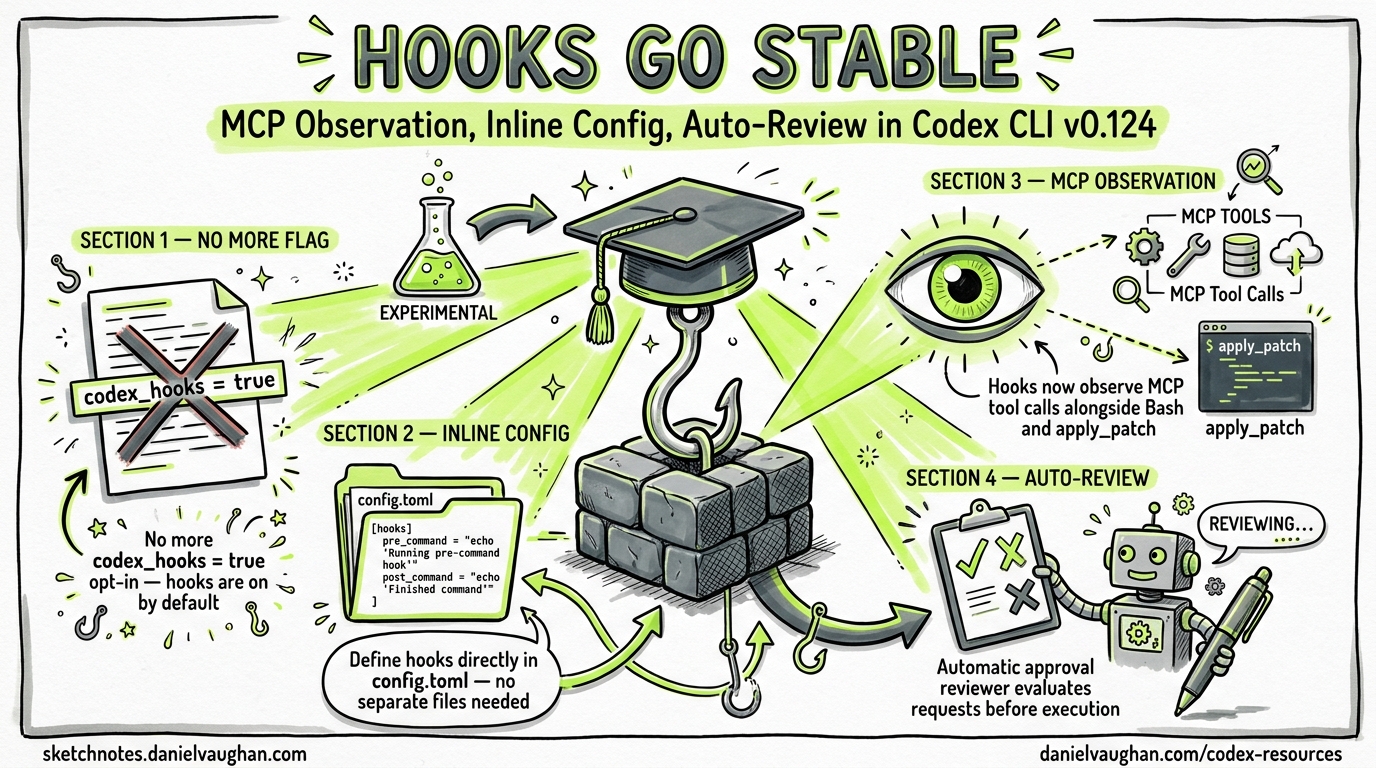
With the release of Codex CLI v0.124.0 on 23 April 2026, hooks have officially graduated from experimental to stable1. This is not merely a label change — the release ships three substantive improvements that transform hooks from a Bash-only curiosity into a production-grade policy enforcement layer: inline configuration in config.toml, observation of MCP tools and apply_patch, and a new automatic approval reviewer that can evaluate approval requests before execution2.
If you have been deferring hook adoption because of the [features] codex_hooks = true requirement and the “under development” caveat, this is your green light.
What Changed in v0.124.0
The v0.124.0 release changelog summarises the hooks changes in a single line: “Hooks marked as stable, configurable in config files, and expanded to observe MCP tools alongside apply_patch and Bash sessions”1. Unpacking that line reveals three distinct improvements.
1. No More Feature Flag
Prior to v0.124, hooks required an explicit opt-in:
# No longer needed in v0.124.0+
[features]
codex_hooks = true
As of v0.124, hooks are enabled by default when a hooks.json file is discovered in an active config layer3. The feature flag still exists for managed environments that need to disable hooks via requirements.toml, but the default has flipped.
2. MCP and apply_patch Observation
The most requested hooks enhancement — issue #16732, filed on 3 April 2026 — was that ApplyPatchHandler did not emit PreToolUse or PostToolUse events4. The fix landed in PR #18391 within two days, parameterising tool_name in hook_runtime.rs and implementing payload methods on ApplyPatchHandler4.
v0.124 extends this further: hooks now fire for MCP tool calls alongside apply_patch and Bash sessions1. This means a PreToolUse hook with a matcher like "mcp__docs__search" can intercept, audit, or block MCP tool invocations before they execute.
3. Inline Configuration in config.toml
Previously, hook definitions lived exclusively in hooks.json files discovered next to config layers3. v0.124 adds support for inline hook configuration in config.toml and managed requirements.toml1. This collapses what was a two-file setup into a single configuration surface.
The Hook Event Lifecycle — Updated for v0.124
sequenceDiagram
    participant User
    participant TUI
    participant AgentLoop
    participant Hooks
    participant Tool

    User->>TUI: Submit prompt
    TUI->>AgentLoop: UserPromptSubmit
    AgentLoop->>Hooks: UserPromptSubmit hook
    Hooks-->>AgentLoop: allow / block / inject context

    AgentLoop->>AgentLoop: Model reasoning

    AgentLoop->>Hooks: PreToolUse (Bash / apply_patch / MCP)
    Hooks-->>AgentLoop: allow / deny / modify

    alt Requires approval
        AgentLoop->>Hooks: PermissionRequest
        Hooks-->>AgentLoop: allow / deny
    end

    AgentLoop->>Tool: Execute tool
    Tool-->>AgentLoop: Result

    AgentLoop->>Hooks: PostToolUse
    Hooks-->>AgentLoop: continue / block

    AgentLoop->>Hooks: Stop
    Hooks-->>AgentLoop: continue / halt
Six hook events remain unchanged from the experimental API3:
| Event | Scope | Matcher | New in v0.124 |
|---|---|---|---|
SessionStart |
Session | Source (startup, resume, clear) |
clear source added |
PreToolUse |
Turn | Tool name | MCP + apply_patch matchers |
PermissionRequest |
Turn | Tool name | MCP + apply_patch matchers |
PostToolUse |
Turn | Tool name | MCP + apply_patch matchers |
UserPromptSubmit |
Turn | N/A | No change |
Stop |
Turn | N/A | No change |
The critical expansion is in the matcher column: where previously only Bash was a valid tool name for turn-scoped events, v0.124 accepts any registered tool name — including MCP tools (prefixed mcp__<server>__<tool>) and apply_patch14.
Practical Configuration Patterns
Pattern 1: Audit All MCP Tool Calls
{
  "hooks": {
    "PreToolUse": [
      {
        "matcher": "mcp__.*",
        "hooks": [
          {
            "type": "command",
            "command": "/usr/bin/python3 ~/.codex/hooks/audit_mcp.py",
            "statusMessage": "Auditing MCP call"
          }
        ]
      }
    ]
  }
}
The audit_mcp.py script receives the full tool input on stdin, including tool_name and tool_input, and can log to an audit trail or reject calls to specific MCP servers.
Pattern 2: Block Dangerous apply_patch Operations
{
  "hooks": {
    "PreToolUse": [
      {
        "matcher": "apply_patch",
        "hooks": [
          {
            "type": "command",
            "command": "/usr/bin/python3 ~/.codex/hooks/patch_guard.py",
            "statusMessage": "Reviewing patch"
          }
        ]
      }
    ]
  }
}
A patch guard script can parse the patch input from the hook payload, check for modifications to protected files (lockfiles, CI configs, .env files), and return a deny decision:
#!/usr/bin/env python3
import json, sys

data = json.load(sys.stdin)
patch = data.get("tool_input", {}).get("patch", "")

PROTECTED = ["package-lock.json", ".github/workflows/", ".env"]
for path in PROTECTED:
    if path in patch:
        result = {
            "hookSpecificOutput": {
                "hookEventName": "PreToolUse",
                "permissionDecision": "deny",
                "permissionDecisionReason": f"Patch modifies protected path: {path}"
            }
        }
        json.dump(result, sys.stdout)
        sys.exit(0)

# Allow by default
sys.exit(0)
Pattern 3: MCP Rate Limiting
For cost-sensitive environments, a PostToolUse hook can track MCP tool invocations and warn or halt when thresholds are exceeded:
{
  "hooks": {
    "PostToolUse": [
      {
        "matcher": "mcp__.*",
        "hooks": [
          {
            "type": "command",
            "command": "/usr/bin/python3 ~/.codex/hooks/mcp_rate_limiter.py",
            "timeout": 10
          }
        ]
      }
    ]
  }
}
The Auto-Review Capability
v0.124 introduces a new configuration key that complements hooks:
approvals_reviewer = "auto_review"
When set, an automatic reviewer agent evaluates approval requests before they surface to the user2. The reviewer displays its risk assessment alongside the approval prompt in the TUI, enabling faster and more informed decisions.
This pairs naturally with hooks: a PermissionRequest hook can implement deterministic policy gates (e.g., “always deny rm -rf”), whilst the auto-reviewer handles the grey area of requests that pass hook checks but still warrant human awareness.
flowchart LR
    A[Tool Request] --> B{PreToolUse Hook}
    B -->|deny| C[Blocked]
    B -->|allow| D{Needs Approval?}
    D -->|no| E[Execute]
    D -->|yes| F{PermissionRequest Hook}
    F -->|deny| C
    F -->|allow| G{Auto-Reviewer}
    G --> H[Risk Assessment + User Prompt]
    H -->|approved| E
    H -->|rejected| C
The layered architecture creates defence in depth: deterministic hooks first, probabilistic auto-review second, human judgement last5.
Migration Guide: Experimental to Stable
If you have existing hooks.json files from the experimental era, the migration is minimal:
-
Remove the feature flag — delete
codex_hooks = truefrom[features]in yourconfig.toml. Hooks load automatically whenhooks.jsonis present. -
Update matchers — if you had hooks that only matched
Bash, consider whether they should also matchapply_patchor MCP tools. A hook that audits all command execution should now use"Bash|apply_patch"or even".*"to catch everything. -
Test with MCP tools — if your hooks assume
tool_input.commandexists (valid for Bash), they will receive different payloads for MCP tools (tool_inputvaries by tool) and apply_patch (tool_input.patch). Add defensive parsing. -
Consider auto-review — if your
PermissionRequesthooks exist purely to surface information rather than enforce policy,approvals_reviewer = "auto_review"may replace them.
Payload Differences by Tool Type
| Field | Bash | apply_patch | MCP Tool |
|---|---|---|---|
tool_name |
"Bash" |
"apply_patch" |
"mcp__<server>__<tool>" |
tool_input.command |
Shell command | ❌ | ❌ |
tool_input.patch |
❌ | Diff content | ❌ |
tool_input.* |
❌ | ❌ | Tool-specific fields |
Enterprise Considerations
For managed environments using requirements.toml, hooks now participate in the configuration precedence chain6:
- Cloud-managed requirements (ChatGPT Business/Enterprise)
- macOS managed preferences (MDM)
- System
requirements.toml - User
config.toml(including inline hooks) - Project
.codex/config.toml(trusted workspaces only)
Enterprise administrators can enforce hooks via managed configuration — for example, requiring an audit hook on all MCP tool calls — whilst still allowing teams to add project-specific hooks at lower precedence layers6.
The requirements.toml constraint mechanism ensures that security-critical hooks cannot be overridden by user or project configuration:
# Enterprise requirements.toml — enforced hooks
[features]
codex_hooks = true  # Cannot be disabled by users
Performance Implications
Hook execution adds latency to every tool call. With hooks now firing for MCP tools and apply_patch in addition to Bash, the surface area for latency has expanded. Key mitigations:
- Set aggressive timeouts — the default 600-second timeout is far too generous for most hooks. Use
"timeout": 10for simple policy checks3. - Multiple matching hooks run concurrently — hooks from different config layers execute in parallel, so the critical path is the slowest individual hook, not the sum3.
- Suppress output for pass-through hooks — hooks that only audit (log and allow) should exit with code 0 and no stdout to minimise TUI noise.
What Hooks Still Cannot Do
Despite the stable graduation, some limitations persist:
- Write tool — file writes via the Write tool do not yet emit hook events. Use apply_patch hooks as a partial substitute3.
- WebSearch — web search invocations are not interceptable3.
- Undo —
PostToolUsehooks cannot reverse already-executed operations; they can only block further processing and provide feedback3. - Windows — hook support on Windows remains temporarily disabled3.
⚠️ The Write tool gap is the most significant remaining limitation. Teams that need comprehensive file-write auditing should note that the model may use Write instead of apply_patch for certain operations, bypassing hook observation entirely.
What This Means for Existing Hook Articles
The complete hooks guide published on 15 April 2026 remains the authoritative reference for hook architecture, the JSON wire protocol, and the six event types. This article supplements it with the v0.124 changes: stable status, expanded tool observation, and the auto-review integration.
The compiled policy enforcement article described how hooks could evolve towards deterministic Datalog-compiled policy enforcement. With MCP tool observation now in place, the practical gap between current hooks and the PCAS vision has narrowed — the interception points exist; what remains is the policy language.
Citations
-
Codex CLI v0.124.0 Changelog — “Hooks marked as stable, configurable in config files, and expanded to observe MCP tools alongside apply_patch and Bash sessions.” April 2026. ↩ ↩2 ↩3 ↩4 ↩5
-
Codex CLI v0.124.0 Changelog — “An optional automatic reviewer agent can evaluate approval requests before execution, displaying review status and risk assessments in the app.” April 2026. ↩ ↩2
-
Codex CLI Hooks Documentation — Official hooks reference covering events, matchers, payloads, and limitations. ↩ ↩2 ↩3 ↩4 ↩5 ↩6 ↩7 ↩8 ↩9
-
GitHub Issue #16732: ApplyPatchHandler doesn’t emit PreToolUse/PostToolUse hook event — Filed by @mklikushin on 3 April 2026, fixed in PR #18391 on 5 April 2026. ↩ ↩2 ↩3
-
Codex CLI Configuration Reference —
approvals_reviewerkey documentation:user | auto_review. ↩ -
Codex Managed Configuration — Enterprise requirements.toml precedence and constraint mechanism. ↩ ↩2