Memory Lifecycle Management: Create, Consolidate, Clean, Delete in Codex CLI
Memory Lifecycle Management: Create, Consolidate, Clean, Delete in Codex CLI
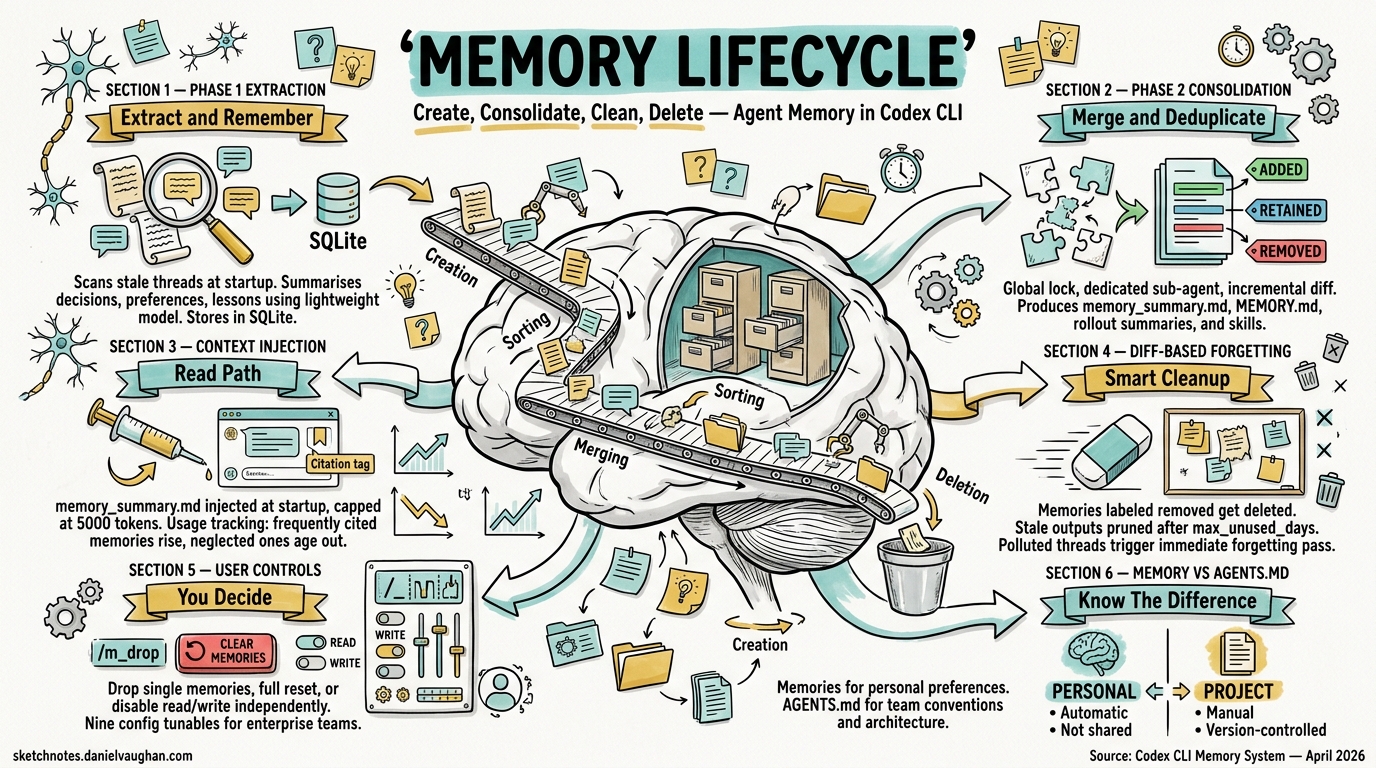
Since v0.100.0, Codex CLI has shipped a persistent memory system that retains facts, preferences, and project context across sessions1. What started as a simple key–value note store has matured into a two-phase extraction-and-consolidation pipeline backed by SQLite, with configurable retention, diff-based forgetting, and programmatic deletion. This article walks through every stage of that lifecycle — create, consolidate, clean, delete — and explores the configuration surface and data-governance implications for enterprise teams.
Why Agent Memory Matters
Stateless agents force developers to repeat context: “use pnpm, not npm”; “our API always returns a meta field”; “run tests with pytest -x --tb=short”. Codex CLI’s memory system eliminates that friction by persisting observations from past sessions and injecting them into the model’s developer instructions at startup2. The payoff compounds across long-running projects where architectural decisions, tool preferences, and codebase conventions accumulate over weeks.
Architecture at a Glance
flowchart LR
    A[Session Rollouts<br/>.jsonl files] -->|Startup scan| B[Phase 1<br/>Extraction]
    B -->|StageOneOutput| C[(SQLite<br/>state DB)]
    C -->|Incremental diff| D[Phase 2<br/>Consolidation]
    D --> E[memory_summary.md]
    D --> F[MEMORY.md]
    D --> G[rollout_summaries/]
    D --> H[skills/]
    E -->|Injected at startup| I[New Session<br/>Context Window]
The pipeline comprises two asynchronous phases that run at session startup, a set of on-disk artefacts under ~/.codex/memory/, and a SQLite state database that tracks job ownership and watermarks3.
Phase 1 — Extraction
Phase 1 identifies stale threads — those updated since their last memory extraction — and summarises each one using the lightweight gpt-5.4-mini model3. The output is a StageOneOutput struct containing:
| Field | Purpose |
|---|---|
raw_memory |
Detailed markdown capturing decisions, preferences, and lessons |
rollout_summary |
Compact recap suitable for the rollout_summaries/ directory |
rollout_slug |
Optional human-readable filename stem |
Results land in the stage1_outputs table in SQLite. Concurrency is governed by CONCURRENCY_LIMIT (default 8), ensuring the startup scan does not saturate API quotas3.
Selection Criteria
Not every thread qualifies. Phase 1 scans the threads table for active threads within max_rollout_age_days and filters out those idle for less than min_rollout_idle_hours (recommended >12 h)4. This prevents in-progress sessions from generating premature memories.
Phase 2 — Global Consolidation
Phase 2 is the heavy lift. It claims a global lock via try_claim_global_phase2_job (with a one-hour lease expiry) and spawns a dedicated sub-agent sourced as SubAgentSource::MemoryConsolidation3. The consolidation model is gpt-5.3-codex running at medium reasoning effort — stronger than Phase 1’s mini model, because merging and deduplicating memories requires judgement5.
Incremental Diff Labels
Rather than reprocessing every memory from scratch, Phase 2 tracks an input_watermark and classifies each Stage 1 output with a diff label5:
| Label | Meaning |
|---|---|
added |
In the current selection but absent from the previous Phase 2 baseline |
retained |
Present in both current selection and prior snapshot, unchanged |
removed |
Was in the prior baseline but no longer in the current top-N |
The consolidation agent receives these labels and adjusts the on-disk artefacts accordingly — merging new facts, preserving stable ones, and forgetting removed evidence.
On-Disk Artefacts
Phase 2 maintains five artefact types under codex_home:
~/.codex/memory/
├── memory_summary.md          # Navigational summary injected into prompts
├── MEMORY.md                  # Searchable registry of aggregated insights
├── raw_memories.md            # Temporary merge of Phase 1 outputs (input to Phase 2)
├── rollout_summaries/
│   └── <thread_id>-<ts>-<slug>.md
└── skills/
    └── <name>/SKILL.md        # Reusable procedures and scripts
Rollout summary filenames are generated by rollout_summary_file_stem, combining ThreadId, a timestamp fragment, and the optional rollout_slug3.
Context Injection — The Read Path
At session start, memory_summary.md is injected into the model’s developer instructions, truncated to MEMORY_TOOL_DEVELOPER_INSTRUCTIONS_SUMMARY_TOKEN_LIMIT (5,000 tokens)3. The agent is instructed to cite specific files and line ranges using <oai-mem-citation> blocks, creating a retrieval-augmented generation loop where the model can reference evidence from past sessions.
Each citation triggers a call to record_stage1_output_usage, incrementing usage_count and updating last_usage in the database3. This usage tracking feeds directly into the selection ranking for the next consolidation pass:
usage_count DESC → last_usage DESC → source_updated_at DESC
Frequently cited memories rise to the top; neglected ones gradually age out5.
Cleaning — Diff-Based Forgetting
Introduced in v0.106.0, diff-based forgetting is the mechanism that keeps the memory store lean1. During Phase 2, memories labelled removed trigger deletion of the corresponding evidence from rollout_summaries/ and MEMORY.md. The consolidation agent produces a forgetting pass that “deletes only the evidence supported by removed thread IDs”6.
Stale Output Pruning
Phase 1 also performs housekeeping: stage1_outputs older than max_unused_days are pruned in batches of PRUNE_BATCH_SIZE3. This prevents the SQLite database from growing unboundedly on machines with years of session history.
Polluted Thread Handling
When a session uses a disqualifying tool (one that produces non-deterministic or sensitive output), the thread can be marked as polluted. If the thread had selected_for_phase2 = 1, the system immediately enqueues a new global Phase 2 job so the forgetting pass can remove it6.
Deletion — User-Controlled and Programmatic
Interactive Deletion
The /m_drop <query> slash command removes a memory matching the query from the active store1. This is the simplest deletion path — useful for correcting a stale preference or removing an outdated architectural fact.
Full Reset
For a clean slate — when switching between unrelated projects, for instance — codex debug clear-memories wipes all memory artefacts and resets the SQLite state1. Introduced in v0.107.0, this addresses the common complaint that memories from Project A would bleed into Project B.
Disabling the Read Path
Three methods exist to suppress memory injection without deleting the underlying data7:
# Command line flag
codex --no-project-doc

# Environment variable
export CODEX_DISABLE_PROJECT_DOC=1
# config.toml
[project_docs]
enabled = false
For the memories pipeline itself, the memories.use_memories and memories.generate_memories booleans in config.toml control read and write paths independently4:
[memories]
use_memories = true        # Inject memories into prompts
generate_memories = true   # Run Phase 1/2 pipeline at startup
Setting generate_memories = false while keeping use_memories = true freezes the memory store — the agent still reads existing memories but stops creating new ones.
Configuration Reference
The full [memories] section in ~/.codex/config.toml exposes nine tunables4:
[memories]
use_memories = true
generate_memories = true
max_rollout_age_days = 90
min_rollout_idle_hours = 12
max_rollouts_per_startup = 5000
max_unused_days = 60
max_raw_memories_for_global = 200
phase_1_model = "gpt-5.4-mini"
phase_2_model = "gpt-5.3-codex"
| Key | Default | Purpose |
|---|---|---|
max_rollout_age_days |
90 | Threads older than this are excluded from Phase 1 |
min_rollout_idle_hours |
12 | Minimum idle time before a thread qualifies |
max_rollouts_per_startup |
5000 | Cap on Phase 1 candidates per session start |
max_unused_days |
60 | Stale outputs pruned after this many days |
max_raw_memories_for_global |
200 | Top-N memories fed into Phase 2 consolidation |
phase_1_model |
gpt-5.4-mini | Lightweight extraction model |
phase_2_model |
gpt-5.3-codex | Consolidation model with medium reasoning |
Enterprise teams will want to tune max_unused_days and max_raw_memories_for_global to balance recall depth against startup latency.
Memory vs AGENTS.md — When to Use Which
Codex CLI offers two persistence mechanisms, and conflating them is a common mistake:
| Dimension | Memories | AGENTS.md |
|---|---|---|
| Scope | Personal, per-user | Project or directory, version-controlled |
| Creation | Automatic from sessions | Manual, authored by developers |
| Sharing | Not shared | Committed to the repository |
| Hierarchy | Flat (single user store) | Three-level merge: global → project → directory7 |
| Best for | Personal preferences, tool choices | Team conventions, architecture docs |
Use memories for “always use pytest” and AGENTS.md for “this repo’s API layer lives in src/api/ and uses FastAPI”.
Enterprise Data Governance Considerations
For organisations deploying Codex CLI at scale, the memory system raises several governance questions:
-
Data residency: Memories are stored locally under
codex_home. In cloud-task mode, they reside on the ephemeral runner — ensure your task infrastructure handles cleanup. -
Secret leakage: Since v0.101.0, automatic secret sanitisation prevents credentials from being written to memory files1. However, teams should audit
raw_memories.mdperiodically, especially in regulated environments. -
Retention policies: Map
max_unused_daysandmax_rollout_age_daysto your organisation’s data retention requirements. A 60-day default may be too long — or too short — depending on compliance posture. -
Cross-project contamination: Without per-project memory partitioning, memories from one codebase can influence another. Use
codex debug clear-memorieswhen rotating between sensitive projects, or setgenerate_memories = falsefor short-lived tasks.
Comparison with Claude Code
Claude Code takes a fundamentally different approach: it has no built-in persistent memory system equivalent to Codex’s two-phase pipeline5. Instead, Claude Code relies on CLAUDE.md instruction files (analogous to AGENTS.md) and a three-tier context compaction strategy (tool result trimming → cache-friendly strategies → structured summaries)8. The absence of automatic cross-session memory means Claude Code users must manually curate their instruction files — more control, less automation.
Conclusion
Codex CLI’s memory lifecycle — create via Phase 1 extraction, consolidate via Phase 2’s diff-aware merging, clean through forgetting passes and stale pruning, delete via /m_drop or clear-memories — represents the most sophisticated agent memory system in any terminal-based coding tool today. The nine configuration tunables give enterprise teams the knobs they need to balance recall, latency, and data governance. As the pipeline continues to evolve, expect tighter integration with the TUI and finer-grained per-project memory partitioning.
Citations
-
Blake Crosley — Codex CLI: The Definitive Technical Reference — Memory system overview, version history, slash commands, and data governance enhancements. ↩ ↩2 ↩3 ↩4 ↩5
-
Codex CLI Features — OpenAI Developers — Official feature documentation including conversation resumption and context persistence. ↩
-
DeepWiki — Memory System (openai/codex) — Two-phase pipeline architecture, SQLite storage, context injection, and source file references. ↩ ↩2 ↩3 ↩4 ↩5 ↩6 ↩7 ↩8
-
Mintlify — Codex Configuration Reference — Full
[memories]configuration section with all tunables. ↩ ↩2 ↩3 -
Zylos Research — OpenAI Codex CLI Architecture and Multi-Runtime Agent Patterns — Phase 2 consolidation model, diff labels, and Claude Code comparison. ↩ ↩2 ↩3 ↩4
-
Justin3go — Shedding Heavy Memories: Context Compaction in Codex, Claude Code, and OpenCode — Diff-based forgetting, polluted thread handling, and compaction strategies. ↩ ↩2
-
Mintlify — Codex Memory & Project Docs — AGENTS.md hierarchy, disabling memory, and project docs configuration. ↩ ↩2
-
OpenAI Developers — Codex CLI Changelog — Release notes for v0.119.0 and v0.120.0. ↩