Codex CLI Team Configuration: The .codex Directory, Shared Profiles, and Repository-Scoped Settings for Consistent Agent Behaviour
Codex CLI Team Configuration: The .codex Directory, Shared Profiles, and Repository-Scoped Settings for Consistent Agent Behaviour
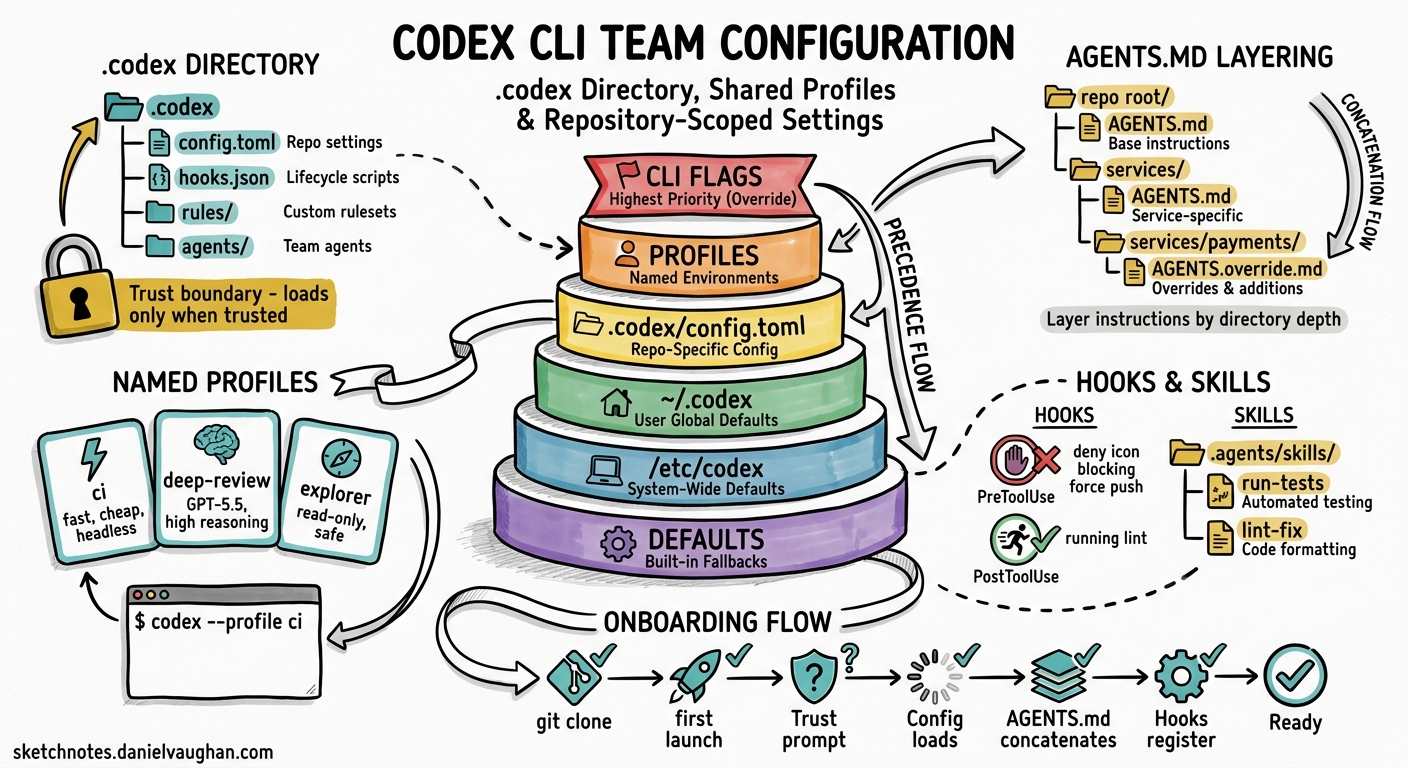
Individual developers can get productive with Codex CLI in minutes. Getting a ten-person team to work consistently with the same model, approval policies, sandbox constraints, hooks, and AGENTS.md conventions takes considerably more thought. This article maps the full surface area of team-level configuration — the .codex/ directory, AGENTS.md layering, shared hooks, named profiles, skills, plugin distribution, and the enterprise requirements.toml ceiling — and provides concrete recipes for shipping a repository that any new joiner can clone and trust once to inherit the team’s entire Codex setup.
The Configuration Precedence Stack
Codex resolves every setting through a strict precedence hierarchy12:
graph TD
    A["CLI flags / --config overrides"] --> B["Profile values (--profile)"]
    B --> C[".codex/config.toml (closest to cwd wins)"]
    C --> D["~/.codex/config.toml (user)"]
    D --> E["/etc/codex/config.toml (system)"]
    E --> F["Built-in defaults"]

    style A fill:#e74c3c,color:#fff
    style B fill:#e67e22,color:#fff
    style C fill:#f1c40f,color:#000
    style D fill:#2ecc71,color:#fff
    style E fill:#3498db,color:#fff
    style F fill:#9b59b6,color:#fff
Project-scoped files — everything inside .codex/ — only load when the developer has explicitly marked the project as trusted1. This is the foundational security boundary: cloning a malicious repository cannot silently override a developer’s approval policies or sandbox mode. When a project is untrusted, Codex falls back to user and system layers, ignoring project-local config, hooks, and rules entirely1.
For teams, the sweet spot is the repository-level .codex/config.toml. It sets project-specific defaults that every team member inherits on clone, whilst individual developers retain the ability to override specific keys in their personal ~/.codex/config.toml2.
Anatomy of the .codex Directory
A well-structured repository-level .codex/ directory looks like this:
.codex/
├── config.toml          # Team defaults: model, sandbox, approval policy
├── hooks.json           # Shared lifecycle hooks (lint gates, test gates)
├── rules/               # Exec-policy rule files
│   └── no-force-push.toml
└── agents/              # Custom agent definitions
    ├── reviewer.toml
    └── explorer.toml
Alongside .codex/, the repository root typically holds:
AGENTS.md                # Top-level project instructions
.agents/
├── skills/              # Shared skill directories
│   ├── run-tests/
│   │   └── SKILL.md
│   └── lint-fix/
│       └── SKILL.md
└── plugins/
    └── marketplace.json # Pinned plugin versions for the project
Each of these files participates in a different subsystem, but they compose into a single runtime configuration that every team member shares.
config.toml: Team Defaults
The project-scoped config.toml is where most teams should start. A pragmatic baseline for a backend team:
# .codex/config.toml — checked into version control

model = "gpt-5.5"
model_reasoning_effort = "medium"

# Require explicit approval for writes; read-only by default
approval_policy = "on-request"
sandbox_mode = "workspace-write"

# Lock down web search to cached mode for deterministic CI behaviour
web_search = "cached"

# Default permission profile
default_permissions = ":workspace"

# Shell environment: inherit minimal, never leak secrets
[shell_environment_policy]
inherit = "core"
exclude = ["AWS_*", "AZURE_*", "GH_TOKEN", "OPENAI_API_KEY"]

# MCP servers the team uses
[mcp_servers.context7]
command = "npx"
args = ["-y", "@context7/mcp-server"]
startup_timeout_seconds = 30

# Feature flags
[features]
codex_hooks = true
multi_agent = true
Key decisions to make as a team:
- Model choice. Pin a specific model rather than relying on defaults. Model routing changes between releases, and pinning avoids surprise behaviour changes3.
- Approval policy.
"on-request"is the sensible middle ground — developers see what the agent wants to do before it executes, but can escalate to"never"(manual approval for everything) orgranularapproval per category4. - Sandbox mode.
"workspace-write"confines writes to the project directory. Never commit"danger-full-access"to a shared repository unless the team has a specific, documented reason4. - Shell environment policy. The
excludelist prevents Codex from inheriting sensitive environment variables. Theignore_default_excludesflag (defaultfalse) retains automatic KEY/SECRET/TOKEN filtering2.
AGENTS.md: Layered Project Instructions
AGENTS.md is the team’s natural-language contract with the agent. Codex walks the directory tree from the project root to the current working directory, concatenating every AGENTS.md file it finds5. This means you can layer instructions:
repo-root/
├── AGENTS.md                    # Broad conventions (style, testing, CI)
├── services/
│   ├── AGENTS.md                # Service-layer patterns (API design, error handling)
│   └── payments/
│       └── AGENTS.override.md   # Payments-specific overrides (PCI constraints)
└── libs/
    └── AGENTS.md                # Library conventions (semver, public API stability)
An AGENTS.override.md file replaces the regular AGENTS.md at that directory level — it does not concatenate5. This is useful when a subdirectory has fundamentally different constraints (e.g., a payments service under PCI scope that should not inherit the general “feel free to refactor” guidance from the root).
Size limit. The combined AGENTS.md content is capped at project_doc_max_bytes — 32 KiB by default5. If your team’s documentation exceeds this, increase it in config.toml:
project_doc_max_bytes = 65536
If you have existing documentation standards, configure fallback filenames so Codex picks them up automatically:
project_doc_fallback_filenames = ["TEAM_GUIDE.md", ".agents.md", "CONTRIBUTING.md"]
What Belongs in AGENTS.md
A root-level AGENTS.md for a team typically covers:
# Project Conventions

## Build and Test
- Run tests: `make test`
- Run lint: `make lint`
- Never commit with failing tests.

## Code Style
- British English in comments and documentation.
- Use structured logging (slog) — never fmt.Printf for log output.
- Error handling: wrap errors with context, never discard.

## Architecture
- Services communicate via gRPC; REST is only for external-facing APIs.
- Database migrations use Atlas. Never write raw SQL migration files.

## Security
- Never hardcode secrets. Use environment variables or Vault references.
- All new endpoints require authentication middleware.
Keep it actionable and specific. Vague guidance (“write clean code”) wastes context window budget.
Shared Hooks: Quality Gates for the Team
Hooks fire at specific points in the agent lifecycle — before a tool runs (PreToolUse), after it runs (PostToolUse), before compaction, and at session start/end6. Project-level hooks live in .codex/hooks.json or as inline [hooks] tables in .codex/config.toml6.
A typical team hook that blocks force pushes:
{
  "hooks": [
    {
      "event": "PreToolUse",
      "tool_name": "shell",
      "match": "git push --force|git push -f",
      "action": "deny",
      "message": "Force pushes are prohibited. Use --force-with-lease if you must."
    }
  ]
}
A PostToolUse hook that runs the linter after every file write:
{
  "hooks": [
    {
      "event": "PostToolUse",
      "tool_name": "apply_patch",
      "command": "make lint-changed",
      "on_failure": "warn"
    }
  ]
}
If both hooks.json and inline [hooks] exist in the same config layer, Codex merges them and warns at startup6. Settle on one format per layer to avoid confusion.
Project hooks only load when the project is trusted — the same security boundary that protects config.toml1.
Named Profiles: Role-Based Configuration
Profiles let team members switch between configuration sets without editing files2. Define them in the user’s ~/.codex/config.toml or in the project’s .codex/config.toml:
# .codex/config.toml

[profiles.ci]
model = "gpt-5.3-codex-spark"
model_reasoning_effort = "low"
approval_policy = "never"
web_search = "disabled"

[profiles.deep-review]
model = "gpt-5.5"
model_reasoning_effort = "xhigh"
approval_policy = "on-request"

[profiles.explorer]
model = "gpt-5.4"
model_reasoning_effort = "medium"
sandbox_mode = "read-only"
Invoke with:
codex --profile ci exec "Run the test suite and report failures as JSON"
codex --profile deep-review
The ci profile is deliberately frugal — a smaller, faster model with no web search and no interactive approval, suitable for headless pipelines. The deep-review profile uses the flagship model at maximum reasoning effort for thorough code review. The explorer profile locks the sandbox to read-only for safe codebase exploration23.
⚠️ Profiles are currently experimental and unsupported in the IDE extension2. Plan for CLI-only usage.
Custom Agent Definitions
For teams with specialised workflows, custom agents live as TOML files in .codex/agents/ (project-scoped) or ~/.codex/agents/ (personal)7:
# .codex/agents/reviewer.toml

name = "reviewer"
description = "Reviews code changes for style, correctness, and security"

[developer_instructions]
content = """
You are a code reviewer. Focus on:
1. Logic errors and edge cases
2. Security vulnerabilities (injection, auth bypass, data leaks)
3. Adherence to the project's AGENTS.md conventions
4. Test coverage gaps

Never suggest cosmetic-only changes. Every comment must identify
a concrete risk or defect.
"""

sandbox_mode = "read-only"
model = "gpt-5.5"
model_reasoning_effort = "high"
Subagents inherit the parent session’s sandbox policy and approval overrides unless explicitly overridden7. The max_threads setting (default 6) caps concurrent agent threads7.
Skills: Shared Repeatable Workflows
Skills are reusable instruction packages stored in .agents/skills/ directories8. Each skill is a folder containing at minimum a SKILL.md file:
.agents/skills/
├── run-tests/
│   ├── SKILL.md
│   └── scripts/
│       └── test-runner.sh
├── generate-migration/
│   ├── SKILL.md
│   └── references/
│       └── atlas-docs.md
└── security-scan/
    └── SKILL.md
Codex scans .agents/skills from the current working directory upwards to the repository root8. A team can commit shared skills to the repository, and individual developers can add personal skills in ~/.codex/skills/.
Plugin Distribution
Plugins bundle skills, MCP servers, and hooks into installable packages9. For team-wide plugin standardisation:
- Project-level:
.agents/plugins/marketplace.jsonpins specific plugin versions for the repository - Personal:
~/.agents/plugins/marketplace.jsonand~/.codex/plugins/for individual preferences
The /plugins slash command manages installation and discovery interactively9.
The Enterprise Ceiling: requirements.toml
For organisations using ChatGPT Enterprise or Business plans, requirements.toml provides an admin-enforced ceiling that no user or project configuration can override1011:
graph TD
    R["requirements.toml (admin-enforced)"] --> CF["CLI flags"]
    CF --> P["Profiles"]
    P --> PC["Project .codex/config.toml"]
    PC --> UC["User ~/.codex/config.toml"]
    UC --> SC["System /etc/codex/config.toml"]
    SC --> D["Built-in defaults"]

    style R fill:#c0392b,color:#fff
When a resolved configuration value conflicts with a requirement, Codex falls back to a compliant value and notifies the developer10. Requirements can constrain:
- Approval policies and sandbox modes
- Web search modes
- MCP server allow-lists
- Feature flags
- Managed hooks (scripts deployed via MDM)
Cloud-managed requirements.toml policies are configured through the Codex Policies page in workspace settings, eliminating the need to distribute files to devices11.
Onboarding Recipe: From Clone to Productive
Here is the practical flow for a new team member:
sequenceDiagram
    participant Dev as New Developer
    participant Git as Git Repository
    participant Codex as Codex CLI

    Dev->>Git: git clone repo
    Dev->>Codex: codex (first launch in repo)
    Codex->>Dev: "Untrusted project. Trust?"
    Dev->>Codex: Trust (one-time)
    Codex->>Codex: Load .codex/config.toml
    Codex->>Codex: Concatenate AGENTS.md files
    Codex->>Codex: Register hooks from .codex/hooks.json
    Codex->>Codex: Discover .agents/skills/
    Codex->>Codex: Load plugin pinnings
    Codex->>Dev: Ready — team config active
The developer’s personal ~/.codex/config.toml still applies for any keys they choose to override — file opener preference, personality mode, or model provider credentials. The project configuration sets the floor; the personal configuration handles individual ergonomics.
Verify the setup with:
codex --ask-for-approval never "Summarise the current instructions and configuration."
Codex should echo the AGENTS.md content in precedence order and confirm the active model, sandbox mode, and approval policy5.
For debugging configuration resolution issues, use:
codex /debug-config
This prints every config layer, showing which file contributed each setting and whether any values were overridden2.
Recommendations
- Commit
.codex/config.tomlandAGENTS.mdfrom day one. These two files cover 80% of team standardisation. - Pin the model. Do not rely on default model routing — it changes between releases.
- Start with
"on-request"approval and"workspace-write"sandbox. Relax constraints deliberately, not by default. - Keep AGENTS.md under 16 KiB. Half the default budget leaves room for subdirectory overrides.
- Use profiles for CI vs interactive. A
ciprofile with a smaller model and no approval avoids wasting flagship-model tokens on headless runs. - Ship hooks for hard rules, not soft preferences. A
PreToolUsedeny hook for force pushes is a gate; a style preference belongs in AGENTS.md. - Distribute plugins via
.agents/plugins/marketplace.json. Pinning versions prevents drift between team members. - Use
requirements.tomlfor security invariants. If a constraint must never be overridden (e.g., no"danger-full-access"sandbox), enforce it at the admin level.
Citations
-
OpenAI, “Config basics — Codex,” May 2026. https://developers.openai.com/codex/config-basic ↩ ↩2 ↩3 ↩4
-
OpenAI, “Advanced Configuration — Codex,” May 2026. https://developers.openai.com/codex/config-advanced ↩ ↩2 ↩3 ↩4 ↩5 ↩6 ↩7
-
OpenAI, “Configuration Reference — Codex,” May 2026. https://developers.openai.com/codex/config-reference ↩ ↩2
-
OpenAI, “Agent Approvals & Security — Codex,” May 2026. https://developers.openai.com/codex/agent-approvals-security ↩ ↩2
-
OpenAI, “Custom instructions with AGENTS.md — Codex,” May 2026. https://developers.openai.com/codex/guides/agents-md ↩ ↩2 ↩3 ↩4
-
OpenAI, “Hooks — Codex,” May 2026. https://developers.openai.com/codex/hooks ↩ ↩2 ↩3
-
OpenAI, “Subagents — Codex,” May 2026. https://developers.openai.com/codex/subagents ↩ ↩2 ↩3
-
OpenAI, “Agent Skills — Codex,” May 2026. https://developers.openai.com/codex/skills ↩ ↩2
-
OpenAI, “Best practices — Codex,” May 2026. https://developers.openai.com/codex/learn/best-practices ↩ ↩2
-
OpenAI, “Managed configuration — Codex,” May 2026. https://developers.openai.com/codex/enterprise/managed-configuration ↩ ↩2
-
OpenAI, “Admin Setup — Codex,” May 2026. https://developers.openai.com/codex/enterprise/admin-setup ↩ ↩2