Running Codex CLI in Devcontainers and Docker Sandboxes: Secure Containerised Agent Workflows
Running Codex CLI in Devcontainers and Docker Sandboxes: Secure Containerised Agent Workflows
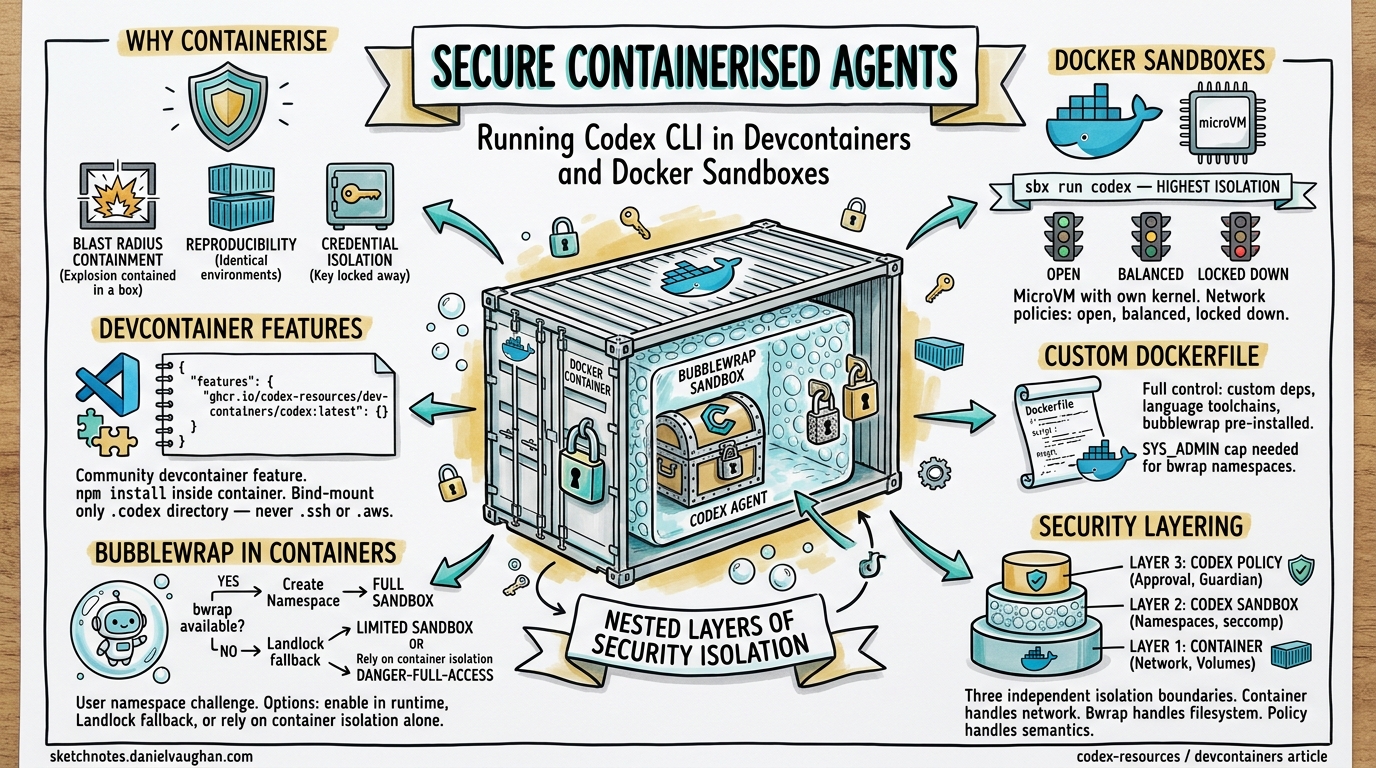
Running a coding agent on your bare metal workstation means trusting it with your filesystem, network, and credentials. Even with Codex CLI’s built-in bubblewrap sandbox, a misconfigured danger-full-access flag or an unpatched namespace escape can expose your host1. Containerisation adds a second, independent isolation boundary — and with Docker Sandboxes, devcontainer features, and custom Dockerfiles now mature enough for production use, there is no reason not to adopt one.
This article covers the three main approaches to running Codex CLI inside containers, the security trade-offs of each, and practical configuration for local development and CI/CD pipelines.
Why Containerise Your Coding Agent?
Codex CLI already ships with platform-native sandboxing: Seatbelt on macOS, bubblewrap on Linux2. These mechanisms restrict filesystem writes to the workspace and block network access by default. So why add another layer?
Blast radius containment. If an agent-generated command escapes the bubblewrap sandbox — something the CBSE (Configuration-Based Sandbox Escape) attack class has demonstrated is possible via path traversal and apply_patch bypasses3 — the container boundary is the second line of defence. The agent can trash the container filesystem without touching your host.
Reproducible environments. A Dockerfile pins the Node.js version, system libraries, and Codex CLI version. Every team member and CI runner gets an identical agent environment, eliminating “works on my machine” failures.
Credential isolation. Bind-mounting only OPENAI_API_KEY (not your entire ~/.ssh or ~/.aws) keeps secrets outside the agent’s reach.
CI/CD compatibility. Headless codex exec inside a container slots naturally into GitHub Actions and GitLab CI without polluting runner state.
Approach 1: Docker Sandboxes (sbx run codex)
Docker Sandboxes — shipped as the sbx CLI — run each agent inside a lightweight microVM with its own Linux kernel, filesystem, and network stack4. This is the highest-isolation option available today.
Setup
# Install Docker Sandboxes (requires Docker Desktop 4.44+)
sbx version

# Store your API key once
sbx secret set -g openai

# Launch Codex against a project
sbx run codex ~/my-project
If the workspace path is omitted, sbx defaults to the current directory5.
Network Policies
Docker Sandboxes enforce network isolation via a host-side HTTP/HTTPS proxy with three configurable tiers4:
| Policy | Behaviour |
|---|---|
| Open | All traffic allowed |
| Balanced (default) | Default deny; common developer domains (npm, PyPI, GitHub) permitted |
| Locked Down | All traffic blocked unless explicitly allowed |
Passing Codex CLI Options
Supply flags after a double-dash delimiter:
sbx run codex --name my-sandbox -- --model gpt-5.4 \
  -c model_reasoning_effort="high"
Limitations
- User-level configuration (
~/.codex/config.toml, memory files) is not mounted automatically — only project-level configuration travels into the sandbox5. - Approval prompts are disabled by default inside the sandbox, so the agent runs with full autonomy within the container boundary.
- OAuth authentication runs on the host machine, not inside the sandbox container5.
Approach 2: Devcontainer Features
For teams already using VS Code devcontainers, a community-maintained devcontainer feature installs Codex CLI as part of the container build6.
Minimal Configuration
{
  "name": "codex-dev",
  "image": "mcr.microsoft.com/devcontainers/base:ubuntu",
  "features": {
    "ghcr.io/dirien/devcontainer-feature-codex/codex:0": {
      "version": "latest"
    }
  },
  "remoteEnv": {
    "OPENAI_API_KEY": "${localEnv:OPENAI_API_KEY}"
  }
}
The feature requires Node.js — either include the node devcontainer feature or use a base image with Node pre-installed6.
Persistent Authentication and Configuration
Bind-mount your Codex configuration directory to preserve session history and memory across container rebuilds:
{
  "mounts": [
    "source=${localEnv:HOME}/.codex,target=/home/vscode/.codex,type=bind,consistency=cached"
  ]
}
⚠️ Security note: Avoid mounting your entire home directory. Bind only the specific directories the agent needs —
~/.codexfor configuration, never~/.sshor~/.aws7.
Version Pinning
For reproducible builds, pin the Codex CLI version:
{
  "features": {
    "ghcr.io/dirien/devcontainer-feature-codex/codex:0": {
      "version": "1.0.9"
    }
  }
}
Approach 3: Custom Dockerfile
When you need full control — custom system dependencies, language toolchains, or bubblewrap pre-installed — build your own image.
Base Dockerfile
FROM mcr.microsoft.com/devcontainers/base:ubuntu

# System dependencies
RUN apt-get update && apt-get install -y \
    curl git build-essential bubblewrap \
    && rm -rf /var/lib/apt/lists/*

# Node.js (required for Codex CLI)
RUN curl -fsSL https://deb.nodesource.com/setup_22.x | bash - \
    && apt-get install -y nodejs

# Install Codex CLI
RUN npm install -g @openai/codex@latest

# Non-root user with UID 1000 for host/container UID alignment
USER vscode
WORKDIR /workspace
Docker Compose for Team Use
services:
  codex-agent:
    build:
      context: .devcontainer
      dockerfile: Dockerfile
    volumes:
      - .:/workspace
      - codex-config:/home/vscode/.codex
    environment:
      - OPENAI_API_KEY
    security_opt:
      - seccomp=unconfined
    cap_add:
      - SYS_ADMIN
    command: codex exec "Run the test suite and fix failures"

volumes:
  codex-config:
The SYS_ADMIN capability and unconfined seccomp profile are necessary for bubblewrap’s user namespace creation inside the container2. Without them, bwrap cannot call clone(CLONE_NEWUSER) and Codex falls back to danger-full-access mode.
The Bubblewrap-in-Container Challenge
Codex CLI’s Linux sandbox uses bubblewrap to create isolated user and PID namespaces8. Inside a Docker container, this requires the host kernel to permit unprivileged user namespace creation — which many container runtimes block by default.
flowchart TD
    A[Codex CLI starts] --> B{bwrap on PATH?}
    B -->|Yes| C{Can create user namespace?}
    B -->|No| D[Use vendored bwrap binary]
    D --> C
    C -->|Yes| E[Full bubblewrap sandbox]
    C -->|No| F{use_legacy_landlock = true?}
    F -->|Yes| G[Landlock fallback]
    F -->|No| H[Sandbox disabled — danger-full-access]
    E --> I[Agent runs with namespace isolation]
    G --> I
    H --> J[Agent runs unrestricted in container]
Enabling Bubblewrap in Containers
Three options, from most to least secure:
Option A — Enable user namespaces in the container runtime:
docker run --security-opt seccomp=unconfined \
  --cap-add SYS_ADMIN \
  -e OPENAI_API_KEY \
  -v $(pwd):/workspace \
  codex-agent
Option B — Use the Landlock fallback:
# .codex/config.toml inside the container
[features]
use_legacy_landlock = true
This avoids the namespace requirement but provides weaker isolation than bubblewrap8.
Option C — Rely on container isolation alone:
codex --sandbox danger-full-access exec "Fix the failing test"
When the container itself is the security boundary (as with Docker Sandboxes’ microVMs), disabling the inner sandbox is acceptable. The agent cannot escape the container regardless4.
AppArmor Considerations
On distributions with AppArmor restricting namespace creation (Ubuntu 24.04+), you may need2:
sudo sysctl -w kernel.apparmor_restrict_unprivileged_userns=0
Or configure the container’s AppArmor profile to permit clone(CLONE_NEWUSER).
Security Layering: Defence in Depth
The optimal configuration depends on your threat model:
graph LR
    subgraph "Layer 1: Container"
        A[Docker/microVM isolation]
        B[Network policy]
        C[Volume mount restrictions]
    end
    subgraph "Layer 2: Codex Sandbox"
        D[Bubblewrap namespaces]
        E[Seccomp filters]
        F[Filesystem split policy]
    end
    subgraph "Layer 3: Codex Policy"
        G[Approval policy]
        H[Permission profiles]
        I[Guardian reviewer]
    end
    A --> D --> G
| Scenario | Container Layer | Codex Sandbox | Approval Policy |
|---|---|---|---|
| Local dev (trusted code) | Devcontainer | workspace-write |
on-request |
| CI/CD pipeline | Docker Sandboxes (balanced) | read-only |
never |
| Untrusted repo review | Docker Sandboxes (locked down) | read-only |
untrusted |
| Enterprise shared runner | microVM + custom seccomp | Full bubblewrap | granular + Guardian |
CI/CD Integration Patterns
GitHub Actions with Docker Sandboxes
jobs:
  codex-autofix:
    runs-on: ubuntu-latest
    steps:
      - uses: actions/checkout@v4

      - name: Install Docker Sandboxes
        run: |
          curl -fsSL https://get.docker.com/sbx | sh

      - name: Run Codex in sandbox
        env:
          OPENAI_API_KEY: ${{ secrets.OPENAI_API_KEY }}
        run: |
          sbx run codex . -- exec \
            --sandbox read-only \
            --ask-for-approval never \
            "Analyse test failures and suggest fixes"
GitLab CI with Custom Image
codex-review:
  image: your-registry/codex-agent:latest
  variables:
    OPENAI_API_KEY: $OPENAI_API_KEY
  script:
    - codex exec --sandbox read-only --ask-for-approval never \
        "Review the diff in this merge request and list issues"
  artifacts:
    paths:
      - codex-output.md
Headless Execution with codex exec
For containerised CI, codex exec is the entry point9. It routes through InProcessAppServerClient (as of PR #14005), unifying the internal plumbing with the IDE integration path:
codex exec \
  --model gpt-5.3-codex \
  --sandbox read-only \
  --ask-for-approval never \
  "Run the linter, fix all warnings, and output a summary"
Configuration Reference
Essential config.toml for Containerised Agents
# Model selection
model = "gpt-5.3-codex"
model_reasoning_effort = "medium"

# Sandbox — adjust based on container isolation level
sandbox_mode = "workspace-write"
approval_policy = "on-request"

# Bubblewrap fallback if user namespaces unavailable
[features]
use_legacy_landlock = true

# Network — typically handled by container layer
[sandbox_workspace_write]
network_access = false

# Disable login shells for tighter security
allow_login_shell = false
Named Profile for CI
[profiles.ci]
approval_policy = "never"
sandbox_mode = "read-only"
model_reasoning_effort = "low"
Activate with codex --profile ci exec "...".
Troubleshooting
| Symptom | Cause | Fix |
|---|---|---|
bwrap: Can't create namespace |
Container blocks CLONE_NEWUSER |
Add --cap-add SYS_ADMIN --security-opt seccomp=unconfined |
⚠ Codex could not find system bubblewrap |
bwrap not installed in image |
apt install bubblewrap in Dockerfile |
Sandbox falls back to danger-full-access |
WSL1 or restricted container | Use use_legacy_landlock = true or accept container-only isolation |
| Config not loaded | ~/.codex not mounted |
Add bind mount for .codex directory |
| Network timeout in sandbox | Codex network isolation + container network isolation double-blocking | Set network_access = true in config and rely on container-level network policy |
Conclusion
Containerising Codex CLI is not about replacing its built-in sandbox — it is about adding a second, independent isolation layer. Docker Sandboxes provide the strongest out-of-the-box isolation with microVM boundaries. Devcontainer features offer the smoothest developer experience for VS Code users. Custom Dockerfiles give full control for CI/CD and enterprise deployments.
The key architectural decision is where to enforce each security concern: let the container handle network isolation and credential scoping, let bubblewrap handle filesystem isolation within the workspace, and let Codex’s approval policies handle the semantic layer of what the agent should and should not do.
Citations
-
Cymulate Research Labs, “Configuration-Based Sandbox Escape (CBSE)” research, April 2026. CVE-2025-59532 and related vulnerabilities demonstrating sandbox escape vectors in coding agents. ↩
-
OpenAI, “Sandbox – Codex CLI,” OpenAI Developers documentation, 2026. https://developers.openai.com/codex/concepts/sandboxing ↩ ↩2 ↩3
-
OpenAI Codex CLI v0.121.0 security fixes including apply_patch bypass remediation and zsh-fork bypass patches, April 2026. https://github.com/openai/codex/releases ↩
-
Docker, “Docker Sandboxes — Sandboxes for Coding Agents,” Docker documentation, 2026. https://docs.docker.com/ai/sandboxes/ ↩ ↩2 ↩3
-
Docker, “Codex — Docker Sandboxes,” Docker documentation, 2026. https://docs.docker.com/ai/sandboxes/agents/codex/ ↩ ↩2 ↩3
-
Engin Diri, “devcontainer-feature-codex — Dev Container feature to install OpenAI Codex CLI,” GitHub, 2026. https://github.com/dirien/devcontainer-feature-codex ↩ ↩2
-
Mark Phelps, “Running AI Agents in Devcontainers,” 2026. https://markphelps.me/posts/running-ai-agents-in-devcontainers/ ↩
-
OpenAI, “codex-rs/linux-sandbox README,” GitHub, 2026. https://github.com/openai/codex/blob/main/codex-rs/linux-sandbox/README.md ↩ ↩2
-
OpenAI, “Agent approvals & security – Codex CLI,” OpenAI Developers documentation, 2026. https://developers.openai.com/codex/agent-approvals-security ↩