Codex CLI Guardian Approval: Configuring Auto-Review Policies
Codex CLI Guardian Approval: Configuring Auto-Review Policies
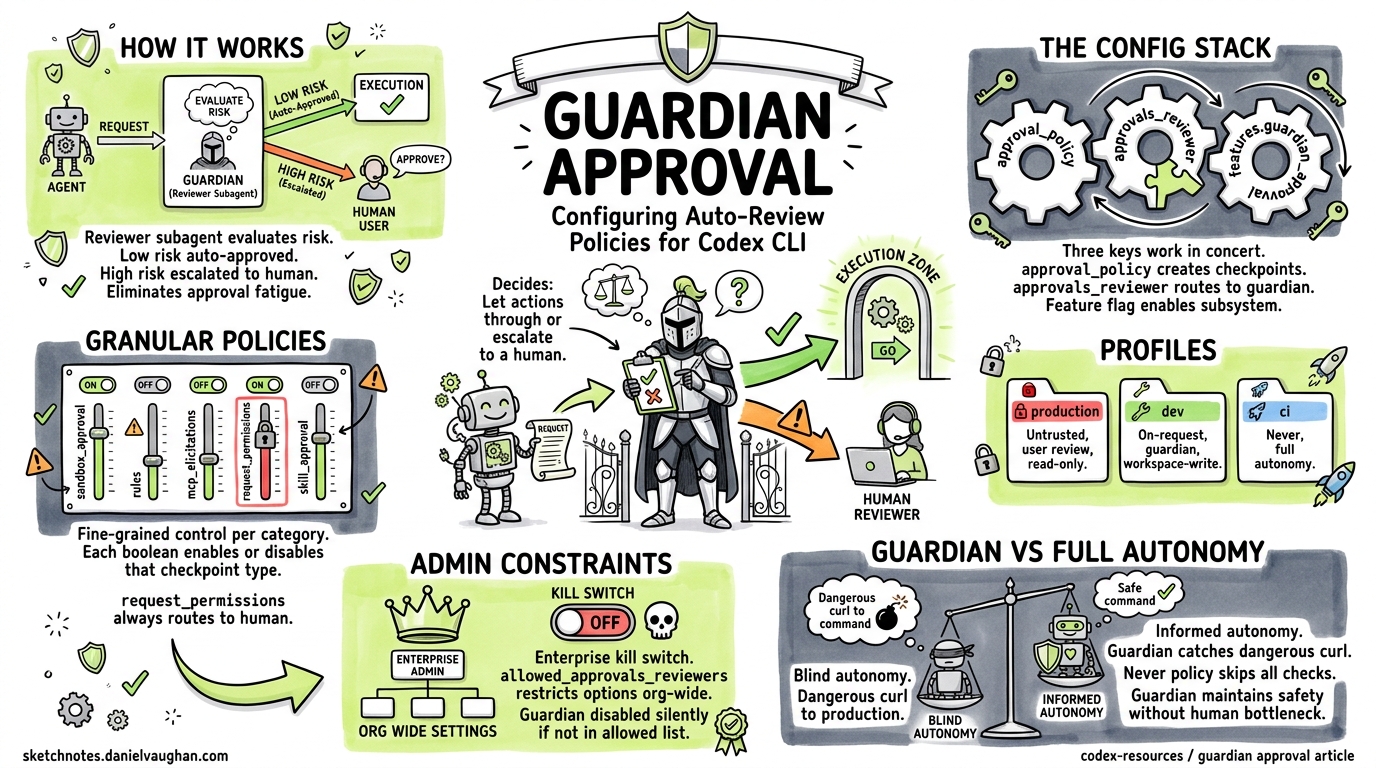
Every developer who has spent a day in on-request mode knows the pattern: approve, approve, approve, glance-approve, approve-without-reading. That reflexive clicking — authorisation fatigue — is not just annoying; it is a genuine security risk1. Codex CLI’s guardian approval feature addresses this by delegating eligible approval decisions to a reviewer subagent: an independent LLM instance that evaluates each tool-call request on your behalf, escalating only genuinely risky operations to the human.
This article is a practical configuration reference. It covers every knob, shows how the pieces fit together, and provides copy-paste policy examples for common workflows.
How Guardian Approval Works
When guardian approval is active, Codex interposes a reviewer subagent between the agent’s requested action and execution. The flow looks like this:
sequenceDiagram
    participant Agent as Codex Agent
    participant Guardian as Guardian Subagent
    participant User as Human User
    participant Sandbox as Sandbox / Executor

    Agent->>Guardian: Tool-call request (e.g. shell command)
    Guardian->>Guardian: Evaluate risk context
    alt Low/medium risk
        Guardian->>Sandbox: Approve — execute
        Guardian-->>Agent: Auto-approved
    else High risk / uncertain
        Guardian->>User: Escalate for manual review
        User->>Sandbox: Approve or deny
    end
The guardian inherits your current sandbox policy and network settings from the parent session2. It sees the full conversation context, the requested command, and any file-change diffs. Its output is a structured assessment with discrete risk, authorisation, outcome, and rationale fields3.
The Configuration Stack
Guardian approval involves three configuration keys that work in concert. Getting them right requires understanding how they interact.
1. approval_policy — When to Pause
Controls which actions trigger an approval checkpoint at all. Without a checkpoint, the guardian never sees the request.
# Options: "untrusted" | "on-request" | "never" | { granular = { ... } }
approval_policy = "on-request"
| Value | Behaviour |
|---|---|
"untrusted" |
Only known-safe read operations run automatically; everything else pauses4 |
"on-request" |
Actions outside sandbox constraints pause for review |
"never" |
No approval checkpoints — guardian never activates |
{ granular = { ... } } |
Fine-grained control per category |
2. approvals_reviewer — Who Reviews
Determines whether approval checkpoints route to you or to the guardian subagent.
# Options: "user" | "guardian_subagent"
approvals_reviewer = "guardian_subagent"
Setting this to "guardian_subagent" is the key toggle5. When set to "user" (the default), every checkpoint requires manual human response.
3. features.guardian_approval — Feature Gate
The experimental feature flag that enables the guardian subsystem. Required alongside approvals_reviewer6.
[features]
guardian_approval = true
How They Interact
flowchart TD
    A[Agent requests action] --> B{approval_policy}
    B -->|"never"| C[Execute immediately — no review]
    B -->|"on-request" / "untrusted" / granular| D{Action needs approval?}
    D -->|No — within sandbox| C
    D -->|Yes — outside sandbox| E{approvals_reviewer}
    E -->|"user"| F[Prompt human]
    E -->|"guardian_subagent"| G{features.guardian_approval?}
    G -->|false| F
    G -->|true| H[Guardian evaluates]
    H -->|Approved| C
    H -->|Denied / Escalated| F
All three must align: approval_policy must create checkpoints, approvals_reviewer must point to the guardian, and the feature flag must be enabled. Miss any one and you get standard human-in-the-loop approval.
Minimal Setup
The fastest path to guardian approval:
# ~/.codex/config.toml
approval_policy = "on-request"
approvals_reviewer = "guardian_subagent"

[features]
guardian_approval = true
Or enable it dynamically mid-session with the /experimental slash command in the TUI, which toggles Smart Approvals and automatically configures:
approval_policy = "on-request"approvals_reviewer = "guardian_subagent"sandbox_mode = "workspace-write"7
From the CLI, the --full-auto flag sets --sandbox workspace-write --ask-for-approval on-request, but you still need the guardian feature flag in your config to route reviews to the subagent rather than the terminal8.
Granular Approval Policies
The real power emerges with granular policies. Instead of a blanket "on-request", you can selectively enable or disable approval categories:
approval_policy = { granular = {
  sandbox_approval = true,     # Sandbox escalation prompts
  rules = true,                # ExecPolicy prompt rules
  mcp_elicitations = true,     # MCP server elicitation prompts
  request_permissions = false,  # request_permissions tool prompts
  skill_approval = false        # Skill-script approval prompts
} }

approvals_reviewer = "guardian_subagent"

[features]
guardian_approval = true
Each boolean controls whether that category of prompt surfaces at all5. When a category is true, the prompt passes to whichever reviewer is configured. When false, Codex auto-rejects that category silently.
Category Reference
| Category | What It Gates | Guardian-Eligible? |
|---|---|---|
sandbox_approval |
File writes outside workspace, network access | Yes |
rules |
ExecPolicy prompt rules from .codex/exec-policy.toml |
Yes |
mcp_elicitations |
MCP servers requesting user input | Yes |
request_permissions |
Agent requesting additional permissions at runtime | No — always routes to user |
skill_approval |
Skill script execution confirmations | Yes |
Note that request_permissions always routes to the human regardless of reviewer setting — the guardian cannot grant itself new permissions5.
Profile-Based Policies
Named profiles let you switch between approval configurations per task:
# Tight review for production work
[profiles.production]
approval_policy = "untrusted"
approvals_reviewer = "user"
sandbox_mode = "read-only"

# Guardian-assisted for routine development
[profiles.dev]
approval_policy = "on-request"
approvals_reviewer = "guardian_subagent"
sandbox_mode = "workspace-write"

# Full autonomy for trusted CI pipelines
[profiles.ci]
approval_policy = "never"
sandbox_mode = "workspace-write"
Switch profiles from the command line:
codex --profile dev "Refactor the auth module"
codex --profile production "Review the deployment config changes"
Admin Constraints for Teams
Enterprise administrators can constrain which reviewers are permitted using managed configuration9. The allowed_approvals_reviewers admin setting restricts what individual developers can configure:
# Admin-managed config (organisation level)
allowed_approvals_reviewers = ["user"]  # Guardian disabled org-wide
When set, any developer attempting to configure approvals_reviewer = "guardian_subagent" will find it silently overridden to the allowed value. This gives security teams a kill switch for guardian approval across the organisation without modifying individual developer configs.
What the Guardian Sees
When evaluating a request, the guardian subagent receives:
- The conversation context — what the agent has been asked to do
- The specific tool call — the command, file path, or API request
- Sandbox state — current permission boundaries
- Recent actions — what the agent has already done in this session
It produces a structured assessment containing risk level, authorisation decision, outcome, and human-readable rationale3. This structured output feeds into the app-server protocol via lifecycle notifications: item/autoApprovalReview/started and item/autoApprovalReview/completed7.
Practical Examples
Example 1: Guardian Approves a Test Command
With guardian enabled, running npm run test when it requires network access:
Agent wants to run: npm run test
⏳ Guardian reviewing...
✅ Auto-reviewer approved codex to run npm run test this time.
The guardian recognises test commands as routine and approves without human intervention1.
Example 2: Guardian Escalates a Destructive Operation
Agent wants to run: rm -rf dist/ && git push --force origin main
⏳ Guardian reviewing...
⚠️ Auto-reviewer denied (risk: high) — escalating to user
> Approve? [y/N]
Force pushes and recursive deletions trigger the guardian’s high-risk heuristics, routing to the human.
Example 3: Granular Policy Skipping MCP Prompts
approval_policy = { granular = {
  sandbox_approval = true,
  mcp_elicitations = false   # Auto-reject MCP prompts
} }
approvals_reviewer = "guardian_subagent"
MCP elicitation prompts are silently rejected. Sandbox escalations route through the guardian. This is useful when MCP servers are chatty but trusted.
Troubleshooting
“Guardian review completed without an assessment payload”
This error (tracked in issue #15341) occurred in v0.116.0 when the underlying API returned malformed reasoning items. The fix (PR #15542) drops orphan reasoning items before replay10. Upgrade to v0.117.0+ to resolve.
Guardian Never Activates
Check all three conditions:
approval_policyis not"never"— that bypasses all checkpointsapprovals_reviewer = "guardian_subagent"is setfeatures.guardian_approval = trueis present- The action actually falls outside your sandbox boundary
Guardian Approves Too Aggressively
Tighten the sandbox. The guardian evaluates risk relative to your sandbox policy. A broad workspace-write sandbox means fewer actions need approval in the first place. Consider:
sandbox_mode = "read-only"
approval_policy = "on-request"
approvals_reviewer = "guardian_subagent"
This forces more actions through the approval checkpoint, giving the guardian more opportunities to evaluate.
Guardian in CI/CD Pipelines
For codex exec in CI, guardian approval adds a layer of runtime safety without blocking:
codex exec \
  --sandbox workspace-write \
  --ask-for-approval on-request \
  "Run the migration and verify schema"
With guardian_approval = true in the CI environment’s config, approval checkpoints are handled by the guardian rather than hanging on stdin. This is particularly valuable for long-running batch jobs where human approval would stall the pipeline8.
⚠️ Note: codex exec behaviour with guardian in fully non-interactive environments may vary — test thoroughly in your CI setup before relying on it for production pipelines.
Guardian vs Full Autonomy
A common question: why not just use approval_policy = "never" and skip approvals entirely?
The guardian provides informed autonomy rather than blind autonomy. It evaluates each action against the conversation context and can catch genuinely dangerous operations that the static sandbox policy cannot anticipate — like a semantically dangerous curl to a production endpoint that is technically within the network allowlist. The "never" policy skips all safety checks; the guardian maintains them while removing the human bottleneck for routine operations.
Summary
| Configuration | Effect |
|---|---|
approval_policy = "on-request" |
Creates approval checkpoints for out-of-sandbox actions |
approvals_reviewer = "guardian_subagent" |
Routes checkpoints to AI reviewer instead of human |
features.guardian_approval = true |
Enables the guardian subsystem |
| Granular policy with category booleans | Selective checkpoint control per action type |
allowed_approvals_reviewers (admin) |
Organisation-level constraint on reviewer options |
--profile <name> |
Switch between named policy sets |
The guardian is not a replacement for sandbox policy — it is a complement. Configure your sandbox boundaries first, then layer guardian approval on top for the actions that cross those boundaries. The result is a workflow that maintains security oversight without the authorisation fatigue that undermines it.
Citations
-
azukiazusa.dev, “Understanding Codex Sandbox and Agent Approvals,” 2026. https://azukiazusa.dev/en/blog/codex-sandbox-agent-authorization/ ↩ ↩2
-
OpenAI, “Subagents – Codex,” OpenAI Developers. https://developers.openai.com/codex/subagents ↩
-
OpenAI, “Guardian Output Schema,” PR #17061 / Codex CLI v0.119. Referenced in existing codex-resources article
2026-04-10-guardian-output-schema-enterprise-compliance.md. ↩ ↩2 -
OpenAI, “Agent approvals & security – Codex,” OpenAI Developers. https://developers.openai.com/codex/agent-approvals-security ↩
-
OpenAI, “Configuration Reference – Codex,” OpenAI Developers. https://developers.openai.com/codex/config-reference ↩ ↩2 ↩3
-
OpenAI, “Sample Configuration – Codex,” OpenAI Developers. https://developers.openai.com/codex/config-sample ↩
-
charley-oai, “Add Smart Approvals guardian review across core, app-server, and TUI,” PR #13860, openai/codex. https://github.com/openai/codex/pull/13860 ↩ ↩2
-
SmartScope, “Codex CLI No-Approval Guide: –full-auto vs approval modes,” 2026. https://smartscope.blog/en/generative-ai/chatgpt/codex-cli-approval-modes-no-approval/ ↩ ↩2
-
OpenAI, “Advanced Configuration – Codex,” OpenAI Developers. https://developers.openai.com/codex/config-advanced ↩
-
GitHub Issue #15341, “Automatic approval review failed: guardian review completed without an assessment payload,” openai/codex. https://github.com/openai/codex/issues/15341 ↩