Codex CLI Permission Profiles: Built-in Sandbox Modes, Custom Profiles, and the Two-Layer Security Model
Codex CLI Permission Profiles: Built-in Sandbox Modes, Custom Profiles, and the Two-Layer Security Model
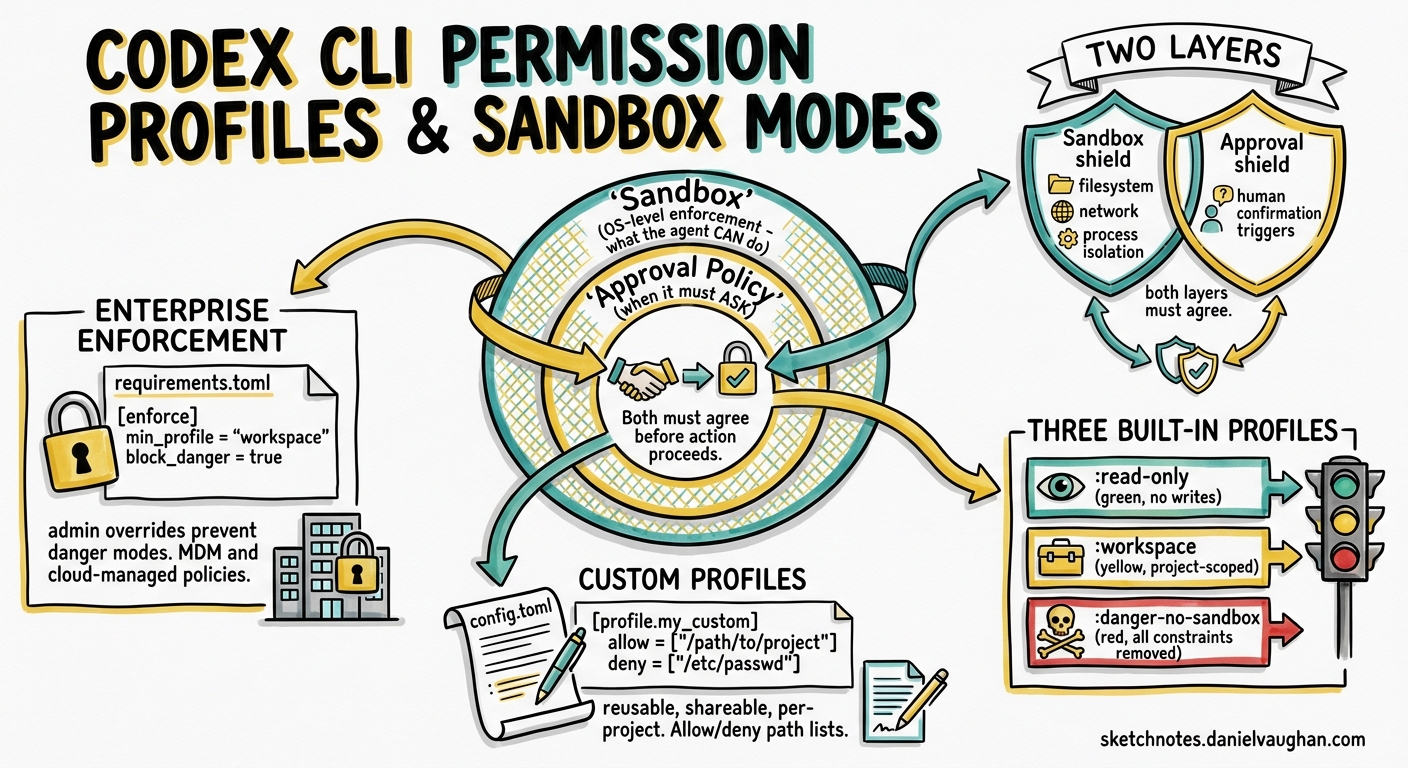
Codex CLI implements a two-layer security model: sandbox enforcement controls what the agent can technically do, while approval policies control when it must ask permission. As of v0.129, named permission profiles make this system reusable and shareable across projects and teams.
The Two Layers
| Layer | Controls | Enforcement |
|---|---|---|
| Sandbox | Filesystem access, network, process isolation | OS-level (Seatbelt on macOS, bwrap+seccomp on Linux, native Windows sandbox) |
| Approval policy | When the agent asks for human confirmation | Runtime policy checked before each tool call |
Both layers must agree before an action proceeds. A sandbox may technically allow network access, but the approval policy can still require confirmation.
Built-in Permission Profiles
Codex ships three built-in profiles, prefixed with a colon:
:read-only
- No filesystem writes permitted
- No command execution
- Suitable for code review, Q&A, and exploration tasks
:workspace
- Read/write access within the project workspace
- Commands allowed within the working directory
- Network disabled by default
- Protected paths (
.git/,.agents/,.codex/) remain read-only even within writable roots
:danger-no-sandbox
- All sandbox constraints removed
- Full filesystem and network access
- Not recommended for production use
Setting a Default Profile
# config.toml
default_permissions = ":workspace"
The CLI flag --sandbox also accepts profile names for one-off overrides.
Custom Permission Profiles
Custom profiles use the same structure but without the leading colon:
default_permissions = "ci-runner"

[permissions.ci-runner.filesystem]
":project_roots" = { "." = "write", "**/*.env" = "none" }

[permissions.ci-runner.network]
enabled = true
mode = "limited"
This creates a ci-runner profile that can write to the project root but cannot read .env files, with limited network access enabled.
Approval Policy Modes
Approval policies layer on top of sandbox permissions:
| Mode | Flag | Behaviour |
|---|---|---|
| Auto (default) | --ask-for-approval on-request |
Reads/edits/executes in workspace; approval for external access |
| Read-only | --ask-for-approval on-request + --sandbox read-only |
Questions only; approval for any changes |
| Untrusted | --ask-for-approval untrusted |
Auto-edits; approval for state-mutating commands |
| Full auto | --dangerously-bypass-approvals-and-sandbox |
No sandbox, no approvals (not recommended) |
Granular Approval Policies
For fine-grained control, the granular approval policy lets you selectively enable or disable specific approval categories:
approval_policy = { granular = {
  sandbox_approval = true,
  rules = true,
  mcp_elicitations = true,
  request_permissions = false
} }
Automatic Approval Reviews
Route approval decisions through a reviewer sub-agent:
approval_policy = "on-request"
approvals_reviewer = "auto_review"
The reviewer evaluates requests for data exfiltration, credential probing, and destructive actions. It fails closed on timeouts — if the reviewer does not respond, the action is denied.
Protected Paths
Even within writable workspaces, these paths remain read-only:
.git/directories and gitdir pointers.agents/and.codex/directories- Paths matched by
noneglob patterns in custom profiles
Network Access Controls
[sandbox_workspace_write]
network_access = true
Web search has three modes:
"cached"(default) — OpenAI-maintained index, reduced prompt injection exposure"live"— real-time browsing"disabled"— no web access
Platform-Specific Sandbox Implementation
- Cloud — isolated OpenAI containers with two-phase runtime: setup phase has network for dependencies, agent phase runs offline by default
- macOS — Seatbelt profiles
- Linux —
bwrap+seccomp-bpf - Windows — native Windows sandbox
OpenTelemetry Monitoring
Permission events are observable via opt-in telemetry:
[otel]
environment = "staging"
exporter = "otlp-http"
log_user_prompt = false
Tracked events include conversation starts, API requests, tool decisions, and approval outcomes. Prompt content is redacted by default.
Enterprise Pattern: Layered Profiles
# Team-wide baseline
default_permissions = "team-standard"

[permissions.team-standard.filesystem]
":project_roots" = { "." = "write", "**/*.env" = "none", "**/secrets/**" = "none" }

[permissions.team-standard.network]
enabled = false
Combine with requirements.toml network allow-lists for state backends:
# requirements.toml
[network]
allow = ["api.github.com", "registry.npmjs.org"]
Key Takeaway
Permission profiles turn Codex CLI’s security model from a set of flags into named, reusable, shareable configurations. The two-layer model (sandbox + approval policy) means you can grant filesystem access while still requiring approval for specific operations, or allow network access but restrict it to known hosts. For teams, custom profiles checked into the repository ensure every developer and CI runner operates under the same security constraints.
Sources: Agent Approvals & Security, Advanced Configuration, Config Basics, Sandbox Concepts. Published 2026-05-08.