Codex CLI and Docker MCP Toolkit: Secure Containerised Tool Servers at Scale
Codex CLI and Docker MCP Toolkit: Secure Containerised Tool Servers at Scale
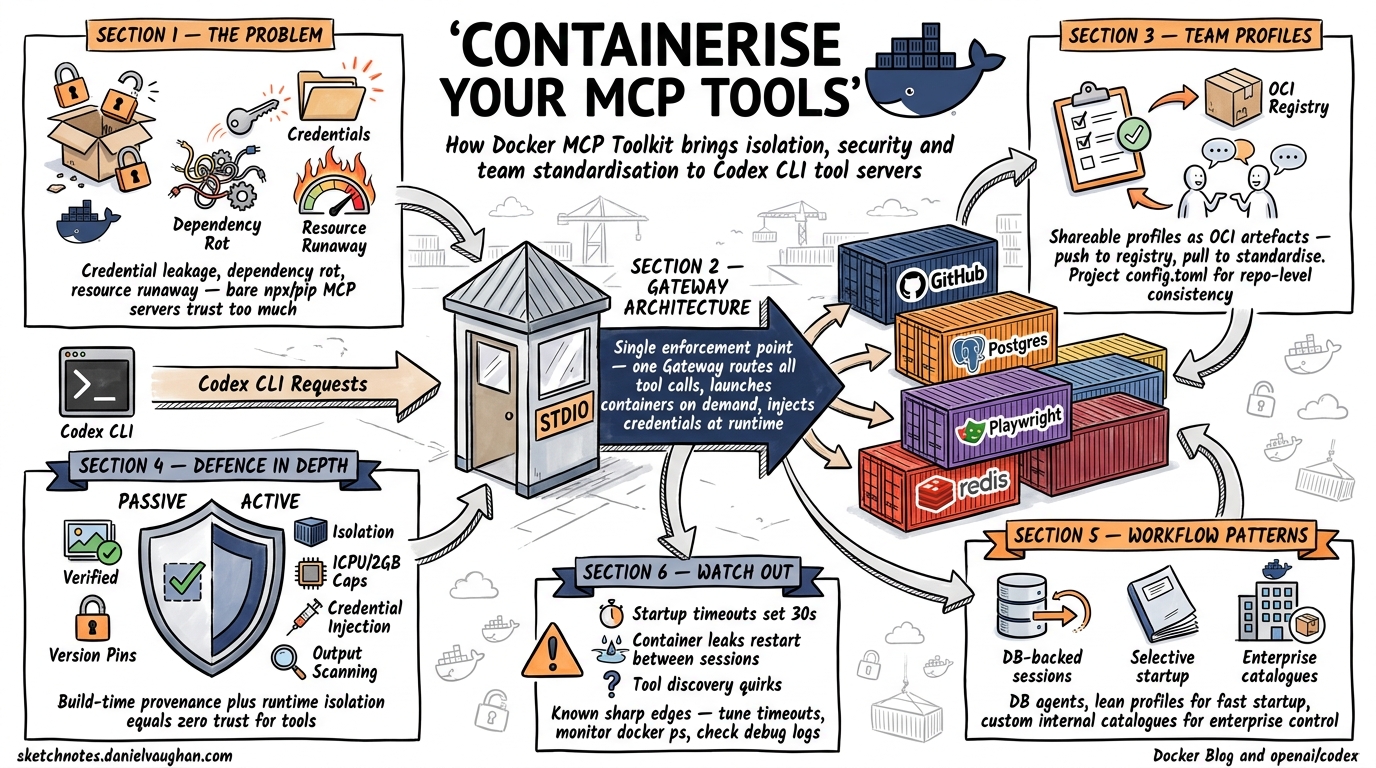
The Model Context Protocol gives Codex CLI access to external tools — databases, filesystems, APIs, browsers — but running MCP servers as bare npx or pip processes on a developer’s machine introduces dependency conflicts, credential sprawl, and zero isolation between the agent and the host. Docker’s MCP Toolkit solves this by packaging 300+ verified MCP servers as container images, fronted by a single gateway process that handles routing, credential injection, and resource limits1. This article covers the full integration path: from first configuration to team-scale profile sharing and production hardening.
Why Containerise MCP Servers?
Running MCP servers natively means trusting arbitrary npm packages with host filesystem access, ambient environment variables (including API keys for unrelated services), and unconstrained CPU/memory. Three problems emerge at scale:
- Credential leakage — a poorly-written MCP server can read
~/.aws/credentialsor Docker socket mounts not intended for it. - Dependency rot — two MCP servers requiring conflicting Node.js or Python versions fight on the same machine.
- Resource runaway — an agent loop calling a misbehaving tool can saturate the host, crashing unrelated workloads.
Docker’s MCP Toolkit addresses all three by running each server in an isolated container with restricted privileges, no host filesystem access by default, 1 CPU and 2 GB memory limits, and centralised credential management through the Gateway2.
Architecture Overview
flowchart LR
    subgraph Host
        A[Codex CLI] -->|stdio| B[Docker MCP Gateway]
        B -->|container| C[GitHub MCP Server]
        B -->|container| D[PostgreSQL MCP Server]
        B -->|container| E[Playwright MCP Server]
        B -->|container| F[Filesystem MCP Server]
    end
    subgraph Docker Desktop
        B
        C
        D
        E
        F
    end
The Gateway is a single process that Codex CLI communicates with over stdio. Internally it routes tool calls to the appropriate containerised server, launching containers on demand and injecting credentials at runtime3. Since all MCP traffic passes through one gateway, it becomes a single enforcement point for threat detection and access control2.
Prerequisites
- Docker Desktop with the MCP Toolkit beta feature enabled4
- Codex CLI v0.121.0 or later (for reliable stdio MCP support)
- The
dockerCLI available on$PATH
Enable the toolkit in Docker Desktop under Settings → Beta features → Docker MCP Toolkit4.
Basic Configuration
Step 1: Create a Profile
Profiles group MCP servers for a specific project or workflow:
docker mcp profile create --name codex-dev
Step 2: Add Servers from the Catalogue
Browse the catalogue (300+ verified servers)1 and add what you need:
docker mcp profile server add codex-dev \
  --server catalog://mcp/docker-mcp-catalog/github-official \
  --server catalog://mcp/docker-mcp-catalog/postgres \
  --server catalog://mcp/docker-mcp-catalog/playwright
Step 3: Wire Into Codex CLI
Add the gateway to your ~/.codex/config.toml:
[mcp_servers.MCP_DOCKER]
command = "docker"
args = ["mcp", "gateway", "run", "--profile", "codex-dev"]
startup_timeout_sec = 30
tool_timeout_sec = 120
The startup_timeout_sec = 30 is deliberate — the full catalogue can take longer than Codex’s default 10-second timeout to initialise, which causes handshake failures with the default setting5.
Step 4: Verify
codex --chat
/mcp
You should see MCP_DOCKER listed with a connected status and tools from each server in your profile.
Profile Management for Teams
Docker profiles are shareable as OCI artefacts, making them ideal for standardising tool access across a development team:
# Export to file
docker mcp profile export codex-dev ./codex-dev-profile.yaml

# Push to a private registry
docker mcp profile push codex-dev registry.internal.com/mcp-profiles/codex-dev:v2

# Team members pull and use
docker mcp profile pull registry.internal.com/mcp-profiles/codex-dev:v2
This pairs naturally with Codex CLI’s project-scoped configuration. Add a .codex/config.toml to your repository specifying the profile name, and every developer with Docker Desktop gets identical tool access:
# .codex/config.toml (committed to repo)
[mcp_servers.MCP_DOCKER]
command = "docker"
args = ["mcp", "gateway", "run", "--profile", "codex-dev"]
startup_timeout_sec = 30
Security Model
The Docker MCP Toolkit implements defence in depth through both passive (build-time) and active (runtime) measures2:
Passive Security
| Control | Detail |
|---|---|
| Image provenance | Servers sourced from the Docker MCP Catalogue are built from verified sources with supply-chain attestation1 |
| Minimal base images | Attack surface reduced by stripping unnecessary binaries |
| Version pinning | Catalogue references include digest-level pinning |
Active Security
| Control | Detail |
|---|---|
| Container isolation | Each server runs in its own namespace — restricted privileges, limited network, no host filesystem2 |
| Resource caps | 1 CPU, 2 GB memory per container2 |
| Credential injection | Secrets injected at runtime by the Gateway, never baked into images or exposed via environment variables6 |
| Output scanning | Responses checked for leaked secrets before returning to the client2 |
| OAuth handling | Built-in OAuth support with secure credential storage — no hardcoded tokens6 |
Comparison with Native MCP Servers
flowchart TB
    subgraph Native["Native MCP (npx/pip)"]
        N1[Full host access]
        N2[Ambient credentials]
        N3[No resource limits]
        N4[Dependency conflicts]
    end
    subgraph Docker["Docker MCP Toolkit"]
        D1[Container isolation]
        D2[Injected credentials only]
        D3[1 CPU / 2 GB cap]
        D4[Independent runtimes]
    end
Practical Workflow Patterns
Pattern 1: Database-Backed Agent Sessions
Add PostgreSQL and Redis MCP servers to a profile for a backend development workflow:
docker mcp profile server add backend-dev \
  --server catalog://mcp/docker-mcp-catalog/postgres \
  --server catalog://mcp/docker-mcp-catalog/redis
Configure credentials via the Docker Desktop MCP Toolkit UI or CLI:
docker mcp profile config backend-dev \
  --set postgres.POSTGRES_CONNECTION_STRING="postgresql://dev:pw@host:5432/app"
Now Codex can query your schema, generate migrations, and validate SQL — all without your database credentials appearing in config.toml or shell history.
Pattern 2: Selective Catalogue for Faster Startup
The full Docker MCP Catalogue (300+ servers) causes startup timeouts5. Instead, run the gateway with only the servers you need:
docker mcp gateway run \
  --catalog mcp/docker-mcp-catalog \
  --servers github-official --servers playwright --servers filesystem
Or better, create a lean profile that contains only your required servers.
Pattern 3: Custom Internal Catalogue
Enterprises can build private catalogues containing approved, audited MCP servers:
# Create custom catalogue
docker mcp catalog create registry.internal.com/mcp/approved:v1 \
  --title "Approved MCP Servers" \
  --server catalog://mcp/docker-mcp-catalog/github-official \
  --server docker://internal-tools/jira-mcp:1.2.0

# Push to internal registry
docker mcp catalog push registry.internal.com/mcp/approved:v1

# Developers use it
docker mcp gateway run --catalog registry.internal.com/mcp/approved:v1
This gives platform teams control over which tools agents can access, whilst individual developers still get self-service configuration.
Known Issues and Workarounds
The integration is production-ready but has documented sharp edges:
| Issue | Symptom | Workaround |
|---|---|---|
| Startup timeout5 | MCP client for MCP_DOCKER failed to start: request timed out |
Set startup_timeout_sec = 30 or higher; reduce profile to needed servers only |
| Container resource leak7 | Docker containers for MCP servers are not released until Codex exits | Restart Codex between long sessions; monitor with docker ps |
| Tool discovery failure8 | Codex ignores configured gateway and guesses local binaries | Ensure config.toml uses exact key MCP_DOCKER; restart Codex after config changes |
| Silent tool exclusion9 | Tools listed but non-functional due to parsing errors | Check codex --log-level debug output; report upstream |
Integration with Codex Subagents
When Codex spawns subagents, each gets its own MCP connection to the Docker gateway. Be aware that this means multiple container instances may be running simultaneously7. For resource-constrained environments, configure the gateway with --max-instances or use project-scoped profiles that expose fewer tools to subagents:
# .codex/config.toml for subagent-heavy workflows
[mcp_servers.MCP_DOCKER]
command = "docker"
args = ["mcp", "gateway", "run", "--profile", "lean-tools"]
startup_timeout_sec = 20
tool_timeout_sec = 60
enabled_tools = ["github_create_pull_request", "github_search_code", "postgres_query"]
The enabled_tools allowlist prevents subagents from accessing tools they don’t need — applying least-privilege at the MCP layer.
CI/CD Integration
For headless codex exec pipelines, configure the Docker MCP gateway as part of your CI environment:
# .github/workflows/codex-review.yml
jobs:
  review:
    runs-on: ubuntu-latest
    services:
      mcp-gateway:
        image: docker/mcp-gateway:latest
        options: --profile ci-review
    steps:
      - uses: actions/checkout@v4
      - name: Run Codex review
        env:
          OPENAI_API_KEY: ${{ secrets.OPENAI_API_KEY }}
        run: |
          codex exec "Review this PR for security issues" \
            --config .codex/ci-config.toml
Decision Framework
flowchart TD
    A[Need MCP tools in Codex?] --> B{How many servers?}
    B -->|1-2 simple| C[Native stdio servers]
    B -->|3+ or sensitive| D{Team or solo?}
    D -->|Solo| E[Docker profile, local]
    D -->|Team| F[Docker profile, OCI registry]
    F --> G[Project .codex/config.toml]
    E --> G
    C --> H[Direct config.toml entries]
Use native servers for simple, trusted, single-tool setups. Switch to Docker MCP Toolkit when you need isolation, credential management, team standardisation, or are running more than a handful of servers.
Citations
-
Docker, “Docker MCP Catalog: Discover and Run Secure MCP Servers,” Docker Blog, 2025. https://www.docker.com/blog/docker-mcp-catalog-secure-way-to-discover-and-run-mcp-servers/ ↩ ↩2 ↩3
-
Docker, “MCP Toolkit: Run MCP Servers Securely,” Docker Blog, 2025. https://www.docker.com/blog/mcp-toolkit-mcp-servers-that-just-work/ ↩ ↩2 ↩3 ↩4 ↩5 ↩6
-
Docker, “MCP Gateway Documentation,” Docker Docs, 2026. https://docs.docker.com/ai/mcp-catalog-and-toolkit/mcp-gateway/ ↩
-
Docker, “Get started with Docker MCP Toolkit,” Docker Docs, 2026. https://docs.docker.com/ai/mcp-catalog-and-toolkit/get-started/ ↩ ↩2
-
“MCP client times out when launching Docker MCP Toolkit gateway,” GitHub Issue #5444, openai/codex, 2026. https://github.com/openai/codex/issues/5444 ↩ ↩2 ↩3
-
Docker, “MCP Security: Risks, Challenges, and How to Mitigate,” Docker Blog, 2026. https://www.docker.com/blog/mcp-security-explained/ ↩ ↩2
-
“STDIO MCP Servers (Docker cmd) per sub-agent never release until Codex is exited entirely,” OpenAI Developer Community, 2026. https://community.openai.com/t/stdio-mcp-servers-docker-cmd-per-sub-agent-never-release-until-codex-is-exited-entirely/1375209 ↩ ↩2
-
“Codex fails to detect and use configured MCP gateway, repeatedly guessing binaries instead,” GitHub Issue #5161, openai/codex, 2026. https://github.com/openai/codex/issues/5161 ↩
-
“MCP tools silently excluded due to errors,” GitHub Issue #4176, openai/codex, 2026. https://github.com/openai/codex/issues/4176 ↩