Workspace Agents and Codex Slack Integration: From CLI Automations to Team-Shared Agentic Workflows
Workspace Agents and Codex Slack Integration: From CLI Automations to Team-Shared Agentic Workflows
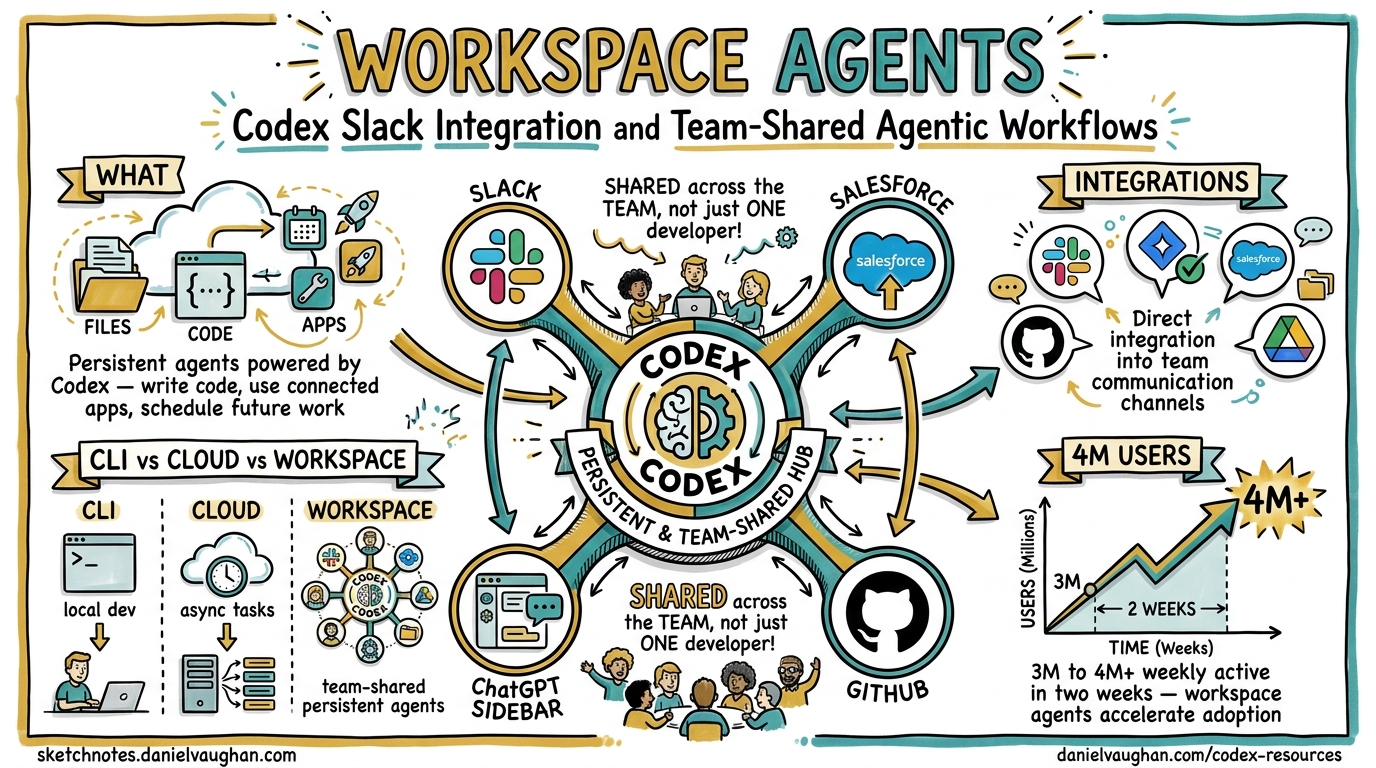
On 22 April 2026, OpenAI launched workspace agents — shared, persistent agents powered by Codex that run in the cloud and integrate directly into Slack, Salesforce, and the ChatGPT sidebar1. Two days later, Codex crossed four million weekly active developers2. For teams already running codex exec pipelines and CLI-based automations, these announcements raise an immediate question: how do workspace agents relate to the CLI workflows you already have, and when should you use which?
This article maps the architectural relationship between Codex CLI, Codex Cloud, and workspace agents, then provides a practical decision framework and migration guide.
What Workspace Agents Actually Are
Workspace agents are an evolution of Custom GPTs, rebuilt on the Codex harness rather than the Assistants API1. Each agent gets its own persistent workspace with access to files, code, connected apps, and cross-session memory3. Unlike a Custom GPT, a workspace agent can:
- Write and execute code in a sandboxed cloud environment
- Use connected third-party apps (Slack, Jira, GitHub, Salesforce, Google Drive) via the plugin ecosystem4
- Schedule future work and wake up autonomously to continue multi-day tasks4
- Retain information across sessions, building organisational knowledge over time1
Workspace agents are available in research preview on ChatGPT Business, Enterprise, Edu, and Teachers plans1. They are free until 6 May 2026, after which credit-based pricing applies1.
The Architecture: Three Layers of Codex
To understand where workspace agents fit, consider the Codex platform as three concentric layers sharing a single App Server protocol5:
graph TB
    subgraph "Layer 1: Local"
        CLI["Codex CLI<br/>codex / codex exec"]
        IDE["IDE Extensions<br/>VS Code / JetBrains"]
    end
    subgraph "Layer 2: Cloud"
        APP["Codex App<br/>Desktop / Web"]
        CLOUD["Cloud Tasks<br/>Remote sandboxes"]
    end
    subgraph "Layer 3: Team"
        WA["Workspace Agents<br/>Shared, persistent"]
        SLACK["Slack Integration<br/>@Codex mentions"]
    end

    CLI -->|"App Server<br/>JSON-RPC"| CLOUD
    IDE -->|"App Server<br/>JSON-RPC"| CLOUD
    APP --> CLOUD
    WA --> CLOUD
    SLACK -->|"Creates tasks"| CLOUD
All three layers ultimately execute against the same cloud sandbox infrastructure and share the same model roster (gpt-5.5, gpt-5.4, gpt-5.4-mini, gpt-5.3-codex)6. The differentiation is in who triggers the work and how results are shared.
| Dimension | Codex CLI | Cloud Tasks | Workspace Agents |
|---|---|---|---|
| Trigger | Developer in terminal | Developer in app/web | Anyone via ChatGPT or Slack |
| Execution | Local sandbox (bubblewrap/seatbelt) or cloud | Cloud sandbox | Cloud sandbox |
| Visibility | Single developer | Single developer | Entire team/workspace |
| Persistence | Session transcripts, local memory | Cloud task history | Cross-session memory + scheduled wake-ups |
| Configuration | config.toml, AGENTS.md, hooks |
App settings | Natural-language agent builder |
| Best for | Tight dev loops, CI/CD, scripting | Long-running tasks, PR creation | Shared team automations, cross-functional workflows |
The Slack Integration: @Codex in Your Channels
The Slack integration is the primary surface through which non-CLI teams interact with Codex’s cloud infrastructure7. Setup requires:
- A ChatGPT Plus, Pro, Business, Enterprise, or Edu subscription7
- A connected GitHub account with at least one configured environment7
- Installation of the Codex Slack app from workspace settings (may require admin approval)7
Once installed, any team member can mention @Codex in a channel or thread with a prompt7. Codex:
- Reacts with 👀 to acknowledge receipt
- Reviews accessible environments and selects the best match7
- Creates a cloud task, running against the default branch of the matched repository7
- Posts results (and optionally an inline answer) back to the thread7
Users can specify a repository explicitly — @Codex fix the flaky test in openai/codex — or let Codex infer from context7. Enterprise administrators can disable inline answer posting, limiting responses to task links only7.
Environment Selection Mechanics
The automatic environment selection follows a simple heuristic: Codex scans the user’s accessible environments, matches based on repository names mentioned in the prompt or thread, and falls back to the most recently used environment if ambiguous7. For teams managing multiple repositories, maintaining an accurate repository map in each environment is essential.
When CLI Developers Should Care
If you have been building automations with codex exec, you have effectively been creating single-developer workspace agents. The patterns translate:
Pattern 1: CI/CD Gate → Shared Review Agent
CLI approach:
codex exec "Review this diff for security issues" \
  --output-schema ./review-schema.json \
  -o ./findings.json
Workspace agent equivalent: Create a workspace agent named “Security Reviewer” with instructions to review PRs against your security checklist. Team members invoke it from Slack: @Codex review the latest PR on backend-api.
Pattern 2: Scheduled codex exec → Automations
CLI approach (cron):
# crontab entry
0 8 * * 1 codex exec "Summarise last week's commits and open PRs" \
  --model gpt-5.4-mini -o /tmp/weekly-digest.md
Workspace agent equivalent: Build an agent with automation scheduling built in. Codex can now schedule future work for itself and wake up automatically4, eliminating the need for external cron infrastructure.
Pattern 3: AGENTS.md + Hooks → Agent Instructions
Your AGENTS.md files and hooks.json configurations encode organisational knowledge. When building a workspace agent, translate these into the agent’s natural-language instructions:
# AGENTS.md (CLI)
## Build
Run `pnpm install && pnpm build`

## Test
Run `pnpm test -- --coverage`
Never commit with coverage below 80%.

## Review guidelines
- Flag any use of eval() or Function()
- Require error handling on all async operations
Becomes the workspace agent’s instructions:
When working on this repository, always run
pnpm install && pnpm buildfirst. Run tests withpnpm test -- --coverageand never commit if coverage drops below 80%. During reviews, flag eval() usage and missing error handling on async operations.
Pattern 4: MCP Servers → Connected Apps
If you run MCP servers locally to give Codex CLI access to Jira, Slack, or databases, workspace agents replace that plumbing with first-party plugin integrations4. The 90+ plugins launched in April 2026 include Atlassian Rovo (Jira), CircleCI, GitLab Issues, Microsoft Suite, and Neon by Databricks4.
The Decision Framework
flowchart TD
    A[New automation task] --> B{Who needs the result?}
    B -->|Just me| C{Latency-sensitive?}
    B -->|My team| D{Technical or cross-functional?}

    C -->|Yes - tight loop| E["Codex CLI<br/>Interactive or codex exec"]
    C -->|No - can run async| F{Need local files?}
    F -->|Yes| E
    F -->|No| G["Cloud Task<br/>Codex App or API"]

    D -->|Technical - devs only| H{Triggered from Slack?}
    D -->|Cross-functional| I["Workspace Agent<br/>Natural language setup"]

    H -->|Yes| J["Slack @Codex<br/>Cloud task from channel"]
    H -->|No| K{Recurring?}
    K -->|Yes| I
    K -->|No| G
Use Codex CLI when:
- You need local sandbox execution with bubblewrap/seatbelt isolation
- The workflow requires local filesystem access beyond Git repositories
- You are iterating rapidly and need sub-second feedback
- You need fine-grained control via
config.tomlprofiles, hooks, and approval modes - You are running in CI/CD pipelines where
codex execis already wired up
Use Workspace Agents when:
- The automation serves a team, not just one developer
- Non-technical stakeholders need to trigger or consume results
- The workflow benefits from persistent cross-session memory
- You want natural-language configuration rather than TOML and JSON
- The task integrates with Slack, Jira, or other connected apps natively
Use Slack @Codex when:
- A team member describes a bug or question in a channel and needs a quick code-backed answer
- You want Codex to create a PR directly from a conversation thread
- Ad-hoc, context-rich requests where the Slack thread is the specification
Pricing Implications for Teams
The credit-based pricing that takes effect on 6 May 2026 adds a new dimension to the CLI-versus-cloud decision8:
| Model | Input (credits/1M tokens) | Output (credits/1M tokens) |
|---|---|---|
| gpt-5.5 | 125 | 750 |
| gpt-5.4 | 62.50 | 375 |
| gpt-5.4-mini | 18.75 | 113 |
For Plus/Pro individual users, messages cost approximately 14 credits (gpt-5.5) or 7 credits (gpt-5.4) each8. Cloud tasks are available only on Business and Enterprise plans8.
CLI users with API keys pay standard per-token API rates instead8, which can be significantly cheaper for high-volume codex exec pipelines but without cloud sandbox infrastructure. The trade-off:
- CLI + API key: Lowest per-token cost, full local control, no cloud tasks
- Business plan: Cloud tasks, workspace agents, Slack integration, credit-based pricing
- Enterprise: Priority processing, admin controls, enterprise security8
For teams evaluating the switch, monitor your current codex exec token consumption (visible via OpenTelemetry traces if configured) and compare against the credit pricing table above.
Migration Checklist: CLI Automations → Workspace Agents
For teams ready to promote CLI automations to shared workspace agents:
- Audit existing automations — List all
codex execscripts, cron jobs, and CI/CD steps that use Codex CLI - Classify by audience — Single-developer automations stay on CLI; team-facing ones are migration candidates
- Extract instructions — Convert
AGENTS.md,hooks.json, and prompt templates into natural-language agent instructions - Replace MCP servers with plugins — Swap local MCP configurations for first-party plugin integrations where available
- Configure environments — Ensure GitHub repositories are mapped to cloud environments with correct default branches
- Test in research preview — Workspace agents are still in preview; validate behaviour before decommissioning CLI automations
- Set admin controls — Enterprise admins should configure role-based access, answer-posting policies, and credit budgets before the 6 May pricing transition7
Limitations and Caveats
⚠️ Workspace agents are in research preview — behaviour may change before general availability1.
⚠️ No direct CLI-to-workspace-agent migration path exists yet. You cannot export a config.toml + AGENTS.md bundle and import it as a workspace agent. The conversion is currently manual.
⚠️ Slack integration requires GitHub-connected environments7. Non-GitHub workflows (GitLab, Bitbucket) are not yet supported for Slack-triggered tasks, though GitLab Issues is available as a plugin for workspace agents4.
⚠️ The automatic environment selection in Slack can misfire for teams with many similarly named repositories. Specify the repository explicitly in your @Codex prompt to avoid surprises7.
⚠️ Credit pricing details beyond token rates have not been fully disclosed. Per-task overhead costs and scheduled-wake-up pricing remain unconfirmed as of 24 April 2026.
What Comes Next
The trajectory is clear: OpenAI is building towards a unified Codex runtime where the same agent logic runs across CLI, cloud, IDE, Slack, and enterprise platforms via the shared App Server protocol5. For CLI developers, this means your investment in AGENTS.md, hooks, skills, and MCP configurations is not stranded — it is groundwork for the team-scale automations that workspace agents enable.
The practical advice: keep using codex exec for developer-facing, latency-sensitive, and CI/CD workflows. Promote proven automations to workspace agents when they need team-wide access. And install the Slack integration today — the free preview window closes on 6 May1.
Citations
-
OpenAI, “Introducing workspace agents in ChatGPT,” 22 April 2026. https://openai.com/index/introducing-workspace-agents-in-chatgpt/ ↩ ↩2 ↩3 ↩4 ↩5 ↩6 ↩7
-
OpenAI, “Scaling Codex to enterprises worldwide,” 21 April 2026. https://openai.com/index/scaling-codex-to-enterprises-worldwide/ ↩
-
9to5Mac, “OpenAI updates ChatGPT with Codex-powered ‘workspace agents’ for teams,” 22 April 2026. https://9to5mac.com/2026/04/22/openai-updates-chatgpt-with-codex-powered-workspace-agents-for-teams/ ↩
-
OpenAI, “Codex for (almost) everything,” 16 April 2026. https://openai.com/index/codex-for-almost-everything/ ↩ ↩2 ↩3 ↩4 ↩5 ↩6
-
OpenAI, “Codex App Server README,” codex-rs/app-server, GitHub. https://github.com/openai/codex/blob/main/codex-rs/app-server/README.md ↩ ↩2
-
OpenAI, “Models — Codex,” OpenAI Developers. https://developers.openai.com/codex/models ↩
-
OpenAI, “Use Codex in Slack,” OpenAI Developers. https://developers.openai.com/codex/integrations/slack ↩ ↩2 ↩3 ↩4 ↩5 ↩6 ↩7 ↩8 ↩9 ↩10 ↩11 ↩12 ↩13 ↩14
-
OpenAI, “Pricing — Codex,” OpenAI Developers. https://developers.openai.com/codex/pricing ↩ ↩2 ↩3 ↩4 ↩5