Automated Regression Hunting with Codex CLI: AI-Powered Git Bisect and Root Cause Analysis
Automated Regression Hunting with Codex CLI: AI-Powered Git Bisect and Root Cause Analysis
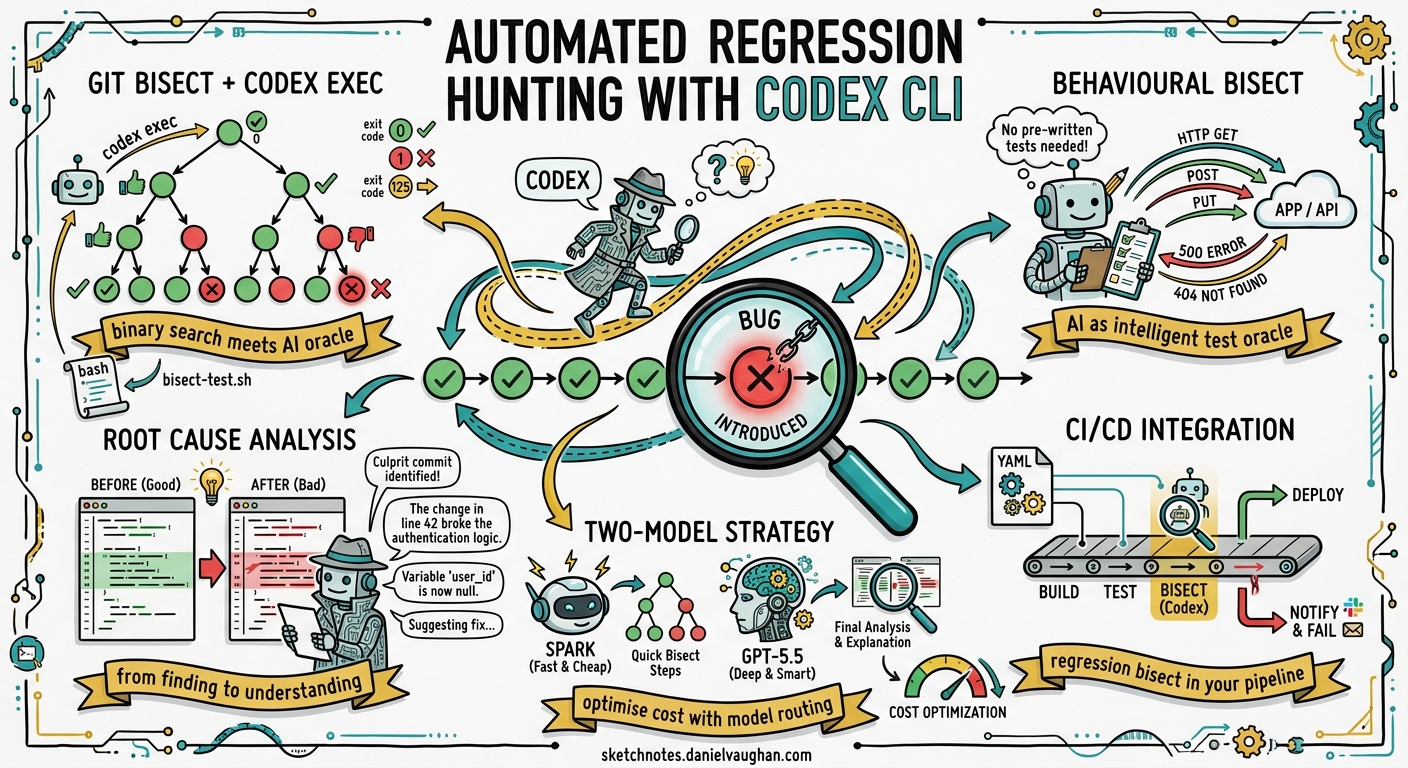
Git bisect is one of the most powerful debugging tools in any developer’s arsenal, yet it remains chronically underused1. The barrier has always been the same: expressing a reliable test condition, managing the binary search manually, and interpreting the results across potentially hundreds of commits. Codex CLI changes this equation entirely. By combining codex exec with git bisect run, you can turn regression hunting from a tedious manual exercise into a one-command automated pipeline that not only finds the offending commit but explains why it broke.
The Problem: Regressions Hide in Plain Sight
Every team has experienced it. A test that was green last week is red today. A feature that worked in production is now returning 500s. The commit history shows 47 merges since the last known-good state. Manually checking each one is impractical; even with git bisect, you still need to write a test script, handle edge cases like uncompilable intermediate commits, and interpret the results.
The traditional git bisect run workflow requires a shell script that returns exit code 0 for good commits and non-zero for bad ones2. The special exit code 125 tells bisect to skip commits that cannot be tested (e.g. broken builds)3. This is well-established but rarely used because crafting that test script is often harder than the debugging itself.
How Codex CLI Fits In
Codex CLI’s exec subcommand runs a prompt non-interactively — it takes instructions, executes against your codebase, and exits with a meaningful exit code4. When tests fail, codex exec returns non-zero5. This makes it a natural fit as a git bisect run test oracle: instead of writing a bespoke test script, you describe the regression in natural language and let Codex determine whether each commit exhibits the bug.
flowchart TD
    A[git bisect start] --> B[Mark BAD commit]
    B --> C[Mark GOOD commit]
    C --> D[git bisect run ./bisect-test.sh]
    D --> E{Codex exec evaluates commit}
    E -->|Exit 0: GOOD| F[Bisect narrows range]
    E -->|Exit 1: BAD| F
    E -->|Exit 125: SKIP| F
    F --> G{Range exhausted?}
    G -->|No| E
    G -->|Yes| H[First bad commit identified]
    H --> I[Codex analyses root cause]
Setting Up the Bisect Pipeline
Step 1: Identify the Regression Window
Before invoking bisect, you need a known-good and known-bad commit. If you maintain a linear merge history with squash merges — a pattern the Codex CLI best practices documentation recommends6 — this is straightforward:
# Find the last known-good tag or commit
GOOD_COMMIT=$(git log --oneline --before="2026-04-20" -1 --format="%H")
BAD_COMMIT=$(git rev-parse HEAD)

git bisect start "$BAD_COMMIT" "$GOOD_COMMIT"
Step 2: Write the Bisect Test Script
Create a bisect-test.sh that wraps codex exec:
#!/usr/bin/env bash
set -euo pipefail

# Skip commits that don't compile
if ! npm run build 2>/dev/null; then
  exit 125
fi

# Use Codex to evaluate whether the regression is present
codex exec \
  --approval-mode full-auto \
  -q \
  "Run the test suite for the payments module with 'npm test -- --testPathPattern=payments'.
   If the tests pass, exit 0. If they fail, exit 1.
   Do not attempt to fix anything." 2>/dev/null

# codex exec propagates the exit code from the test run
chmod +x bisect-test.sh
git bisect run ./bisect-test.sh
The --approval-mode full-auto flag (or the equivalent --yolo shorthand) allows Codex to run shell commands without interactive approval, which is essential for automated bisect runs7. The -q flag suppresses TUI output, keeping the bisect log clean.
Step 3: Interpret the Results
When bisect completes, Git reports the first bad commit:
abc123def is the first bad commit
commit abc123def
Author: developer@example.com
Date:   Mon Apr 21 14:32:00 2026 +0100

    refactor: extract payment validation into separate module
Beyond Simple Test Execution: AI-Powered Root Cause Analysis
Finding the commit is only half the battle. Understanding why it introduced the regression is where Codex CLI truly differentiates itself. Once bisect identifies the culprit, pipe the diff into Codex for analysis:
FIRST_BAD=$(git bisect view --format="%H" | head -1)

codex exec \
  "Analyse the diff of commit $FIRST_BAD against its parent.
   Explain exactly why this change introduced a regression in the
   payments test suite. Focus on behavioural changes, not style.
   Suggest a minimal fix."
This gives you a structured explanation that would normally take 30 minutes of manual code archaeology. Codex reads the full diff, cross-references the test assertions, and identifies the semantic mismatch — for example, a refactored function that changed the default return value from null to undefined, breaking a strict equality check downstream.
Advanced Pattern: Behavioural Bisect Without Existing Tests
The most powerful application is when you don’t have a failing test — you have a behavioural regression reported by a user. Traditional bisect requires a test script; Codex can serve as the test itself:
#!/usr/bin/env bash
set -euo pipefail

if ! npm run build 2>/dev/null; then
  exit 125
fi

# Codex evaluates the behaviour directly
result=$(codex exec --json \
  "Start the application server in the background on port 3999.
   Send a POST to /api/payments with this payload: {\"amount\": 100, \"currency\": \"GBP\"}.
   Check whether the response includes a 'transaction_id' field.
   If it does, this commit is GOOD. If not, this commit is BAD.
   Report your finding as the last line: GOOD or BAD." 2>/dev/null)

if echo "$result" | grep -q "GOOD"; then
  exit 0
else
  exit 1
fi
This pattern uses Codex as an intelligent test oracle that can reason about application behaviour without a pre-written test8. The --json flag, which now reports reasoning-token usage9, enables structured output parsing for programmatic consumers.
Integrating with CI/CD
For teams that want regression bisect as part of their CI pipeline, the Codex GitHub Action (openai/codex-action@v1) provides a clean integration point10:
name: Regression Bisect
on:
  workflow_dispatch:
    inputs:
      good_commit:
        description: 'Last known good commit SHA'
        required: true
      bad_commit:
        description: 'First known bad commit SHA'
        required: true
      regression_description:
        description: 'Description of the regression'
        required: true

jobs:
  bisect:
    runs-on: ubuntu-latest
    steps:
      - uses: actions/checkout@v4
        with:
          fetch-depth: 0

      - uses: openai/codex-action@v1
        with:
          api-key: ${{ secrets.OPENAI_API_KEY }}
          prompt: |
            Run git bisect between ${{ inputs.good_commit }} and
            ${{ inputs.bad_commit }} to find the commit that introduced
            this regression: "${{ inputs.regression_description }}".
            Write a test script, run git bisect run, then analyse the
            result and post a summary.
          sandbox: read-write
Performance and Cost Considerations
Each bisect step invokes codex exec, which means each step incurs API token costs. For a binary search across 128 commits, that is approximately 7 steps — manageable, but worth optimising:
| Strategy | Effect |
|---|---|
Use --model gpt-5.3-codex-spark for bisect steps |
Reduces per-step cost by ~80%11 |
| Reserve GPT-5.5 for final root cause analysis | Full reasoning power where it matters |
Pre-compile and cache node_modules |
Reduces wall-clock time per step |
Use exit 125 liberally for broken intermediates |
Avoids wasting tokens on uncompilable states |
The codex exec --json output now includes reasoning-token usage9, so you can track exactly how many tokens each bisect step consumed and optimise accordingly.
Configuration for Bisect Workflows
Create a dedicated profile in ~/.codex/config.toml for bisect operations:
[profiles.bisect]
model = "gpt-5.3-codex-spark"
approval_mode = "full-auto"
sandbox_permissions.disk = "full"
sandbox_permissions.network = "none"

[profiles.bisect-analysis]
model = "gpt-5.5"
approval_mode = "full-auto"
sandbox_permissions.disk = "read-only"
Then invoke with profiles12:
# Fast model for the bisect loop
codex --profile bisect exec "run tests..."

# Heavy model for the final analysis
codex --profile bisect-analysis exec "analyse commit..."
Limitations and Caveats
Non-determinism: Codex’s responses can vary between runs. For critical bisect operations, consider running each step twice and requiring consensus before marking a commit as good or bad.
Stateful regressions: If the regression depends on database state or external services, the bisect script must provision that state at each step. Codex cannot conjure external dependencies.
Token budget: Very large codebases with slow test suites can consume significant tokens across many bisect steps. The two-model strategy (Spark for bisect, GPT-5.5 for analysis) mitigates this effectively.
Sandbox constraints: Running codex exec with --approval-mode full-auto in an unsupervised bisect loop requires careful sandbox configuration. The Codex CLI sandbox (Seatbelt on macOS, Landlock on Linux) constrains filesystem and network access13, but you should still run bisect in an isolated environment — a disposable container or CI runner — rather than on your development machine.
Practical Recommendations
- Keep bisect scripts idempotent — each step must be able to build and test from a clean state without leaking state from previous steps.
- Use squash merges — linear history makes bisect dramatically more effective by reducing the search space and eliminating merge commits that may not compile independently6.
- Log everything — redirect
codex execoutput to a file per step so you can review the AI’s reasoning if the bisect result seems wrong. - Combine with
git blame— once bisect finds the commit, usegit blameon the specific changed lines to understand the full history of that code path14. - Automate with hooks — use Codex CLI hooks to trigger a bisect automatically when a previously-passing test starts failing in CI15.
Conclusion
The combination of git bisect run and codex exec transforms regression hunting from an art practised by senior developers into a repeatable, automatable process. The AI handles the parts that make bisect difficult — writing test scripts, handling edge cases, and explaining root causes — while Git’s binary search provides the mathematical efficiency. For teams maintaining large codebases with frequent merges, this pattern can reduce regression diagnosis time from hours to minutes.
Citations
-
Simon Willison, “Using Git with Coding Agents”, Agentic Engineering Patterns, 2026. https://simonwillison.net/guides/agentic-engineering-patterns/using-git-with-coding-agents/ ↩
-
Git Documentation, “git-bisect - Use binary search to find the commit that introduced a bug”. https://git-scm.com/docs/git-bisect ↩
-
Git Documentation, “git bisect run — exit code 125 for untestable commits”. https://git-scm.com/docs/git-bisect#_bisect_run ↩
-
OpenAI Developers, “Non-interactive mode — Codex CLI”. https://developers.openai.com/codex/noninteractive ↩
-
OpenAI Developers, “Features — Codex CLI: exec exits non-zero if submission fails”. https://developers.openai.com/codex/cli/features ↩
-
OpenAI Developers, “Best practices — Codex: squash merge PRs for clean linear history”. https://developers.openai.com/codex/learn/best-practices ↩ ↩2
-
OpenAI Developers, “Command line options — Codex CLI: –approval-mode full-auto”. https://developers.openai.com/codex/cli/reference ↩
-
OpenAI, “Unrolling the Codex agent loop — iterative tool execution”. https://openai.com/index/unrolling-the-codex-agent-loop/ ↩
-
OpenAI Developers, “Changelog — April 24, 2026: codex exec –json reports reasoning-token usage”. https://developers.openai.com/codex/changelog ↩ ↩2
-
OpenAI Developers, “GitHub Action — Codex CLI”. https://developers.openai.com/codex/github-action ↩
-
OpenAI Developers, “Models — Codex: GPT-5.3-Codex-Spark pricing and performance”. https://developers.openai.com/codex/models ↩
-
OpenAI Developers, “Advanced Configuration — Profiles”. https://developers.openai.com/codex/config-advanced ↩
-
OpenAI Developers, “CLI — Codex: sandbox and permissions”. https://developers.openai.com/codex/cli ↩
-
Graphite, “Debugging with git bisect: Identifying the commit that introduced a bug”. https://graphite.com/guides/git-bisect-debugging-guide ↩
-
OpenAI Developers, “Codex CLI Hooks”. https://developers.openai.com/codex/cli/features ↩