Codex Security Meets Codex CLI: Building an Automated Vulnerability Remediation Pipeline
Codex Security Meets Codex CLI: Building an Automated Vulnerability Remediation Pipeline
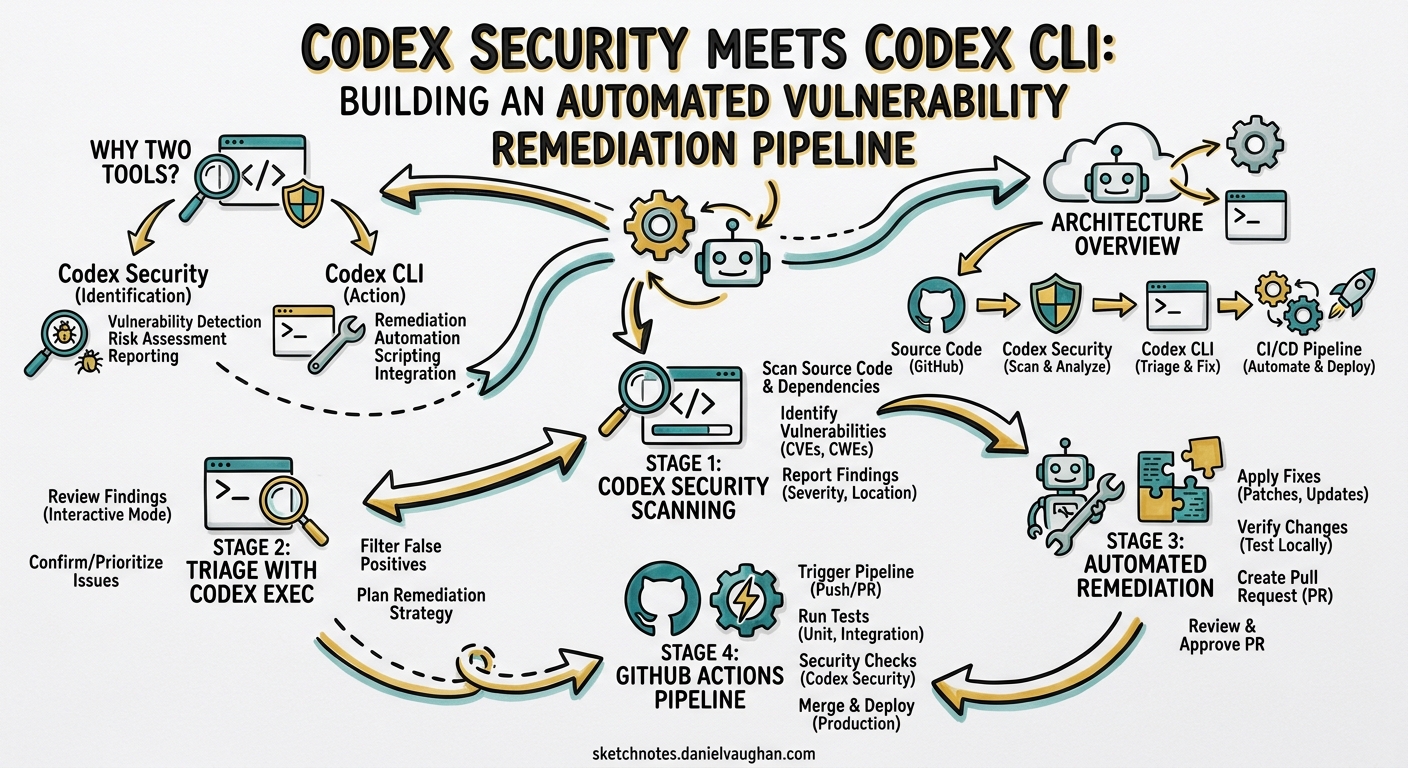
OpenAI now ships two complementary security surfaces: Codex Security, the cloud-hosted application security agent that scans repositories commit-by-commit1, and Codex CLI, the terminal-native coding agent that can generate patches on demand via codex exec2. Individually each is useful; wired together they form a closed-loop scan → triage → patch → validate → PR pipeline that catches vulnerabilities earlier and remediates them faster than either tool alone.
This article walks through the architecture of that pipeline, the configuration needed for both GitHub Actions and GitLab CI/CD, and the practical patterns that make it production-ready.
Why Two Tools?
Codex Security and Codex CLI solve different halves of the same problem.
| Capability | Codex Security | Codex CLI (codex exec) |
|---|---|---|
| Scanning | Semantic, repo-wide, commit-by-commit1 | Not a scanner — acts on provided findings |
| Threat modelling | Auto-generated, editable per-repo3 | N/A |
| Validation | Reproduces issues in ephemeral containers3 | Can run test suites inside its sandbox |
| Patch generation | Minimal diffs surfaced for review1 | Full agentic code generation with --output-schema2 |
| CI integration | GitHub-native via Codex Web4 | Any CI runner via codex exec or codex-action@v15 |
Codex Security excels at finding business-logic flaws — broken access control, IDOR, privilege escalation — through chain-of-thought reasoning that simulates attacker paths6. Codex CLI excels at fixing them by generating validated patches inside a sandboxed environment2. The pipeline stitches the two together.
Architecture Overview
flowchart LR
    A[Developer Push] --> B[CI Trigger]
    B --> C[Codex Security Scan]
    C --> D{Findings?}
    D -->|None| E[Pipeline Passes]
    D -->|Yes| F[Triage & Rank]
    F --> G[codex exec Remediation]
    G --> H[Patch Validation]
    H --> I{Valid?}
    I -->|Yes| J[Open PR / MR]
    I -->|No| K[Flag for Human Review]
    J --> L[Human Approval]
The pipeline has five stages:
- Scan — Codex Security analyses the commit range, building a code property graph that traces data flows across service boundaries6.
- Triage — Findings are ranked by exploitability and consolidated to remove duplicates.
- Remediate —
codex execreceives each high/critical finding and generates a minimal patch. - Validate — The patch is checked with
git apply --checkand, optionally, the project’s test suite. - PR/MR — Validated patches are committed to a remediation branch and surfaced for human review.
Stage 1: Codex Security Scanning
Codex Security operates through Codex Web with connected GitHub repositories4. During its beta it scanned over 1.2 million commits, identifying 792 critical and 10,561 high-severity findings across open-source projects7.
How the scan works
Codex Security uses a three-phase methodology3:
- Threat modelling — Maps data flows, identifies trust boundaries, and determines what security controls should exist. The auto-generated threat model is editable per-repository.
- Vulnerability analysis — Searches for exploitable issues using semantic reasoning rather than pattern matching, asking context-specific questions about permission validation and access controls.
- Validation — Generates proof-of-concept code in ephemeral containers to confirm findings are genuinely exploitable.
The output is a ranked list of findings with severity, location, validation evidence, and suggested patch options1.
Scan configuration
Administrators can tune the threat model through scope definition, attack-surface specification, and criticality assumptions4. Initial scans on large repositories may take hours to days; subsequent incremental scans are faster3.
Important: Codex Security is language-agnostic but performance varies by language and framework — its reasoning ability depends on the underlying model’s training data for the stack in question3.
Stage 2: Triage with codex exec
When Codex Security is not available (e.g. you are using third-party SAST scanners such as Semgrep, Snyk, or GitLab SAST), codex exec can post-process raw scanner output into a prioritised, actionable report. The OpenAI Cookbook demonstrates this pattern for GitLab8:
codex exec --full-auto \
  "Parse the SAST JSON at gl-sast-report.json.
   Consolidate duplicate findings.
   Rank by exploitability.
   Output a prioritised markdown report between
   === BEGIN_SECURITY_MD === and === END_SECURITY_MD === markers."
The marker-based extraction pattern is critical: Codex output may contain ANSI colour codes and conversational preamble, so the pipeline strips escape sequences and extracts content between known delimiters8:
sed -E 's/\x1B\[[0-9;]*[A-Za-z]//g' "${CODEX_RAW_LOG}" \
  | tr -d '\r' \
  | awk '
      /^\s*=== BEGIN_SECURITY_MD ===\s*$/ {grab=1; next}
      /^\s*=== END_SECURITY_MD ===\s*$/   {grab=0}
      grab
    ' > "${TMP_OUT}"
This pattern recurs throughout the pipeline — any stage that consumes Codex output should use markers and strip ANSI codes.
Stage 3: Automated Remediation
The remediation stage loops over high and critical findings, feeding each to codex exec for patch generation.
Vulnerability loop
#!/usr/bin/env bash
set -euo pipefail

SAST_REPORT="gl-sast-report.json"
PATCH_DIR="patches"
mkdir -p "${PATCH_DIR}"

jq -c '.vulnerabilities[]?
  | select((.severity | ascii_downcase) == "high"
       or (.severity | ascii_downcase) == "critical")' \
  "${SAST_REPORT}" | while IFS= read -r vuln; do

  ID=$(echo "${vuln}" | jq -r '.id // .identifiers[0].value // "unknown"')
  FILE=$(echo "${vuln}" | jq -r '.location.file // "unknown"')
  LINE=$(echo "${vuln}" | jq -r '.location.start_line // "?"')
  DESC=$(echo "${vuln}" | jq -r '.message // .description // "No description"')

  echo "Remediating ${ID} in ${FILE}:${LINE}"

  PROMPT="Fix the following vulnerability in ${FILE} at line ${LINE}:
${DESC}

Output ONLY a unified diff between
=== BEGIN_PATCH === and === END_PATCH === markers.
Do not modify unrelated code."

  codex exec --full-auto "${PROMPT}" \
    2>&1 | tee "${PATCH_DIR}/${ID}-raw.log"

  # Extract patch
  sed -E 's/\x1B\[[0-9;]*[A-Za-z]//g' "${PATCH_DIR}/${ID}-raw.log" \
    | tr -d '\r' \
    | awk '
        /=== BEGIN_PATCH ===/ {grab=1; next}
        /=== END_PATCH ===/   {grab=0}
        grab
      ' > "${PATCH_DIR}/${ID}.patch"

done
Validation gate
Every generated patch is validated before being applied:
for patch_file in "${PATCH_DIR}"/*.patch; do
  [ -s "${patch_file}" ] || continue

  if git apply --check "${patch_file}" 2>/dev/null; then
    git apply "${patch_file}"
    echo "Applied: ${patch_file}"
  elif git apply --check -p1 "${patch_file}" 2>/dev/null; then
    git apply -p1 "${patch_file}"
    echo "Applied (p1): ${patch_file}"
  else
    echo "FAILED: ${patch_file} — flagging for manual review"
    mv "${patch_file}" "${PATCH_DIR}/failed/"
  fi
done
After applying patches, run the project’s test suite to catch regressions:
# Run tests inside Codex sandbox to verify patches
codex exec --full-auto \
  "Run the project test suite. Report pass/fail summary between
   === BEGIN_TEST_RESULTS === and === END_TEST_RESULTS === markers."
Stage 4: GitHub Actions Pipeline
The openai/codex-action@v1 action simplifies CI integration by handling CLI installation, API proxy startup, and codex exec invocation5.
name: Security Remediation

on:
  schedule:
    - cron: '0 6 * * 1'  # Weekly Monday scan
  workflow_dispatch:

permissions:
  contents: write
  pull-requests: write

jobs:
  remediate:
    runs-on: ubuntu-latest
    steps:
      - uses: actions/checkout@v4

      - name: Run SAST scanner
        uses: returntocorp/semgrep-action@v1
        with:
          config: p/owasp-top-ten
          output: semgrep-results.json
          json: true

      - name: Triage findings
        uses: openai/codex-action@v1
        with:
          prompt: |
            Read semgrep-results.json.
            Filter to high and critical severity.
            For each finding, generate a unified diff patch.
            Save each patch to patches/<rule-id>.patch.
            Validate each with git apply --check.
          sandbox: workspace-write
          model: o3
          effort: high
          safety-strategy: drop-sudo
        env:
          OPENAI_API_KEY: ${{ secrets.OPENAI_API_KEY }}

      - name: Create remediation PR
        if: success()
        run: |
          git config user.name "codex-security-bot"
          git config user.email "codex-bot@example.com"
          BRANCH="security/auto-remediation-$(date +%Y%m%d)"
          git checkout -b "${BRANCH}"
          git add -A
          git diff --cached --quiet && exit 0
          git commit -m "security: auto-remediate SAST findings

          Generated by Codex CLI via codex-action@v1"
          git push origin "${BRANCH}"
          gh pr create \
            --title "Security: Automated vulnerability remediation" \
            --body "Automated patches generated by Codex CLI from Semgrep findings." \
            --reviewer security-team
GitLab CI/CD equivalent
The OpenAI Cookbook provides a complete GitLab pipeline with two stages8:
stages:
  - security-triage
  - remediation

codex_triage:
  stage: security-triage
  image: node:24
  script:
    - npm -g i @openai/codex@latest
    - codex exec --full-auto "${CODEX_TRIAGE_PROMPT}" 2>&1 | tee codex-raw.log
    # Extract prioritised markdown
  artifacts:
    paths:
      - security_priority.md
    expire_in: 14 days
  rules:
    - if: '$OPENAI_API_KEY'

codex_resolution:
  stage: remediation
  image: node:24
  needs: [codex_triage]
  script:
    - npm -g i @openai/codex@latest
    # Loop over high/critical vulns, generate and validate patches
    - bash scripts/remediate-vulns.sh
  artifacts:
    paths:
      - patches/
    expire_in: 14 days
Stage 5: Safety Guardrails
Automated remediation demands strong safety controls. Apply these guardrails:
1. Sandbox isolation
Always run codex exec with the minimum required permissions5:
# Read-only for triage (no code changes needed)
codex exec --sandbox read-only "${TRIAGE_PROMPT}"

# Workspace-write for remediation (needs to generate patches)
codex exec --sandbox workspace-write "${REMEDIATION_PROMPT}"
Never use --sandbox danger-full-access for security workflows.
2. Patch scope limits
Constrain Codex to modifying only the vulnerable file:
codex exec --full-auto \
  "Fix the vulnerability in src/auth/middleware.ts at line 42.
   Do NOT modify any other files.
   Output ONLY a unified diff for src/auth/middleware.ts."
3. Human-in-the-loop
Generated patches are suggestions, not automatic merges1. The pipeline opens a PR/MR that requires human approval. Configure branch protection rules to enforce this:
# GitHub branch protection
- required_reviewers: 2
  required_teams: ["security-team"]
  dismiss_stale_reviews: true
4. Deny-read policies
Prevent Codex from accessing credentials during remediation using v0.125’s deny-read glob policies9:
# ~/.codex/config.toml
[permissions]
deny_read = [
  "**/.env",
  "**/*.pem",
  "**/secrets/**",
  "**/credentials.json",
]
AGENTS.md Template for Security Workflows
# AGENTS.md — Security Remediation

## Role
You are a security remediation agent. Your job is to fix
vulnerabilities identified by SAST scanners.

## Rules
- Fix ONLY the vulnerability described in the prompt
- Do NOT refactor surrounding code
- Do NOT add new dependencies
- Generate minimal, targeted patches
- Include a brief comment explaining the fix

## Review Guidelines
- Every patch MUST pass `git apply --check`
- Every patch MUST NOT introduce new linter warnings
- Prefer established security patterns from the existing codebase
Decision Framework: When to Use What
flowchart TD
    A[Security concern identified] --> B{Source?}
    B -->|New commit / PR| C[Codex Security scan]
    B -->|Existing SAST report| D[codex exec triage]
    B -->|Manual audit| D
    C --> E{Validated finding?}
    E -->|Yes, with PoC| F[Use Codex Security patch]
    E -->|Yes, no patch| G[codex exec remediation]
    D --> G
    G --> H[git apply --check]
    H -->|Pass| I[Run test suite]
    H -->|Fail| J[Flag for human fix]
    I -->|Pass| K[Open PR for review]
    I -->|Fail| J
Use Codex Security when you need deep semantic analysis, cross-service vulnerability detection, and validated proof-of-concept exploits. It is ideal for scheduled repository-wide scans and ongoing commit monitoring1.
Use codex exec when you have findings from any scanner (Semgrep, Snyk, CodeQL, GitLab SAST) and need automated patch generation in CI/CD. It is the better choice for remediation loops and pipeline integration8.
Use both for a complete closed-loop: Codex Security finds and validates; Codex CLI remediates and tests.
Cost Considerations
⚠️ Costs depend heavily on repository size, finding count, and model choice. General guidance:
- Triage prompts are lightweight — use
o4-miniwith--effort mediumfor cost efficiency. - Remediation prompts need stronger reasoning — use
o3orgpt-5.5with--effort highfor complex vulnerability classes10. - Codex Security scanning is included for ChatGPT Enterprise, Business, and Education customers, with the first month free at launch7.
- Each
codex execremediation call typically consumes 2,000–8,000 tokens depending on vulnerability complexity.
Limitations
- Codex Security treats all existing code behaviour as intended — it may miss vulnerabilities where the code works as written but violates business intent6.
- ⚠️ Automated patches should never be auto-merged. Even validated patches may introduce subtle regressions in edge cases not covered by existing tests.
- Codex Security is currently accessible only through Codex Web with GitHub repositories4. GitLab and Bitbucket support has not been announced.
- Initial scans on large repositories can take hours to days3.
- The marker-based extraction pattern is brittle — malformed Codex output may cause the pipeline to emit empty patches. Always include fallback handling.
Citations
-
OpenAI, “Codex Security: now in research preview,” March 2026. https://openai.com/index/codex-security-now-in-research-preview/ ↩ ↩2 ↩3 ↩4 ↩5 ↩6
-
OpenAI, “Non-interactive mode — Codex CLI,” OpenAI Developers, 2026. https://developers.openai.com/codex/noninteractive ↩ ↩2 ↩3
-
OpenAI, “FAQ — Codex Security,” OpenAI Developers, 2026. https://developers.openai.com/codex/security/faq ↩ ↩2 ↩3 ↩4 ↩5 ↩6
-
OpenAI, “Security — Codex,” OpenAI Developers, 2026. https://developers.openai.com/codex/security ↩ ↩2 ↩3 ↩4
-
OpenAI, “GitHub Action — Codex,” OpenAI Developers, 2026. https://developers.openai.com/codex/github-action ↩ ↩2 ↩3
-
Gecko Security, “Codex Security: Complete Guide to OpenAI’s Code Vulnerability Scanner,” April 2026. https://www.gecko.security/blog/codex-security-complete-guide-openai-code-vulnerability-scanner ↩ ↩2 ↩3
-
The Hacker News, “OpenAI Codex Security Scanned 1.2 Million Commits and Found 10,561 High-Severity Issues,” March 2026. https://thehackernews.com/2026/03/openai-codex-security-scanned-12.html ↩ ↩2
-
OpenAI, “Automating Code Quality and Security Fixes with Codex CLI on GitLab,” OpenAI Cookbook, 2026. https://developers.openai.com/cookbook/examples/codex/secure_quality_gitlab ↩ ↩2 ↩3 ↩4
-
OpenAI, “Codex CLI v0.125.0 Release Notes,” GitHub, April 2026. https://github.com/openai/codex/releases ↩
-
OpenAI, “Models — Codex,” OpenAI Developers, 2026. https://developers.openai.com/codex/models ↩