Codex CLI for GraphQL Development: Apollo MCP Server, Schema-First Workflows, and Type-Safe Agent Patterns
Codex CLI for GraphQL Development: Apollo MCP Server, Schema-First Workflows, and Type-Safe Agent Patterns
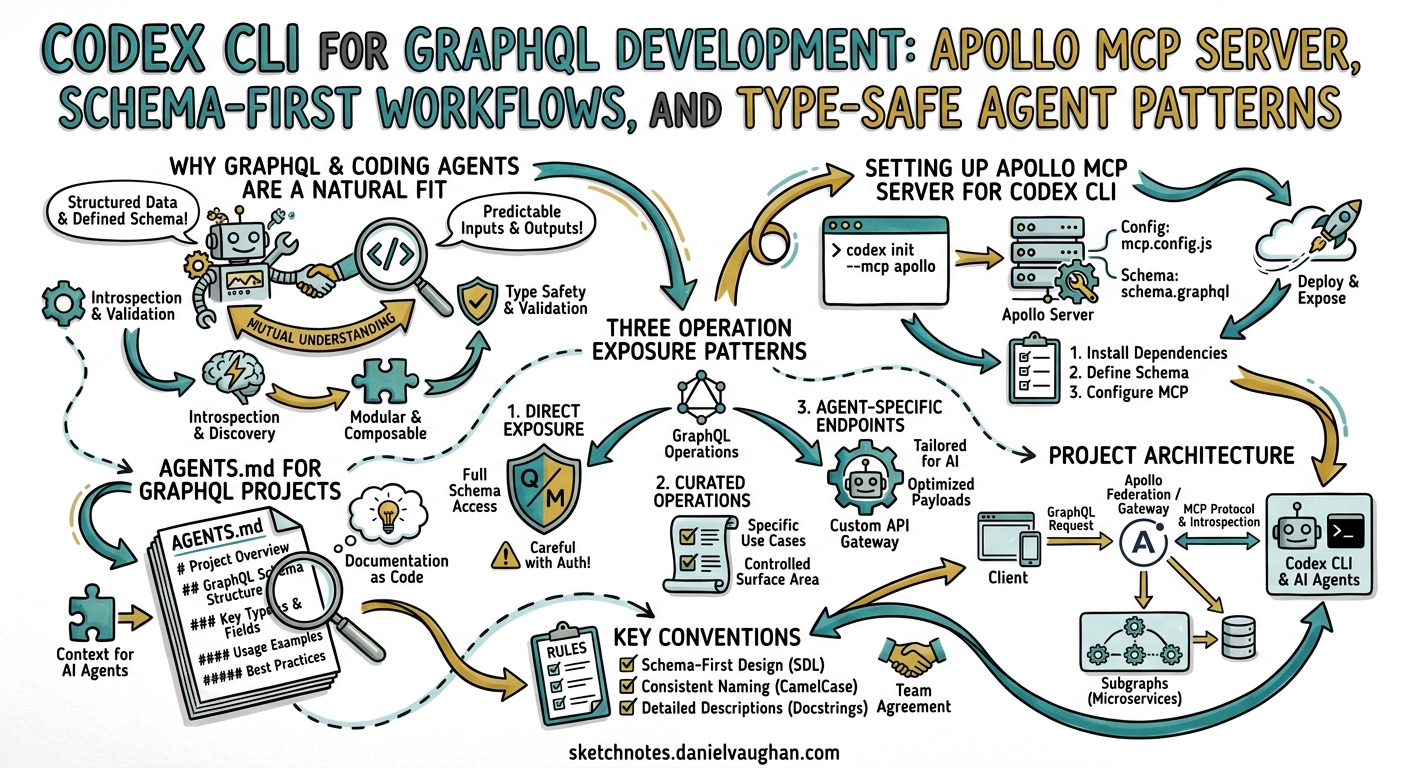
GraphQL APIs occupy an unusual position in the coding agent landscape. The typed schema, introspection capabilities, and operation-level granularity that make GraphQL powerful for humans also make it exceptionally well-suited for AI agents. An agent that can introspect a schema, validate operations before execution, and receive typed responses is an agent that makes fewer mistakes. This article covers how to wire Codex CLI into a GraphQL development workflow — from Apollo MCP Server integration to schema-first code generation and type-safe testing patterns.
Why GraphQL and Coding Agents Are a Natural Fit
GraphQL schemas are, at their core, machine-readable API contracts. Every field has a type, every argument is declared, and the introspection system exposes the entire API surface programmatically1. For Codex CLI, this means the agent can discover available data, construct valid operations, and validate responses without guesswork.
The practical benefits compound:
- Schema-as-context: feeding
schema.graphqlinto AGENTS.md gives the agent a complete map of your API surface2 - Operation validation: malformed queries fail at parse time, not at runtime — the agent gets immediate, structured feedback
- Typed code generation: tools like GraphQL Code Generator produce TypeScript types that the agent can use to write resolvers with compile-time safety3
- Demand control: Apollo Router’s cost calculation rejects expensive queries before they execute, providing a safety net for agent-generated operations4
Setting Up Apollo MCP Server for Codex CLI
Apollo MCP Server bridges your GraphQL API to any MCP-compatible agent by translating GraphQL operations into MCP tools5. Each .graphql operation file becomes a discrete tool with a typed input schema — non-null types become required parameters, nullable types and defaults become optional6.
Installation
You need Rover CLI v0.37 or later7:
rover init --mcp
Select “Create MCP tools from a new Apollo GraphOS project” and choose the connector template. Start the development server:
rover dev --supergraph-config supergraph.yaml --mcp .apollo/mcp.local.yaml
This launches GraphQL at http://localhost:4000 and the MCP server at http://127.0.0.1:8000/mcp7.
Codex CLI Configuration
Add Apollo MCP Server to your Codex config. For a stdio transport via mcp-remote:
[mcp_servers.apollo-graphql]
command = "npx"
args = ["-y", "mcp-remote", "http://127.0.0.1:8000/mcp"]
startup_timeout_sec = 15
tool_timeout_sec = 30
For direct HTTP transport (requires Codex v0.124+):
[mcp_servers.apollo-graphql]
url = "http://127.0.0.1:8000/mcp"
startup_timeout_sec = 15
tool_timeout_sec = 30
Verify the connection from the TUI with /mcp — you should see your GraphQL operations listed as available tools8.
Alternatively: Lightweight mcp-graphql
If you do not use Apollo GraphOS, the community mcp-graphql server provides direct schema introspection and query execution against any GraphQL endpoint9:
[mcp_servers.graphql]
command = "npx"
args = ["-y", "mcp-graphql"]

[mcp_servers.graphql.env]
ENDPOINT = "http://localhost:4000/graphql"
ALLOW_MUTATIONS = "false"
Mutations are disabled by default — a sensible security measure when an agent can construct arbitrary operations9.
Three Operation Exposure Patterns
Apollo MCP Server supports three patterns for controlling what your agent can do, and the choice matters for both security and agent effectiveness6:
graph TD
    A[Agent Request] --> B{Operation Source}
    B -->|Pattern 1| C[Pre-defined .graphql Files]
    B -->|Pattern 2| D[Persisted Query Manifest]
    B -->|Pattern 3| E[Dynamic Introspection]
    C --> F[Typed MCP Tool]
    D --> F
    E --> G[introspect / search / validate / execute]
    F --> H[GraphQL Endpoint]
    G --> H
    H --> I[Typed Response]

    style C fill:#2d5016,color:#fff
    style D fill:#1a3a5c,color:#fff
    style E fill:#5c1a1a,color:#fff
Pattern 1 — Pre-defined operations (recommended for mutations): each .graphql file becomes a named tool. The agent can only execute what you have explicitly approved:
# operations/GetProductById.graphql
# Retrieves a single product with pricing and inventory
query GetProductById($id: ID!) {
  product(id: $id) {
    id
    name
    description
    price
    inventory {
      available
      warehouse
    }
  }
}
Pattern 2 — Persisted queries: operations published to Apollo GraphOS with automatic safelisting via the Router manifest5.
Pattern 3 — Dynamic introspection: the agent gets four runtime tools (introspect, search, validate, execute) and can explore the schema freely6. Useful for read-only exploration but requires careful security configuration for production APIs.
Most teams combine patterns: pre-defined operations for writes, introspection for reads4.
# apollo-mcp-server.yaml
operations:
  source: local
  paths:
    - ./operations/mutations/*.graphql
introspection:
  execute:
    enabled: true
  search:
    enabled: true
overrides:
  mutation_mode: explicit
AGENTS.md for GraphQL Projects
A well-structured AGENTS.md dramatically reduces the agent’s tendency to generate malformed schemas or ignore project conventions. Here is a template for a schema-first GraphQL project:
# AGENTS.md

## Project Architecture
This is a schema-first GraphQL API using Apollo Server 4 and TypeScript.
The schema definition (`schema.graphql`) is the single source of truth.

## Key Conventions
- Schema changes go in `src/schema.graphql` FIRST, then run codegen
- Run `npm run codegen` after any schema change to regenerate types
- Resolvers live in `src/resolvers/` — one file per root type
- All resolvers MUST use generated types from `src/__generated__/resolvers-types.ts`
- Use DataLoader for N+1 prevention — never call a data source in a loop
- Every mutation must return a union with a `...Error` type for error handling

## Testing
- Run `npm test` to execute the test suite
- Integration tests use a test Apollo Server instance
- Mock data factories live in `test/factories/`

## Commands
- `npm run codegen` — regenerate TypeScript types from schema
- `npm run dev` — start dev server with hot reload
- `npm test` — run Jest test suite
- `npm run lint` — ESLint + GraphQL ESLint rules
Schema-First Development with Codex CLI
The schema-first workflow maps naturally to agentic development. The agent modifies the SDL, runs code generation, and then writes resolvers against the generated types — each step producing verifiable output.
Step 1: Schema Evolution
Prompt Codex to extend the schema:
Add a `reviews` field to the Product type. Each review has an id, author (String!),
rating (Int!, 1-5), body (String), and createdAt (DateTime!). Add a createReview
mutation that requires productId, author, rating, and optional body.
The agent edits schema.graphql and can validate the result against GraphQL ESLint rules.
Step 2: Type Generation
After schema changes, the agent runs code generation to produce typed resolver signatures3:
npx graphql-codegen --config codegen.ts
A codegen.ts configuration for a typical project:
# codegen.ts (referenced in package.json scripts)
import type { CodegenConfig } from '@graphql-codegen/cli';

const config: CodegenConfig = {
  schema: './src/schema.graphql',
  generates: {
    './src/__generated__/resolvers-types.ts': {
      plugins: ['typescript', 'typescript-resolvers'],
      config: {
        useIndexSignature: true,
        contextType: '../context#GraphQLContext',
        mappers: {
          Product: '../models/Product#ProductModel',
          Review: '../models/Review#ReviewModel',
        },
      },
    },
  },
};

export default config;
The mappers configuration is critical — it tells the code generator that your database models differ from your GraphQL types, ensuring the agent writes resolvers that correctly map between them10.
Step 3: Resolver Implementation
With generated types in place, the agent writes resolvers with full type safety:
import { Resolvers } from '../__generated__/resolvers-types';

export const productResolvers: Resolvers = {
  Product: {
    reviews: async (parent, _args, { dataSources }) => {
      return dataSources.reviewsAPI.getByProductId(parent.id);
    },
  },
  Mutation: {
    createReview: async (_parent, { input }, { dataSources }) => {
      const review = await dataSources.reviewsAPI.create(input);
      return { __typename: 'CreateReviewSuccess', review };
    },
  },
};
TypeScript will flag any mismatches between the resolver return types and the schema — the agent gets compile-time feedback rather than runtime surprises.
Enforcing the Workflow with Hooks
Use a post_tool_use hook to automatically run codegen after schema file changes11:
[[hooks.post_tool_use]]
event = "post_tool_use"
tool_names = ["apply_patch"]
command = "bash -c 'if git diff --name-only | grep -q schema.graphql; then npm run codegen; fi'"
This ensures the agent always works against current types — a common failure mode is editing a schema without regenerating, leading to resolvers that type-check against stale definitions.
Security Hardening for Agent-Generated GraphQL
Agents can construct expensive or dangerous operations if left unchecked. Layer your defences:
graph LR
    A[Agent Operation] --> B[Schema Validation]
    B --> C[Demand Control Cost Check]
    C --> D{Cost Acceptable?}
    D -->|Yes| E[Execution]
    D -->|No| F[Rejection with Cost Feedback]
    E --> G[Response]

    style D fill:#5c4b1a,color:#fff
    style F fill:#5c1a1a,color:#fff
- Mutation mode: set
mutation_mode: explicitin Apollo MCP Server config — agents can only execute mutations you have pre-defined as.graphqlfiles4 - Demand control: use
@costand@listSizedirectives on your schema to assign execution costs to fields and list types4 - Codex sandbox permissions: restrict network access to localhost only for development:
[sandbox]
allow_network = ["localhost:4000"]
- Operation depth limiting: configure your GraphQL server to reject queries beyond a maximum depth — prevents the agent from constructing deeply nested operations that could cause performance issues
Testing GraphQL with Codex CLI
GraphQL’s typed nature makes agent-generated tests more reliable than for REST APIs. The agent can generate test data that conforms to the schema types and validate responses against the same types.
Integration Test Pattern
import { ApolloServer } from '@apollo/server';
import { typeDefs, resolvers } from '../src/schema';
import { createTestContext } from './helpers';

describe('Product Reviews', () => {
  let server: ApolloServer;

  beforeAll(() => {
    server = new ApolloServer({ typeDefs, resolvers });
  });

  it('creates a review and retrieves it', async () => {
    const context = createTestContext();

    const createResult = await server.executeOperation({
      query: `mutation CreateReview($input: CreateReviewInput!) {
        createReview(input: $input) {
          ... on CreateReviewSuccess { review { id rating } }
          ... on ValidationError { message field }
        }
      }`,
      variables: {
        input: { productId: 'prod-1', author: 'Alice', rating: 5 },
      },
    }, { contextValue: context });

    expect(createResult.body.singleResult.data?.createReview.__typename)
      .toBe('CreateReviewSuccess');
  });
});
Using codex exec for Schema Validation in CI
Run schema compatibility checks as part of your CI pipeline:
codex exec \
  --model gpt-5.3-codex-spark \
  --approval-mode full-auto \
  "Check schema.graphql for breaking changes against the main branch version. \
   Report any removed fields, changed types, or removed arguments." \
  --output-schema ./schemas/breaking-changes.json \
  -o ./reports/schema-check.json
⚠️ Note: --output-schema and MCP tools cannot be used simultaneously in the same codex exec invocation due to a known limitation (#15451)12.
Model Selection for GraphQL Tasks
Different GraphQL tasks benefit from different model and reasoning configurations:
| Task | Model | Reasoning | Rationale |
|---|---|---|---|
| Schema design | GPT-5.5 | High | Domain modelling requires deep reasoning about relationships |
| Resolver implementation | GPT-5.5 | Medium | Straightforward with generated types |
| Test generation | GPT-5.3-Codex-Spark | Low | Fast iteration, type-safe patterns are templatable |
| Schema migration scripts | GPT-5.5 | High | Breaking change analysis needs careful reasoning |
| Documentation generation | GPT-5.3-Codex-Spark | Low | Mechanical extraction from schema + resolvers |
Adjust reasoning effort with Alt+, and Alt+. in the TUI, or via --reasoning-effort in codex exec13.
Common Pitfalls
N+1 queries in resolvers: agents frequently generate resolvers that call a data source inside a loop. Include DataLoader guidance in AGENTS.md and enforce it with a post_tool_use hook that greps for obvious patterns.
Stale generated types: if the agent edits schema.graphql but the hook fails to run codegen, subsequent resolver edits will use outdated types. Make codegen a required step in your testing flow.
Over-broad introspection access: giving the agent full dynamic introspection on a production API is equivalent to giving it full API access. Use pre-defined operations for anything beyond local development.
Schema drift between services: in a federated GraphQL architecture, changes to one subgraph can break composition. Use rover subgraph check in your CI pipeline before merging agent-generated schema changes.