Database Schema Migrations with Codex CLI: Atlas Skills, ORM Workflows, and Agent-Driven Migration Pipelines
Database Schema Migrations with Codex CLI: Atlas Skills, ORM Workflows, and Agent-Driven Migration Pipelines
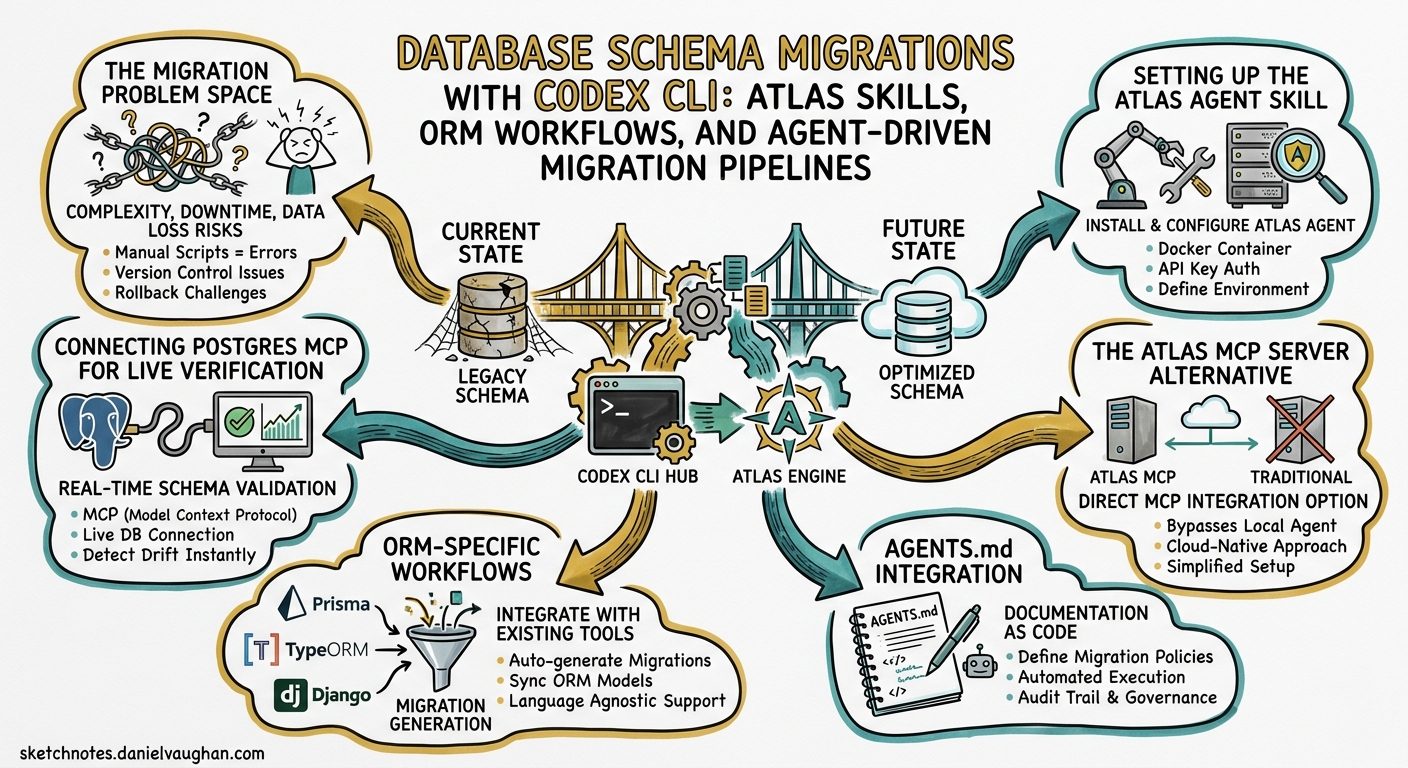
Database schema migrations sit at an uncomfortable intersection: they demand precision (a wrong column drop is irreversible), context awareness (what does the ORM expect?), and multi-step orchestration (generate, lint, test, apply). This makes them an ideal candidate for agent-driven workflows — provided the agent has the right tooling. This article covers how to wire Codex CLI into a robust migration pipeline using Atlas agent skills, ORM-specific patterns, and Postgres MCP for live schema verification.
The Migration Problem Space
Manual migration workflows typically involve editing a schema file, running a CLI command to generate SQL, eyeballing the diff, and hoping the CI environment matches production. The failure modes are well-documented: forgotten --dry-run flags, schema drift between environments, and migrations that lint clean but deadlock under load.
Codex CLI addresses this through three layers:
- Skills — the Atlas agent skill packages migration expertise as context-aware instructions that activate only when relevant 1.
- MCP servers — a Postgres MCP server gives the agent direct database access for schema inspection and migration verification 2.
- Hooks —
PostToolUsehooks enforce validation gates (lint, dry-run) before any migration reaches production 3.
flowchart TD
    A[Developer prompt:<br/>'Add a users table with email unique constraint'] --> B[Codex CLI]
    B --> C{Atlas skill<br/>activated?}
    C -->|Yes| D[Read atlas.hcl<br/>environment config]
    C -->|No| E[Fall back to<br/>ORM-native commands]
    D --> F[atlas schema inspect<br/>current state]
    F --> G[Edit schema files]
    G --> H[atlas schema validate]
    H --> I[atlas migrate diff]
    I --> J[atlas migrate lint]
    J --> K{Lint<br/>passes?}
    K -->|Yes| L[atlas migrate apply<br/>--dry-run]
    K -->|No| M[Fix issues<br/>and retry]
    M --> I
    L --> N[Postgres MCP:<br/>verify applied state]
    N --> O[Commit migration files]
    E --> P[ORM generate<br/>migration]
    P --> Q[ORM apply<br/>with verification]
    Q --> O
Setting Up the Atlas Agent Skill
Atlas provides a purpose-built agent skill that packages migration commands, safety rules, and ORM integration guidance into a single SKILL.md file 1. Unlike dumping instructions into AGENTS.md, skills activate through implicit invocation — Codex loads them only when your prompt matches database or migration keywords, keeping the context window clean for non-database work 4.
Installation
Create the skill directory and download the official skill definition:
mkdir -p ~/.codex/skills/atlas/references
# Download the official Atlas skill
curl -sL https://atlasgo.io/guides/ai-tools/agent-skills \
  -o ~/.codex/skills/atlas/SKILL.md
For team-wide consistency, commit the skill to your repository:
mkdir -p .agents/skills/atlas
cp ~/.codex/skills/atlas/SKILL.md .agents/skills/atlas/
Codex scans .agents/skills in the working directory first, then walks up to the repository root, then checks $HOME/.agents/skills, and finally falls back to system-level skills at /etc/codex/skills 4.
Skill Anatomy
The Atlas skill includes YAML front matter that controls implicit matching:
---
name: atlas-database-migration
description: >
  Generate, validate, lint, test, and apply database schema migrations
  using Atlas. Activate when working with atlas.hcl, schema.hcl,
  migration directories, or any database schema change request.
---
The description is critical — it determines whether Codex automatically selects this skill when you say “add an email column” versus “write a function” 4. Front-load trigger words (migration, schema, database) to improve matching accuracy.
Connecting Postgres MCP for Live Verification
Skills provide instructions; MCP provides tooling. The @modelcontextprotocol/server-postgres package gives Codex direct database access for inspecting schemas, running verification queries, and confirming migration state 2.
Registration
codex mcp add postgres-dev -- \
  npx -y @modelcontextprotocol/server-postgres \
  "postgresql://${PGUSER}:${PGPASSWORD}@localhost:5432/${PGDATABASE}"
Verify registration:
codex mcp list
# Look for: postgres-dev  Status: enabled
For project-scoped configuration, add the server to your config.toml:
[mcp_servers.postgres-dev]
command = "npx"
args = ["-y", "@modelcontextprotocol/server-postgres"]
env = { DATABASE_URL = "${DATABASE_URL}" }
Security Considerations
Never embed credentials directly in configuration files or command arguments. Use environment variables via getenv() in atlas.hcl and ${VAR} interpolation in config.toml 1 2. For Docker-based development databases, use Docker network hostnames (db-service:5432) rather than exposing ports to the host 2.
The Atlas MCP Server Alternative
For teams that prefer MCP over skills, the community-maintained mcp-atlas server wraps six Atlas commands as MCP tools 5:
| Tool | Purpose |
|---|---|
migrate-apply |
Apply pending migrations |
migrate-diff |
Generate migrations from schema diff |
migrate-lint |
Analyse migration directory for issues |
migrate-new |
Create empty migration files |
migrate-status |
Report current migration state |
migrate-validate |
Check directory integrity |
[mcp_servers.atlas]
command = "npx"
args = ["-y", "@mpreziuso/mcp-atlas"]
The skill-based approach is generally preferable for Codex CLI because skills carry richer context (ORM integration guidance, security rules, workflow decision trees) that MCP tool descriptions cannot encode 1 5. Use the MCP server as a complement when you want tool-level granularity in approval mode — each migrate-apply call triggers a separate approval prompt.
ORM-Specific Workflows
Atlas supports external schema sources, meaning it can read your ORM’s schema definitions and generate migrations from them 1. This eliminates the dual-maintenance problem where you update both ORM models and raw SQL.
Drizzle (TypeScript)
Drizzle’s code-first approach makes it a natural fit for agent-driven workflows — the TypeScript schema is the source of truth 6.
# atlas.hcl
data "external_schema" "drizzle" {
  program = ["npx", "drizzle-kit", "export"]
}

env "development" {
  src = data.external_schema.drizzle.url
  dev = "docker://postgres/16/dev?search_path=public"
  migration {
    dir = "file://drizzle/migrations"
  }
}
Agent prompt pattern:
Add a `last_login_at` timestamp column to the users table.
Use the Drizzle schema as source of truth and generate an Atlas migration.
Lint it and show me the dry-run output before applying.
Prisma
Prisma’s schema-first model requires an export step to feed Atlas 7:
data "external_schema" "prisma" {
  program = ["npx", "prisma-atlas-provider"]
}

env "development" {
  src = data.external_schema.prisma.url
  dev = "docker://postgres/16/dev?search_path=public"
  migration {
    dir = "file://prisma/migrations"
  }
}
⚠️ The prisma-atlas-provider package bridges Prisma’s .prisma schema format to Atlas. Verify compatibility with your Prisma version — the provider tracks Prisma releases but may lag behind major versions.
SQLAlchemy (Python)
data "external_schema" "sqlalchemy" {
  program = ["python", "-m", "atlas_provider_sqlalchemy", "models.py"]
}

env "development" {
  src = data.external_schema.sqlalchemy.url
  dev = "docker://postgres/16/dev?search_path=public"
  migration {
    dir = "file://migrations"
  }
}
The atlas-provider-sqlalchemy package reads SQLAlchemy model definitions and emits Atlas-compatible schema 1.
Django
Django projects use the atlas-provider-django external schema:
data "external_schema" "django" {
  program = [
    "python", "manage.py", "atlas-provider-django",
    "--dialect", "postgresql"
  ]
}
AGENTS.md Integration
Add migration-specific guidance to your project’s AGENTS.md to complement the Atlas skill:
## Database Migrations

- Schema source of truth: `src/db/schema.ts` (Drizzle)
- Migration directory: `drizzle/migrations/`
- Configuration: `atlas.hcl` (read this FIRST before any migration work)
- Dev database: Docker PostgreSQL 16 via `docker compose up db`
- ALWAYS run `atlas migrate lint` before committing migration files
- ALWAYS use `--dry-run` before applying to any non-local environment
- Migration names must follow: `YYYYMMDD_HHMMSS_description`
This gives Codex project-specific context that the generic Atlas skill cannot provide — your team’s naming conventions, which ORM you use, and where the configuration lives 8.
PostToolUse Hooks for Migration Safety
Hooks transform best practices from “hope the agent remembers” to “enforce automatically” 3. A PostToolUse hook can intercept shell commands and enforce lint/validation gates:
#!/usr/bin/env bash
# .codex/hooks/post-tool-use-migration-lint.sh
# Runs after any atlas migrate diff command

if echo "$CODEX_TOOL_ARGS" | grep -q "atlas migrate diff"; then
  echo "Running migration lint..."
  atlas migrate lint --env development --latest 1
  if [ $? -ne 0 ]; then
    echo "MIGRATION LINT FAILED — fix issues before proceeding"
    exit 1
  fi
  echo "Lint passed. Running dry-run..."
  atlas migrate apply --env development --dry-run
fi
Register the hook in your config.toml:
[[hooks.post_tool_use]]
command = ".codex/hooks/post-tool-use-migration-lint.sh"
match_tools = ["shell"]
Headless Migration Pipeline
For CI/CD, use codex exec to run migration workflows non-interactively 9:
# Generate and validate a migration in CI
codex exec \
  --approval-mode full-auto \
  --sandbox-mode network-off \
  "Read atlas.hcl, inspect the current schema, generate a migration \
   for the changes in this PR, lint it, and output the dry-run result. \
   If lint fails, fix the migration and retry."
Combine with the Atlas skill and Postgres MCP for a fully automated pipeline:
sequenceDiagram
    participant CI as CI Pipeline
    participant CX as codex exec
    participant SK as Atlas Skill
    participant DB as Postgres MCP

    CI->>CX: Trigger on PR with schema changes
    CX->>SK: Activate atlas-database-migration skill
    SK->>CX: Load migration instructions
    CX->>DB: atlas schema inspect (current state)
    DB-->>CX: Current schema DDL
    CX->>CX: atlas migrate diff (generate migration)
    CX->>CX: atlas migrate lint (validate)
    alt Lint fails
        CX->>CX: Auto-fix and regenerate
    end
    CX->>DB: atlas migrate apply --dry-run
    DB-->>CX: Dry-run output
    CX-->>CI: Migration files + validation report
Model Selection for Migration Tasks
Migration work involves two distinct phases with different compute profiles:
| Phase | Recommended Model | Reasoning |
|---|---|---|
| Schema design, complex ALTER strategies | gpt-5.5 |
Requires deep reasoning about constraints, indices, and data preservation 10 |
| Routine column additions, lint fixes | gpt-5.3-codex-spark |
Fast, cost-effective for mechanical changes 10 |
| Migration review and verification | o4-mini |
Strong at spotting logical errors in SQL 10 |
Configure model selection in config.toml:
[model]
default = "gpt-5.3-codex-spark"

[profiles.schema-design]
model = "gpt-5.5"
Switch profiles per session: codex --profile schema-design.
Common Pitfalls
| Pitfall | Symptom | Fix |
|---|---|---|
| Wrong dev database scope | Extensions silently dropped | Use docker://postgres/16/dev (database-scoped) for PostGIS/pgvector 1 |
Missing migrate hash after manual edit |
Atlas refuses to apply | Run atlas migrate hash after any hand-edit to migration files 1 |
| Credentials in LLM context | Security risk | Always use getenv() in atlas.hcl, never inline URLs 1 |
| Skill not activating | Agent ignores Atlas workflow | Check skill description matches your prompt; use explicit $atlas invocation 4 |
| Docker network mismatch | MCP cannot reach database | Use Docker network hostnames, not localhost, when MCP runs in a container 2 |
Conclusion
Database migrations benefit enormously from agent-driven orchestration — the generate-lint-test-apply sequence is mechanical enough for automation but consequential enough to demand guardrails. The combination of Atlas skills (for workflow expertise), Postgres MCP (for live database access), and PostToolUse hooks (for enforcement) creates a pipeline where the agent does the repetitive work whilst the developer retains control over the irreversible bits. Start with the Atlas skill and AGENTS.md guidance, add Postgres MCP when you need live verification, and layer in hooks as your confidence grows.
Citations
-
Atlas, “Database Schema Migration Skill for AI Agents,” atlasgo.io, 2026. https://atlasgo.io/guides/ai-tools/agent-skills ↩ ↩2 ↩3 ↩4 ↩5 ↩6 ↩7 ↩8 ↩9
-
Greycloak, “Creating and Using Postgres MCP with Codex,” greycloak.com, February 2026. https://greycloak.com/post/2026-02-20-creating-and-using-mcp-postres/ ↩ ↩2 ↩3 ↩4 ↩5
-
OpenAI, “Features — Codex CLI,” developers.openai.com, 2026. https://developers.openai.com/codex/cli/features ↩ ↩2
-
OpenAI, “Agent Skills — Codex,” developers.openai.com, 2026. https://developers.openai.com/codex/skills ↩ ↩2 ↩3 ↩4
-
Michele Preziuso, “mcp-atlas: An MCP server for Ariga Atlas,” github.com, 2026. https://github.com/mpreziuso/mcp-atlas ↩ ↩2
-
Drizzle Team, “Migrations with Drizzle Kit,” orm.drizzle.team, 2026. https://orm.drizzle.team/docs/kit-overview ↩
-
Prisma, “Prisma ORM Documentation,” prisma.io, 2026. https://www.prisma.io/docs ↩
-
OpenAI, “Best Practices — Codex,” developers.openai.com, 2026. https://developers.openai.com/codex/learn/best-practices ↩
-
OpenAI, “CLI — Codex,” developers.openai.com, 2026. https://developers.openai.com/codex/cli ↩
-
OpenAI, “Models — Codex,” developers.openai.com, 2026. https://developers.openai.com/codex/models ↩ ↩2 ↩3