Task Decomposition for Codex CLI: Right-Sizing Agent Work for Reliability, Speed, and Cost
Task Decomposition for Codex CLI: Right-Sizing Agent Work for Reliability, Speed, and Cost
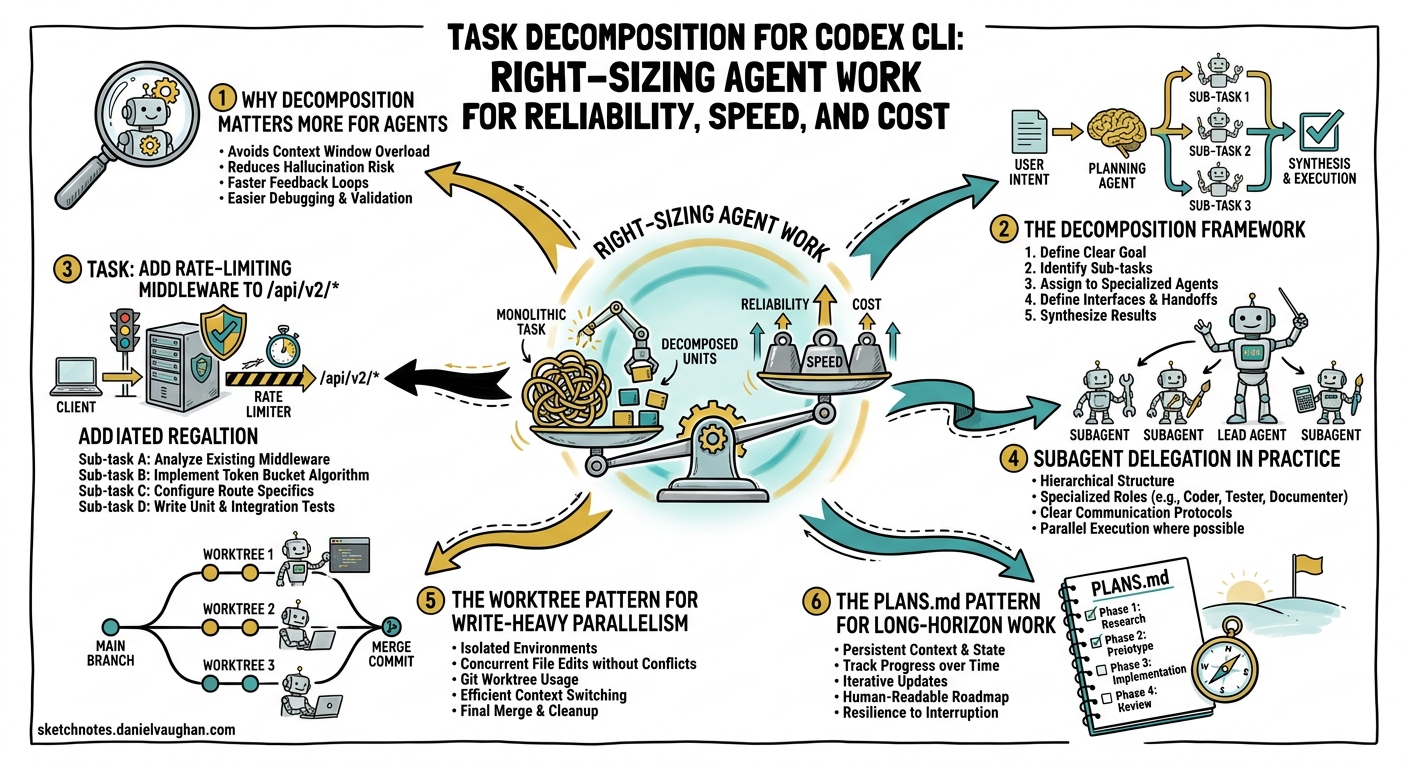
The single biggest determinant of whether a Codex CLI session succeeds or spirals into wasted tokens is not the model you pick — it is how you scope the work you hand to the agent. OpenAI’s own best practices page states it bluntly: “Using one thread per project instead of one thread per task … leads to bloated context and worse results over time.”1 Yet most practitioners still drop an entire feature request into a single prompt and hope for the best.
This article provides a systematic framework for decomposing developer work into agent-friendly units, drawing on OpenAI’s long-horizon task guidance2, the subagents documentation3, Addy Osmani’s multi-agent orchestration research4, and community patterns that have emerged since GPT-5.5 shipped on 23 April 20265.
Why Decomposition Matters More for Agents
Human developers context-switch constantly — reading a file, running a test, checking a ticket — but they carry the project’s gestalt in long-term memory. An LLM-backed agent has no such luxury. Its entire world is the context window, and that window has a fixed budget: 400K tokens for GPT-5.5 in Codex, 1M via the raw API5. Every file read, every tool result, every prior turn consumes budget that cannot be reclaimed without compaction6.
Research from early 2026 confirms the intuition: “Results will tend to be better when the context window is ‘less full’“7. Coding agents function as long-context processors that dynamically adjust strategy based on task demands8, but signal-to-noise ratio degrades as irrelevant context accumulates. Decomposition is the primary lever for keeping that ratio high.
graph TD
    A[Large Vague Task] -->|monolithic session| B[Context Bloat]
    B --> C[Hallucination & Drift]
    B --> D[High Token Cost]
    B --> E[Difficult Review]
    A -->|decompose| F[Scoped Unit 1]
    A -->|decompose| G[Scoped Unit 2]
    A -->|decompose| H[Scoped Unit 3]
    F --> I[Clean Context]
    G --> I
    H --> I
    I --> J[Higher Accuracy]
    I --> K[Parallel Execution]
    I --> L[Easier Review]
Three concrete benefits fall out of disciplined decomposition:
- Reliability — smaller, well-defined tasks produce verifiable outputs. The agent can run tests, check types, and confirm “done” before the session ends1.
- Speed — independent units run in parallel via subagents or worktrees, collapsing wall-clock time3.
- Cost — fewer wasted tokens on irrelevant context, higher prompt-cache hit rates, and the option to route simple subtasks to cheaper models like
gpt-5.4-miniorgpt-5.3-codex-spark9.
The Decomposition Framework
Step 1: Define “Done” Before Anything Else
Every unit of work needs an unambiguous acceptance criterion the agent can verify programmatically. OpenAI’s best practices recommend including four elements in every prompt: Goal, Context, Constraints, and Done when1.
## Task: Add rate-limiting middleware to /api/v2/*

**Goal:** Implement sliding-window rate limiting (100 req/min per API key).
**Context:** Express 5.x, Redis for state, existing auth middleware in src/middleware/auth.ts.
**Constraints:** No new npm dependencies beyond ioredis (already installed). British English in comments.
**Done when:** `npm test` passes, new tests cover 429 responses, `npm run lint` clean.
If you cannot write a concrete “done when” clause, the task is too vague to hand to an agent. Use plan mode (/plan) to have Codex interview you first1.
Step 2: Apply the Task-Sizing Heuristic
Not every task should be a separate session. Decomposing too aggressively introduces coordination overhead. The sweet spot depends on three variables:
| Factor | Keep Together | Split Apart |
|---|---|---|
| File scope | Changes touch 1–3 tightly coupled files | Changes span 5+ loosely related files |
| Verification | Single test suite validates the change | Multiple independent test suites needed |
| Context dependency | Each step depends on the previous step’s output | Steps are independent and parallelisable |
| Token budget | Estimated context stays under ~100K tokens | Context likely exceeds 150K tokens |
A practical rule of thumb: if you would review the change as a single pull request, it is probably a single agent task. If it would naturally split into multiple PRs, split the agent work too.
Step 3: Choose a Decomposition Axis
Most developer work decomposes along one of four axes:
By layer — frontend, API, database, infrastructure. Each layer has distinct tooling, test suites, and file patterns. This is the natural axis for full-stack features.
By feature slice — vertical slices that cut across layers but implement one user-facing behaviour. This suits iterative product development where each slice ships independently.
By phase — explore, plan, implement, test, document. The PLANS.md / ExecPlan pattern formalises this axis for long-horizon work2. Each phase can run in a separate session or as a milestone within a single long session.
By service — in microservice architectures, each service boundary is a natural decomposition point. Use --add-dir to scope the agent to one service’s directory10.
flowchart LR
    subgraph "Decomposition Axes"
        direction TB
        L["By Layer\n(frontend / API / DB)"]
        F["By Feature Slice\n(vertical cuts)"]
        P["By Phase\n(explore → plan → build → test)"]
        S["By Service\n(service boundaries)"]
    end
    T[Feature Request] --> L
    T --> F
    T --> P
    T --> S
Step 4: Map Units to Execution Strategy
Once you have a set of scoped tasks, decide how each runs:
| Strategy | When to Use | Codex Primitive |
|---|---|---|
| Sequential sessions | Tasks depend on each other’s output | codex resume <SESSION_ID> |
| Parallel subagents | Read-heavy or independently writable tasks | Prompt: “spawn two agents, one per module”3 |
| Parallel worktrees | Write-heavy tasks that modify different branches | git worktree add + separate codex processes11 |
| Hierarchical delegation | Large projects needing coordination layers | Custom agent definitions in .codex/agents/12 |
Subagent Delegation in Practice
Codex does not spawn subagents automatically — you must ask for them explicitly3. A well-structured delegation prompt clarifies three things: the work division, whether to wait for all agents, and what summaries to return.
# Interactive TUI prompt
"Spawn three subagents in parallel:
 1. Agent A: audit src/auth/ for OWASP Top 10 issues, return a markdown table of findings.
 2. Agent B: run the test suite in tests/integration/ and summarise any failures.
 3. Agent C: scan package.json for dependencies with known CVEs using npm audit.
 Wait for all three, then synthesise a single risk report."
Model Selection per Subagent
Not every subtask needs the frontier model. The subagents documentation recommends3:
gpt-5.5— complex reasoning, multi-step implementation, security reviewgpt-5.4-mini— fast scans, boilerplate generation, log analysisgpt-5.3-codex-spark— latency-critical text work where speed matters more than depth
Configure per-agent model selection in .codex/agents/:
# .codex/agents/scanner.toml
name = "scanner"
model = "gpt-5.4-mini"
reasoning_effort = "low"
instructions = """
You are a fast code scanner. Read files, identify patterns, return structured findings.
Do not modify any files.
"""
Subagent Configuration
Control parallel execution in config.toml12:
[agents]
max_threads = 6        # concurrent subagent cap
max_depth = 2          # prevent recursive delegation
job_max_runtime_seconds = 300  # timeout per worker
The Worktree Pattern for Write-Heavy Parallelism
When multiple tasks need to modify files simultaneously, subagents sharing a single working directory will create conflicts. The community has converged on git worktrees as the isolation layer1113.
# Create isolated worktrees for parallel agent work
git worktree add ../feature-auth feature/auth
git worktree add ../feature-search feature/search
git worktree add ../feature-export feature/export

# Launch agents in parallel (tmux or separate terminals)
cd ../feature-auth && codex exec --full-auto \
  "Implement JWT refresh token rotation per spec in docs/auth-spec.md"

cd ../feature-search && codex exec --full-auto \
  "Add full-text search to the products endpoint using pg_trgm"

cd ../feature-export && codex exec --full-auto \
  "Implement CSV export for the /reports endpoint"
Each worktree shares the .git object database but has its own working directory, HEAD, and staging area — preventing the index-lock contention that plagued early multi-agent setups13.
sequenceDiagram
    participant O as Orchestrator
    participant W1 as Worktree: auth
    participant W2 as Worktree: search
    participant W3 as Worktree: export
    participant M as Main Branch

    O->>W1: codex exec "Implement auth refresh"
    O->>W2: codex exec "Add search endpoint"
    O->>W3: codex exec "Build CSV export"
    Note over W1,W3: Parallel execution — no conflicts
    W1-->>O: PR #101
    W2-->>O: PR #102
    W3-->>O: PR #103
    O->>M: Merge PRs sequentially
The PLANS.md Pattern for Long-Horizon Work
For tasks that exceed a single session — multi-day refactors, framework migrations, new feature epics — OpenAI’s cookbook recommends the ExecPlan pattern2. Four markdown files create a durable project memory that survives compaction and session boundaries:
| File | Purpose | Updated By |
|---|---|---|
Prompt.md |
Frozen specification — goals, constraints, “done when” | Human |
Plan.md |
Ordered milestones with acceptance criteria | Agent (human-approved) |
Implement.md |
Operational runbook — how to work, when to validate | Human |
Documentation.md |
Living status log — current milestone, decisions, blockers | Agent |
The key insight is that milestones replace monolithic task descriptions. Each milestone is independently verifiable, creating natural checkpoints where the agent validates its work before proceeding2.
# Kick off a long-horizon task with plan mode
codex --full-auto \
  "Read Prompt.md and Plan.md. Follow Implement.md exactly. \
   Start from the first incomplete milestone in Documentation.md. \
   After completing each milestone, run the acceptance tests listed \
   in Plan.md before proceeding to the next."
Anti-Patterns to Avoid
The Kitchen-Sink Prompt
Dumping an entire feature specification, database schema, API contract, and UI mockup into a single prompt. The agent spends tokens processing irrelevant context and produces unfocused output.
Fix: split by decomposition axis. Hand the API contract to one session and the UI implementation to another.
Premature Parallelisation
Spawning five subagents for tasks that have sequential dependencies. Agent B needs Agent A’s output but starts before it is available, leading to hallucinated assumptions.
Fix: map dependencies explicitly. Only parallelise tasks where the dependency graph has no edges between them.
Over-Decomposition
Breaking a three-file change into nine separate sessions, then spending more time coordinating and reviewing than the work itself would have taken.
Fix: apply the sizing heuristic. If it is one PR, it is one session.
Context Hoarding
Keeping a session alive across unrelated tasks because it “already knows the codebase”. Accumulated context from Task A pollutes reasoning about Task B.
Fix: one thread per coherent unit of work. Use /fork only when work truly branches from a shared starting point1.
Putting It Together: A Worked Example
Suppose you need to add a new “Teams” feature to a SaaS application: database schema, API endpoints, frontend components, permissions, and tests.
Step 1 — Define units:
| Unit | Axis | Files | Dependencies |
|---|---|---|---|
| Schema migration | Layer | migrations/, src/models/ |
None |
| API endpoints | Layer | src/routes/teams/, src/services/ |
Schema |
| Permission rules | Feature | src/middleware/rbac.ts |
Schema |
| Frontend components | Layer | src/components/teams/ |
API |
| Integration tests | Phase | tests/integration/teams/ |
API + Permissions |
Step 2 — Execution plan:
graph TD
    A[Schema Migration] --> B[API Endpoints]
    A --> C[Permission Rules]
    B --> D[Frontend Components]
    B --> E[Integration Tests]
    C --> E
Schema runs first (sequential). API and permissions run in parallel (worktrees). Frontend and integration tests run after their dependencies complete.
Step 3 — Execute:
# Phase 1: Schema (single session)
codex exec --full-auto "Create Teams schema migration per docs/teams-spec.md. \
  Run 'npm run migrate' and 'npm test -- --grep teams' to validate."

# Phase 2: API + Permissions (parallel worktrees)
git worktree add ../teams-api feature/teams-api
git worktree add ../teams-rbac feature/teams-rbac

cd ../teams-api && codex exec --full-auto \
  "Implement Teams CRUD endpoints per docs/teams-api-spec.md. \
   Run tests. Lint clean."

cd ../teams-rbac && codex exec --full-auto \
  "Add Teams permission rules to RBAC middleware per docs/teams-rbac-spec.md. \
   Run 'npm test -- --grep rbac' to validate."

# Phase 3: Frontend + Integration (after merging Phase 2)
git worktree add ../teams-fe feature/teams-fe
cd ../teams-fe && codex exec --full-auto \
  "Build Teams UI components per Figma export in docs/teams-mockups/. \
   Run 'npm run test:components' to validate."
Key Takeaways
- One thread per coherent unit of work — not per project, not per file. Match session scope to PR scope.
- Define “done when” before starting — if the agent cannot verify completion programmatically, the task is not ready for delegation.
- Parallelise reads, serialise writes — subagents for exploration and analysis, worktrees for concurrent implementation.
- Route subtasks to appropriate models — use GPT-5.5 for complex reasoning, Spark or mini for fast scans, and save tokens on both axes.
- Use PLANS.md for anything exceeding a single session — durable project memory survives compaction and provides human-reviewable checkpoints.
Task decomposition is not overhead — it is the engineering discipline that turns a powerful but bounded language model into a reliable development partner.
Citations
-
OpenAI, “Best practices — Codex,” https://developers.openai.com/codex/learn/best-practices ↩ ↩2 ↩3 ↩4 ↩5
-
OpenAI Cookbook, “Using PLANS.md for multi-hour problem solving,” https://developers.openai.com/cookbook/articles/codex_exec_plans ↩ ↩2 ↩3 ↩4
-
OpenAI, “Subagents — Codex,” https://developers.openai.com/codex/concepts/subagents ↩ ↩2 ↩3 ↩4 ↩5
-
Addy Osmani, “The Code Agent Orchestra — what makes multi-agent coding work,” https://addyosmani.com/blog/code-agent-orchestra/ ↩
-
OpenAI, “Introducing GPT-5.5,” https://openai.com/index/introducing-gpt-5-5/ ↩ ↩2
-
OpenAI, “Features — Codex CLI,” https://developers.openai.com/codex/cli/features ↩
-
Zylos Research, “Long-Running AI Agents and Task Decomposition 2026,” https://zylos.ai/research/2026-01-16-long-running-ai-agents ↩
-
Wang et al., “Coding Agents are Effective Long-Context Processors,” arXiv:2603.20432, March 2026, https://arxiv.org/html/2603.20432v1 ↩
-
OpenAI, “Codex CLI Changelog — v0.125.0,” https://developers.openai.com/codex/changelog ↩
-
OpenAI, “Command line options — Codex CLI,” https://developers.openai.com/codex/cli/reference ↩
-
Particula Tech, “Run Parallel Coding Agents With the oh-my-codex Pattern,” https://particula.tech/blog/parallel-coding-agents-worktree-pattern-oh-my-codex ↩ ↩2
-
OpenAI, “Subagents — Configuration,” https://developers.openai.com/codex/subagents ↩ ↩2
-
Penligent AI, “Git Worktrees Need Runtime Isolation for Parallel AI Agent Development,” https://www.penligent.ai/hackinglabs/git-worktrees-need-runtime-isolation-for-parallel-ai-agent-development/ ↩ ↩2