Codex CLI for Rust Development Teams: rust-analyzer MCP, Cargo Hooks, and Agent-Driven Workflows
Codex CLI for Rust Development Teams: rust-analyzer MCP, Cargo Hooks, and Agent-Driven Workflows
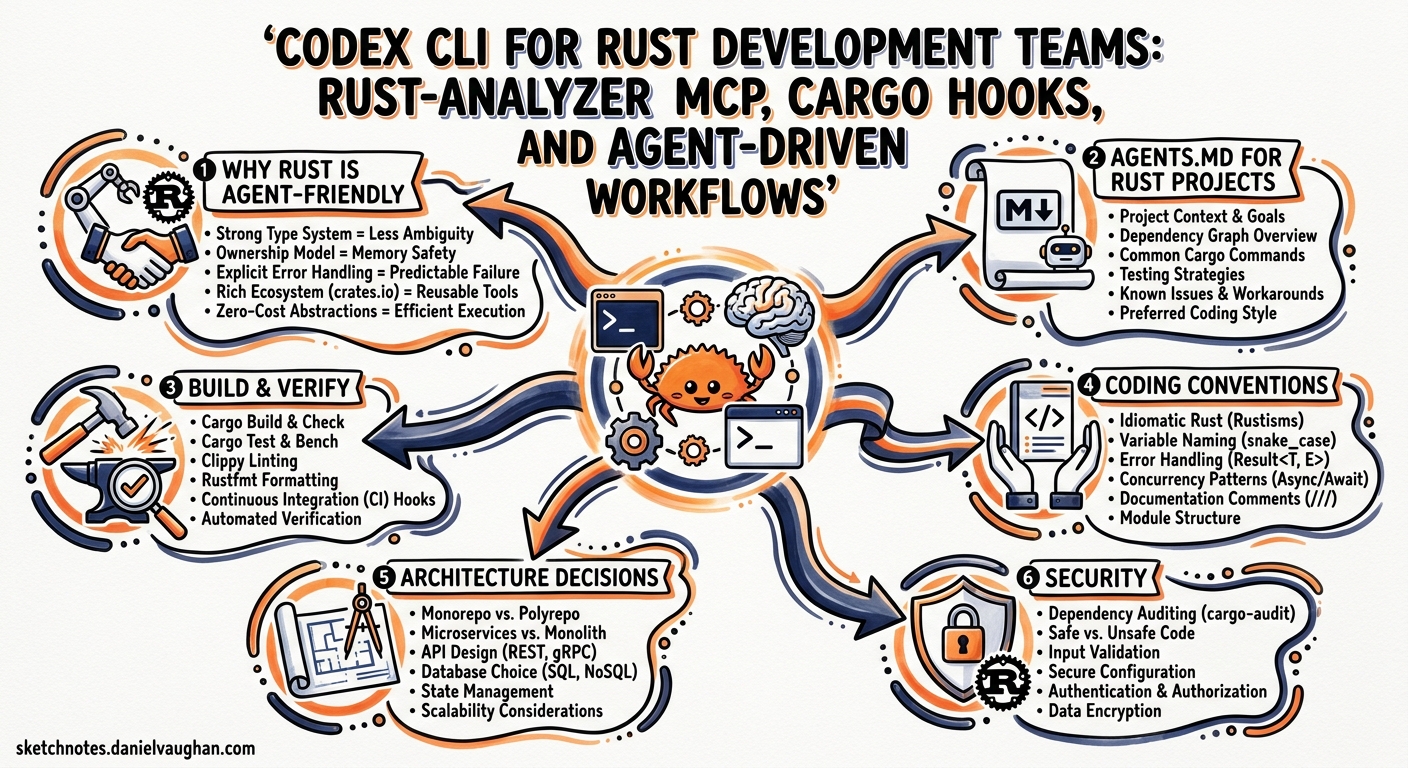
Codex CLI is itself built in Rust — roughly 95% of the codebase lives in the codex-rs crate1. That shared lineage makes it unusually well-suited for Rust projects: the agent already understands Cargo conventions, and the Rust toolchain’s deterministic compiler feedback gives the agent the tight signal loop it needs to self-correct. This article covers the full stack for Rust teams adopting Codex CLI in 2026: AGENTS.md conventions, the rust-analyzer MCP server, PostToolUse hooks for cargo verification, config profiles, and a practical feature development workflow.
Why Rust Is Agent-Friendly
Three properties make Rust an excellent target for agentic development:
-
Deterministic compiler feedback.
rustcandcargo clippyproduce structured, actionable diagnostics. Unlike dynamically typed languages where errors surface at runtime, the agent gets immediate, precise error messages it can parse and act on2. -
Convention-heavy toolchain.
cargo fmt,cargo clippy,cargo test, andcargo docform a uniform verification pipeline that every Rust project shares. The agent does not need project-specific build incantations. -
Strong type system. Ownership, borrowing, and lifetime rules mean the compiler catches entire categories of bugs that agents in other languages would silently introduce. The agent’s output is either correct or rejected — there is little ambiguity.
AGENTS.md for Rust Projects
The AGENTS.md file tells Codex CLI what it cannot infer from the codebase alone3. For Rust projects, the key is encoding conventions the compiler does not enforce:
# AGENTS.md

## Build & Verify
- `cargo fmt --check` — formatting gate, must pass before any commit
- `cargo clippy -- -D warnings` — treat all warnings as errors
- `cargo test` — full test suite, run after every change
- `cargo build --release` — verify release builds compile

## Coding Conventions
- Rust 2024 edition (edition = "2024" in Cargo.toml)
- Never use `.unwrap()` in library code; use `thiserror` for typed errors
  and `anyhow` for application-level error handling
- Prefer `impl Trait` over `dyn Trait` unless dynamic dispatch is required
- All public items require doc comments (`///`)
- 100-character line limit

## Architecture Decisions
- Async runtime: tokio (multi-threaded scheduler)
- Serialisation: serde + serde_json
- HTTP: axum with tower middleware
- No unsafe code without an accompanying `// SAFETY:` comment

## Security
- Never hardcode secrets; use environment variables via `dotenvy`
- Dependencies must pass `cargo audit` with no advisories
For polyglot monorepos, place this in the Rust workspace root directory. Codex CLI discovers AGENTS.md files hierarchically, so a top-level file governs the whole workspace while subdirectory files can override for individual crates4.
The agentsmd crate on crates.io can auto-generate per-project AGENTS.md files using conditional matchers like exists("**/*.rs"), which is useful for teams managing multiple repositories5.
rust-analyzer MCP Server
The rust-analyzer-mcp server bridges rust-analyzer’s Language Server Protocol capabilities into Codex CLI via MCP, giving the agent semantic code intelligence rather than relying solely on text pattern matching6.
Installation
cargo install rust-analyzer-mcp
Requires rust-analyzer installed and a valid workspace with Cargo.toml. Minimum Rust version: 1.706.
config.toml Setup
[mcp_servers.rust-analyzer]
command = "rust-analyzer-mcp"
args = []
The server communicates via stdio, so no additional transport configuration is needed6.
Available Tools
The server exposes ten tools6:
| Tool | Purpose |
|---|---|
rust_analyzer_symbols |
List all symbols (functions, structs, enums) in a file |
rust_analyzer_definition |
Jump to a symbol’s definition |
rust_analyzer_references |
Find all references to a symbol |
rust_analyzer_hover |
Display documentation and type information |
rust_analyzer_completion |
Code completions at a position |
rust_analyzer_format |
Format code via rustfmt |
rust_analyzer_code_actions |
Available refactorings and quick fixes |
rust_analyzer_diagnostics |
Errors, warnings, and hints for a file |
rust_analyzer_workspace_diagnostics |
Diagnostics across the entire workspace |
rust_analyzer_set_workspace |
Change the workspace root |
For large workspaces, rust_analyzer_workspace_diagnostics can be expensive. Consider using rust_analyzer_diagnostics on individual files during iterative development and reserving the workspace-wide scan for final verification.
PostToolUse Hooks for Cargo Verification
Hooks are now stable as of v0.124 and can be configured inline in config.toml7. For Rust projects, the most valuable pattern is running cargo clippy and cargo test after every Bash command that modifies source files:
[features]
codex_hooks = true

[[hooks.PostToolUse]]
matcher = "^Bash$"

[[hooks.PostToolUse.hooks]]
type = "command"
command = "cargo clippy -- -D warnings 2>&1 | head -50"
timeout = 120
statusMessage = "Running cargo clippy..."

[[hooks.PostToolUse]]
matcher = "^apply_patch$"

[[hooks.PostToolUse.hooks]]
type = "command"
command = "cargo clippy -- -D warnings 2>&1 | head -50"
timeout = 120
statusMessage = "Verifying patch with clippy..."
The hook output is fed back to the agent as additionalContext, so when clippy reports a warning, the agent sees it immediately and can self-correct in the same turn7.
Important: keep the timeout generous for large workspaces. Incremental clippy builds are fast, but the first invocation after a cold start can take minutes. Pipe through head -50 to avoid flooding the agent’s context window with verbose output.
For a tighter loop, add a second hook that runs the test suite:
[[hooks.PostToolUse]]
matcher = "^Bash$|^apply_patch$"

[[hooks.PostToolUse.hooks]]
type = "command"
command = "cargo test --lib --quiet 2>&1 | tail -20"
timeout = 180
statusMessage = "Running cargo test..."
Config Profiles for Rust Development
# ~/.codex/config.toml

[profiles.rust-deep]
model = "gpt-5.5"
approval_mode = "suggest"
reasoning_effort = "high"

[profiles.rust-flow]
model = "o4-mini"
approval_mode = "auto-edit"
reasoning_effort = "medium"

[profiles.rust-ci]
model = "codex-spark"
approval_mode = "full-auto"
reasoning_effort = "low"

# Sandbox settings for Rust projects
[sandbox]
allow_commands = [
  "cargo",
  "rustc",
  "rustup",
  "rust-analyzer-mcp",
]
Use rust-deep for complex refactoring, unsafe code review, and architectural decisions where GPT-5.5’s stronger reasoning pays off8. Use rust-flow for everyday feature development. Reserve rust-ci with Codex-Spark for fast, cheap CI gates via codex exec9.
Agent-Driven Feature Development Workflow
The following sequence illustrates the typical loop when developing a new feature in a Rust project with Codex CLI:
sequenceDiagram
    participant Dev as Developer
    participant Codex as Codex CLI
    participant RA as rust-analyzer MCP
    participant Cargo as Cargo Toolchain
    participant Hook as PostToolUse Hook

    Dev->>Codex: Describe feature requirement
    Codex->>RA: rust_analyzer_symbols (explore codebase)
    RA-->>Codex: Module structure, existing types
    Codex->>RA: rust_analyzer_references (find usage patterns)
    RA-->>Codex: Call sites and consumers
    Codex->>Codex: Generate implementation (apply_patch)
    Codex->>Hook: PostToolUse fires
    Hook->>Cargo: cargo clippy -- -D warnings
    Cargo-->>Hook: Diagnostic output
    Hook-->>Codex: additionalContext with warnings
    Codex->>Codex: Fix clippy warnings (apply_patch)
    Codex->>Hook: PostToolUse fires
    Hook->>Cargo: cargo clippy (clean)
    Hook->>Cargo: cargo test --lib
    Cargo-->>Hook: Test results
    Hook-->>Codex: All tests pass
    Codex-->>Dev: Feature complete, ready for review
This closed-loop pattern means the agent rarely produces code that fails the project’s own quality gates. The rust-analyzer MCP server provides semantic awareness (definitions, references, diagnostics) while the PostToolUse hooks enforce the cargo verification pipeline after every edit.
Agent-Ready API Documentation
A proposed Cargo feature (cargo doc --output-format=markdown) would generate Markdown API documentation from your exact Cargo.lock versions, giving the agent version-accurate reference material rather than stale training data10. Until this lands in stable Cargo, a practical workaround is to generate JSON docs and reference them in your AGENTS.md:
RUSTDOCFLAGS="-Z unstable-options --output-format json" cargo doc --no-deps
Then point your AGENTS.md at the generated JSON:
## API Reference
- Generated docs: `target/doc/*.json` (run `cargo doc` to refresh)
- Always check the generated docs before assuming an API shape
Model Selection Table
| Task | Recommended Model | Reasoning Effort | Rationale |
|---|---|---|---|
| Feature implementation | o4-mini | Medium | Good balance of speed and capability |
| Unsafe code review | GPT-5.5 | High | Needs deep reasoning about soundness8 |
| Refactoring (large) | GPT-5.5 | High | Cross-module awareness matters |
| Bug fix from stack trace | o4-mini | Medium | Focused, localised changes |
CI gate (codex exec) |
Codex-Spark | Low | Fast, cheap, sufficient for lint-and-test9 |
| Dependency audit | GPT-5.5 | Medium | Evaluating security advisories |
Common Pitfalls
| Pitfall | Symptom | Fix |
|---|---|---|
Agent uses .unwrap() everywhere |
Runtime panics in production | Add explicit ban in AGENTS.md; clippy unwrap_used lint |
| Stale rust-analyzer index | MCP returns outdated symbols | Restart the MCP server or call rust_analyzer_set_workspace |
| Hook timeout on cold build | PostToolUse hook fails with timeout | Increase timeout to 300s; pre-warm with cargo check before starting |
Agent generates unsafe without justification |
Unsound code | AGENTS.md rule: require // SAFETY: comments; consider PreToolUse hook to flag unsafe blocks |
| Clippy flood fills context window | Agent loses focus from verbose output | Pipe hook output through head -50 or \| grep "^error" |
| Agent ignores workspace structure | Edits wrong crate in multi-crate workspace | Use hierarchical AGENTS.md with per-crate overrides4 |
| MCP schema bloat | Slow tool discovery with many MCP servers | Only enable rust-analyzer MCP; disable unused servers for Rust sessions |
Headless CI Pipeline
For CI integration, use codex exec with the Rust-specific profile:
codex exec \
  --model codex-spark \
  --approval-mode full-auto \
  --sandbox network-off \
  --ignore-user-config \
  "Review the changes in this PR for Rust best practices. \
   Run cargo clippy -- -D warnings and cargo test. \
   Report any issues as a JSON object with fields: \
   pass (boolean), issues (array of strings)." \
  --output-schema ./pr-review-schema.json
Combine with codex-action@v1 in GitHub Actions for automated PR review11:
- uses: openai/codex-action@v1
  with:
    codex-args: >
      exec
      --model codex-spark
      --approval-mode full-auto
      --sandbox network-off
      "Run cargo clippy -- -D warnings and cargo test.
       Summarise results."
  env:
    OPENAI_API_KEY: ${{ secrets.OPENAI_API_KEY }}
Conclusion
Rust’s deterministic compiler feedback, convention-heavy toolchain, and strong type system make it one of the best-suited languages for agentic development. The combination of an AGENTS.md that encodes project conventions, a rust-analyzer MCP server for semantic code intelligence, and PostToolUse hooks for continuous cargo verification creates a tight feedback loop where the agent self-corrects against the same quality gates your team already enforces. The irony is not lost: the tool built in Rust is also one of the best tools for building with Rust.
Citations
-
InfoQ, “Another Rust Rewrite: OpenAI’s Codex CLI Goes Native”, https://www.infoq.com/news/2025/06/codex-cli-rust-native-rewrite/ ↩
-
Rust Blog, “Announcing Rust 1.85.0 and Rust 2024”, https://blog.rust-lang.org/2025/02/20/Rust-1.85.0/ ↩
-
OpenAI, “Custom instructions with AGENTS.md”, https://developers.openai.com/codex/guides/agents-md ↩
-
OpenAI, “Config basics — Codex”, https://developers.openai.com/codex/config-basic ↩ ↩2
-
crates.io, “agentsmd — generate per-project AGENTS.md files”, https://crates.io/crates/agentsmd ↩
-
GitHub, “zeenix/rust-analyzer-mcp — MCP server for rust-analyzer”, https://github.com/zeenix/rust-analyzer-mcp ↩ ↩2 ↩3 ↩4
-
OpenAI, “Hooks — Codex”, https://developers.openai.com/codex/hooks ↩ ↩2
-
OpenAI, “Models — Codex”, https://developers.openai.com/codex/models ↩ ↩2
-
OpenAI, “Codex CLI Speed Stack — fast mode, reasoning effort, Spark”, https://developers.openai.com/codex/cli/features ↩ ↩2
-
GitHub, “cargo doc –output-format=markdown: generate agent-ready API docs”, https://github.com/rust-lang/cargo/issues/16720 ↩
-
OpenAI, “codex-action@v1 — GitHub Action”, https://developers.openai.com/codex/guides/github-action ↩