Codex CLI Memories: Native Session Persistence, Third-Party Memory MCP Servers, and Cross-Session Context Strategies
Codex CLI Memories: Native Session Persistence, Third-Party Memory MCP Servers, and Cross-Session Context Strategies
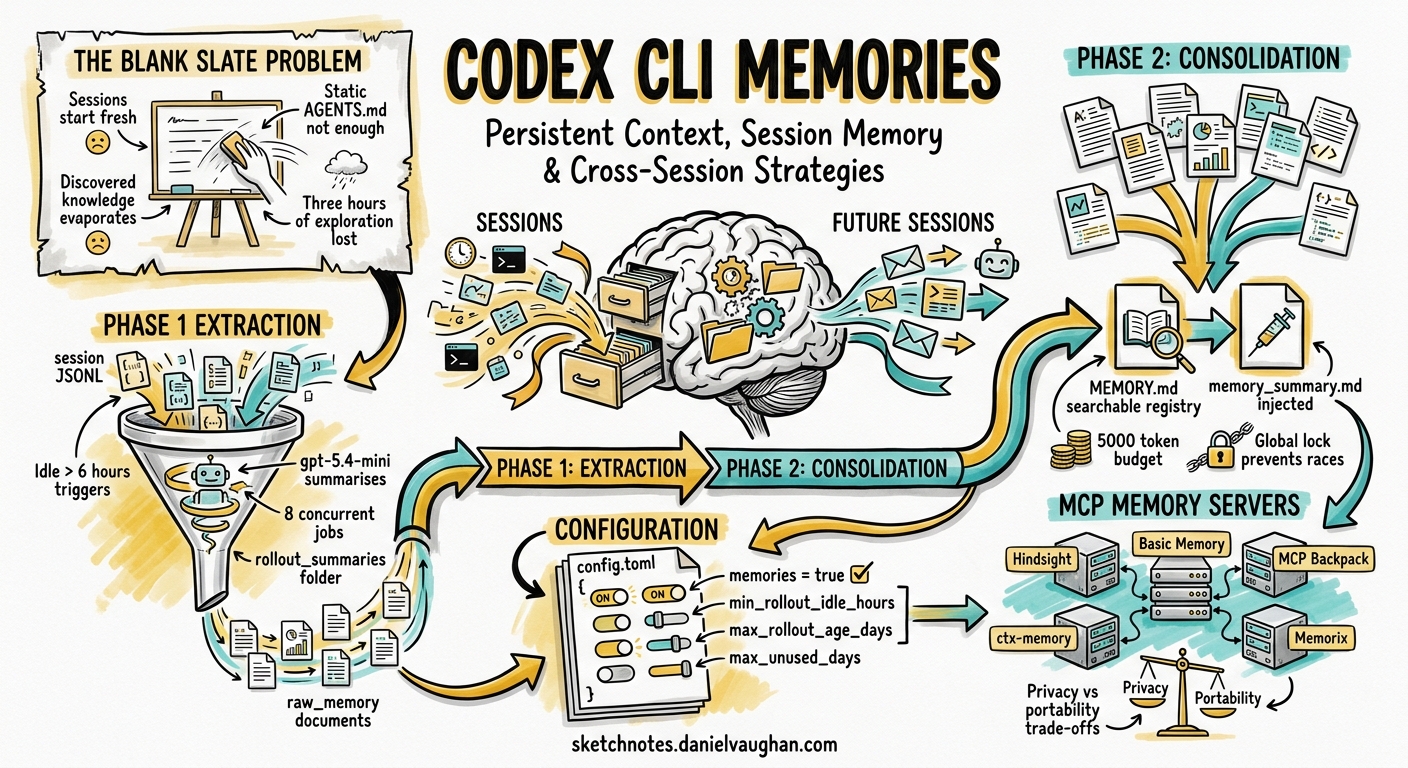
Every Codex CLI session starts with a blank slate. AGENTS.md and skills provide static context — project conventions, coding standards, tool preferences — but they cannot encode what happened last session: which refactoring approach failed, which API quirk you discovered, which architectural decision you reached after three hours of exploration. That knowledge evaporates when the session ends.
Codex CLI v0.128 ships a native Memories system that addresses this gap, extracting durable insights from completed sessions and injecting them into future ones automatically 1. Meanwhile, a growing ecosystem of third-party MCP memory servers — Hindsight, Basic Memory, ctx-memory, MCP Backpack, and Memorix — offers alternative persistence strategies with different trade-offs around privacy, portability, and granularity 2345.
This article covers both layers: how the native system works under the hood, how to configure it, when to supplement it with third-party memory, and which patterns to avoid.
How Native Memories Work
The native Memories system operates as a two-phase background pipeline that runs after sessions go idle 16.
flowchart TD
    A[Session ends / goes idle] --> B{Idle > min_rollout_idle_hours?}
    B -->|No| Z[Skip]
    B -->|Yes| C[Phase 1: Extraction]
    C --> D["gpt-5.4-mini summarises rollout → raw_memory + rollout_summary"]
    D --> E[Results stored in stage1_outputs DB]
    E --> F{Enough raw memories accumulated?}
    F -->|No| Z
    F -->|Yes| G[Phase 2: Consolidation]
    G --> H["Memory Writing Agent merges → MEMORY.md + memory_summary.md"]
    H --> I[Future sessions inject memory_summary.md into system prompt]
Phase 1: Extraction
When a thread has been idle for at least min_rollout_idle_hours (default: 6 hours) and falls within the max_rollout_age_days window (default: 30 days), Codex spawns an extraction job 6. Up to 8 concurrent extraction jobs process stale threads in parallel, each using gpt-5.4-mini to distil the raw .jsonl rollout into two outputs:
raw_memory— a detailed Markdown summary of discoveries, decisions, and lessonsrollout_summary— a compact recap stored under~/.codex/memories/rollout_summaries/
Phase 2: Consolidation
Periodically, a consolidation agent — spawned as a sub-agent with a global lock to prevent races — merges accumulated raw memories into two navigational files 6:
MEMORY.md— a searchable registry of aggregated insightsmemory_summary.md— a high-level summary injected into future session system prompts, governed by a ~5,000-token budget
The consolidation prompt also reads from memories_extensions/ for source-specific signals contributed by plugins or external tools 6.
File Structure
~/.codex/memories/
├── memory_summary.md          # Injected into system prompt
├── MEMORY.md                  # Searchable insight registry
├── raw_memories.md            # Temporary Phase 2 input
├── rollout_summaries/         # Per-thread recaps
├── memories_extensions/       # Plugin/source-specific inputs
└── skills/                    # Reusable procedures
Enabling and Configuring Native Memories
Memories are off by default. Enable them in ~/.codex/config.toml 17:
[features]
memories = true
The [memories] table exposes granular controls 7:
[memories]
generate_memories = true                    # Store new threads for memory inputs
use_memories = true                         # Inject existing memories into sessions
disable_on_external_context = false         # Exclude MCP/web-search threads from generation
min_rollout_idle_hours = 6                  # Hours idle before thread qualifies (1–48)
max_rollout_age_days = 30                   # Thread age window (0–90)
max_rollouts_per_startup = 16              # Rollout candidates per startup (max 128)
max_raw_memories_for_consolidation = 256   # Raw memories retained for consolidation (max 4096)
max_unused_days = 30                        # Days before memory expires from consolidation (0–365)
min_rate_limit_remaining_percent = 25       # Rate-limit headroom required (0–100)
# extract_model = "gpt-5.4-mini"           # Override extraction model
# consolidation_model = "gpt-5.4-mini"     # Override consolidation model
Thread-Level Control
Use /memories in the TUI to toggle per-thread behaviour: whether the current session can access existing memories, and whether it contributes to future memory generation 1.
Regional Availability
Memories are unavailable in the European Economic Area, the United Kingdom, and Switzerland at launch 1. Teams in these regions must rely on AGENTS.md, skills, or third-party MCP memory servers.
The Third-Party Memory Ecosystem
Native Memories solve the “what did I learn last session?” problem, but they operate within constraints: they are tied to a single codex_home, they require idle time before extraction, and they offer no cross-agent portability. Third-party MCP memory servers fill these gaps.
Hindsight
Hindsight hooks into the Codex CLI lifecycle via Python hook scripts, providing real-time auto-recall and auto-retain 3:
curl -fsSL https://hindsight.vectorize.io/get-codex | bash
How it works: A UserPromptSubmit hook queries the Hindsight memory bank before each prompt, injecting relevant memories as additionalContext. A post-response hook retains conversation content for future retrieval 3.
Configuration lives in ~/.hindsight/codex.json:
{
  "bankId": "codex",
  "recallBudget": "mid",
  "recallMaxTokens": 1024,
  "retainEveryNTurns": 10,
  "retainMode": "chunked"
}
Key differentiator: Hindsight supports per-project memory banks via dynamic bankId resolution based on working directory, and it works across Codex CLI, Claude Code, and other MCP-compatible agents 3.
Basic Memory
Basic Memory connects via MCP, storing memories as plain Markdown files that are accessible from any MCP-compatible client 4:
# Local installation
codex mcp add basic-memory bash -c "uvx basic-memory mcp"

# Cloud configuration in ~/.codex/config.toml
[mcp_servers.basic-memory]
url = "https://cloud.basicmemory.com/mcp"
bearer_token_env_var = "BASIC_MEMORY_API_KEY"
Key differentiator: Markdown-native storage means memories are human-readable, version-controllable, and portable across Codex CLI, Claude Code, and Cursor without format translation 4.
ctx-memory
ctx-memory takes a radically local approach: a shell wrapper intercepts tool invocations and fires hooks, then runs a three-layer pipeline (extract → compress to ≤500-token digest → merge into project memory) at session end 5:
- No cloud, no telemetry — everything lives in
~/.ctx-memory/store.db(SQLite) - Next session gets prior context injected automatically
- Supports Codex CLI, Claude Code, Gemini CLI, and OpenCode
Key differentiator: Zero network dependency makes it suitable for air-gapped environments and privacy-sensitive teams 5.
MCP Backpack
MCP Backpack stores per-project memories in Git-tracked files, providing portability across machines 8:
- Two-layer storage: a speed-optimised local cache plus Git-tracked portable files
- Memories survive machine transfers via
git push/git pull
Comparison Matrix
| Feature | Native Memories | Hindsight | Basic Memory | ctx-memory | MCP Backpack |
|---|---|---|---|---|---|
| Setup complexity | Feature flag | Installer script | MCP add | Shell wrapper | MCP server |
| Storage | ~/.codex/memories/ |
Cloud or local daemon | Markdown files | Local SQLite | Git-tracked files |
| Cross-agent | No | Yes | Yes | Yes | Yes |
| Real-time recall | No (batch) | Yes (per-prompt) | On-demand | Session start | On-demand |
| Per-project isolation | No | Dynamic bankId | --project flag |
Per-directory | Per-repo |
| Privacy | Local (no upload) | Configurable | Cloud or local | Fully local | Local + Git |
| Token budget control | ~5,000 system prompt | recallMaxTokens |
N/A | ≤500-token digest | N/A |
| EU/UK availability | No | Yes | Yes | Yes | Yes |
Practical Patterns
Pattern 1: Native Memories for Solo Developers
For individual developers working primarily on one machine, native Memories provide the lowest-friction option:
[features]
memories = true

[memories]
min_rollout_idle_hours = 1      # Faster extraction for iterative work
max_rollout_age_days = 60       # Longer retention for personal projects
Pattern 2: Hindsight for Cross-Agent Teams
Teams using both Codex CLI and Claude Code benefit from Hindsight’s cross-agent recall. Configure dynamic project isolation to prevent cross-contamination:
{
  "bankId": "dynamic",
  "recallBudget": "high",
  "retainEveryNTurns": 5
}
Pattern 3: Native + MCP Layering
Native Memories and third-party MCP memory are not mutually exclusive. A layered approach uses native Memories for Codex-specific session persistence and an MCP server for cross-agent, team-shared knowledge:
[features]
memories = true

[memories]
disable_on_external_context = true   # Avoid duplicating MCP-sourced context

[mcp_servers.basic-memory]
url = "https://cloud.basicmemory.com/mcp"
bearer_token_env_var = "BASIC_MEMORY_API_KEY"
Setting disable_on_external_context = true prevents native Memories from re-extracting knowledge that originated from MCP tool calls, avoiding duplication 7.
Pattern 4: Air-Gapped Environments
For regulated or air-gapped environments where native Memories may be unavailable (EU/UK regions) or cloud MCP servers are prohibited:
# Install ctx-memory — fully local, no network
# See https://glama.ai/mcp/servers/GhadiSaab/ctx-memory for setup
Combine with AGENTS.md as the static knowledge layer and ctx-memory for dynamic session-to-session persistence 5.
Anti-Patterns to Avoid
Relying on memories for mandatory rules. Memories are generated state, not configuration. Team-wide coding standards, security policies, and architectural constraints belong in AGENTS.md or requirements.toml — not in the memory layer 1.
Sharing ~/.codex/memories/ without review. Memory files may contain sensitive information despite secret redaction. Review before copying to shared locations or committing to repositories 1.
Over-extracting with aggressive settings. Setting min_rollout_idle_hours = 1 and max_rollouts_per_startup = 128 generates more memory overhead than most workflows benefit from. Start with defaults and tune based on observed memory quality.
Running multiple memory systems without deduplication. Enabling native Memories alongside Hindsight without disable_on_external_context = true can produce redundant context injection, consuming token budget without adding value.
Measuring Memory Effectiveness
The native system tracks memory usage through citation tracking: each time a stage-1 output is injected into a session, the system increments a usage_count and updates a last_usage timestamp 6. Memories that go unused for max_unused_days are pruned from consolidation.
For third-party solutions, Hindsight provides debug logging ("debug": true in codex.json) that shows which memories were recalled and their relevance scores 3.
A practical signal that memories are working: you stop needing to re-explain project context at the start of each session.
Citations
-
[Memories — Codex OpenAI Developers](https://developers.openai.com/codex/memories) -
[Codex CLI Persistent Memory with Hindsight Integration Guide](https://hindsight.vectorize.io/sdks/integrations/codex) -
Add Memory to OpenAI Codex — Persistent Development Context — Basic Memory ↩ ↩2 ↩3
-
[ctx-memory by GhadiSaab Glama](https://glama.ai/mcp/servers/GhadiSaab/ctx-memory) -
[Memories System openai/codex DeepWiki](https://deepwiki.com/openai/codex/3.9-memories-system) -
[Configuration Reference — Codex OpenAI Developers](https://developers.openai.com/codex/config-reference) -
[Introducing MCP Backpack: Persistent, Portable Memory for AI Coding Agents Medium](https://medium.com/codex/introducing-mcp-backpack-persistent-portable-memory-for-ai-coding-agents-87eea16eaa54)