Codex CLI Troubleshooting Field Guide: Diagnosing and Fixing the Most Common Errors
Codex CLI Troubleshooting Field Guide: Diagnosing and Fixing the Most Common Errors
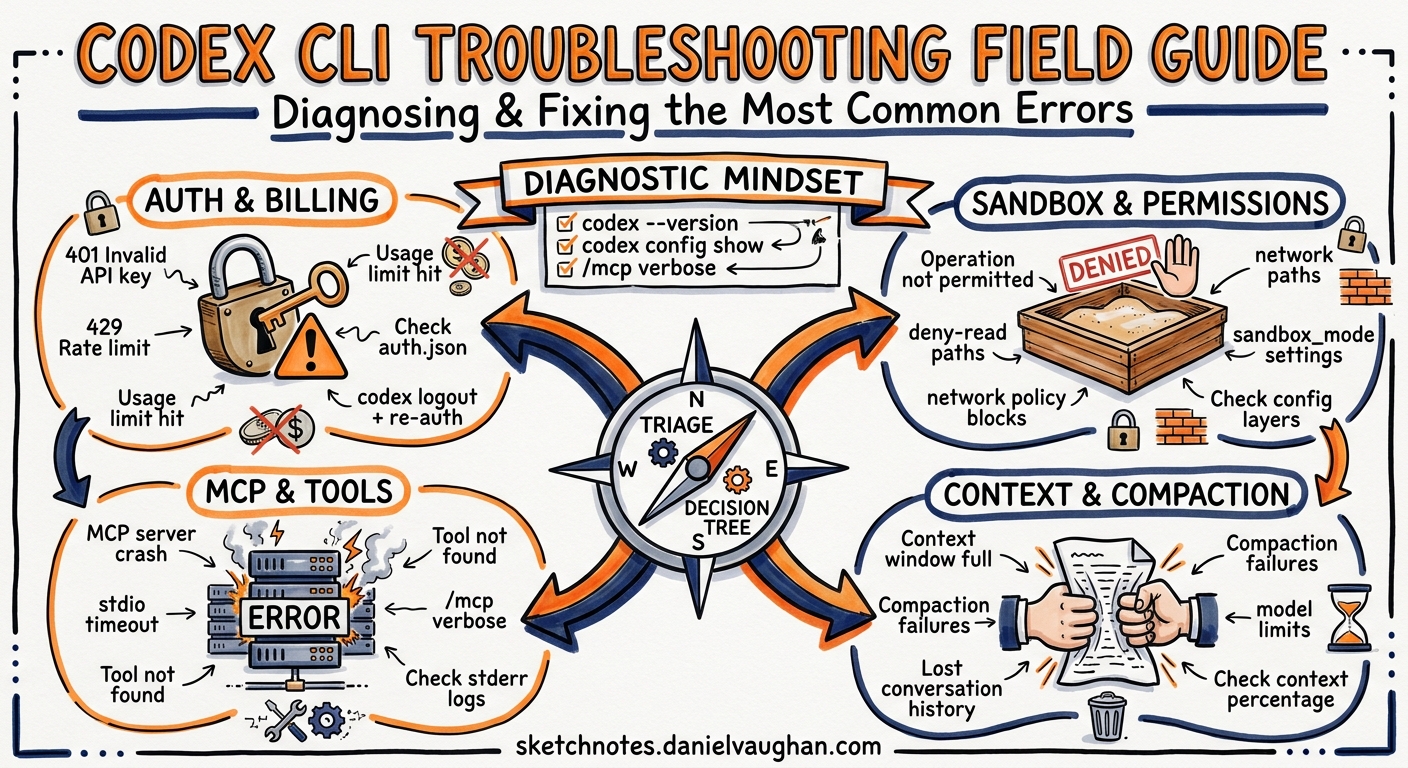
Every Codex CLI practitioner eventually hits an error that halts a session. The frustration is compounded when the error message is terse and the fix is not obvious. This field guide catalogues the most common Codex CLI errors as of v0.128, explains the root cause of each, and provides the fastest path to resolution. Bookmark it — you will need it.
The Diagnostic Mindset
Before diving into specific errors, establish a triage routine. Codex CLI surfaces errors from four distinct layers, and knowing which layer produced the message determines where to look:
flowchart TD
    E[Error Occurs] --> A{Which layer?}
    A -->|Auth / API| B[Authentication & Billing]
    A -->|Sandbox / FS| C[Sandbox & Permissions]
    A -->|MCP / Tools| D[MCP Server Lifecycle]
    A -->|Session / Context| F[Context & Compaction]

    B --> B1[Check auth.json, API key, plan tier]
    C --> C1[Check sandbox mode, deny-read, network policy]
    D --> D1[Run /mcp verbose, check stderr, timeouts]
    F --> F1[Check context %, compaction config, model limits]
Useful first steps for any error:
# Check your Codex version
codex --version

# View active configuration (merged from all layers)
codex config show

# Check MCP server health
# (inside a TUI session, type /mcp verbose)
Authentication and Billing Errors
401 Unauthorized — Invalid API key
Root cause: The OPENAI_API_KEY environment variable is unset, contains trailing whitespace, or holds a revoked key1.
Fix:
# Verify the stored value (look for trailing spaces or quotes)
echo "[$OPENAI_API_KEY]"

# Clear cached credentials and re-authenticate
rm -f ~/.codex/auth.json
codex logout
export OPENAI_API_KEY  # set to your platform API key
If you use ChatGPT subscription auth instead of an API key, ensure you have run codex login and that ~/.codex/auth.json exists. Treat this file like a password — it contains access tokens2.
429 Too Many Requests — Rate limit exceeded
Root cause: You have exceeded your plan’s per-window rate limit. On ChatGPT Plus this resets every five hours; on Pro and API plans the windows and thresholds differ3. A known bug can trigger 429s even when the dashboard shows remaining quota4.
Fix:
- Wait for the retry-after period (typically 60 seconds for transient 429s).
- If you are on a ChatGPT plan, check
Settings → Usagein the ChatGPT web interface for your actual remaining quota. - Switch to a cheaper model for routine tasks:
codex -m gpt-5.4-miniorcodex -m codex-sparkwill consume fewer credits per turn5. - If the error persists despite visible quota, clear your session and retry — stale session tokens occasionally cause phantom 429s4.
You've hit your usage limit
Root cause: Your subscription plan’s weekly or five-hour spending cap has been reached. Several users have reported this appearing prematurely, with GitHub Issues #12299 and #11508 tracking the problem6.
Fix: If you have remaining quota on the dashboard, try codex logout && codex login to refresh your session token. If the cap is genuinely reached, wait for the window to reset or switch to API key billing where you control the budget directly.
Silent switch to API key billing
Root cause: When OPENAI_API_KEY is present in the environment alongside a ChatGPT login, Codex may silently prefer the API key, causing unexpected charges7.
Fix:
# Remove the environment variable if you intend to use ChatGPT auth
unset OPENAI_API_KEY

# Or force the login method in config.toml
# [auth]
# forced_login_method = "chatgpt"
Sandbox and Permissions Errors
PermissionError: Operation not permitted — sandbox policy violation
Root cause: The Codex sandbox (Landlock on Linux, Seatbelt on macOS, AppContainer on Windows) has blocked an operation that falls outside your current permission profile8.
Fix: Determine what was blocked. The error context usually names the path or syscall.
# In ~/.codex/config.toml, choose a profile that fits your workflow:
[profile.dev]
sandbox = "workspace-write"
approval_policy = "unless-allow-listed"
Common scenarios:
- Writing outside the workspace: Switch from
read-onlytoworkspace-writesandbox mode. - Network access denied: Set
sandbox_workspace_write.network_access = truein your profile or use--sandbox full-auto9. - Accessing
/tmpor home directory: These are intentionally restricted. Use--cdto ensure Codex operates from your project root.
FileNotFoundError: No such file or directory (inside sandbox)
Root cause: The sandbox only sees files tracked by Git. Untracked files, .env files in .gitignore, and files outside the working tree are invisible to the agent10.
Fix:
# Stage the file so the sandbox can see it
git add path/to/new-file.ts

# Or for .env files, pass values via config.toml instead:
# [shell_environment_policy]
# inherit = "allowlist"
# allow = ["DATABASE_URL", "NODE_ENV"]
failed in sandbox (intermittent, commands succeed on retry)
Root cause: A race condition in sandbox initialisation, particularly on WSL2 and older macOS versions. This is a known issue tracked in GitHub Issue #493411.
Fix: Retry the command. If it recurs consistently, check your Codex version — codex update to v0.128+ includes fixes for several sandbox edge cases. On WSL2, ensure you are running WSL2 (not WSL1) as bubblewrap requires it since v0.11512.
MCP Server Errors
MCP server timeout on startup
Root cause: The default MCP startup timeout is 10 seconds. Large MCP servers (particularly those pulling remote schemas or running Docker containers) often exceed this13.
Fix:
# In config.toml, increase the startup timeout
[[mcp_servers]]
name = "my-slow-server"
command = "npx"
args = ["-y", "@my-org/mcp-server"]
startup_timeout_seconds = 30
tool_timeout_seconds = 120
Run /mcp verbose inside a TUI session to see the full initialisation log and identify where the server stalls.
user cancelled MCP tool call (under managed sandbox)
Root cause: When using read-only or workspace-write sandbox modes, Codex may block MCP tool calls that it classifies as write operations. This is a known issue with v0.125 alpha builds14.
Fix:
- Upgrade to v0.128 stable where this is partially resolved.
- Explicitly allow specific MCP tools in your permission profile:
[sandbox_workspace_write]
mcp_tool_policy = "allow-listed"
mcp_tool_allowlist = ["my-server:read_data", "my-server:search"]
MCP server crashes silently
Root cause: stdio-based MCP servers write errors to stderr, which Codex does not surface by default13.
Fix:
# Test the MCP server standalone first
echo '{"jsonrpc":"2.0","method":"initialize","id":1,"params":{"protocolVersion":"2025-11-25","capabilities":{},"clientInfo":{"name":"test","version":"1.0"}}}' | npx -y @my-org/mcp-server 2>mcp-errors.log

# Check the error log
cat mcp-errors.log
Inside a running session, /mcp verbose exposes the server’s stderr output and connection state.
Context and Compaction Errors
high demand error during compaction
Root cause: Server-side auto-compaction is an API call that can fail during periods of high platform load. When compaction fails, subsequent API calls may also fail as the context exceeds limits15.
Fix:
- Wait 30–60 seconds and retry. Compaction failures are transient.
- Use
/compactmanually before the context fills — do not wait for auto-compaction. - For long sessions, adopt a checkpoint pattern:
/compactafter each major milestone, and/forkto continue with a clean context when the session becomes unwieldy16.
Maximum context length exceeded
Root cause: Your prompt plus the accumulated conversation exceeds the model’s context window (400K tokens for GPT-5.5 in Codex, smaller for other models)17.
Fix:
# Lower the compaction threshold to trigger earlier
[model]
compaction_threshold = 0.7  # compact at 70% context usage
Alternatively, target specific files with @path/to/file.ts rather than letting the agent read entire directories. For large codebases, prefer semantic search MCP servers (CocoIndex, SymDex) over brute-force file reads18.
Chat history disappearing mid-session
Root cause: Auto-compaction summarises and evicts earlier turns to stay within the context window. This is expected behaviour, not data loss. The full session is preserved in rollout files19.
Fix: If you need to reference earlier context, use /fork to create a branch from the current state, or check ~/.codex/sessions/ for the complete JSONL rollout log.
Installation and Environment Errors
EACCES: permission denied, access '/usr/local/lib/node_modules'
Root cause: npm is installed system-wide and requires root for global packages1.
Fix:
# Use nvm to install Node.js in your home directory
curl -o- https://raw.githubusercontent.com/nvm-sh/nvm/v0.40.2/install.sh | bash
nvm install --lts
npm i -g @openai/codex
Or use Homebrew on macOS: brew install codex20.
codex update fails or is not recognised
Root cause: The codex update self-update command was added in v0.128. Earlier versions do not have it21.
Fix:
# If codex update is not available, update via your package manager
npm update -g @openai/codex
# or
brew upgrade codex
PowerShell execution policy blocks installation (Windows)
Root cause: Windows default execution policy prevents running npm post-install scripts1.
Fix:
Set-ExecutionPolicy -Scope CurrentUser -ExecutionPolicy RemoteSigned
Alternatively, use Git Bash or WSL2 where this restriction does not apply.
Remote and App-Server Errors
WebSocket connection drops under load
Root cause: The app-server WebSocket transport can fail to drain events during heavy tool-use sequences, particularly in v0.125 and earlier22.
Fix: Upgrade to v0.128, which includes reliability fixes for WebSocket event draining and shutdown handling. If running behind a reverse proxy, ensure WebSocket upgrade headers are forwarded and idle timeouts are set to at least 300 seconds.
Device code authentication fails in headless environments
Root cause: The default browser-based login flow cannot open a browser in SSH sessions, containers, or CI environments2.
Fix:
# Use device code flow (beta)
codex login --method device-code

# Or copy auth.json from a machine where you can log in
scp ~/.codex/auth.json remote-host:~/.codex/auth.json

# Or use SSH port forwarding for the callback
ssh -L 1455:localhost:1455 remote-host
# Then run codex login on the remote machine
The Quick-Reference Decision Table
| Symptom | Likely Cause | First Action |
|---|---|---|
401 Unauthorized |
Bad or missing API key | echo $OPENAI_API_KEY, check for spaces |
429 Too Many Requests |
Rate limit hit | Wait, check dashboard, try cheaper model |
sandbox policy violation |
Operation outside sandbox scope | Check sandbox mode in active profile |
FileNotFoundError in sandbox |
File not tracked by Git | git add the file |
| MCP server timeout | Slow server startup | Increase startup_timeout_seconds |
high demand on compaction |
Server-side load | Wait and retry, or manual /compact |
| Context length exceeded | Session too large | /compact, /fork, or start fresh |
EACCES on npm install |
System-wide npm | Use nvm or Homebrew |
| WebSocket drops | App-server transport bug | Upgrade to v0.128+ |
| Auth loop or silent billing | Mixed auth methods | Unset OPENAI_API_KEY or force method |
When to Escalate
If none of the above resolves your issue:
- Check the GitHub Issues at github.com/openai/codex/issues — search for your error message.
- File a bug report with your Codex version (
codex --version), OS, the full error output, and your config (redact API keys). - Use
/feedbackinside a TUI session to send a report with optional session context directly to OpenAI. - Check logs at
~/.codex/sessions/for session rollout files and at~/Library/Logs/com.openai.codex/(macOS) for app logs23.
Citations
-
Codex CLI Installation and Error Messages Troubleshooting Guide. uniflow.kr, 2026. https://www.uniflow.kr/en/codex-cli-install-setup-troubleshooting-guide/ ↩ ↩2 ↩3
-
Authentication — Codex. OpenAI Developers, 2026. https://developers.openai.com/codex/auth ↩ ↩2
-
Pricing — Codex. OpenAI Developers, 2026. https://developers.openai.com/codex/pricing ↩
-
“Improper 429 error near the end of a 5-hour window.” GitHub Issue #9135, openai/codex. https://github.com/openai/codex/issues/9135 ↩ ↩2
-
Codex CLI Models. OpenAI Developers, 2026. https://developers.openai.com/codex/models ↩
-
“You’ve hit your usage limit despite 10% remaining.” GitHub Issue #12299, openai/codex. https://github.com/openai/codex/issues/12299 ↩
-
“Codex silently switches to API key auth when environment variable is present.” GitHub Issue #20099, openai/codex. https://github.com/openai/codex/issues/20099 ↩
-
Agent Approvals and Security — Codex. OpenAI Developers, 2026. https://developers.openai.com/codex/agent-approvals-security ↩
-
Configuration Reference — Codex. OpenAI Developers, 2026. https://developers.openai.com/codex/config-reference ↩
-
“Commands failed to run in sandbox in Codex CLI.” GitHub Issue #4934, openai/codex. https://github.com/openai/codex/issues/4934 ↩
-
Ibid. ↩
-
Windows — Codex. OpenAI Developers, 2026. https://developers.openai.com/codex/windows ↩
-
Model Context Protocol — Codex. OpenAI Developers, 2026. https://developers.openai.com/codex/mcp ↩ ↩2
-
“Codex CLI 0.125.0-alpha.3 cancels MCP tool calls under read-only/workspace-write sandbox.” OpenAI Developer Community, 2026. https://community.openai.com/t/codex-cli-0-125-0-alpha-3-cancels-mcp-tool-calls-under-read-only-workspace-write-sandbox/1379772 ↩
-
“High API error rate during remote compaction.” GitHub Issue #15105, openai/codex. https://github.com/openai/codex/issues/15105 ↩
-
Slash Commands in Codex CLI. OpenAI Developers, 2026. https://developers.openai.com/codex/cli/slash-commands ↩
-
GPT-5.5 Million-Token Context Window. OpenAI Developers, 2026. https://developers.openai.com/codex/models ↩
-
Semantic Code Search for Codex CLI. Codex Blog, 2026-04-27. https://codex.danielvaughan.com/2026/04/27/codex-cli-semantic-code-search/ ↩
-
Features — Codex CLI. OpenAI Developers, 2026. https://developers.openai.com/codex/cli/features ↩
-
CLI — Codex. OpenAI Developers, 2026. https://developers.openai.com/codex/cli ↩
-
Codex CLI v0.128.0 Release Notes. GitHub, openai/codex, 2026-04-30. https://github.com/openai/codex/releases ↩
-
Changelog — Codex. OpenAI Developers, 2026. https://developers.openai.com/codex/changelog ↩
-
Troubleshooting — Codex App. OpenAI Developers, 2026. https://developers.openai.com/codex/app/troubleshooting ↩