Codex CLI Shell Integration: Completions, Functions, Environment Policies and Productivity Recipes
Codex CLI Shell Integration: Completions, Functions, Environment Policies and Productivity Recipes
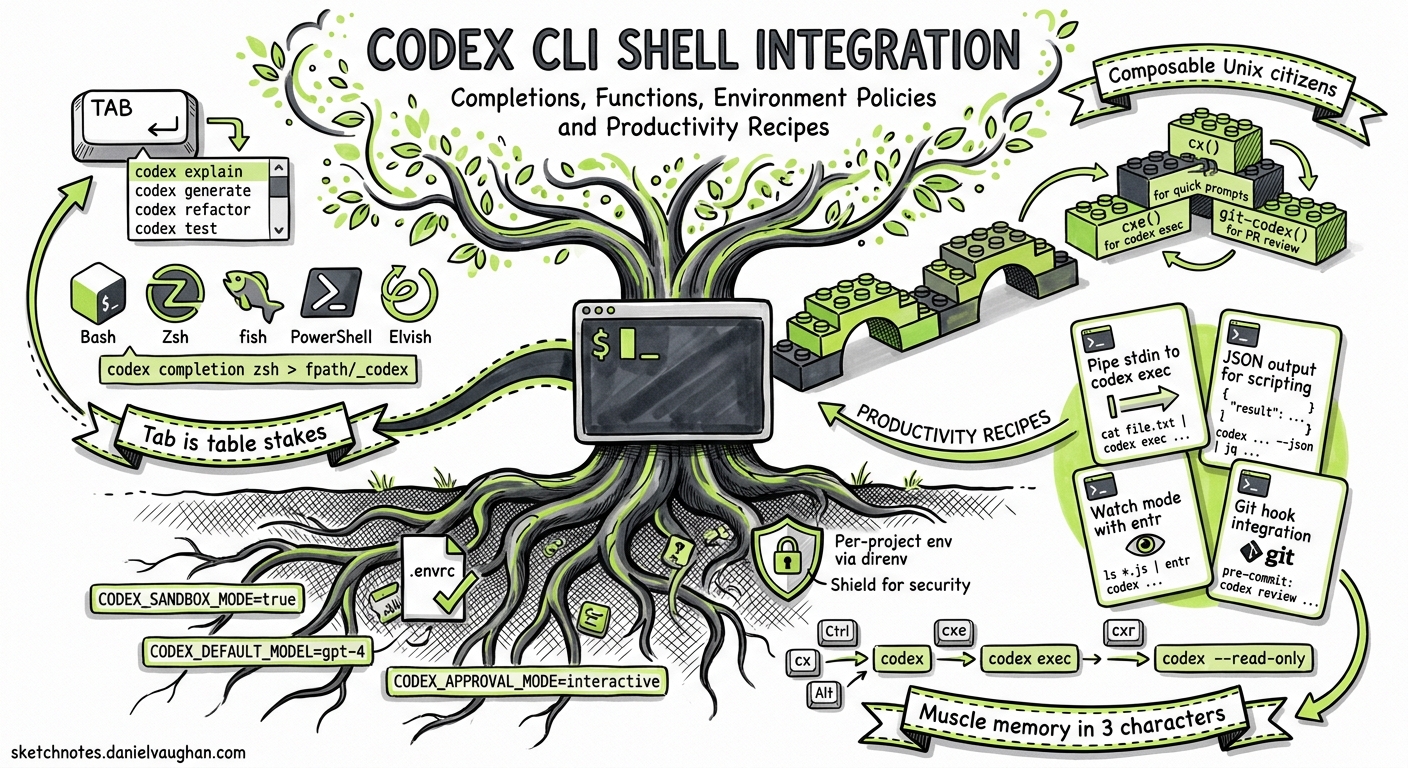
Codex CLI runs in your terminal, yet most guides skip the glue that makes it feel native: shell completions, wrapper functions, environment variable policies and the small recipes that turn codex exec into a composable Unix citizen. This article fills that gap, covering everything a senior developer needs to wire Codex into a daily shell workflow.
Shell Completions
Tab completion is table stakes. Codex ships a completion subcommand that emits scripts for five shells1:
codex completion bash
codex completion zsh
codex completion fish
codex completion power-shell
codex completion elvish
Zsh Setup
Redirect the output into a directory on your fpath and reinitialise compinit1:
codex completion zsh > "${fpath[1]}/_codex"
autoload -Uz compinit && compinit
If you see a command not found: compdef error, ensure the compinit call appears before the completion line in ~/.zshrc2.
Bash Setup
# Add to ~/.bashrc
eval "$(codex completion bash)"
Fish Setup
codex completion fish | source
# Or persist:
codex completion fish > ~/.config/fish/completions/codex.fish
Once installed, codex <Tab> completes subcommands (exec, resume, fork, completion, update) and flags (--sandbox, --json, --output-schema)1.
Shell Environment Policy
The [shell_environment_policy] section in config.toml controls which environment variables Codex passes to every subprocess it launches — tool commands, shell executions, and hook scripts3. Getting this wrong either leaks secrets or breaks tool chains.
How It Works
flowchart LR
    A[Parent Shell Env] --> B{inherit policy}
    B -->|none| C[Empty env]
    B -->|core| D[PATH, HOME, LANG, TERM]
    B -->|all| E[Full parent env]
    C --> F[Apply set overrides]
    D --> F
    E --> F
    F --> G[Apply exclude globs]
    G --> H[Apply include_only whitelist]
    H --> I[Default-exclude KEY/SECRET/TOKEN]
    I --> J[Subprocess Env]
Configuration Reference
[shell_environment_policy]
inherit = "none"                  # "none" | "core" | "all"
set = { PATH = "/usr/local/bin:/usr/bin", LANG = "en_GB.UTF-8" }
ignore_default_excludes = false   # keep the SECRET/TOKEN/KEY safety net
exclude = ["AWS_*", "AZURE_*", "GH_TOKEN"]
include_only = ["PATH", "HOME", "LANG", "TERM"]
Patterns are case-insensitive globs supporting *, ? and [A-Z] character classes3.
Recommended Profiles
| Profile | inherit |
Use Case |
|---|---|---|
| Paranoid | "none" + explicit set |
CI runners, untrusted repos |
| Developer | "core" + selective include_only |
Daily interactive sessions |
| Legacy | "all" + exclude secrets |
Quick prototyping (not recommended) |
The safest starting point is inherit = "none", layering in only the variables your tool chain needs3. The default safety filter automatically drops any variable whose name contains KEY, SECRET or TOKEN, even when you use inherit = "all"3.
Shell Wrapper Functions
Aliases are brittle — zsh and bash handle word-splitting of alias expansions differently. Use functions instead4.
Quick One-Shot Execution
# Ask Codex a question about the current repo, non-interactively
cx() {
  codex exec "$@"
}
Commit Message Generator
Pipe git diff into codex exec to generate a conventional commit message:
cxcommit() {
  local msg
  msg=$(git diff --cached | codex exec \
    -e minimal \
    "Write a concise conventional commit message for this diff. \
     Output only the message, no explanation.")
  if [[ -n "$msg" ]]; then
    printf "Proposed commit message:\n\n%s\n\nCommit? [y/N] " "$msg"
    read -r confirm
    [[ "$confirm" =~ ^[Yy]$ ]] && git commit -m "$msg"
  fi
}
PR Description from Branch Diff
cxpr() {
  local base="${1:-main}"
  git diff "${base}"...HEAD | codex exec \
    -e medium \
    "Write a pull request description with a Summary section \
     and a Test Plan section. Use markdown."
}
Quick Code Review
cxreview() {
  local base="${1:-main}"
  git diff "${base}"...HEAD | codex exec \
    -e high \
    "Review this diff for bugs, security issues and style \
     problems. Be concise. Flag severity as [critical], \
     [warning] or [info]."
}
Structured Output for Scripting
cxjson() {
  local schema="$1"; shift
  codex exec --output-schema "$schema" "$@"
}

# Example: extract metadata into stable JSON
cxjson ./schemas/project-meta.json "Extract project metadata from this repo"
Resume Last Session
cxlast() {
  codex resume --last "$@"
}
The Zsh Alias Inheritance Problem
A notable sharp edge: Codex does not inherit aliases defined in ~/.zshrc when it spawns subprocesses5. This is because Codex launches non-interactive, non-login shells that do not source ~/.zshrc.
Workaround: Define critical helpers as functions in ~/.zshenv instead, which is sourced by all zsh invocations5:
# ~/.zshenv — sourced by every zsh process, including Codex subshells
mytest() { npm test -- --coverage; }
Alternatively, use the set key in [shell_environment_policy] to inject the specific variables or paths that your aliases depend on3.
Shell Selection
On macOS (where zsh is the default since Catalina), Codex respects $SHELL from your environment6. If you find Codex launching bash when you expect zsh, check that $SHELL is set correctly in the environment Codex inherits. With inherit = "none" in your shell_environment_policy, you may need to add SHELL explicitly:
[shell_environment_policy]
inherit = "core"
set = { SHELL = "/bin/zsh" }
Composing with Unix Pipes
codex exec reads from stdin when you pass - as the prompt, making it a first-class Unix filter7:
# Pipe test failures into Codex for triage
npm test 2>&1 | codex exec "Summarise failures and propose fixes"

# Chain with jq for structured pipelines
codex exec --json "List all TODO comments in src/" \
  | jq -r 'select(.type == "item.completed") | .content'

# Feed a prompt file
cat prompts/security-audit.md | codex exec -
Pipeline Integration with --output-last-message
For scripts that need the final answer without JSONL event parsing:
codex exec \
  --output-last-message ./result.md \
  "Analyse the test coverage gaps in this project"

# result.md now contains only the final markdown response
Profile-Based Shell Aliases
Combine named profiles in config.toml with shell aliases for instant context switching:
# ~/.codex/config.toml
[profiles.fast]
model = "gpt-4.1-mini"
model_reasoning_effort = "minimal"

[profiles.deep]
model = "gpt-5.5"
model_reasoning_effort = "high"

[profiles.ci]
model = "gpt-4.1-mini"
model_reasoning_effort = "low"
# ~/.zshrc
alias cxf='codex --profile fast'
alias cxd='codex --profile deep'
alias cxci='codex --profile ci exec'
Now cxf launches a fast interactive session, cxd a deep-reasoning session, and cxci runs non-interactively with CI-tuned settings8.
Tmux and Terminal Multiplexer Patterns
Running multiple Codex sessions in parallel is natural with tmux:
# Launch three parallel Codex agents in tmux panes
cxparallel() {
  tmux new-session -d -s codex-sprint
  tmux send-keys "codex exec 'Refactor auth module'" C-m
  tmux split-window -h
  tmux send-keys "codex exec 'Add integration tests for payments'" C-m
  tmux split-window -v
  tmux send-keys "codex exec 'Update API documentation'" C-m
  tmux attach -t codex-sprint
}
Session managers like CCManager and Agent Deck build on this pattern to add cost tracking, log aggregation and conductor-agent orchestration across panes9.
Putting It All Together
A complete ~/.zshrc snippet wiring Codex into your daily flow:
# Shell completions
eval "$(codex completion zsh)"

# Quick aliases
alias cx='codex'
alias cxe='codex exec'

# Wrapper functions
cxcommit() {
  git diff --cached | codex exec -e minimal \
    "Write a conventional commit message. Output only the message."
}

cxpr() {
  git diff "${1:-main}"...HEAD | codex exec -e medium \
    "Write a PR description with Summary and Test Plan sections."
}

cxreview() {
  git diff "${1:-main}"...HEAD | codex exec -e high \
    "Review this diff. Flag issues as [critical], [warning] or [info]."
}

# Profile switching
alias cxf='codex --profile fast'
alias cxd='codex --profile deep'
Summary
Codex CLI is designed to be a composable terminal tool, but the composability only pays off when you invest in the shell integration layer. Tab completions eliminate flag-guessing, shell_environment_policy prevents secret leakage, wrapper functions encode your team’s workflows, and Unix pipes let you chain Codex into existing scripts. The upfront cost is a few dozen lines in your shell configuration; the return is an agent that fits your terminal as naturally as git or jq.
Citations
-
OpenAI, “Command line options — Codex CLI,” OpenAI Developers, 2026. https://developers.openai.com/codex/cli/reference ↩ ↩2 ↩3
-
GitHub, “
codex completionwithout any arguments always returns the bash completion,” openai/codex issue #3009, 2025. https://github.com/openai/codex/issues/3009 ↩ -
OpenAI, “Advanced Configuration — Codex,” OpenAI Developers, 2026. https://developers.openai.com/codex/config-advanced ↩ ↩2 ↩3 ↩4 ↩5
-
EveryInc, “Local dev shell aliases — zsh and bunx fixes,” compound-engineering-plugin docs, 2026. https://github.com/EveryInc/compound-engineering-plugin/blob/main/docs/solutions/developer-experience/local-dev-shell-aliases-zsh-and-bunx-fixes-2026-03-26.md ↩
-
GitHub, “Codex does not inherit zsh aliases from .zshrc during command execution,” openai/codex issue #16551, 2026. https://github.com/openai/codex/issues/16551 ↩ ↩2
-
GitHub, “Codex does not respect the user’s default terminal (launches bash instead of zsh),” openai/codex issue #3916, 2025. https://github.com/openai/codex/issues/3916 ↩
-
OpenAI, “Non-interactive mode — Codex,” OpenAI Developers, 2026. https://developers.openai.com/codex/noninteractive ↩
-
OpenAI, “Config basics — Codex,” OpenAI Developers, 2026. https://developers.openai.com/codex/config-basic ↩
-
CCManager GitHub repository, 2026. https://github.com/ccmanager/ccmanager ↩