GPT-5.5 Instant and chat-latest: Dynamic Model Pointers for Codex CLI Developers
GPT-5.5 Instant and chat-latest: Dynamic Model Pointers for Codex CLI Developers
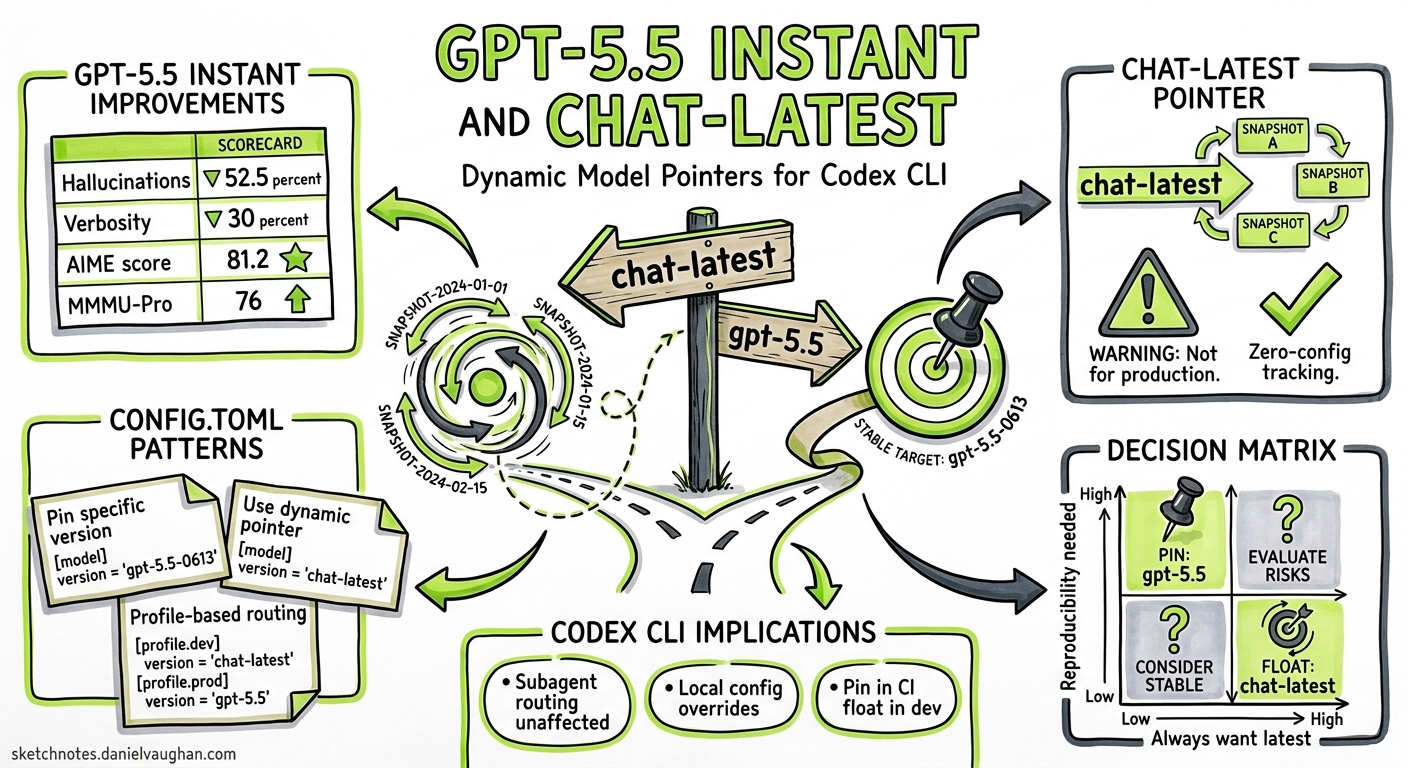
On 5 May 2026, OpenAI replaced GPT-5.3 Instant with GPT-5.5 Instant as the default ChatGPT model and simultaneously shipped a new API model alias — chat-latest — that always resolves to the current Instant snapshot12. For Codex CLI developers, this creates a new class of configuration decision: should you pin a specific model version, or ride the chat-latest pointer and accept whatever OpenAI promotes next?
This article unpacks what GPT-5.5 Instant changes, how chat-latest works at the API layer, and what that means for your config.toml profiles.
What Is GPT-5.5 Instant?
GPT-5.5 Instant is the consumer-optimised variant of the GPT-5.5 family. Where gpt-5.5 targets complex agentic workloads — 1,050,000-token context window, $5/$30 per million input/output tokens, xhigh reasoning support3 — the Instant variant prioritises low latency and conciseness for everyday chat.
Key improvements over GPT-5.3 Instant14:
| Metric | Improvement |
|---|---|
| Hallucinated claims (high-stakes prompts) | −52.5% |
| Inaccurate claims (user-flagged conversations) | −37.3% |
| Output verbosity (words) | −30.2% |
| Output verbosity (lines) | −29.2% |
| AIME 2025 maths score | 81.2 (vs 65.4) |
| MMMU-Pro multimodal reasoning | 76 (vs 69.2) |
The model also gains improved visual reasoning, stronger STEM performance, and enhanced web search routing logic4. For Codex CLI users who previously noticed the Instant tier drifting into verbose, hedging responses, the word-count reduction alone is significant.
The chat-latest Model Pointer
chat-latest is a dynamic model alias in the OpenAI API. It resolves to whichever Instant snapshot currently powers ChatGPT25. Today that is GPT-5.5 Instant; when OpenAI ships the next Instant generation, chat-latest will silently advance.
This follows the precedent set by chatgpt-4o-latest, which tracked GPT-4o snapshots through 20255. The key characteristics:
- No version suffix — the pointer is deliberately unpinned
- Regular updates — OpenAI states the underlying snapshot will be “regularly updated”2
- Not recommended for production — the documentation explicitly suggests using pinned model IDs like
gpt-5.5for production API work2
For developers, chat-latest occupies a specific niche: a zero-configuration way to track ChatGPT’s current model without manually updating config files after each OpenAI release.
Configuring Models in Codex CLI
Codex CLI reads the model key from ~/.codex/config.toml (user-level) or .codex/config.toml (project-level)6. Any model ID accepted by the Responses API works here, including chat-latest:
# ~/.codex/config.toml — ride the Instant pointer
model = "chat-latest"
Or pin to the full GPT-5.5 for agentic workloads:
# Pin to the frontier model
model = "gpt-5.5"
You can also override at invocation time without touching config files7:
# One-off session with chat-latest
codex -m chat-latest "Refactor the auth middleware to use JWT"

# Override via -c flag
codex -c model="chat-latest" "Summarise this PR"
Profile-Based Model Routing
The real power emerges when you combine chat-latest with Codex CLI’s profile system. Profiles let you bundle model selection with reasoning effort, verbosity, and other settings under a named key8:
# Daily driver — fast, cheap, tracks ChatGPT's latest
[profiles.quick]
model = "chat-latest"
model_reasoning_effort = "low"
model_verbosity = "low"

# Deep work — pinned frontier model, maximum reasoning
[profiles.deep]
model = "gpt-5.5"
model_reasoning_effort = "xhigh"
model_verbosity = "high"

# CI pipelines — pinned for reproducibility
[profiles.ci]
model = "gpt-5.5-2026-04-23"
model_reasoning_effort = "medium"
Switch profiles at the command line:
codex --profile quick "Fix the typo in README.md"
codex --profile deep "Design the migration strategy for the payments service"
When to Use chat-latest vs Pinned Models
The choice between dynamic and pinned model IDs maps directly to your tolerance for behavioural drift.
flowchart TD
    A[Choosing a model ID] --> B{Reproducibility required?}
    B -->|Yes| C{Exact snapshot needed?}
    B -->|No| D[chat-latest]
    C -->|Yes| E["gpt-5.5-2026-04-23<br/>(dated snapshot)"]
    C -->|No| F["gpt-5.5<br/>(latest within family)"]
    D --> G[Quick tasks, exploration,<br/>local development]
    E --> H[CI pipelines, config lockfiles,<br/>regulated environments]
    F --> I[Production sessions,<br/>subagent roles]
Use chat-latest When
- Exploring or prototyping — you want the newest capabilities without config churn
- Quick one-off tasks — commit messages, PR summaries, code explanations where exact reproducibility is irrelevant
- Tracking ChatGPT parity — you want Codex CLI to behave like the ChatGPT you use in the browser
Avoid chat-latest When
- CI/CD pipelines — a model change mid-sprint can alter output format, break
--output-schemaassumptions, or shift token costs unpredictably - Config lockfiles — if you use
debug.config_lockfilefor reproducible sessions, a dynamic pointer defeats the purpose9 - Subagent roles — MultiAgentV2 custom agents should pin their model to avoid one subagent silently upgrading while others stay fixed10
- Regulated or audited environments — you need to record exactly which model produced each output
GPT-5.5 vs GPT-5.5 Instant: Which for Codex?
These are not interchangeable. The full gpt-5.5 model and the Instant variant behind chat-latest serve different purposes within the Codex ecosystem.
| Dimension | gpt-5.5 |
chat-latest (GPT-5.5 Instant) |
|---|---|---|
| Context window | 1,050,000 tokens3 | ⚠️ Not publicly documented for Instant |
| Max output tokens | 128,0003 | ⚠️ Not publicly documented for Instant |
| Reasoning effort | Supports xhigh3 | Optimised for speed; reasoning depth unclear |
| Input pricing | $5.00 / 1M tokens3 | ⚠️ Separate pricing not yet published |
| Output pricing | $30.00 / 1M tokens3 | ⚠️ Separate pricing not yet published |
| Authentication | API key3 | API key (via chat-latest alias) |
| Target use case | Complex agentic coding, multi-file refactors, architecture | Quick tasks, chat, lightweight code generation |
| Behavioural stability | Pinned within family | Moves with each Instant release |
For Codex CLI’s core strengths — multi-turn agentic sessions, /goal workflows, subagent orchestration — the full gpt-5.5 remains the right default. Reserve chat-latest for the fast-feedback loop: quick explanations, commit messages, and exploratory prompts where latency matters more than depth.
The Three-Month Deprecation Window
GPT-5.3 Instant remains available for paid users for three months following the 5 May announcement1. This gives teams using gpt-5.3-instant or any alias that resolved to it a concrete migration window:
- Now → August 2026: Test
chat-latestorgpt-5.5against your existing workflows - Verify
--output-schemacompatibility: GPT-5.5’s structured output behaviour may differ from 5.3’s; run your CI eval suite - Update AGENTS.md model references: If your AGENTS.md files reference specific model names in instructions, ensure they reflect the new lineup
Prompt Caching Implications
Codex CLI relies heavily on prompt caching to keep costs down in multi-turn sessions — cached input tokens cost 90% less311. The cache requires an exact prefix match and works in 128-token increments for prompts exceeding 1,024 tokens11.
A dynamic model pointer introduces a subtle risk: if chat-latest advances mid-session (unlikely within a single session, but possible across sessions in a /goal workflow), the model change would invalidate the cache entirely. With a pinned model ID, this cannot happen.
For long-running /goal workflows that span hours or days, pin the model explicitly.
Practical Recommendation
A sensible default for most Codex CLI users in May 2026:
# ~/.codex/config.toml
model = "gpt-5.5"                    # Pinned frontier default
model_reasoning_effort = "medium"    # Balanced baseline

[profiles.quick]
model = "chat-latest"                # Fast feedback loop
model_reasoning_effort = "low"
model_verbosity = "low"

[profiles.ci]
model = "gpt-5.5-2026-04-23"        # Snapshot-pinned for reproducibility
model_reasoning_effort = "medium"
This gives you three tiers: a stable daily driver, a fast-and-cheap profile for lightweight tasks, and a hermetically sealed CI profile. As GPT-5.5 matures and the Instant variant’s specifications become fully documented, you can re-evaluate whether chat-latest deserves a larger role.
Citations
-
OpenAI releases GPT-5.5 Instant, a new default model for ChatGPT — TechCrunch, 5 May 2026 ↩ ↩2 ↩3
-
OpenAI API Changelog — chat-latest model snapshot, May 2026 ↩ ↩2 ↩3 ↩4
-
GPT-5.5 Model — OpenAI API Documentation ↩ ↩2 ↩3 ↩4 ↩5 ↩6 ↩7 ↩8
-
GPT-5.5 Instant launch details — ResultSense, 6 May 2026 ↩ ↩2
-
Command line options — Codex CLI Reference, OpenAI Developers ↩
-
Configuration Reference — Codex CLI, OpenAI Developers (debug.config_lockfile) ↩