Codex CLI Official Workflow Recipes: Nine Patterns That Structure the Developer Loop
Codex CLI Official Workflow Recipes: Nine Patterns That Structure the Developer Loop
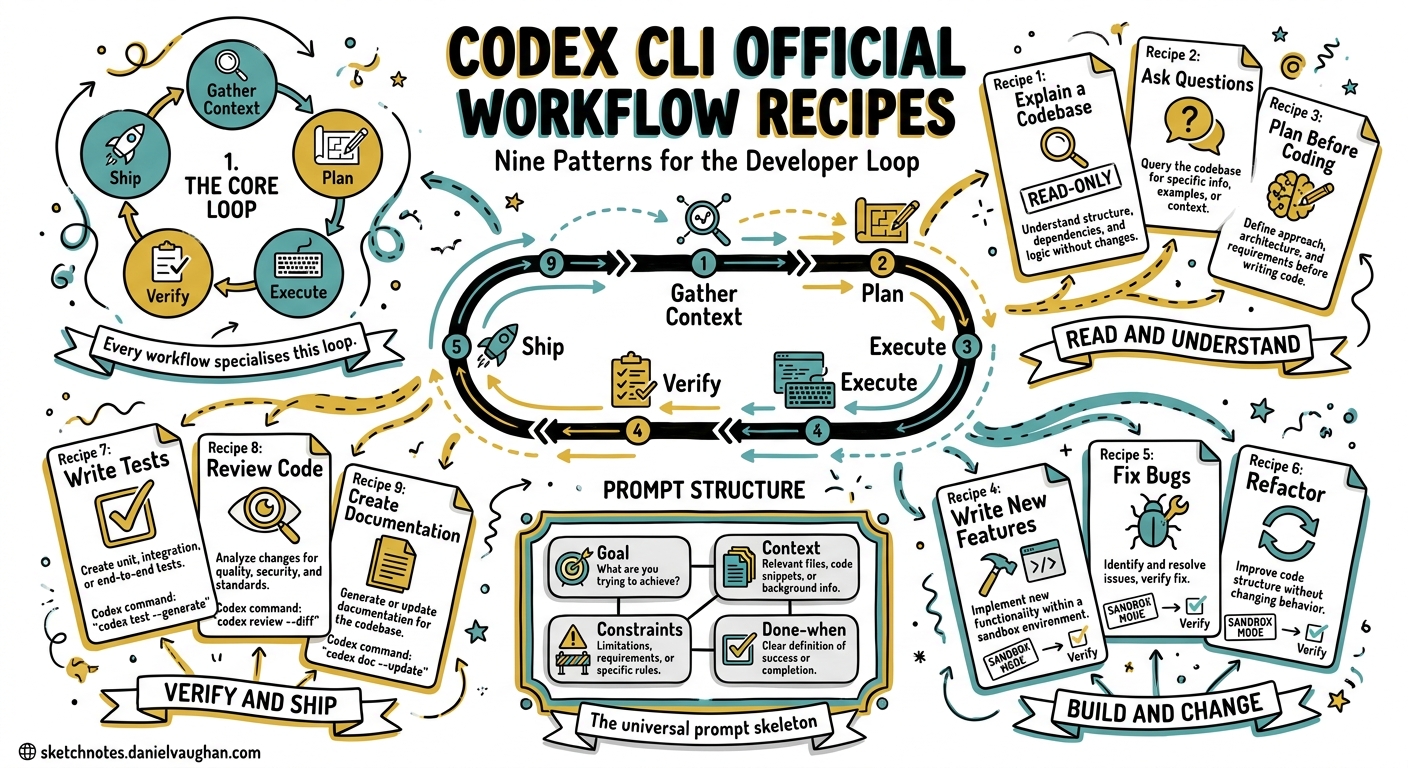
OpenAI’s developer documentation now includes a dedicated Workflows page that codifies nine canonical patterns for using Codex CLI across the software development lifecycle 1. These are not abstract suggestions — they are concrete, repeatable recipes that map to the slash commands, configuration options, and model capabilities available in Codex CLI v0.128+ 2. This article walks through each workflow with the configuration and commands you need to make it work.
The Underlying Loop
Every workflow shares a common skeleton: gather context, plan the work, execute with sandbox guardrails, verify the result, and ship. OpenAI’s best practices documentation formalises this as the four-part prompt structure: Goal, Context, Constraints, and Done-when 3. The nine workflows below are specialisations of this loop for different stages of development.
flowchart LR
    A[Gather Context] --> B[Plan]
    B --> C[Execute]
    C --> D[Verify]
    D --> E{Correct?}
    E -->|No| B
    E -->|Yes| F[Ship]
1. Explain a Codebase
When to use: Onboarding to a new project, inheriting a service, or reasoning about an unfamiliar data model or request flow 1.
This workflow is read-only by design. Start in read-only sandbox mode so Codex cannot accidentally modify anything whilst exploring:
codex --sandbox-mode read-only
Inside the session, use @ file fuzzy search to attach specific files, then ask targeted questions:
@src/api/middleware.ts @src/models/user.ts
Explain the authentication flow from request entry to database lookup.
Trace which middleware runs before the User model is instantiated.
Tip: Pair this with /plan mode. Codex will gather context and produce a structured explanation without touching files 3.
2. Fix a Bug
When to use: You have a failing test, error trace, or reproducible behaviour to resolve 1.
The key is giving Codex a tight reproduction loop. Paste the error output directly, reference the failing test file, and define the completion criterion explicitly:
@tests/api/test_auth.py
This test fails with "AssertionError: expected 200, got 403".
The regression was introduced after commit abc123.
Fix the bug. Done when `pytest tests/api/test_auth.py` passes.
Codex will iterate — running the test, reading the traceback, editing code, and re-running — until the test passes or it requests guidance. This is the workflow where workspace-write sandbox mode with on-request approval earns its keep 4:
# .codex/config.toml
sandbox_mode = "workspace-write"
approval_policy = "on-request"
3. Write a Test
When to use: You need unit or integration tests for a function, module, or endpoint 1.
Effective test generation requires Codex to see both the implementation and any existing test conventions. Reference both:
@src/billing/invoice.py @tests/billing/test_charges.py
Write unit tests for the `calculate_pro_rata` function.
Follow the same fixtures and assertion patterns as test_charges.py.
Done when all new tests pass and coverage for invoice.py exceeds 80%.
The over-mocking problem is real — agent-generated tests often mock too aggressively, producing tests that pass but verify nothing 5. Counter this by specifying constraints: “Use real database fixtures, not mocks, for integration paths.”
4. Prototype from a Screenshot
When to use: You have a design mock or reference screenshot and need a working implementation 1.
Codex accepts image input via the -i flag 6:
codex -i design-mock.png "Implement this login form using React and Tailwind CSS. Match the spacing, colours, and typography as closely as possible."
This workflow benefits from higher reasoning effort. In config.toml or via /model, select a model with strong visual capabilities:
model = "gpt-5.5"
GPT-5.5 achieves 82.7% on Terminal-Bench 2.0 and is OpenAI’s recommended choice for implementation tasks 7.
5. Iterate on UI with Live Updates
When to use: You are running a dev server and want rapid visual refinement 1.
Start your development server in a background terminal, then iterate within the same Codex session. Codex can observe the running process via the /ps command 6:
Start the Next.js dev server on port 3000.
Then adjust the header component: reduce padding to 12px,
change the background to #1a1a2e, and make the navigation
links 14px semibold.
Each edit triggers a hot reload. If you have browser-use capability enabled (available in the Codex app), Codex can verify its changes visually 8.
6. Delegate Refactor to Cloud
When to use: A large refactoring task that should run in a cloud environment whilst you continue working locally 1.
This is a two-phase workflow. First, plan locally:
/plan
Refactor the payment module from callbacks to async/await.
Scope: src/payments/*.ts (12 files).
Constraints: maintain all existing test assertions.
Do not change the public API surface.
Once the plan is approved, submit to Codex cloud 9:
codex cloud submit --prompt "Execute the refactoring plan in PLANS.md" \
  --project ./payment-service
The cloud environment runs with its own sandbox, and results appear in your Triage queue for review.
sequenceDiagram
    participant Dev as Developer (Local)
    participant CLI as Codex CLI
    participant Cloud as Codex Cloud
    Dev->>CLI: /plan refactoring scope
    CLI-->>Dev: Structured plan
    Dev->>Cloud: codex cloud submit
    Cloud->>Cloud: Execute in sandbox
    Cloud-->>Dev: Results in Triage
    Dev->>Dev: Review and merge
7. Do a Local Code Review
When to use: You want a second pair of eyes on uncommitted changes before committing 1.
The /review slash command is purpose-built for this 6:
/review
By default, it reviews uncommitted working-tree changes. You can also target a specific base branch:
/review --base main
Or review only staged changes:
/review --staged
Codex operates in a read-only reviewer mode — it does not modify your working tree. It produces structured feedback covering correctness, style, security concerns, and test coverage gaps 1. For teams, combine this with the auto-review subagent for automated approval decisions 10:
approval_policy = "on-request"
approvals_reviewer = "auto_review"
8. Review a GitHub Pull Request
When to use: A PR needs review and you do not want to check it out locally 1.
Tag @codex in a PR comment, and Codex reviews the diff directly on GitHub. This integrates through the Codex GitHub app or via the CLI with the gh tool:
codex exec "Review the PR at https://github.com/org/repo/pull/42. \
Focus on security implications of the new authentication middleware. \
Comment inline on any concerns."
For CI integration, codex exec --json now reports reasoning-token usage alongside input and output tokens, making it straightforward to track review costs programmatically 2:
{
  "input_tokens": 12450,
  "cached_input_tokens": 8200,
  "output_tokens": 3100,
  "reasoning_output_tokens": 1800
}
9. Update Documentation
When to use: Documentation has drifted from the implementation, or you need to add docs for new features 1.
This workflow requires both code context and documentation context:
@src/api/routes/*.ts @docs/api-reference.md
The API reference is out of date. Compare the route handlers
with the documented endpoints. Update docs/api-reference.md
to reflect the current implementation. Verify all URLs are valid.
Done when the doc accurately describes every public endpoint.
Documentation workflows pair well with hooks. A PostToolUse hook can validate that modified Markdown files pass a linter 11:
[[hooks.PostToolUse]]
matcher = "^apply_patch$"

[[hooks.PostToolUse.hooks]]
type = "command"
command = 'markdownlint docs/'
timeout = 15
statusMessage = "Linting documentation"
Configuration Profiles for Workflows
Rather than reconfiguring for each workflow, define named profiles in config.toml and switch with codex --profile <name> 12:
[profiles.explore]
sandbox_mode = "read-only"
model = "gpt-5.5"

[profiles.fix]
sandbox_mode = "workspace-write"
approval_policy = "on-request"
model = "gpt-5.5"

[profiles.review]
sandbox_mode = "read-only"
approval_policy = "never"
approvals_reviewer = "auto_review"
model = "gpt-5.4"

[profiles.fast]
sandbox_mode = "workspace-write"
approval_policy = "on-request"
model = "gpt-5.3-codex-spark"
The explore profile maps to workflows 1 (Explain) and 9 (Docs). The fix profile suits workflows 2 (Bug Fix), 3 (Tests), 4 (Prototype), and 5 (UI iteration). The review profile covers workflows 7 and 8. The fast profile uses Codex-Spark at over 1,000 tokens per second for rapid iteration tasks 13.
The Workflow Decision Framework
Choosing the right workflow depends on two axes: risk level (read-only vs write) and scope (single file vs multi-file/multi-service).
quadrantChart
    title Workflow Selection by Risk and Scope
    x-axis "Single File" --> "Multi-Service"
    y-axis "Read-Only" --> "Write + Execute"
    quadrant-1 "Delegate Refactor (6)"
    quadrant-2 "Fix Bug (2), Write Test (3)"
    quadrant-3 "Explain Codebase (1)"
    quadrant-4 "Review PR (8), Local Review (7)"
    "Prototype from Screenshot": [0.3, 0.7]
    "Iterate UI": [0.4, 0.8]
    "Update Docs": [0.6, 0.5]
Sequencing Workflows in Practice
A realistic development session chains several workflows. A typical bug-fix cycle:
- Explain (
/planmode) — understand the failing area - Fix — implement the repair with test verification
- Write Test — add regression coverage
- Local Review (
/review) — self-review before pushing - PR Review — request Codex review on the PR
Each step uses the same session context. Use /fork when branching to exploratory work, and /side for quick tangential questions that should not pollute the main thread 6.
Key Takeaways
- The nine workflows are not prescriptive — they are composable building blocks.
- Named profiles eliminate configuration friction when switching between workflows.
- Plan mode (
/planor Shift+Tab) should precede any multi-file or ambiguous task 3. - The four-part prompt structure (Goal, Context, Constraints, Done-when) applies universally.
- Use
/reviewas a habit before every commit, not just for formal reviews.
The workflows page represents OpenAI’s opinionated answer to a question most Codex users eventually ask: “What should I actually use this for?” The answer is structured, repeatable loops — not one-off prompts.
Citations
-
[Workflows - Codex OpenAI Developers](https://developers.openai.com/codex/workflows) -
[Changelog - Codex OpenAI Developers](https://developers.openai.com/codex/changelog) -
[Best Practices - Codex OpenAI Developers](https://developers.openai.com/codex/learn/best-practices) -
[Agent Approvals & Security - Codex OpenAI Developers](https://developers.openai.com/codex/agent-approvals-security) -
Over-Mocked Tests: Agent-Generated Test Quality - Codex Blog, 2 May 2026 ↩
-
[Features - Codex CLI OpenAI Developers](https://developers.openai.com/codex/cli/features) -
[Introducing GPT-5.5 OpenAI](https://openai.com/index/introducing-gpt-5-5/) -
[In-app Browser - Codex App OpenAI Developers](https://developers.openai.com/codex/app/browser) -
Codex CLI vs Codex Cloud: When to Use Each - Codex Blog, 18 April 2026 ↩
-
Codex CLI Granular Approval Policies and the Auto-Review Subagent - Codex Blog, 7 May 2026 ↩
-
[Hooks - Codex OpenAI Developers](https://developers.openai.com/codex/hooks) -
[Configuration Reference - Codex OpenAI Developers](https://developers.openai.com/codex/config-reference) -
[Introducing GPT-5.3-Codex-Spark OpenAI](https://openai.com/index/introducing-gpt-5-3-codex-spark/)