Codex CLI for Ruby on Rails Teams: RuboCop MCP, RSpec Workflows, and Convention-Friendly AGENTS.md Patterns
Codex CLI for Ruby on Rails Teams: RuboCop MCP, RSpec Workflows, and Convention-Friendly AGENTS.md Patterns
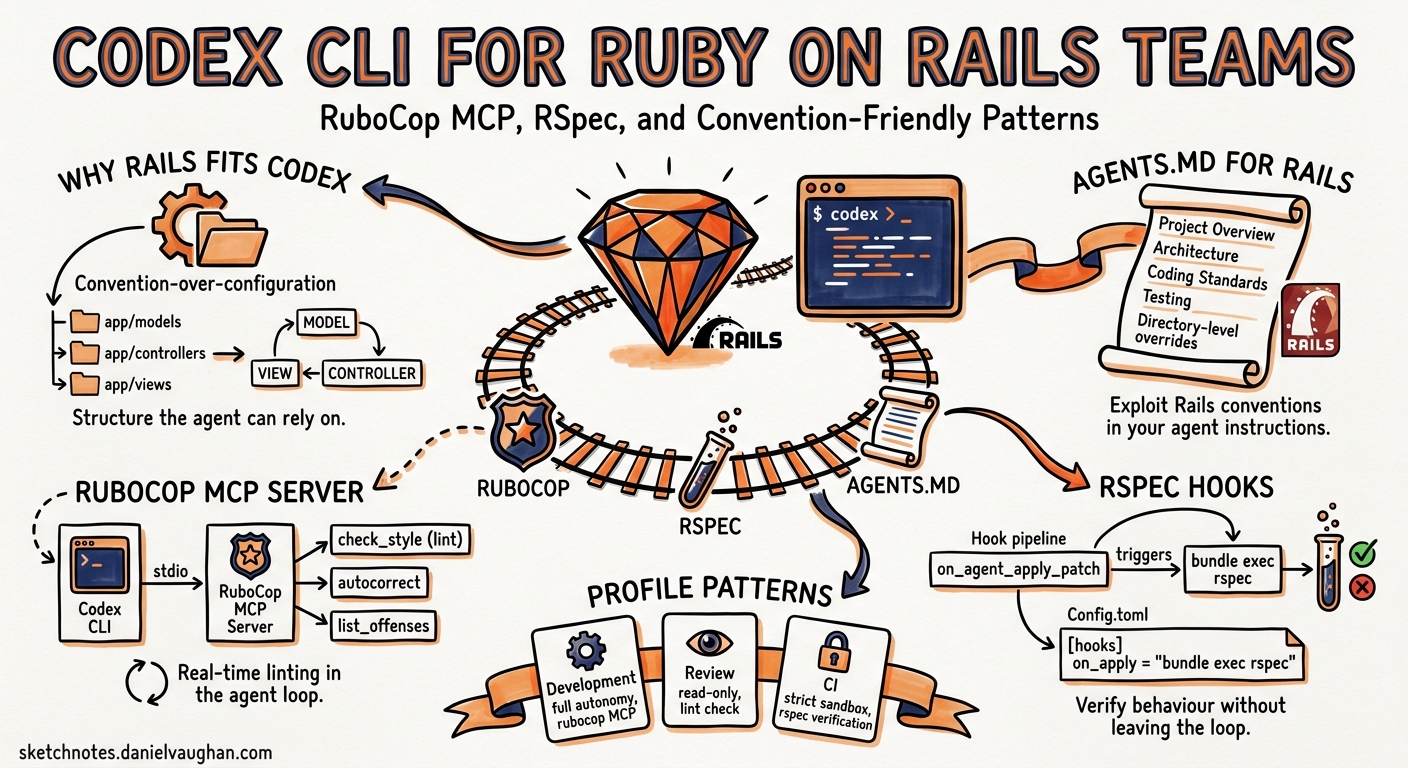
Rails has always been opinionated about structure. Models live in app/models/, controllers in app/controllers/, views in app/views/. That predictability — the same convention-over-configuration philosophy that made Rails productive for humans — turns out to be equally valuable for AI coding agents1. When Codex CLI drops into a Rails repository, the consistent naming, the MVC boundaries, and the standardised file layout give the agent a head start that less conventional frameworks cannot match.
This article covers the practical setup for running Codex CLI against a Rails codebase: writing an AGENTS.md that exploits Rails conventions, wiring RuboCop’s built-in MCP server for live linting, configuring hooks for RSpec verification, and structuring profiles that match how Rails teams actually work.
Why Rails and Codex CLI Fit Together
Rails 8’s strengthened conventions — Solid Queue replacing Sidekiq as the default queue, built-in authentication, Active Storage for uploads — reduce the number of external dependencies an agent needs to reason about1. The Enumerable-heavy Ruby idiom (map, select, inject) gives the model a narrow surface area of collection patterns to learn once and reuse everywhere1. And RuboCop, which virtually every production Rails team runs, now ships a built-in MCP server that Codex CLI can connect to directly2.
The result is a toolchain where the agent writes code, the linter catches style violations in-session, and RSpec confirms behaviour — all without leaving the Codex CLI loop.
AGENTS.md for Rails Projects
The Rails framework itself now ships an AGENTS.md in its repository root, authored by Rafael França as a guide for AI agents contributing to the monorepo3. For application teams, the pattern is the same but scoped to your domain.
Root-Level AGENTS.md
# AGENTS.md

## Project Overview
Ruby on Rails 8.x application. Ruby 3.4. PostgreSQL 17. Redis for caching and Action Cable.

## Architecture
Standard Rails MVC with Hotwire (Turbo + Stimulus). API namespace under `app/controllers/api/v1/`.
Background jobs via Solid Queue. File uploads via Active Storage (S3 backend).

## Coding Standards
- Follow RuboCop defaults. Run `bundle exec rubocop` before committing.
- Use `frozen_string_literal: true` in every Ruby file.
- Prefer `assert_not` over `refute` in Minitest; prefer `eq(exact_value)` over `be_truthy` in RSpec.
- Controllers: thin. Push logic into models or service objects under `app/services/`.
- Database migrations: always reversible. Include `safety_assured` blocks for strong_migrations checks.

## Testing
- RSpec for application specs. Run with `bundle exec rspec`.
- Factory Bot for fixtures. Factories live in `spec/factories/`.
- Request specs preferred over controller specs.
- Feature specs use Capybara with Playwright driver.

## File Map
- `app/services/` — domain logic extracted from controllers
- `app/queries/` — complex Active Record scopes
- `lib/tasks/` — Rake tasks
- `config/initializers/` — boot-time configuration
Directory-Scoped AGENTS.md
Codex CLI reads the nearest AGENTS.md relative to the files being edited, with local files overriding the root4. For a Rails monolith with distinct domains, drop targeted instructions into subdirectories:
# app/services/payments/AGENTS.md

## Payment Services
All classes inherit from `Payments::BaseService`. Must handle `Stripe::StripeError`
and log to `Rails.logger.tagged("payments")`. Never store raw card numbers.
Integration tests hit Stripe's test-mode API — run with `STRIPE_TEST=1 bundle exec rspec spec/services/payments/`.
This layering exploits Rails’ directory conventions. The agent editing a payment service inherits global style rules from the root AGENTS.md and domain-specific constraints from the payments directory4.
RuboCop MCP Server: Live Linting in the Agent Loop
RuboCop 1.85 introduced a built-in MCP server that exposes two tools: rubocop_inspection (analyse code for violations) and rubocop_autocorrection (apply safe fixes)2. This means Codex CLI can lint Ruby code without shelling out to a separate process on every edit.
Configuration
Add the RuboCop MCP server to your project-scoped config.toml:
# .codex/config.toml

[[mcp_servers]]
name = "rubocop"
type = "stdio"
command = "bundle"
args = ["exec", "rubocop", "--mcp"]
cwd = "."
The mcp gem must be in your Gemfile2:
# Gemfile
group :development do
  gem "mcp", "~> 0.6"
end
After bundle install, Codex CLI picks up the server on session start. The agent can now call rubocop_inspection to check a file and rubocop_autocorrection to fix violations — all within the same turn, before you ever see the diff.
Safety Modes
The rubocop_autocorrection tool accepts a safety boolean parameter. When true (the default), only safe corrections are applied. Setting it to false permits riskier transformations — useful for bulk style migrations but not recommended during feature work2. Encode this preference in your AGENTS.md:
## RuboCop
- Always run rubocop_inspection after editing Ruby files.
- Use rubocop_autocorrection with safety=true only. Never apply unsafe corrections without human review.
RSpec Verification with PostToolUse Hooks
RuboCop catches style violations, but you also want the agent to run relevant specs after making changes. A PostToolUse hook can trigger RSpec automatically whenever Codex CLI modifies a Ruby file56.
Hook Configuration
{
  "hooks": {
    "PostToolUse": [
      {
        "command": "node /path/to/rspec-runner.mjs --post"
      }
    ]
  }
}
Hook Script
The hook script reads the tool output from stdin, checks whether any .rb files were modified, and runs the corresponding specs:
// rspec-runner.mjs
import { readFileSync } from "fs";
import { execSync } from "child_process";

const input = JSON.parse(readFileSync("/dev/stdin", "utf-8"));

// Only trigger after file edits, not after shell commands
if (input.tool_name !== "apply_patch") {
  process.stdout.write(JSON.stringify({}));
  process.exit(0);
}

// Extract modified file paths
const files = (input.output || "")
  .split("\n")
  .filter(line => line.match(/^[+-]{3} [ab]\/.*\.rb$/))
  .map(line => line.replace(/^[+-]{3} [ab]\//, ""));

if (files.length === 0) {
  process.stdout.write(JSON.stringify({}));
  process.exit(0);
}

// Map source files to spec files
const specFiles = files
  .map(f => f.replace(/^app\//, "spec/").replace(/\.rb$/, "_spec.rb"))
  .filter(f => {
    try { return require("fs").statSync(f).isFile(); }
    catch { return false; }
  });

if (specFiles.length > 0) {
  try {
    execSync(`bundle exec rspec ${specFiles.join(" ")} --format progress`, {
      stdio: "pipe", timeout: 60000
    });
    process.stdout.write(JSON.stringify({
      systemMessage: `RSpec passed for ${specFiles.length} spec(s).`
    }));
  } catch (err) {
    process.stdout.write(JSON.stringify({
      systemMessage: `RSpec failed:\n${err.stdout?.toString().slice(-500)}`,
      stopReason: "rspec_failure"
    }));
  }
} else {
  process.stdout.write(JSON.stringify({}));
}
When a spec fails, the hook sends a stopReason back to Codex CLI, halting the agent and surfacing the failure message. The agent can then read the error and attempt a fix — a tight red-green loop driven entirely by the tool5.
⚠️ Note: as of v0.128, PostToolUse hooks fire reliably for shell commands and apply_patch file edits, but coverage for MCP tool calls remains incomplete6. Test your hook configuration locally before relying on it in CI.
Prefix Rules for Rails Commands
Rails teams repeatedly run the same commands: bundle exec rspec, bundle exec rubocop, rails db:migrate, rails console. Without execution policy rules, Codex CLI prompts for approval on every invocation. Define prefix rules to eliminate the fatigue7:
# .codex/rules/rails.rules

prefix_rule(
    pattern = ["bundle", "exec", ["rspec", "rubocop", "rails"]],
    decision = "allow",
    justification = "Standard Rails toolchain commands"
)

prefix_rule(
    pattern = ["rails", ["db:migrate", "db:rollback", "db:seed"]],
    decision = "prompt",
    justification = "Database mutations require human confirmation"
)

prefix_rule(
    pattern = ["rails", "console"],
    decision = "forbidden",
    justification = "Interactive console not supported in agent context"
)
The precedence model is strict: forbidden overrides prompt, which overrides allow7. This means rails console is always blocked even if a broader rule allows rails subcommands.
Configuration Profiles for Rails Workflows
Different Rails tasks demand different model configurations. A profile for quick RSpec runs should optimise for speed; a profile for complex refactoring should maximise reasoning depth8.
# ~/.codex/config.toml

[profiles.rails-quick]
model = "gpt-5.4-mini"
model_reasoning_effort = "low"

[profiles.rails-deep]
model = "gpt-5.5"
model_reasoning_effort = "high"

[profiles.rails-review]
model = "gpt-5.4"
model_reasoning_effort = "medium"
Launch with the appropriate profile:
# Quick spec generation
codex --profile rails-quick "Add request specs for the UsersController#update action"

# Deep refactoring
codex --profile rails-deep "Extract the payment logic from OrdersController into a PaymentService"

# Code review
codex --profile rails-review
/review Focus on N+1 queries and missing index coverage
Practical Workflow: Feature Development
Bringing it all together, a typical feature development session looks like this:
sequenceDiagram
    participant Dev as Developer
    participant Codex as Codex CLI
    participant RuboCop as RuboCop MCP
    participant RSpec as RSpec Hook

    Dev->>Codex: "Add a Membership model with has_many :through to Team"
    Codex->>Codex: Read AGENTS.md (root + app/models/)
    Codex->>Codex: Generate migration, model, specs
    Codex->>RuboCop: rubocop_inspection on new files
    RuboCop-->>Codex: 2 offences (frozen_string_literal missing)
    Codex->>RuboCop: rubocop_autocorrection (safety=true)
    RuboCop-->>Codex: Corrected
    Codex->>Codex: apply_patch — write files
    Codex->>RSpec: PostToolUse triggers spec run
    RSpec-->>Codex: 1 failure (missing factory)
    Codex->>Codex: Create factory, re-run
    RSpec-->>Codex: All green
    Codex-->>Dev: Migration, model, factory, specs — all passing
The developer issues a single prompt. The agent handles the round trips — linting, fixing, testing, fixing again — and surfaces a clean result. The AGENTS.md constrains style, the RuboCop MCP enforces it, and the RSpec hook verifies behaviour.
What to Watch
Rails’ convention-over-configuration philosophy aligns well with agent-driven development, but there are edges to be aware of:
- Strong Migrations: If your team uses
strong_migrations, add a PostToolUse hook or AGENTS.md instruction to runbundle exec rails db:migratein a dry-run mode before accepting migration files. - Hotwire/Stimulus: Codex CLI handles ERB and Stimulus controllers reasonably well, but complex Turbo Frame interactions benefit from explicit AGENTS.md instructions describing the expected request/response cycle.
- RuboCop extensions: If you use
rubocop-rails,rubocop-rspec, orrubocop-performance, ensure they are loaded in your.rubocop.yml— the MCP server respects the same configuration file2.
Rails teams already have the conventions. The work is in making those conventions machine-readable — and with AGENTS.md, RuboCop MCP, and PostToolUse hooks, the gap is narrower than you might expect.
Citations
-
Katsikanis, N. “Harnessing Rails for AI-Friendly, Testable Code.” https://nikoskatsikanis.com/blog/4-harnessing-rails-for-ai-friendly-testable-code/ ↩ ↩2 ↩3
-
RuboCop Documentation. “MCP (Model Context Protocol).” https://docs.rubocop.org/rubocop/latest/usage/mcp.html ↩ ↩2 ↩3 ↩4 ↩5
-
Rails/Rails PR #55991. “Add AGENTS.md with Rails codebase guide for AI coding agents.” https://github.com/rails/rails/pull/55991 ↩
-
OpenAI. “Custom instructions with AGENTS.md — Codex.” https://developers.openai.com/codex/guides/agents-md ↩ ↩2
-
OpenAI. “Hooks — Codex.” https://developers.openai.com/codex/hooks ↩ ↩2
-
Agentic Control Plane. “Codex CLI hook governance: what works today (and what doesn’t).” https://agenticcontrolplane.com/blog/codex-cli-hooks-reference ↩ ↩2
-
OpenAI. “Rules — Codex.” https://developers.openai.com/codex/rules ↩ ↩2
-
OpenAI. “Advanced Configuration — Codex.” https://developers.openai.com/codex/config-advanced ↩