Codex CLI + Snyk MCP Server: Security Scanning for AI-Generated Code and the Agent Supply Chain
Codex CLI + Snyk MCP Server: Security Scanning for AI-Generated Code and the Agent Supply Chain
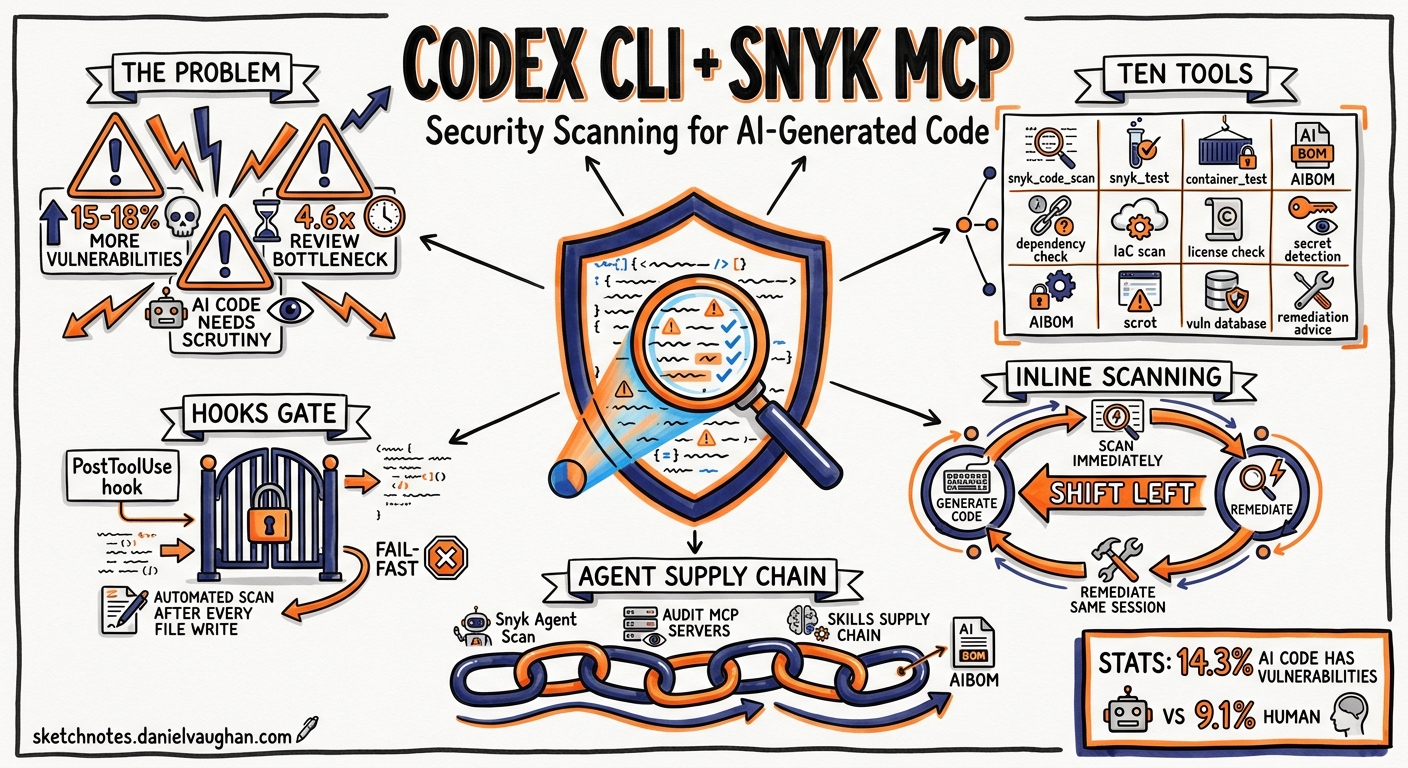
AI coding agents generate code at a pace that outstrips traditional review workflows. Codex CLI’s sandboxed execution model keeps agent commands contained, but the output — the code itself — still needs scrutiny. Snyk’s MCP server integration brings static analysis, dependency scanning, container checks, and a novel AI Bill of Materials directly into the agent loop, turning security from a downstream gate into an inline guardrail.
This article covers the full Snyk surface available to Codex CLI: the MCP server’s ten tools, practical config.toml setup, AGENTS.md conventions for “secure at inception” workflows, PostToolUse hooks for automated scanning gates, and Snyk Agent Scan for auditing Codex’s own MCP and skills supply chain.
Why AI-Generated Code Needs Inline Security
The Opsera 2026 AI Coding Impact Benchmark found that AI-assisted commits introduced 15–18% more security vulnerabilities than human-only commits, whilst simultaneously creating a 4.6× review bottleneck 1. Traditional SAST and SCA gates run after a pull request is raised — by which point the developer has context-switched and the fix cycle lengthens.
Snyk’s MCP integration shifts scanning left — into the agent’s own turn loop. When Codex generates a file, the same session can immediately invoke snyk_code_scan and remediate before the code ever leaves the working directory 2.
Setting Up the Snyk MCP Server
Prerequisites
You need Snyk CLI v1.1298.0 or later and a Snyk account (free tier works for open-source projects) 3. The MCP server ships as a built-in subcommand of the Snyk CLI — no separate package required.
config.toml Configuration
Add the following to your project-level .codex/config.toml or user-level ~/.codex/config.toml:
[mcp_servers.snyk]
command = "npx"
args = ["-y", "snyk@latest", "mcp", "-t", "stdio"]
If you have the Snyk CLI installed globally, use the direct path instead:
[mcp_servers.snyk]
command = "/usr/local/bin/snyk"
args = ["mcp", "-t", "stdio"]
The -t stdio flag selects the standard I/O transport — the recommended mode for local integrations 3. Snyk also supports SSE transport, but stdio avoids network overhead and keeps all traffic local.
Authentication
On first invocation, the MCP server triggers a browser-based authentication flow. For headless or CI environments, export your Snyk API token:
export SNYK_TOKEN="your-snyk-api-token"
You can also prompt Codex directly: “Authenticate my Snyk account” to trigger the snyk_auth tool 4.
Tool Allow-Listing
To restrict which Snyk tools the agent can invoke, use Codex’s enabled_tools mechanism:
[mcp_servers.snyk]
command = "npx"
args = ["-y", "snyk@latest", "mcp", "-t", "stdio"]
enabled_tools = [
  "snyk_code_scan",
  "snyk_sca_scan",
  "snyk_iac_scan",
  "snyk_container_scan"
]
This keeps the agent focused on scanning and prevents unintended calls to snyk_logout or snyk_trust 5.
The Snyk MCP Tool Surface
The Snyk MCP server exposes ten tools across three categories 6 7:
Core Scanning Tools
| Tool | Purpose | What It Analyses |
|---|---|---|
snyk_code_scan |
SAST | First-party source code across 30+ languages |
snyk_sca_scan |
SCA | Open-source dependency vulnerabilities |
snyk_iac_scan |
IaC scanning | Terraform, CloudFormation, Kubernetes manifests |
snyk_container_scan |
Container security | Docker images and base image vulnerabilities |
Supply Chain Management Tools
| Tool | Purpose |
|---|---|
snyk_sbom_scan |
Analyses existing Software Bill of Materials files |
snyk_aibom |
Generates an AI Bill of Materials for AI-generated code |
Utility Tools
| Tool | Purpose |
|---|---|
snyk_auth |
Authenticates the Snyk session |
snyk_trust |
Marks a folder as trusted before scanning |
snyk_version |
Returns Snyk CLI version information |
snyk_logout |
Terminates the Snyk session |
Important caveat: snyk_sca_scan may execute third-party build tools (Gradle, Maven, pip) on your machine to resolve the dependency tree 3. Under Codex’s sandboxed execution, these tools need network access — ensure your sandbox policy permits it or run SCA scans in a pre-configured environment.
The Secure-at-Inception Workflow
The most valuable pattern combines Codex’s code generation with immediate inline scanning. The workflow looks like this:
flowchart LR
    A[Codex generates code] --> B[snyk_code_scan]
    B --> C{Vulnerabilities?}
    C -->|Yes| D[Codex remediates]
    D --> B
    C -->|No| E[snyk_sca_scan]
    E --> F{Dependency issues?}
    F -->|Yes| G[Codex updates deps]
    G --> E
    F -->|No| H[Code ready for review]
AGENTS.md Security Directives
Encode the scan-fix loop in your project’s AGENTS.md so every session follows the same pattern:
## Security Standards

- After generating or modifying any source file, run `snyk_code_scan` on the
  changed files before proceeding to the next task.
- After adding or updating any dependency, run `snyk_sca_scan` and remediate
  all high and critical severity findings before committing.
- For any Terraform or Kubernetes manifest changes, run `snyk_iac_scan` and
  fix all misconfigurations before proceeding.
- Re-scan after each remediation to confirm zero new issues.
- Never suppress or ignore critical-severity findings without explicit
  human approval.
These directives are re-read on every turn and survive context compaction, ensuring the security policy persists across long sessions 8.
PostToolUse Hooks for Automated Gates
For stricter enforcement, pair the AGENTS.md conventions with a PostToolUse hook that automatically triggers a scan after file modifications:
[[hooks]]
event = "post_tool_use"
tool = "apply_patch"
command = "snyk code test --severity-threshold=high --json"
timeout_ms = 30000
When the hook’s exit code is non-zero (vulnerabilities found), Codex receives the JSON output as context and can act on it immediately 9. This converts security scanning from a suggestion into a hard gate.
For dependency changes specifically:
[[hooks]]
event = "post_tool_use"
tool = "apply_patch"
command = "bash -c 'git diff --name-only HEAD | grep -qE \"package\\.json|go\\.mod|requirements\\.txt|Cargo\\.toml\" && snyk test --severity-threshold=high || true'"
timeout_ms = 60000
The AI Bill of Materials (AIBOM)
The snyk_aibom tool generates an AI-specific bill of materials — a structured record of what was generated by AI, which model produced it, and when 6. This is increasingly relevant for enterprise compliance frameworks that require AI provenance tracking.
A typical invocation from the Codex session:
“Generate an AIBOM for this project’s AI-generated components and save it to
docs/aibom.json.”
The AIBOM complements Codex’s own codex_git_commit attribution feature, which appends Co-authored-by: trailers to commits 10. Together, they provide a dual-layer audit trail: git history shows which commits involved AI, whilst the AIBOM captures what the AI contributed at a component level.
Auditing the Agent Supply Chain with Snyk Agent Scan
Security scanning of generated code is one dimension. The other is the supply chain of tools the agent itself uses — MCP servers, skills, and plugins. Snyk’s ToxicSkills study found that 13.4% of agent skills on public registries contained at least one critical-level security issue, including malware distribution, prompt injection attacks, and exposed secrets 11.
Snyk Agent Scan is a standalone CLI tool that audits your Codex installation:
# Install
uvx snyk-agent-scan@latest

# Authenticate
export SNYK_TOKEN="your-snyk-api-token"

# Scan all MCP server configurations
snyk-agent-scan

# Include skills in the scan
snyk-agent-scan --skills

# Scan a specific config file
snyk-agent-scan ~/.codex/config.toml
Agent Scan auto-discovers configurations for Codex CLI alongside Claude Code, Cursor, Gemini CLI, and other agents 12. It detects over 15 distinct security risks:
- Prompt injection in tool descriptions
- Tool poisoning — malicious behaviour hidden in MCP server implementations
- Tool shadowing — a server registering tools that impersonate trusted tools
- Toxic data flows — sensitive data leaking through tool call chains
- Supply chain compromise — known-vulnerable dependencies in server code
⚠️ Important: Agent Scan executes the command defined in your MCP configurations during scanning. Run it in a sandboxed environment when evaluating untrusted configurations, and review the interactive consent prompts carefully 12.
For JSON output suitable for CI pipelines:
snyk-agent-scan --json > agent-scan-results.json
Enterprise Hardening Patterns
Profile-Based Security Levels
Define different scanning profiles for different contexts:
[profile.security-strict]
model = "gpt-5.5"

[profile.security-strict.mcp_servers.snyk]
command = "snyk"
args = ["mcp", "-t", "stdio"]
enabled_tools = [
  "snyk_code_scan",
  "snyk_sca_scan",
  "snyk_iac_scan",
  "snyk_container_scan",
  "snyk_sbom_scan",
  "snyk_aibom"
]

[profile.security-quick]
model = "gpt-5.4-mini"

[profile.security-quick.mcp_servers.snyk]
command = "snyk"
args = ["mcp", "-t", "stdio"]
enabled_tools = ["snyk_code_scan", "snyk_sca_scan"]
Switch profiles at invocation:
codex --profile security-strict    # Full scanning for production code
codex --profile security-quick     # Lightweight scanning for prototypes
CI Pipeline Integration
Combine codex exec with Snyk scanning for automated security-aware code generation:
codex exec "Refactor the authentication module to use argon2id \
  for password hashing. After changes, run snyk_code_scan and \
  snyk_sca_scan. Report any findings." \
  --model gpt-5.5 \
  --output-schema '{"type":"object","properties":{"files_changed":{"type":"array","items":{"type":"string"}},"snyk_findings":{"type":"integer"},"status":{"type":"string"}}}'
Known Limitations
| Limitation | Impact | Workaround |
|---|---|---|
snyk_sca_scan runs build tools |
May fail in strict sandbox modes | Use workspace-write sandbox or run SCA outside the sandbox |
| Browser auth required on first use | Blocks headless/CI environments | Pre-set SNYK_TOKEN environment variable |
snyk_trust needed per folder |
Scanning untrusted folders prompts confirmation | Pass --disable-trust for headless workflows ⚠️ |
| Agent Scan executes MCP commands | Scanning untrusted configs is itself a risk | Use sandboxed environment and review consent prompts |
| Free tier rate limits | May throttle frequent scanning in long sessions | Use a paid Snyk plan for team/enterprise use |
Decision Framework
flowchart TD
    A[What are you securing?] --> B{Generated code?}
    B -->|Yes| C[Snyk MCP Server]
    C --> D[snyk_code_scan + snyk_sca_scan]
    A --> E{Infrastructure config?}
    E -->|Yes| F[snyk_iac_scan + snyk_container_scan]
    A --> G{Agent tooling itself?}
    G -->|Yes| H[Snyk Agent Scan]
    H --> I[Audit MCP servers + skills]
    A --> J{Compliance trail?}
    J -->|Yes| K[snyk_aibom + codex_git_commit]
Conclusion
Snyk’s MCP integration gives Codex CLI teams a practical path to shifting security left — not just to the pull request, but into the agent’s own execution loop. The combination of inline SAST/SCA scanning, AGENTS.md directives, PostToolUse hooks, and Agent Scan for supply-chain auditing covers both the code the agent writes and the tools the agent uses.
The scan-fix-rescan loop encoded in AGENTS.md is the key pattern: it turns security scanning from a phase-gate into a continuous background discipline that runs every time the agent touches code.
Citations
-
Opsera, “2026 AI Coding Impact Benchmark Report,” April 2026. https://opsera.io/resources/ai-coding-impact-benchmark-2026 ↩
-
Snyk, “Secure AI Coding With Snyk: Now Supporting Model Context Protocol (MCP),” 2026. https://snyk.io/articles/secure-ai-coding-with-snyk-now-supporting-model-context-protocol-mcp/ ↩
-
Snyk, “Codex CLI Guide — Snyk User Docs,” 2026. https://docs.snyk.io/integrations/snyk-studio-agentic-integrations/quickstart-guides-for-snyk-studio/codex-cli-guide ↩ ↩2 ↩3
-
Snyk, “Agentic Security with Snyk Studio — Snyk User Docs,” 2026. https://docs.snyk.io/integrations/snyk-studio-agentic-integrations ↩
-
OpenAI, “Agent Approvals & Security — Codex CLI,” 2026. https://developers.openai.com/codex/agent-approvals-security ↩
-
Snyk, “Catch Vulnerabilities Early: Your Snyk MCP Cheat Sheet,” 2026. https://snyk.io/articles/snyk-mcp-cheat-sheet/ ↩ ↩2
-
Snyk, “Snyk Studio MCP — GitHub,” 2026. https://github.com/snyk/studio-mcp ↩
-
OpenAI, “Custom Instructions with AGENTS.md — Codex,” 2026. https://developers.openai.com/codex/guides/agents-md ↩
-
OpenAI, “Hooks — Codex CLI,” 2026. https://developers.openai.com/codex/hooks ↩
-
OpenAI, “Codex CLI Changelog — v0.129.0,” May 2026. https://developers.openai.com/codex/changelog ↩
-
Snyk, “ToxicSkills: Malicious AI Agent Skills — ClawHub and skills.sh Study,” February 2026. https://snyk.io/blog/toxicskills-malicious-ai-agent-skills-clawhub/ ↩
-
Snyk, “Agent Scan — GitHub,” 2026. https://github.com/snyk/agent-scan ↩ ↩2