Vim Modal Editing in the Codex CLI Composer: Configuration, Keymaps, and Terminal-Native Workflows
Vim Modal Editing in the Codex CLI Composer: Configuration, Keymaps, and Terminal-Native Workflows
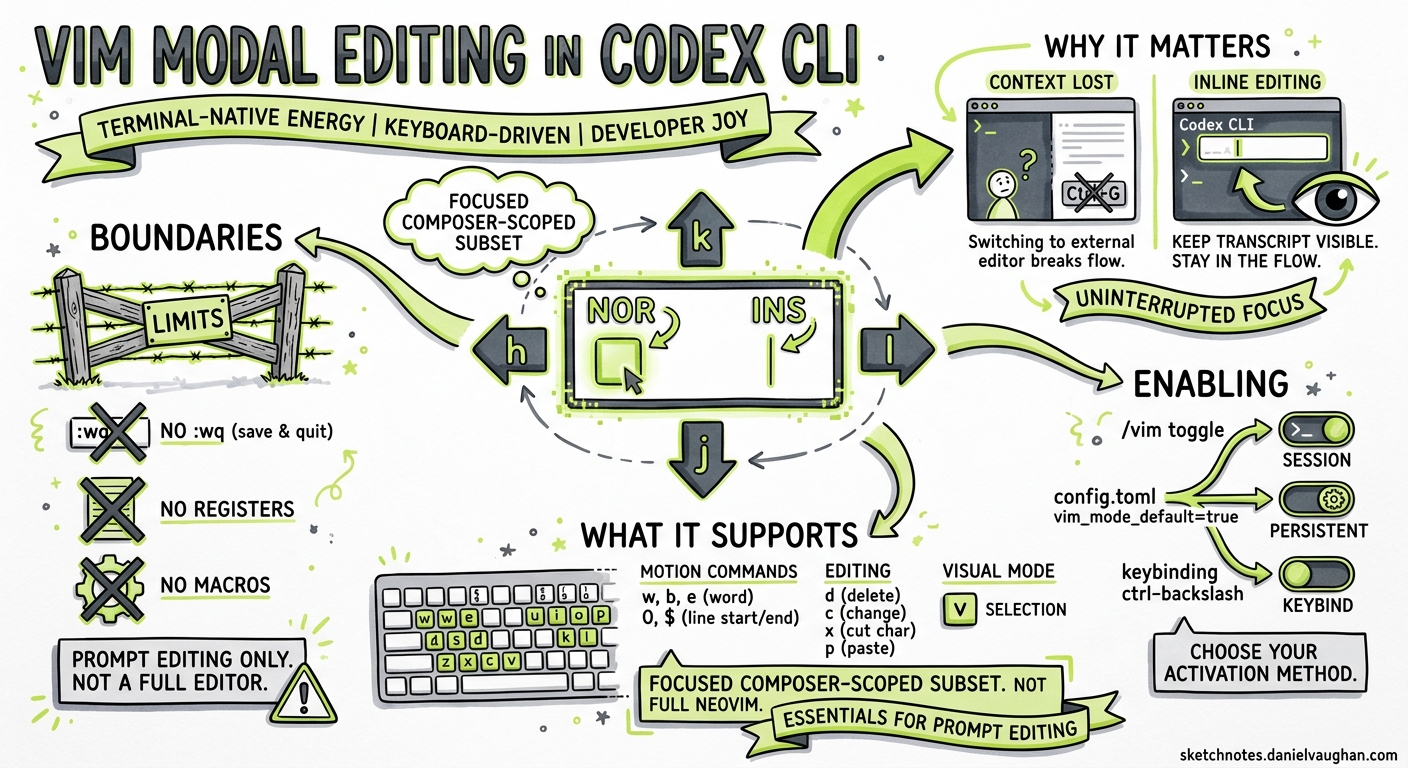
Codex CLI v0.129.0 shipped a feature that terminal-native developers have been requesting since the project’s earliest days: modal Vim editing inside the TUI composer 1. The feature arrived as PR #18595 2, closing a gap that had driven users back to Claude Code purely for its /vim command 3. This article covers how to enable it, what it supports, how to customise keymaps, and where the boundaries lie.
Why Vim Mode in the Composer Matters
AI coding agents live inside a tight prompt-edit-submit loop. Every time you reach for Ctrl+G to launch an external editor, you lose visual context — the agent’s output scrolls off-screen, and your mental model of the conversation fractures 3. Inline Vim editing keeps the entire transcript visible while you restructure a multi-line prompt using motions you already know.
The distinction matters: this is not Neovim-inside-Codex. It is a focused, composer-scoped modal keymap that covers the subset of Vim operations useful for prompt editing. No :wq, no registers, no macros — just fast, muscle-memory cursor movement and text manipulation without leaving the input box 2.
Enabling Vim Mode
There are three ways to activate it.
Runtime Toggle
Type /vim in the composer to toggle modal editing on or off for the current session 1. The mode indicator in the composer border switches between NOR and INS to reflect the active state.
Persistent Configuration
Add the following to ~/.config/codex/config.toml (or the project-scoped .codex/config.toml):
[tui]
vim_mode_default = true
This starts every session in Vim normal mode 2. The composer opens with a block cursor, ready for navigation commands rather than direct text entry.
Global Keybinding
You can bind a key to toggle Vim mode from any context:
[tui.keymap.global]
toggle_vim_mode = "ctrl-\\"
Codex validates this binding against editor keys to prevent conflicts — if you pick a key already bound to a composer action, the CLI rejects it at startup 2.
Supported Keybindings
The implementation covers the core Vim motions and operators that matter for prompt editing. It deliberately omits features like registers, marks, and ex commands that add complexity without clear value in a single-input-field context 2.
Normal Mode
| Key | Action |
|---|---|
h / l |
Move cursor left / right |
j / k |
Move cursor down / up (or navigate command history at boundaries) |
w / b |
Jump forward / backward by word |
e |
Jump to end of word |
^ / $ |
Jump to first non-whitespace / end of line |
0 |
Jump to start of line |
i |
Enter insert mode at cursor |
a |
Enter insert mode after cursor |
I |
Enter insert mode at line start |
A |
Enter insert mode at line end |
o / O |
Open line below / above and enter insert mode |
x |
Delete character under cursor |
dd |
Delete entire line |
yy |
Yank entire line |
p |
Paste after cursor |
u |
Undo |
/ |
Open slash-command entry |
! |
Enter shell mode |
Operator-Pending Mode
Typing d or y enters operator-pending mode, where the next motion determines the scope of the operation 2:
dw   → delete to next word boundary
d$   → delete to end of line
db   → delete backward one word
yw   → yank to next word boundary
y$   → yank to end of line
Invalid sequences (e.g., d followed by i) cancel the pending operator rather than entering insert mode — a deliberate safety decision to prevent accidental text loss 2.
Insert Mode
Insert mode behaves identically to the standard (non-Vim) composer. Press Esc to return to normal mode. Paste operations only function in insert mode 2.
Keymap Contexts and Customisation
Codex v0.129 introduced two new keymap contexts alongside the existing global, chat, composer, editor, pager, list, and approval contexts 4:
vim_normal— active when the composer is in Vim normal modevim_operator— active during operator-pending state (after pressingdory)
You can override default bindings in config.toml:
[tui.keymap.vim_normal]
# Remap word-forward to W (WORD motion)
word_forward = "shift-w"

[tui.keymap.vim_operator]
# No customisations — use defaults
Context-specific bindings override tui.keymap.global, so a key bound in vim_normal takes precedence over the same key in global when the composer is in normal mode 4.
Inspecting Active Bindings
The /keymap slash command opens an interactive picker showing all active bindings across every context 5. For lower-level debugging — useful when terminal multiplexers swallow key sequences — use /keymap debug to inspect raw terminal key events 1.
flowchart LR
    A["Esc pressed"] --> B{"Current mode?"}
    B -->|Insert| C["Switch to Normal"]
    B -->|Normal| D["No-op"]
    E["i / a / I / A / o / O"] --> F["Switch to Insert"]
    G["d / y"] --> H["Enter Operator-Pending"]
    H --> I{"Next key = motion?"}
    I -->|Yes| J["Execute operation"]
    I -->|No / Esc| K["Cancel operator"]
    J --> C
    K --> C
Cursor Behaviour
The TUI render path changes cursor shape to reflect the active mode 2:
| Mode | Cursor |
|---|---|
| Normal | Block (█) |
| Insert | Bar (│) |
| Operator-pending | Underline (_) |
Cursor styling is applied and restored on each render frame, so quitting Codex — or toggling Vim mode off — returns the terminal to its original cursor shape 2.
Interaction with Other TUI Features
Command History
In normal mode, j and k navigate through command history when the cursor is at the top or bottom boundary of the input. Mid-text, they move the cursor vertically as expected 2.
Slash Commands
Pressing / in normal mode opens the slash-command picker rather than searching (there is no in-composer / search). This matches the existing Codex interaction model where / always means “run a command” 5.
Ctrl+G External Editor
The external editor escape hatch still works in Vim mode. Ctrl+G launches $EDITOR with the current composer content. On return, the composer repopulates and Vim mode state resets to normal 6.
Submission
Pressing Enter in insert mode submits the prompt (the standard behaviour). After a successful submission, the composer resets to normal mode if vim_mode_default is true, or to insert mode otherwise 2.
Comparison with Claude Code /vim
Claude Code shipped its /vim toggle earlier in 2025 3. The implementations share the same core philosophy — opt-in, composer-scoped, no full Vim parity — but differ in specifics:
| Aspect | Codex CLI v0.129 | Claude Code |
|---|---|---|
| Activation | /vim toggle or config.toml |
/vim toggle |
| Persistent config | tui.vim_mode_default = true |
Stores preference per project |
| Keymap customisation | Full tui.keymap.vim_normal overrides |
Not customisable |
| Operator-pending mode | d/y + motion |
d/y + motion |
| Cursor shape changes | Yes (block/bar/underline) | Yes (block/bar) |
/keymap debug |
Yes | No equivalent |
The meaningful differentiator is Codex’s keymap customisation layer. If your terminal multiplexer swallows Ctrl+W or your muscle memory maps jk to Esc, you can remap without patching source 4.
Practical Tips
-
Start with runtime toggle. Use
/vimfor a few sessions before committing tovim_mode_default = true. The muscle-memory conflict between “Enter submits” and “Enter opens a new line” catches people out. -
Bind
jkto Esc in insert mode if you use that mapping in Neovim. This is not built in but can be approximated by bindingescapetoj kin thecomposercontext — check/keymapfor current support. -
Use
/keymap debugwhen key sequences behave unexpectedly. Tmux, Zellij, and screen all intercept certain key combinations before they reach Codex 1. -
Combine with
/sidefor complex prompt crafting. Start a side conversation in Vim mode to draft a detailed prompt, then paste the refined version into your main thread. -
Operator-pending timeout. There is no timeout on operator-pending state —
dwaits indefinitely for a motion. If you accidentally pressd, pressEscto cancel cleanly 2.
Limitations
- No visual mode. Character and line selection (
v,V) are not implemented. Use the terminal’s native selection for copy operations. - No registers.
"athrough"zdo not exist. Yank and paste use a single internal clipboard. - No
.repeat. The dot-repeat command is absent — repeat your last edit manually. - No
:ex commands. There is no command-line mode; use Codex slash commands instead. - Paste in normal mode is ignored. Terminal paste events only register in insert mode 2.
These omissions are intentional. The composer is a prompt input field, not a text editor. Features that would require maintaining a full Vim state machine add complexity without proportional value in this context.
Citations
-
Codex CLI v0.129.0 Changelog — OpenAI, May 2026. ↩ ↩2 ↩3 ↩4
-
PR #18595: Vim composer mode for Codex TUI — openai/codex, merged May 2026. ↩ ↩2 ↩3 ↩4 ↩5 ↩6 ↩7 ↩8 ↩9 ↩10 ↩11 ↩12 ↩13 ↩14
-
vi editing mode (like claude code /vim) — Issue #9184 — openai/codex, community feature request with 42 upvotes. ↩ ↩2 ↩3
-
Configuration Reference — Codex CLI — OpenAI Developers, keymap context documentation. ↩ ↩2 ↩3
-
Slash Commands in Codex CLI — OpenAI Developers,
/keymapcommand reference. ↩ ↩2 -
Features — Codex CLI — OpenAI Developers, external editor (
Ctrl+G) documentation. ↩