Codex CLI for Automated Dependency Upgrades and Framework Migrations
Codex CLI for Automated Dependency Upgrades and Framework Migrations
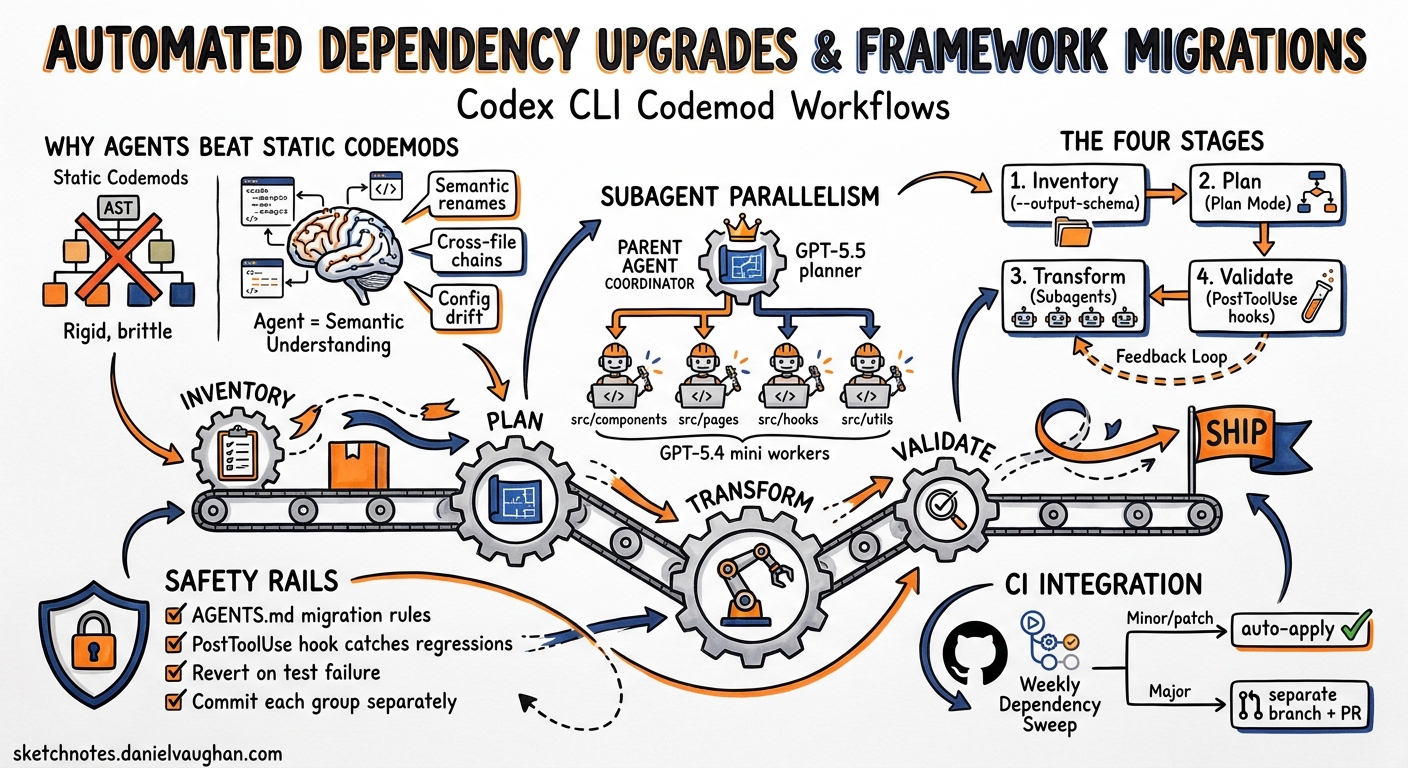
Dependency upgrades and framework migrations are the tax every engineering team pays for staying current. They are tedious, high-volume, and mechanically repetitive — yet a single missed import or overlooked breaking change can cascade into production incidents. Traditional codemods handle the syntactic transformations well enough, but they fall apart when a migration demands semantic understanding: renaming a parameter that also changes behaviour, updating call sites that depend on deprecated return shapes, or adjusting test assertions to match a new API contract.
Codex CLI is well-suited to this problem. It combines an LLM’s semantic comprehension with sandboxed shell access, subagent parallelism, and structured output — precisely the toolkit needed to turn a six-week migration into a disciplined, repeatable pipeline. This article walks through the concrete patterns, configuration, and safety rails for running dependency upgrades and framework migrations with Codex CLI v0.130 1.
Why Agents Beat Static Codemods for Migrations
Static codemods — jscodeshift transforms, Rector rules, go fix rewrites — operate on AST patterns. They excel at mechanical substitutions but struggle with three common migration scenarios:
- Semantic renames where the new API has different defaults or error semantics.
- Cross-file dependency chains where updating a type in one module requires changes to consumers, tests, and documentation simultaneously.
- Configuration drift where framework upgrades introduce new required configuration keys or deprecate existing ones.
An LLM-backed agent can read the migration guide, understand the intent behind each change, and apply transformations that account for context — precisely what Google’s internal research demonstrated when 80% of landed code modifications in a large-scale ID migration were AI-authored, cutting total migration time by an estimated 50% 2.
The Four-Stage Migration Pipeline
A reliable agent-driven migration follows a predictable pipeline. Each stage maps to a specific Codex CLI capability.
flowchart LR
    A[Inventory] --> B[Plan]
    B --> C[Transform]
    C --> D[Validate]
    D -->|failures| C
    D -->|pass| E[Ship]
Stage 1: Inventory
Before touching code, catalogue what needs changing. Pipe your dependency manifest into codex exec with a structured output schema to get a machine-readable inventory:
cat package.json | codex exec \
  "List every dependency that is more than one major version behind its latest release. For each, note the current version, latest version, and whether the changelog mentions breaking changes." \
  --output-schema ./inventory-schema.json \
  -o ./migration-inventory.json \
  --sandbox read-only
The --sandbox read-only flag 3 ensures the inventory phase cannot modify anything. The --output-schema flag 4 constrains the response to a JSON Schema you control, making downstream parsing deterministic.
A minimal inventory schema:
{
  "$schema": "https://json-schema.org/draft/2020-12/schema",
  "type": "object",
  "properties": {
    "dependencies": {
      "type": "array",
      "items": {
        "type": "object",
        "properties": {
          "name": { "type": "string" },
          "current": { "type": "string" },
          "latest": { "type": "string" },
          "breaking_changes": { "type": "boolean" },
          "migration_notes": { "type": "string" }
        },
        "required": ["name", "current", "latest", "breaking_changes"]
      }
    }
  }
}
Stage 2: Plan
For non-trivial migrations, engage Plan Mode before implementation. In interactive mode, press Shift+Tab to toggle Plan Mode 5, or encode planning expectations in your AGENTS.md:
## Migration Protocol

When asked to perform a dependency upgrade or framework migration:
1. Read the relevant changelog and migration guide via web search.
2. Produce a PLANS.md listing every file that needs modification, grouped by change type.
3. Wait for explicit approval before proceeding to implementation.
4. Apply changes one logical group at a time, running tests after each group.
For batch automation, use codex exec with a two-pass approach — first pass generates the plan, second pass executes it:
# Pass 1: Generate the migration plan
codex exec \
  "Read the React 19 migration guide at https://react.dev/blog/2024/04/25/react-19-upgrade-guide. \
   Analyse our codebase and produce a PLANS.md listing every file that needs changes, \
   grouped by: removed APIs, renamed APIs, new required patterns." \
  --sandbox read-only \
  --search \
  -o ./PLANS.md

# Pass 2: Execute the plan
codex exec \
  "Follow PLANS.md exactly. Apply each group of changes, run 'npm test' after each group, \
   and stop if any test fails." \
  --sandbox workspace-write
The --search flag enables live web search 6 so Codex can fetch the latest migration documentation rather than relying on training data.
Stage 3: Transform with Subagents
For large monorepos, a single-threaded migration is too slow. Codex subagents 7 let you parallelise independent transformation groups. Configure them in .codex/config.toml:
[agents]
max_threads = 4
max_depth = 1
job_max_runtime_seconds = 600

[agents.migration-worker]
name = "migration-worker"
description = "Applies a specific migration transformation to a set of files"
developer_instructions = """
You are a migration worker. You receive a list of files and a specific transformation to apply.
Apply the transformation to each file. Run the project's test suite after all changes.
Do not modify files outside your assigned list.
"""
model = "gpt-5.4-mini"
sandbox_mode = "workspace-write"
Using a cheaper model like GPT-5.4 mini for worker subagents 8 keeps costs manageable when spawning multiple parallel agents. The parent agent coordinates:
Upgrade all usages of the deprecated `createRoot` API across these four directories.
Spawn one subagent per directory: src/components/, src/pages/, src/hooks/, src/utils/.
Each subagent should apply the transformation and run `npm test -- --testPathPattern=<dir>`.
Stage 4: Validate
Post-transformation validation should go beyond simply running the test suite. Use a PostToolUse hook 9 to enforce migration-specific invariants:
[[hooks]]
event = "PostToolUse"
tool = "shell"
command = ["bash", "-c", """
  # Fail if any deprecated API usage remains
  if rg -l 'createFactory|React\.createClass|componentWillMount' --type tsx --type jsx src/; then
    echo '{"status":"deny","reason":"Deprecated API usage still present"}'
  else
    echo '{"status":"approve"}'
  fi
"""]
This hook runs after every shell command, catching any regressions that slip through test gaps.
Configuration Profile for Migrations
Create a dedicated migration profile to encapsulate the right trade-offs:
[profiles.migration]
model = "gpt-5.5"
model_reasoning_effort = "high"
sandbox_mode = "workspace-write"
shell_environment_policy.inherit = "core"

[profiles.migration.approval_policy]
auto_approve_read = true
auto_approve_write = true
auto_approve_execute = "on-request"

[profiles.migration.tools.web_search]
mode = "live"
allowed_domains = [
  "react.dev",
  "angular.dev",
  "vuejs.org",
  "docs.python.org",
  "go.dev",
  "github.com"
]
Activate it with codex --profile migration or codex exec --profile migration 10.
Key design choices:
- GPT-5.5 for the primary agent because migrations demand strong reasoning about breaking changes and cross-file impact 11.
- Live web search restricted to official documentation domains to prevent prompt injection from untrusted sources 12.
- Write approval auto-granted but shell execution gated at
on-request— file edits proceed uninterrupted, but commands likenpm installorpip installstill require confirmation unless running in CI.
Multi-Directory Migrations
For migrations spanning multiple packages or services, use the --add-dir flag 13 to grant Codex write access across project boundaries:
codex exec \
  "Upgrade the shared-types package from v2 to v3 and update all consuming services." \
  --sandbox workspace-write \
  --add-dir ../service-a \
  --add-dir ../service-b \
  --add-dir ../shared-types \
  --profile migration
This is particularly useful for monorepo migrations where a shared library upgrade cascades across multiple consumers.
AGENTS.md Patterns for Migration Safety
Encode migration guardrails directly in your repository’s AGENTS.md to persist them across sessions:
## Dependency Upgrade Rules

- NEVER remove a dependency without first confirming no import references remain.
- ALWAYS check the CHANGELOG for breaking changes before upgrading a major version.
- ALWAYS run the full test suite (`make test`) after completing a migration group.
- If a test fails after a migration change, revert that specific change and report the failure rather than attempting speculative fixes.
- When upgrading TypeScript, verify that `tsc --noEmit` passes with zero errors before proceeding.
- Commit each logical migration group separately with a descriptive message referencing the migration guide section.
CI Integration with codex-action
For scheduled dependency sweeps, integrate Codex into your CI pipeline using the GitHub Action 14:
name: Weekly Dependency Sweep
on:
  schedule:
    - cron: '0 6 * * 1'  # Every Monday at 06:00

jobs:
  dependency-sweep:
    runs-on: ubuntu-latest
    steps:
      - uses: actions/checkout@v4

      - uses: openai/codex-action@v1
        with:
          prompt: |
            Check all dependencies for available updates.
            For minor and patch updates, apply them and run tests.
            For major updates with breaking changes, create a separate branch and PR for each.
          codex-args: >-
            --sandbox workspace-write
            --profile migration
            --search
        env:
          CODEX_API_KEY: ${{ secrets.CODEX_API_KEY }}
Cost Management
Migration tasks can be token-intensive, particularly when the agent reads lengthy changelogs and migration guides. Three strategies keep costs under control:
-
Two-tier model routing: Use GPT-5.5 for planning and GPT-5.4 mini for mechanical application via subagents 8. The planning phase needs strong reasoning; the transformation phase needs speed and volume.
-
Scoped context: Rather than loading the entire repository, point Codex at specific directories with
--add-dirand use AGENTS.md to describe the repository structure so the agent knows where to look without reading everything. -
Incremental sessions: Use
codex exec resume --last15 to continue a migration across multiple runs rather than restarting from scratch. Each resumed session carries forward the prior context without re-reading files.
Known Limitations
- MCP + output-schema conflict: When MCP servers are active,
--output-schemamay be silently ignored (tracked in GitHub issue #15451) 16. For the inventory stage, avoid loading MCP servers if you need guaranteed structured output. - Subagent token cost: Each subagent maintains its own context window. Four parallel subagents performing the same migration will each independently read the migration guide, quadrupling that portion of the token spend 7.
- Sandbox write boundaries: The
workspace-writesandbox restricts writes to the working directory and any--add-dirpaths. Migrations that need to modify files outside these boundaries (such as global configuration files) requiredanger-full-access— use this only in isolated CI environments.
Decision Framework
| Scenario | Approach | Model | Sandbox |
|---|---|---|---|
| Patch/minor dependency bumps | codex exec single-pass |
GPT-5.4 mini | workspace-write |
| Major version upgrade (single package) | Plan Mode + two-pass exec | GPT-5.5 | workspace-write |
| Framework migration (React 18 to 19, Django 4 to 5) | PLANS.md + subagent workers | GPT-5.5 + GPT-5.4 mini | workspace-write |
| Monorepo-wide migration | --add-dir + subagents + PostToolUse hooks |
GPT-5.5 + GPT-5.4 mini | workspace-write |
| Exploratory impact assessment | Inventory stage only | GPT-5.4 mini | read-only |
Conclusion
Dependency upgrades and framework migrations are the kind of high-volume, semantically rich transformation work where an agent-driven approach delivers genuine returns. Codex CLI’s combination of structured output for inventorying, Plan Mode for reasoning about breaking changes, subagents for parallel execution, and PostToolUse hooks for validation creates a pipeline that is both faster and safer than manual migration work.
The critical insight is to treat migration as a pipeline, not a prompt. Inventory first, plan second, transform third, validate last — and wire each stage to the appropriate Codex CLI primitive.
Citations
-
Codex CLI v0.130.0 Changelog — May 8, 2026. ↩
-
Accelerating Code Migrations with AI — Google Research Blog — 80% AI-authored modifications, 50% time reduction. ↩
-
Codex CLI Reference — Sandbox Modes —
--sandbox read-only|workspace-write|danger-full-access. ↩ -
Codex CLI Non-Interactive Mode — Output Schema —
--output-schemaflag for JSON Schema validation. ↩ -
Codex Best Practices — Plan Mode — Shift+Tab to toggle Plan Mode. ↩
-
Codex CLI Features — Web Search — Live web search with
--searchflag. ↩ -
Codex Subagents Documentation — Subagent configuration, max_threads, token cost implications. ↩ ↩2
-
OpenAI GPT-5.4 Mini Announcement — GPT-5.4 mini for lighter coding tasks and subagents. ↩ ↩2
-
Codex Hooks Documentation — PostToolUse hook events for validation gates. ↩
-
Codex Configuration Reference — Profiles — Named profile configuration and activation. ↩
-
Codex Models Documentation — GPT-5.5 recommended for complex reasoning tasks. ↩
-
Codex Advanced Configuration — Web Search Security — Domain allow-lists for prompt injection defence. ↩
-
Codex CLI Reference — –add-dir Flag — Grant additional directory write access. ↩
-
Codex GitHub Action —
openai/codex-action@v1for CI integration. ↩ -
Codex Non-Interactive Mode — Resume —
codex exec resume --lastfor session continuation. ↩ -
GitHub Issue #15451 — output-schema ignored with MCP servers — Known conflict between MCP and structured output. ↩