Codex CLI on GitLab CI: Generating CodeClimate Quality Reports and Automated SAST Remediation Pipelines
Codex CLI on GitLab CI: Generating CodeClimate Quality Reports and Automated SAST Remediation Pipelines
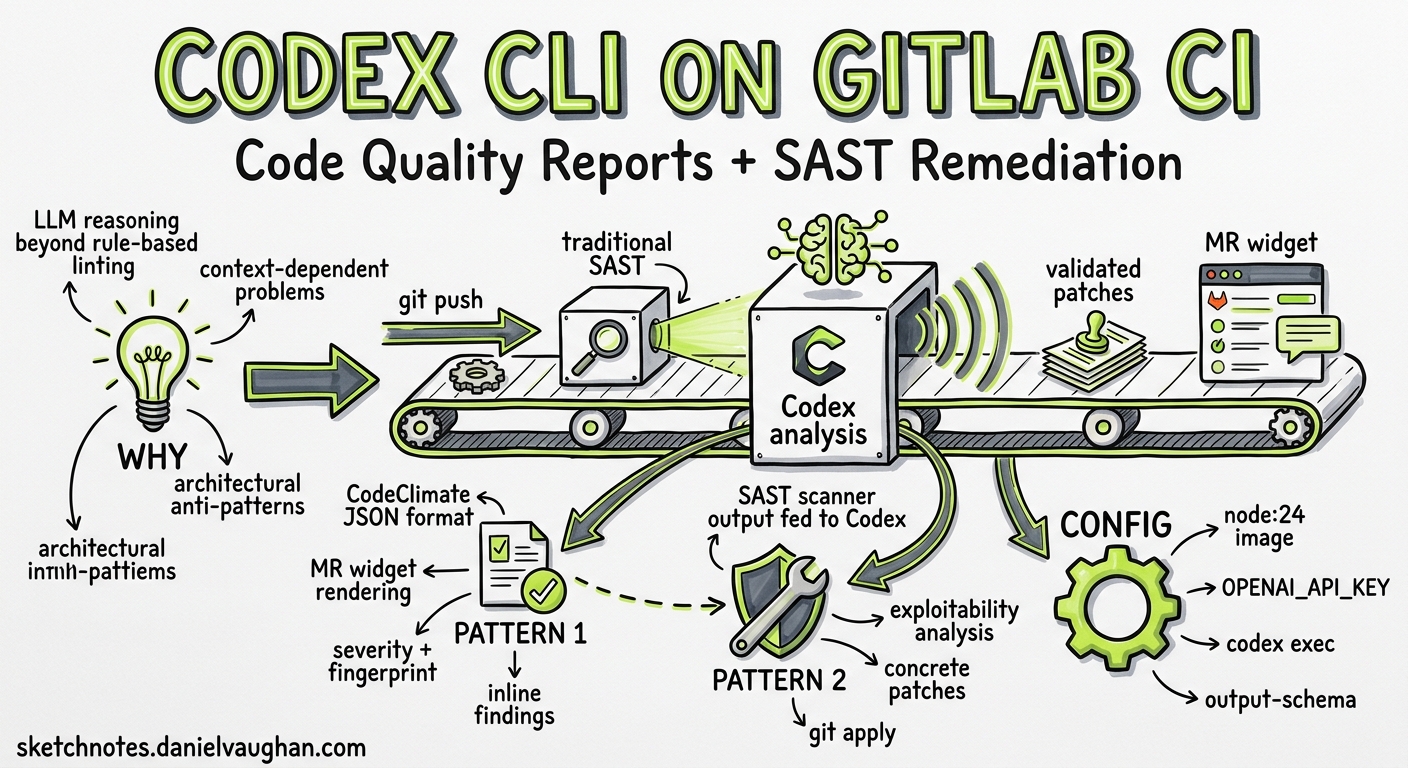
Most teams bolt a linter into CI and call it done. The results sit in a log that nobody reads until a production incident forces a post-mortem. Codex CLI changes this by bringing reasoning-level analysis into your GitLab pipeline — generating CodeClimate-format quality reports that render directly in merge request widgets and post-processing SAST scanner output into prioritised remediation patches that a developer can apply with git apply1.
This article walks through two production-ready pipeline patterns drawn from OpenAI’s own Cookbook1, updated for Codex CLI v0.130 and current best practices.
Why LLM-Powered Analysis Complements Static Tools
Traditional static analysis tools are rule-based: they match patterns and flag violations. They excel at catching style infractions and known vulnerability signatures, but they struggle with context-dependent problems — business logic errors, architectural anti-patterns, and the subtle security flaws that require understanding how data flows through a system1.
Codex CLI adds a reasoning layer on top. It reads the code as a developer would, traces call chains, and surfaces findings that static rules miss. Crucially, it does not replace your existing SAST scanners — it consumes their output and adds exploitability analysis, deduplication, and concrete fix generation1.
flowchart LR
    A[Git Push] --> B[GitLab CI Pipeline]
    B --> C[Traditional SAST Scanner]
    B --> D[Codex CLI Quality Report]
    C --> E[SAST JSON Artifact]
    E --> F[Codex CLI Remediation]
    D --> G[CodeClimate JSON]
    F --> H[Validated Patches]
    G --> I[MR Widget: Quality]
    H --> J[MR Widget: Patches]
Prerequisites
Before configuring these pipeline jobs, ensure you have:
- A GitLab runner with at least 2 vCPUs, 8 GB memory, and 30 GB storage1
- Outbound network access to
api.openai.comfrom the runner - An OpenAI API key stored as a masked CI/CD variable (
OPENAI_API_KEY)2 - Node.js 20+ available in your CI image (the examples use
node:24)1
Pattern 1: AI-Powered Code Quality Reports
The first pattern generates a CodeClimate-format JSON report that GitLab renders natively in merge request widgets3. Each finding appears inline with the affected code, complete with severity, description, and a stable fingerprint for tracking regressions.
The Pipeline Job
codex-quality:
  stage: test
  image: node:24
  variables:
    CODEX_API_KEY: $OPENAI_API_KEY
  before_script:
    - npm install -g @openai/codex
  script:
    - |
      set -euo pipefail

      # Build a file allowlist so Codex only references real files
      FILE_LIST=$(git ls-files | head -500)

      # Run Codex with structured output markers
      codex exec \
        --sandbox read-only \
        --model gpt-5.4 \
        -c reasoning_effort=medium \
        "Review the following repository files for code quality issues.
         Output a single JSON array in CodeClimate format.
         Each object must have: description, check_name, fingerprint,
         severity (info|minor|major|critical|blocker), and
         location (with path and lines.begin).
         Use repo-relative paths without leading './' or absolute paths.
         Wrap output between === BEGIN_CODE_QUALITY_JSON === and
         === END_CODE_QUALITY_JSON === markers.
         No prose, no markdown, no backticks outside the markers.
         Files: ${FILE_LIST}" \
        2>/dev/null | tee /tmp/raw_output.txt

      # Extract JSON between markers
      awk '/=== BEGIN_CODE_QUALITY_JSON ===/,/=== END_CODE_QUALITY_JSON ===/' \
        /tmp/raw_output.txt \
        | grep -v '=== ' \
        | sed 's/\x1b\[[0-9;]*m//g' \
        | tr -d '\r' \
        > /tmp/extracted.json

      # Validate or fall back to empty array
      node -e "
        const fs = require('fs');
        const raw = fs.readFileSync('/tmp/extracted.json', 'utf8').trim();
        try {
          const parsed = JSON.parse(raw);
          if (!Array.isArray(parsed)) throw new Error('not an array');
          fs.writeFileSync('gl-code-quality-report.json', JSON.stringify(parsed, null, 2));
        } catch {
          console.warn('⚠️ Codex output failed validation — using empty report');
          fs.writeFileSync('gl-code-quality-report.json', '[]');
        }
      "
  artifacts:
    reports:
      codequality: gl-code-quality-report.json
  rules:
    - if: $OPENAI_API_KEY && $CI_MERGE_REQUEST_IID
Key Design Decisions
Read-only sandbox. The quality report job never needs to write files, so --sandbox read-only is the correct policy. This follows OpenAI’s own internal practice of granting minimal sandbox permissions4.
File allowlist. Passing git ls-files output constrains Codex to reference actual repository paths. Without this, the model may hallucinate filenames, producing findings that point at non-existent files1.
Marker-based extraction. Raw codex exec output may include ANSI colour codes, progress messages on stderr, and other noise. The === BEGIN_CODE_QUALITY_JSON === / === END_CODE_QUALITY_JSON === delimiter pattern gives AWK a reliable extraction boundary1.
Graceful degradation. If extraction or validation fails, the job writes an empty JSON array rather than failing the pipeline. Quality reports should inform, not block1.
Model selection. GPT-5.4 with medium reasoning effort strikes the right balance between depth and speed for quality analysis. For cost-sensitive pipelines, gpt-5.4-mini works well for straightforward codebases5.
CodeClimate Schema Reference
Each finding in the array must conform to this structure3:
{
  "description": "SQL query built with string concatenation — use parameterised queries",
  "check_name": "security/sql-injection",
  "fingerprint": "a1b2c3d4e5f6",
  "severity": "critical",
  "location": {
    "path": "src/db/queries.py",
    "lines": {
      "begin": 42
    }
  }
}
The fingerprint field is critical — GitLab uses it to track findings across commits, showing which issues are new versus pre-existing in the merge request widget3.
Pattern 2: SAST Post-Processing and Automated Remediation
The second pattern consumes output from GitLab’s built-in SAST scanners and uses Codex CLI to prioritise findings by exploitability and generate validated patches1.
Stage 1: Prioritised Security Recommendations
codex-security-triage:
  stage: test
  image: node:24
  needs:
    - job: semgrep-sast
      artifacts: true
  variables:
    CODEX_API_KEY: $OPENAI_API_KEY
  before_script:
    - npm install -g @openai/codex
  script:
    - |
      set -euo pipefail

      # Extract vulnerability count
      VULN_COUNT=$(jq '.vulnerabilities | length' gl-sast-report.json)
      echo "Found ${VULN_COUNT} SAST findings to triage"

      codex exec \
        --sandbox read-only \
        --model gpt-5.4 \
        -c reasoning_effort=high \
        "You are a senior application security engineer.
         Analyse the SAST findings in gl-sast-report.json.

         1. Consolidate duplicates by CWE, affected function, and file range.
         2. Rank by exploitability: prioritise user-controlled inputs reaching
            dangerous sinks (SQL execution, OS commands, eval, deserialisation).
         3. For each consolidated finding, assess:
            - Reachability from exposed entry points
            - Involvement of authentication boundaries
            - Clear call-stack evidence

         Output a markdown report with:
         - Summary statistics (total, consolidated, by severity)
         - Priority table: CWE | Location | Exploit Path | Risk Level
         - Top 5 Immediate Actions with concrete remediation steps
         - Per-finding detail with exploitability score (0-100)

         Save the report to security_priority.md" \
        -o security_priority.md
  artifacts:
    paths:
      - security_priority.md
    expire_in: 30 days
  rules:
    - if: $OPENAI_API_KEY && $CI_MERGE_REQUEST_IID
Stage 2: Automated Patch Generation
codex-security-patches:
  stage: deploy
  image: node:24
  needs:
    - job: semgrep-sast
      artifacts: true
    - job: codex-security-triage
      artifacts: true
  variables:
    CODEX_API_KEY: $OPENAI_API_KEY
  before_script:
    - npm install -g @openai/codex
    - apt-get update && apt-get install -y jq
    - mkdir -p patches
  script:
    - |
      set -euo pipefail

      # Extract high/critical vulnerabilities
      jq -r '.vulnerabilities[]
        | select(.severity == "High" or .severity == "Critical")
        | @json' gl-sast-report.json > /tmp/high_vulns.jsonl

      FILE_LIST=$(git ls-files | tr '\n' ' ')
      PATCH_COUNT=0

      while IFS= read -r vuln; do
        VULN_ID=$(echo "$vuln" | jq -r '.id // .cve // "unknown"')
        CWE=$(echo "$vuln" | jq -r '.identifiers[]? | select(.type=="cwe") | .value // "unknown"')
        LOCATION=$(echo "$vuln" | jq -r '.location.file // "unknown"')

        echo "Generating patch for ${CWE} in ${LOCATION}..."

        codex exec \
          --sandbox read-only \
          --model gpt-5.4 \
          -c reasoning_effort=high \
          "Generate a unified diff (git diff format) that fixes this
           vulnerability without changing behaviour:
           ${vuln}
           Repository files: ${FILE_LIST}
           Output ONLY the unified diff. No prose, no explanation." \
          -o "/tmp/patch_${PATCH_COUNT}.diff" 2>/dev/null || continue

        # Validate the patch applies cleanly
        if git apply --check "/tmp/patch_${PATCH_COUNT}.diff" 2>/dev/null; then
          cp "/tmp/patch_${PATCH_COUNT}.diff" "patches/${CWE}_${LOCATION//\//_}.patch"
          echo "✅ Valid patch: ${CWE} in ${LOCATION}"
        elif git apply --check -p0 "/tmp/patch_${PATCH_COUNT}.diff" 2>/dev/null; then
          cp "/tmp/patch_${PATCH_COUNT}.diff" "patches/${CWE}_${LOCATION//\//_}.patch"
          echo "✅ Valid patch (p0): ${CWE} in ${LOCATION}"
        else
          echo "⚠️ Patch failed validation: ${CWE} in ${LOCATION}"
        fi

        PATCH_COUNT=$((PATCH_COUNT + 1))
      done < /tmp/high_vulns.jsonl

      echo "Generated ${PATCH_COUNT} patches, $(ls patches/ 2>/dev/null | wc -l) validated"
  artifacts:
    paths:
      - patches/
    expire_in: 30 days
  rules:
    - if: $OPENAI_API_KEY && $CI_MERGE_REQUEST_IID
The Validation Gate
The git apply --check step is non-negotiable. Without it, you risk storing patches that look plausible but fail to apply — or worse, that apply but break the build. The dual check with both default (-p1) and -p0 strip levels handles the two most common path formats Codex produces1.
flowchart TD
    A[SAST Report] --> B[Extract High/Critical]
    B --> C{For Each Vulnerability}
    C --> D[Codex: Generate Unified Diff]
    D --> E{git apply --check}
    E -->|Pass| F[Store in patches/]
    E -->|Fail -p1| G{git apply --check -p0}
    G -->|Pass| F
    G -->|Fail| H[Log Warning, Skip]
    C --> I[Next Vulnerability]
Security Hardening
Running Codex in CI introduces its own attack surface. Follow these practices to keep it tight:
API Key Hygiene
Store OPENAI_API_KEY as a masked, protected CI/CD variable. Restrict it to protected branches and never expose it to forked merge requests2:
rules:
  - if: $OPENAI_API_KEY && $CI_MERGE_REQUEST_IID
    when: on_success
  - when: never
Sandbox Policy
Use --sandbox read-only for analysis jobs. The only job that should ever need write access is patch generation, and even then read-only suffices because patches are written via the -o flag and shell redirection, not by the agent writing to the workspace4.
Never use --dangerously-bypass-approvals-and-sandbox in a pipeline that processes untrusted input. If you need workspace writes, use --sandbox workspace-write explicitly6.
Model Selection for Cost Control
Quality analysis and security triage run on every merge request. At scale, model costs matter:
| Job | Recommended Model | Reasoning Effort | Rationale |
|---|---|---|---|
| Quality report | gpt-5.4-mini |
medium |
Broad scan, speed matters |
| Security triage | gpt-5.4 |
high |
Exploitability analysis needs depth |
| Patch generation | gpt-5.4 |
high |
Correct patches require careful reasoning |
Use profiles in your project’s .codex/config.toml to codify these choices7:
[profiles.ci-quality]
model = "gpt-5.4-mini"
reasoning_effort = "medium"

[profiles.ci-security]
model = "gpt-5.4"
reasoning_effort = "high"
Then reference them in CI:
codex exec --profile ci-quality "Review for quality issues..."
codex exec --profile ci-security "Analyse SAST findings..."
Prompt Engineering for Reliable Pipeline Output
The single biggest failure mode in CI pipelines is unparseable output. Codex is a language model — it wants to explain, caveat, and wrap things in markdown. In a pipeline, you need raw, machine-readable output. Three techniques make this reliable:
1. Explicit format constraints. State the exact output format in the prompt: “Output a single JSON array. No prose, no markdown, no backticks.”1
2. Delimiter markers. Wrap expected output in unique markers (=== BEGIN_... ===) so extraction is deterministic regardless of what else the model emits1.
3. Validation with fallback. Always validate the extracted output against a schema or structural check. If validation fails, fall back to a safe default (empty array, empty report) rather than failing the pipeline1.
For structured output without marker extraction, use the --output-schema flag to enforce a JSON Schema on the final response6:
codex exec \
  --sandbox read-only \
  --output-schema ./quality-schema.json \
  "Review src/ for quality issues and return findings"
This is cleaner than marker extraction but requires a schema file in your repository.
Extending the Pattern
The quality-report and remediation-pipeline patterns generalise beyond SAST. The same architecture works for:
- Dependency scanning — consume
gl-dependency-scanning-report.json, prioritise by CVSS and reachability, generate lockfile patches - Container scanning — triage
gl-container-scanning-report.json, suggest Dockerfile fixes for vulnerable base images - DAST post-processing — correlate dynamic findings with source code to generate targeted fixes
- Licence compliance — flag incompatible licences with business-context explanations
Each extension follows the same shape: consume a GitLab-native scanner artifact, prompt Codex for analysis, validate output, and publish results as a pipeline artifact1.
Known Limitations
- Token costs scale with repository size. Passing
git ls-filesoutput consumes input tokens. For large repositories (10,000+ files), filter to relevant directories or use.codexignorepatterns. - Patch quality varies. Codex-generated patches require human review before merging. The
git apply --checkvalidation catches format errors but not semantic correctness. - Rate limits apply. API-key usage is subject to standard rate limits. For high-throughput pipelines running across many merge requests, monitor usage and consider request batching.
- CodeClimate format deprecation. GitLab deprecated CodeClimate-based scanning in GitLab 17.3, though the report artifact format remains supported3. Check your GitLab version for compatibility.
Citations
-
OpenAI, “Automating Code Quality and Security Fixes with Codex CLI on GitLab,” OpenAI Cookbook, 2026. https://developers.openai.com/cookbook/examples/codex/secure_quality_gitlab ↩ ↩2 ↩3 ↩4 ↩5 ↩6 ↩7 ↩8 ↩9 ↩10 ↩11 ↩12 ↩13 ↩14 ↩15
-
OpenAI, “Non-interactive mode,” Codex Developer Documentation, 2026. https://developers.openai.com/codex/noninteractive ↩ ↩2
-
GitLab, “Code Quality,” GitLab CI/CD Documentation. https://docs.gitlab.com/ci/testing/code_quality/ ↩ ↩2 ↩3 ↩4
-
OpenAI, “Running Codex safely at OpenAI,” OpenAI Blog, 8 May 2026. https://openai.com/index/running-codex-safely/ ↩ ↩2
-
OpenAI, “Models,” Codex Developer Documentation, 2026. https://developers.openai.com/codex/models ↩
-
OpenAI, “Command line options,” Codex CLI Reference, 2026. https://developers.openai.com/codex/cli/reference ↩ ↩2
-
OpenAI, “Advanced Configuration,” Codex Developer Documentation, 2026. https://developers.openai.com/codex/config-advanced ↩