Codex CLI Multi-Environment Sessions: One Conversation, Many Targets
Codex CLI Multi-Environment Sessions: One Conversation, Many Targets
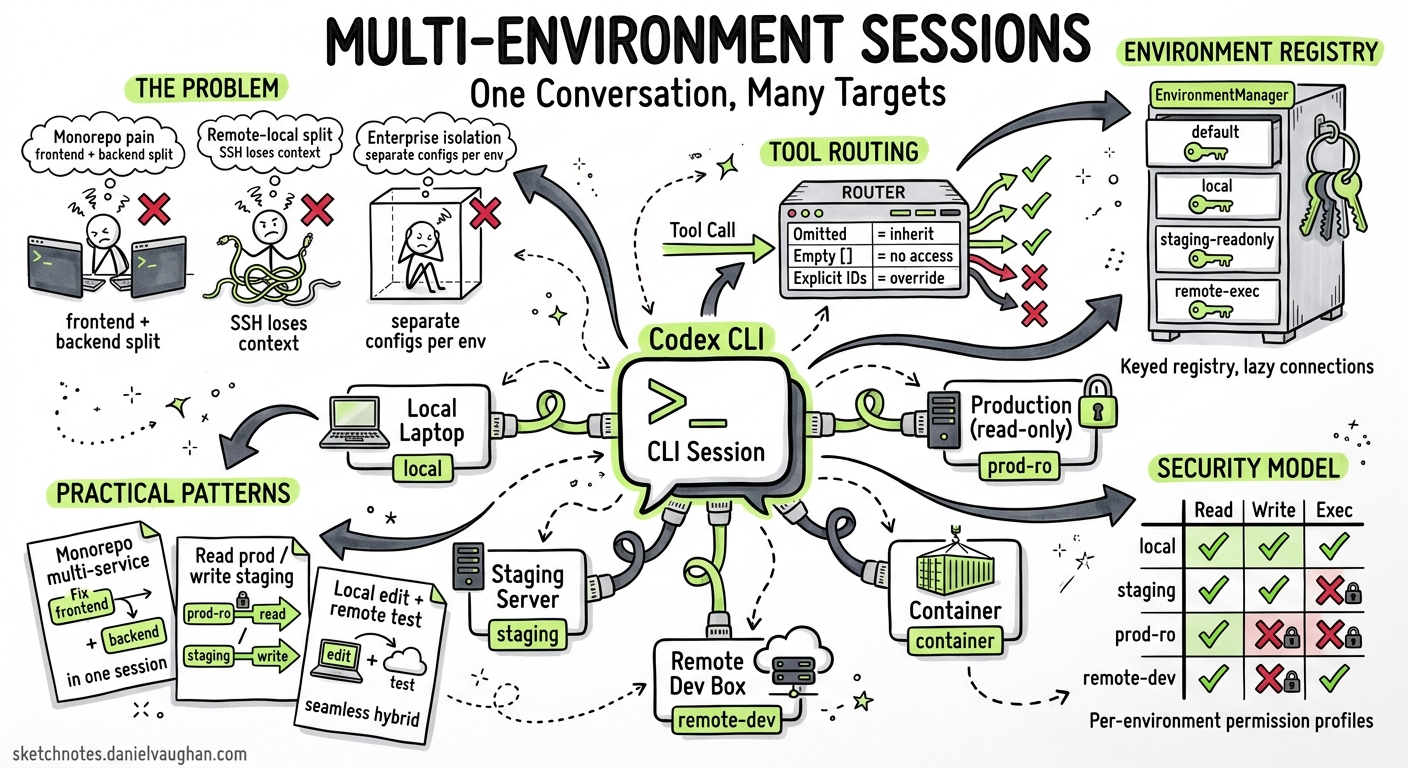
Until May 2026, every Codex CLI session was anchored to a single execution context — one working directory, one sandbox, one filesystem. If you needed to touch a second service in a monorepo, you opened a second session. If you wanted to fix staging while reading production logs, you juggled terminals. The v0.129 alpha series changes that: a single Codex session can now route individual tool calls to different environments — local, remote, or containerised — within the same conversation 1.
This article dissects the architecture, walks through the PR stack that enabled it, and shows practical patterns for monorepo, remote-development, and enterprise workflows.
The Problem: Single-Environment Lock-In
Codex CLI’s sandbox model has always been per-session. You launch codex from a project root, and every apply_patch, shell_command, and list_dir targets that single directory tree. For microservice architectures, polyglot monorepos, and hybrid local-remote setups, this creates friction:
- Monorepo pain: Fixing a frontend bug that requires a corresponding backend change means two sessions, two approvals, two mental contexts.
- Remote-local split: You edit locally but need to run integration tests on a staging server — so you SSH separately and lose conversational continuity.
- Enterprise isolation: Staging writes and production reads need different permission profiles, forcing separate sessions with separate configs.
Architecture: Environment Registry and Tool Routing
The multi-environment feature rests on two foundations introduced across the v0.125–v0.129 release cycle: the EnvironmentManager registry and per-tool-call environment routing 23.
EnvironmentManager
PR #18401 refactored the EnvironmentManager from a single-environment holder into a keyed registry 2. Each environment gets a unique identifier and its own execution context (working directory, sandbox configuration, permission profile). The manager exposes three lookup paths:
- Default environment — the project root, returned as
Option(absent when access is disabled viaCODEX_EXEC_SERVER_URL=none) - Local environment — always available as an internal fallback
- Arbitrary ID lookup — retrieves any registered environment by key
Remote exec-server connections are lazy: they initialise only when an environment is first used for execution or filesystem operations, avoiding startup overhead for environments that may never be touched in a given session 2.
Turn-Scoped Environment Selection
PR #18416 added experimental environments parameters to the turn/start and thread/start API calls 3. The semantic model distinguishes three cases:
environments value |
Behaviour |
|---|---|
| Omitted | Inherit the thread’s sticky environments |
Empty array [] |
No environment access for this turn |
| Explicit IDs | Override sticky selection for this turn only |
Each entry in the array can include a per-environment cwd, allowing the model to target a specific subdirectory within an environment 3. Resolution happens server-side before turn execution begins — an invalid ID fails fast at turn initialisation rather than mid-execution 3.
Sticky Environments
The v0.125.0 release introduced sticky environments at the thread level 4. Once set, they persist across turns unless explicitly overridden. This means a monorepo session can declare its environments once at thread start and every subsequent turn inherits them without repetition.
The Tool-Routing PR Stack
Between May 2 and May 5, a sequence of seven PRs systematically threaded environment_id through every tool surface 15:
graph TD
    A["#20646 — Environment context surfacing<br/>Session knows what environments exist"] --> B["#20669 — Core plumbing<br/>environment_id threading through tool dispatch"]
    B --> C["#20647 — Process tool routing<br/>process/spawn targets correct env"]
    B --> D["#20530 — Filesystem routing<br/>apply_patch, list_dir target correct env"]
    B --> E["#21048 — Freeform apply_patch targeting<br/>Patches can explicitly name an env"]
    B --> F["#21142 — shell_command routing<br/>Shell execution per environment"]
    B --> G["#21143 — view_image routing<br/>Image viewing per environment filesystem"]
The core pattern is consistent: the model emits a tool call containing an environment_id field; the ToolRouter resolves it via the EnvironmentManager; the tool executes against the resolved environment’s working directory and sandbox 5.
Freeform Patch Special Case
Most tool calls use JSON payloads where adding an environment_id field is trivial. The exception is freeform apply_patch, which accepts raw unified-diff text without a JSON wrapper. PR #21048 addressed this by extending the freeform parser to accept environment targeting metadata 1.
Practical Patterns
Pattern 1: Monorepo Multi-Service Fix
A typical microservice monorepo contains independent services that share a conversation but need isolated execution:
sequenceDiagram
    participant Dev as Developer
    participant Codex as Codex Session
    participant Auth as auth-service env
    participant API as api-gateway env
    participant Tests as test-runner env

    Dev->>Codex: "Fix the auth token refresh bug and update the gateway's retry logic"
    Codex->>Auth: apply_patch (env: auth-service)
    Codex->>API: apply_patch (env: api-gateway)
    Codex->>Tests: shell_command "cargo test" (env: test-runner)
    Tests-->>Codex: test results
    Codex-->>Dev: Both fixes applied, tests pass
Each service runs in its own sandbox with its own dependencies, but the model maintains a single conversational context that understands the relationship between changes.
Pattern 2: Remote TUI with Environment Routing
Codex CLI already supports remote TUI mode via the app-server 6:
# On the remote host
codex app-server --listen ws://0.0.0.0:4500 --ws-auth capability-token

# On your laptop
codex --remote ws://staging.internal:4500 --remote-auth-token-env CODEX_REMOTE_TOKEN
With multi-environment support, a single remote app-server can expose multiple environments — a development workspace, a staging sandbox, and a read-only production view — all accessible from one local TUI session 6.
Pattern 3: CI/CD Pipeline Integration
In non-interactive mode, codex exec can target different environments across a pipeline:
# Build in the build environment
codex exec --env build-env "Compile the project and run linters"

# Test in an isolated test environment
codex exec --env test-env "Run the full integration test suite"

# Deploy to staging (read-write)
codex exec --env staging-env "Deploy the latest build"
The --env flag selects a Codex Cloud environment by ID 7. For self-hosted setups, environment configuration flows through the app-server’s thread-level sticky environments API.
Pattern 4: Enterprise Regulated Deployment
Combine multi-environment routing with per-environment permission profiles for regulated workflows:
# config.toml — per-environment permission profiles

[permissions.staging.filesystem]
":project_roots" = { "." = "write" }

[permissions.staging.network]
enabled = true
mode = "limited"

[permissions.production.filesystem]
":project_roots" = { "." = "read" }

[permissions.production.network]
enabled = false
The agent writes freely to staging but can only read production — enforced at the sandbox level, not by prompt engineering 8.
Cloud Environments vs App-Server Environments
It is worth distinguishing two overlapping but distinct environment models:
| Codex Cloud Environments | App-Server Environments | |
|---|---|---|
| Target | Cloud-hosted containers | Local, remote, or custom sandboxes |
| Configuration | Web dashboard + setup scripts | EnvironmentManager registry via API |
| Selection | --env ENV_ID flag |
environments parameter in turn/start |
| Caching | Container cached up to 12 hours 9 | Session-scoped, lazy initialisation |
| Network | Proxy-controlled, off by default in agent phase 9 | Per-profile network rules |
Cloud environments suit hosted CI/CD and Codex web workflows. App-server environments suit self-hosted, IDE-integrated, and enterprise-internal deployments. The environment_id concept is shared across both 79.
Current Limitations
As of May 5 2026, the feature is still in the v0.129 alpha track. Known gaps 1:
- MCP tool routing per environment — not yet PRed. MCP calls currently route to the default environment regardless of
environment_id. - TUI environment indicators — the interactive TUI does not yet show which environment is active per turn.
config.tomlenvironment definitions — documentation for declaratively defining environments in configuration is pending.- Frodex fork inheritance — forked sessions inherit parent environment context, but the interaction model between forked agents and shared environments needs further testing.
⚠️ The v0.129 alpha PRs are landing rapidly; some of the open PRs (#20646, #20647, #20530) may have merged by the time you read this. Check the Codex changelog for the latest status.
What to Watch
Multi-environment execution is arguably the most architecturally significant addition since subagents. It transforms Codex from a single-context tool into a multi-context orchestrator. The immediate next milestones to track:
- MCP routing — once MCP tools respect
environment_id, the full tool surface is covered. - TUI indicators — visual feedback on which environment each turn targets.
- Declarative environment config — defining environments in
config.tomlrather than through the programmatic API. - v0.129 stable promotion — when these features graduate from alpha to the stable release channel.
For teams running monorepos, hybrid local-remote setups, or regulated multi-stage pipelines, this is the feature to start planning around.
Citations
-
Multi-Environment Execution Architecture — Consolidated View (May 2026). Internal research notes based on openai/codex PRs #20646, #20669, #20647, #20530, #21048, #21142, #21143. ↩ ↩2 ↩3 ↩4
-
PR #18401 — Support multiple managed environments. Refactors EnvironmentManager to keyed registry with default/local lookup. ↩ ↩2 ↩3
-
PR #18416 — Add turn-scoped environment selections. Experimental
turn/start.environmentsparams for per-turn environment ID + cwd selections. ↩ ↩2 ↩3 ↩4 -
Codex CLI Changelog — v0.125.0 (April 24, 2026). App-server integrations now support sticky environments and remote thread config/store plumbing. ↩
-
PR #20669 — Prepare selected environment plumbing. Core plumbing adding
environment_idthreading through the tool-call pipeline. ↩ ↩2 -
Codex CLI Features — Remote TUI mode. Remote TUI lets you run the app server on one machine and the terminal UI from another. ↩ ↩2
-
Codex CLI Reference — Command line options.
--envflag for targeting Codex Cloud environment identifiers. ↩ ↩2 -
Codex Advanced Configuration — Permission profiles. Named permission profiles with per-profile filesystem and network rules. ↩
-
Codex Cloud Environments. Cloud environment configuration, container caching, setup scripts, and network access controls. ↩ ↩2 ↩3