AutoLoop with Codex CLI: Bounded Optimisation Loops for Measurable Codebase Improvement
AutoLoop with Codex CLI: Bounded Optimisation Loops for Measurable Codebase Improvement
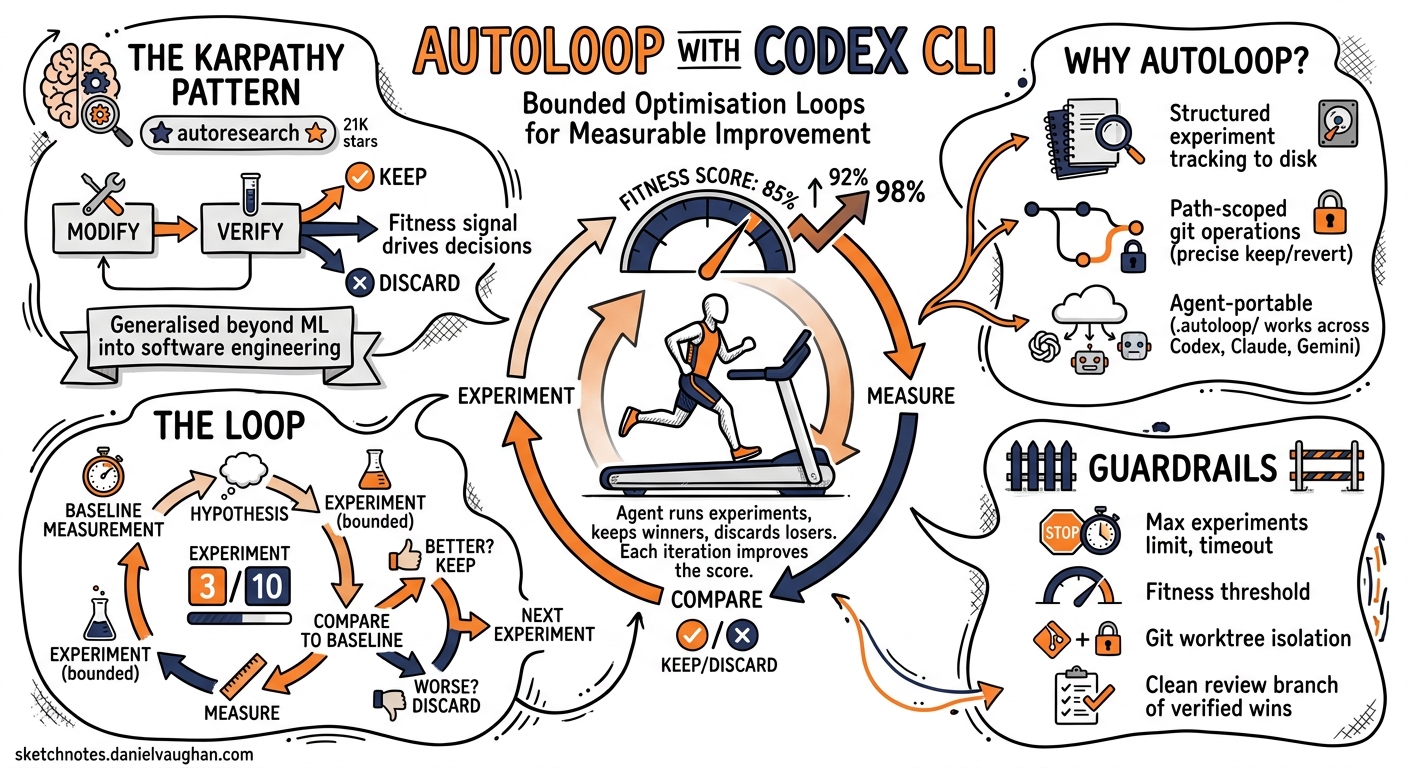
Karpathy’s autoresearch project — released in March 2026 and now sitting at 21,000+ GitHub stars 1 — proved that a tight modify-verify-keep/discard loop can drive real improvement without human steering. The core insight is simple: give an agent a fitness signal, a bounded experiment count, and let it grind. AutoLoop generalises that pattern beyond ML training into everyday software engineering and pairs cleanly with Codex CLI’s /goal mode and codex exec pipelines 2.
This article walks through setting up AutoLoop with Codex CLI, configuring metrics and guardrails, and structuring bounded optimisation runs that leave you with a clean review branch of verified wins.
Why Another Layer on Top of Codex?
Codex CLI already has scored improvement loops via /goal 3 and the iterate-on-difficult-problems workflow 4. So why bolt on AutoLoop?
Three reasons:
- Structured experiment tracking.
/goalkeeps a progress log in the conversation context. AutoLoop persists every experiment outcome to disk under.autoloop/experiments/, surviving session compaction and context limits. - Path-scoped git operations. AutoLoop records exactly which files changed in each experiment. A
keep --commitonly touches those paths; adiscard --revertrolls back precisely what was tried, not the entire worktree 2. - Agent portability. The same
.autoloop/configuration works across Codex CLI, Claude Code, Gemini CLI, Cursor, and OpenCode. If your team uses mixed agents, the experiment history is shared 2.
graph LR
    A[autoloop init] --> B[autoloop baseline]
    B --> C[autoloop install codex]
    C --> D[Agent runs autoloop-run]
    D --> E{Experiment verdict}
    E -->|keep| F[Commit winning paths]
    E -->|discard| G[Revert experiment paths]
    E -->|rerun| D
    F --> H{Budget remaining?}
    G --> H
    H -->|yes| D
    H -->|no| I[autoloop finalize]
Installation and Repository Setup
AutoLoop ships as a single binary with multiple distribution channels 2:
# macOS / Linux — quick install
curl -sSf https://raw.githubusercontent.com/armgabrielyan/autoloop/main/install.sh | sh

# Or via package managers
brew install armgabrielyan/tap/autoloop
npm install -g @armengabrielyan/autoloop
cargo install autoloop
Initialise it inside your repository:
cd your-project
autoloop init --verify
This scans your repo for build and test artefacts — Cargo.toml, pyproject.toml, package.json, go.mod, Maven/Gradle files, .csproj — and infers your eval and guardrail commands 2. The inferred configuration lands in .autoloop/config.toml.
Verifying the Inferred Configuration
Before trusting the inference, run the doctor:
autoloop doctor --fix
This executes every inferred command against the current repo state, flags failures, and offers repaired alternatives where possible 2. Once doctor passes cleanly, record your baseline:
autoloop baseline
The baseline snapshot lands in .autoloop/baseline.json and becomes the reference point for all subsequent experiment verdicts.
The .autoloop/ Directory
After setup, your directory structure looks like this:
.autoloop/
├── config.toml         # Eval/guardrail commands, metric parsing
├── baseline.json       # Starting metric snapshot
├── learnings.md        # Auto-refreshed experiment insights
├── experiments/        # Timestamped iteration history
│   ├── 001-reduce-alloc.json
│   └── 002-batch-queries.json
└── sessions/           # Grouped runs with commit refs
Add .autoloop/ to your .gitignore or track it — the choice depends on whether you want experiment history in your repository’s permanent record. For teams running repeated optimisation passes, tracking it provides useful institutional memory.
Integrating with Codex CLI
Install the Codex-specific wrapper:
autoloop install codex
This generates workspace-local skills that expose AutoLoop’s state machine as commands Codex can invoke autonomously: autoloop-init, autoloop-doctor, autoloop-baseline, autoloop-run, autoloop-status, autoloop-learn, and autoloop-finalize 2.
The Prompt
The key to a successful AutoLoop session is a well-bounded prompt. Direct Codex to use the installed wrapper with explicit constraints:
Use autoloop-run to reduce benchmark latency in this repo.
Keep behaviour unchanged. Use at most 5 experiments and
ask me only if you are genuinely blocked.
This gives Codex three essential constraints: the optimisation target (latency), a behavioural invariant (correctness), and an experiment budget (5 iterations) 2.
Combining with /goal
For long-running optimisation, pair AutoLoop with Codex’s /goal mode 3. First enable the feature if you haven’t already:
# ~/.codex/config.toml
[features]
goals = true
Then set a goal that references AutoLoop:
/goal Reduce p99 API latency by 20% using autoloop-run.
Stop when the target is met or after 10 experiments.
Keep a checkpoint log after each experiment.
/goal provides the autonomous outer loop — working independently across many turns without check-ins 3 — whilst AutoLoop provides the structured experiment tracking and path-scoped git operations beneath it.
Metrics and Guardrails
AutoLoop supports three metric extraction formats 2:
1. Explicit METRIC Markers
If your eval script prints METRIC p99_latency=42ms, AutoLoop extracts it directly.
2. JSON Output
# eval script outputs:
{"p99_latency_ms": 42, "throughput_rps": 1200, "error_rate": 0.001}
AutoLoop parses all numeric fields and tracks them against baseline.
3. Regex Extraction
For legacy test output that prints results in prose, configure regex patterns in .autoloop/config.toml to capture numeric values.
Guardrail Configuration
Guardrails are first-class citizens, not afterthoughts. A faster benchmark that breaks correctness is automatically discarded 2:
# .autoloop/config.toml (conceptual structure)
[eval]
command = "cargo bench --bench api_latency"
metric_format = "json"
primary_metric = "p99_latency_ms"
direction = "lower_is_better"

[guardrails.tests]
command = "cargo test"
pass_threshold = "all"

[guardrails.clippy]
command = "cargo clippy -- -D warnings"
pass_threshold = "all"
The verdict engine combines metric improvement against the primary target with pass/fail results from every guardrail. Three possible outcomes 2:
- keep — metric improved and all guardrails passed → commit the winning paths
- discard — metric regressed or guardrails failed → revert experiment paths
- rerun — results inconclusive (e.g., noisy benchmarks) → retry with a different approach
A Worked Example: Optimising a Go HTTP Service
Consider a Go service where go test -bench=. -benchmem shows high allocations per request:
# Step 1: Initialise
autoloop init --verify
autoloop doctor --fix
autoloop baseline

# Step 2: Install Codex wrapper
autoloop install codex

# Step 3: Run via Codex
codex "Use autoloop-run to reduce allocations per request in the
HTTP handler benchmarks. Preserve all test coverage. Budget: 7 experiments."
Codex will autonomously:
- Read
.autoloop/config.tomlto understand the eval command and guardrails - Run the baseline benchmarks
- Analyse allocation hotspots in the handler code
- Make a focused change (e.g., pooling buffers, pre-allocating slices)
- Run
autoloop eval --jsonto measure the result - Issue
autoloop keep --commitorautoloop discard --revertbased on the verdict - Repeat until the budget is exhausted or the target is met
After the run, review what happened:
autoloop status --all    # Summary of all experiments
autoloop learn --all     # Refresh learnings.md with insights
autoloop finalize --session  # Create a clean review branch
The finalize step creates a branch containing only the committed wins, ready for code review via gh pr create 2.
Codex CLI Non-Interactive Integration
For CI pipelines, combine AutoLoop with codex exec 5:
codex exec "Run autoloop-run targeting compile time reduction. \
  Budget: 3 experiments. Report final metrics as JSON." \
  --json \
  --profile ci
The --json flag produces a JSONL stream including turn.completed events with token usage fields (input_tokens, cached_input_tokens, output_tokens) — useful for tracking the cost of each optimisation pass 5.
For structured final output, use --output-schema 5:
codex exec "Run autoloop-run for latency optimisation. \
  Return a summary of experiments." \
  --output-schema ./optimisation-report-schema.json \
  -o ./report.json
When to Use AutoLoop vs Native /goal
| Dimension | /goal alone |
AutoLoop + /goal |
|---|---|---|
| Experiment persistence | Conversation context only | .autoloop/experiments/ on disk |
| Git operations | Full worktree commits | Path-scoped keep/discard |
| Cross-agent portability | Codex-only | Works across six agents 2 |
| Guardrail enforcement | Manual eval script calls | Built-in verdict engine |
| Session survival | Lost on compaction 6 | Persists independently |
| Overhead | Zero setup | autoloop init + agent install |
Use /goal alone for straightforward migrations and refactors where you trust Codex to track its own progress. Add AutoLoop when you need persistent experiment records, path-scoped rollbacks, or when multiple agents will contribute to the same optimisation effort across sessions.
AGENTS.md Integration
Add AutoLoop conventions to your project’s AGENTS.md so every Codex session respects the optimisation workflow 7:
## Optimisation Runs

When asked to optimise performance metrics:
1. Use `autoloop-run` if `.autoloop/` exists in the repo root
2. Never exceed the stated experiment budget
3. Always run guardrails before issuing a verdict
4. Commit messages must reference the experiment number: "exp-003: pool HTTP buffers"
5. Do not modify `.autoloop/config.toml` without explicit approval
Limitations and Caveats
- Noisy benchmarks. AutoLoop’s verdict engine can produce false
rerunverdicts on benchmarks with high variance. Consider running benchmarks multiple times and reporting the median ⚠️. - Token cost. Each experiment iteration consumes a full eval cycle’s worth of reasoning tokens. Budget accordingly — a 10-experiment run on GPT-5.5 can consume significant tokens 8.
- Sandbox interactions. AutoLoop’s git operations (commit, revert) require write access. If you’re running Codex with
sandbox_mode = "read-only", AutoLoop cannot persist wins. Useworkspace-writeor higher 9. - No visual diff review. AutoLoop tracks path-scoped changes but doesn’t render diffs. Use
autoloop finalize --sessionto create a review branch, then inspect with your usual diff tooling.
Conclusion
AutoLoop sits at the intersection of Karpathy’s autoresearch insight — that agents improve faster when given explicit fitness signals and bounded iteration — and Codex CLI’s autonomous execution capabilities. The combination gives you structured, reproducible optimisation runs with clean git history and cross-agent portability. For teams running regular performance sweeps, dependency optimisations, or compliance remediations, it replaces ad-hoc “run it again and see” workflows with measurable, reviewable experiment records.
Citations
-
Fortune — Why everyone is talking about Andrej Karpathy’s autonomous AI research agent ↩
-
GitHub — armgabrielyan/autoloop: Agent-agnostic tools for intelligent iterative optimization loops ↩ ↩2 ↩3 ↩4 ↩5 ↩6 ↩7 ↩8 ↩9 ↩10 ↩11 ↩12 ↩13
-
OpenAI Developers — Iterate on difficult problems: Codex use cases ↩
-
OpenAI Developers — Non-interactive mode: codex exec ↩ ↩2 ↩3
-
OpenAI Developers — Advanced Configuration: context compaction ↩
-
OpenAI Developers — Configuration Reference: sandbox modes ↩