The Codex Chrome Extension: Parallel Browser Workflows, DevTools Integration, and Domain Access Control
The Codex Chrome Extension: Parallel Browser Workflows, DevTools Integration, and Domain Access Control
Introduction
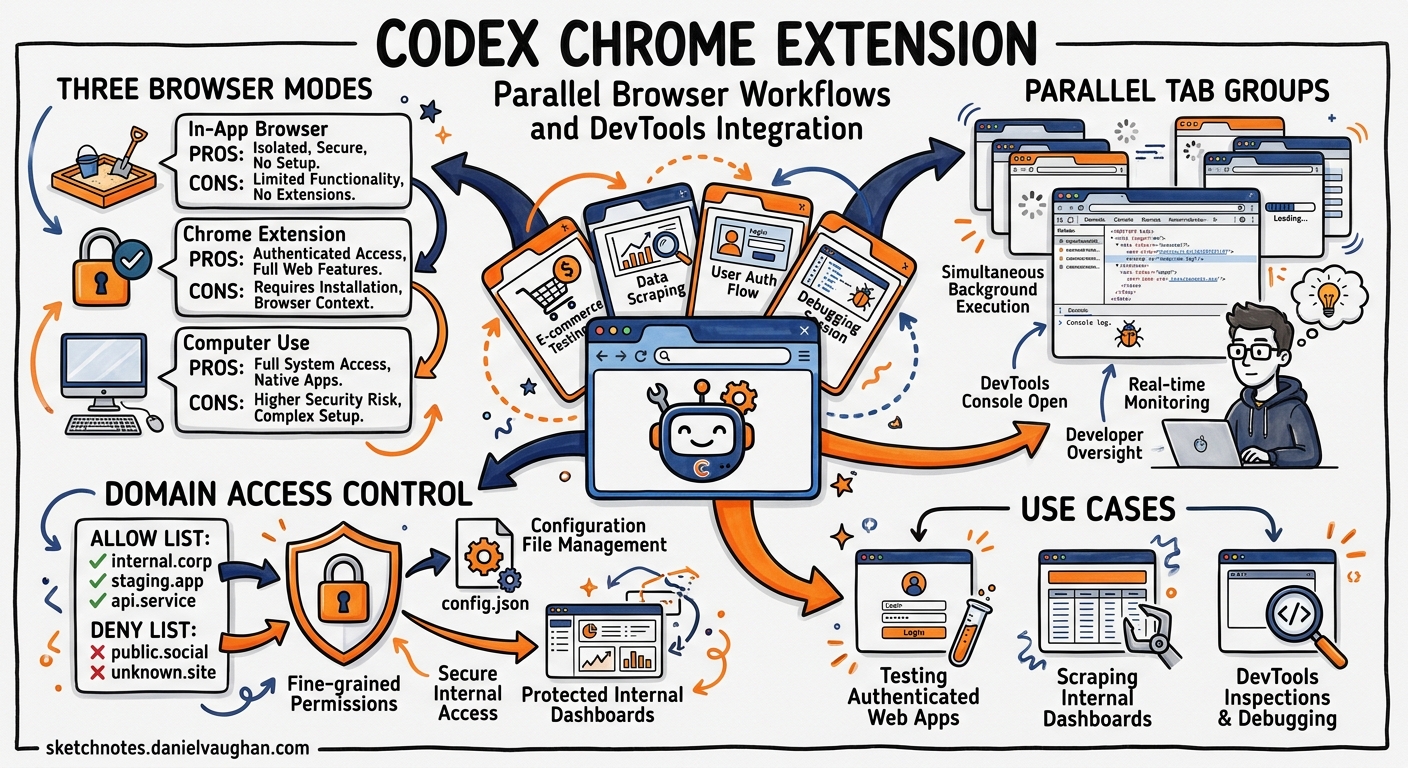
On 7 May 2026, OpenAI shipped the Codex Chrome Extension — a plugin that gives the Codex agent direct access to your authenticated browser sessions on macOS and Windows1. Unlike the sandboxed in-app browser bundled with the Codex desktop application, the extension operates inside your active Chrome profile, inheriting cookies, sessions, and authenticated states2. For developers, this unlocks a class of workflows that previously required manual context-switching: testing authenticated web apps, scraping internal dashboards, and running DevTools inspections — all while Codex works in background tab groups without hijacking your primary browsing3.
This article covers the extension’s architecture, permission model, developer-centric use cases, and practical configuration for teams.
Architecture: Three Browser Modes
Codex now distinguishes between three distinct browser execution environments2:
graph TD
    A[Codex Agent] --> B[In-App Browser]
    A --> C[Chrome Extension]
    A --> D[Computer Use]

    B --> B1[Sandboxed<br/>Localhost dev<br/>No auth state]
    C --> C1[Authenticated<br/>Tab groups<br/>DevTools access]
    D --> D1[OS-level control<br/>Full desktop<br/>Highest risk]
| Mode | Auth Context | Isolation | Use Case |
|---|---|---|---|
| In-app browser | None (sandboxed) | Full | localhost testing, public pages |
| Chrome Extension | User’s profile | Tab-group scoped | SaaS tools, internal dashboards, authenticated testing |
| Computer Use | OS-level | None | Desktop apps, cross-application workflows |
Codex intelligently routes between these modes based on the task4. A request to test a local Next.js app uses the in-app browser; a request to update a Salesforce record routes through Chrome; a request to interact with a native IDE falls through to Computer Use.
Installation and Setup
Installation starts inside the Codex desktop app rather than the Chrome Web Store directly1:
- Open Plugins in the Codex sidebar
- Add the Chrome plugin
- Follow the guided flow to install the extension from the Chrome Web Store
- Accept Chrome’s permission prompts
- Verify the toolbar icon shows Connected
The extension requires Chrome to be running (or allows Codex to launch it) and operates exclusively within the Chrome profile where it was installed1.
File URL Access
For workflows involving local file uploads, enable Allow access to file URLs in chrome://extensions → Codex → Details1.
Tab Group Isolation
The extension’s most developer-relevant design decision is its tab group architecture. Each Codex conversation thread gets its own Chrome tab group3. Tabs opened by a thread remain grouped together, providing:
- Workflow isolation — multiple concurrent Codex threads don’t pollute each other’s browser state
- Auditability — completed task tabs remain available for review after the agent finishes
- Background operation — Codex works in its tab groups while you browse in your own tabs
This matters for teams running parallel investigation tasks. You can have one thread auditing a staging environment, another reviewing a Grafana dashboard, and a third testing an authenticated API explorer — all running concurrently in separate tab groups.
DevTools Integration
The extension can access Chrome DevTools for inspection, debugging, and testing34. Practical developer applications include:
DOM Inspection and Validation
@Chrome open staging.example.com/dashboard and verify the user
table renders all 50 rows. Check the Network tab for failed API calls.
Console Error Monitoring
Codex can monitor the DevTools console for errors during a test run, capture stack traces, and correlate them with recent code changes.
End-to-End Flow Testing
For single-page applications requiring authenticated state, the extension can navigate multi-step flows (login → dashboard → settings → export) while capturing screenshots and DOM state at each step4.
Performance Profiling
The agent can open the Performance tab, record a trace, and report on long tasks or layout shifts — useful for pre-merge performance regression checks.
Domain Access Control
The extension implements a per-host permission model that balances usability with security15:
flowchart LR
    A[Agent requests<br/>domain access] --> B{Domain in<br/>blocklist?}
    B -->|Yes| C[Blocked]
    B -->|No| D{Domain in<br/>allowlist?}
    D -->|Yes| E[Allowed silently]
    D -->|No| F[Prompt user]
    F --> G[Allow this chat]
    F --> H[Always allow]
    F --> I[Decline]
    H --> J[Added to allowlist]
Configuration Options
Domain policies are managed in Computer Use settings within the Codex app:
- Allowlist — domains Codex can access without prompting (e.g.,
staging.internal.com,grafana.internal.com) - Blocklist — domains Codex must never access (e.g.,
banking.example.com,hr-portal.corp.com)
Elevated Risk Toggles
Two optional settings reduce friction at the cost of increased exposure1:
- Always allow browser content — eliminates per-domain confirmation prompts entirely
- Browser history access — includes browsing history (URLs, titles) in the agent’s context window
Both are disabled by default and should remain so in enterprise environments unless covered by additional policy controls.
Developer Workflow Patterns
Pattern 1: Authenticated API Testing
@Chrome navigate to api-explorer.internal.com, authenticate with SSO,
then test the /users endpoint with the payload from my clipboard.
Report the response status and body.
The extension inherits your SSO session, eliminating the need to configure service accounts or API tokens for exploratory testing.
Pattern 2: Cross-Service Context Gathering
Gather context from three sources:
1. @Chrome open the Jira board and summarise the current sprint's blocked tickets
2. @Chrome open Datadog and check error rates for the payments service (last 4h)
3. Read the local diff in ./src/payments/

Then suggest which blocked ticket my local changes might unblock.
Pattern 3: Visual Regression Verification
@Chrome open staging.example.com/checkout on desktop and mobile viewports.
Compare against the screenshots in ./test/baselines/ and flag any
visual differences above 2% pixel deviation.
Pattern 4: Internal Documentation Lookup
@Chrome search our Confluence space for "rate limiting configuration"
and extract the current production limits table.
Security Considerations for Teams
Data Handling
OpenAI does not store a separate record of Chrome actions from the extension. Browser activity is stored only when it becomes part of the Codex conversation context1. However, any data the agent reads from authenticated pages enters the model context and is subject to OpenAI’s standard data handling policies.
Recommendations for Enterprise Deployment
| Control | Recommendation |
|---|---|
| Blocklist | Add all financial, HR, and PII-heavy domains |
| Allowlist | Limit to development and staging environments |
| History access | Keep disabled |
| Always allow | Keep disabled; use per-session grants |
| Chrome profile | Use a dedicated development profile |
| Chrome Enterprise policies | Deploy ExtensionInstallAllowlist to control installation6 |
MCP Server Alternative
For teams uncomfortable with granting browser-session access to an AI agent, the chrome-devtools-mcp server provides a more constrained alternative7:
codex mcp add chrome-devtools -- npx chrome-devtools-mcp@latest
This grants DevTools inspection capabilities without full page interaction, offering a middle ground between the sandboxed in-app browser and full extension access.
Limitations
- Chrome only — no Firefox or Safari support as of May 20261
- Single profile — operates within the profile where installed; switching profiles requires reinstallation
- No headless mode — Chrome must be running with a visible window (cannot be driven from
codex execin CI) - Platform support — macOS and Windows only; Linux support is not yet available3
- Rate awareness — the extension does not automatically throttle requests to external services; aggressive automation may trigger rate limits or CAPTCHAs
Relationship to Codex CLI
The Chrome Extension is a feature of the Codex desktop app (the GUI application), not the Codex CLI (the terminal tool). The CLI’s browser capabilities remain limited to the $playwright-interactive skill and MCP-based DevTools servers. However, teams using both tools can share domain policies through their organisation’s Codex configuration, and the extension’s tab-group pattern may inform future CLI browser integration designs.
Conclusion
The Codex Chrome Extension represents a pragmatic evolution in agentic browser access. By operating within existing authenticated sessions rather than requiring separate credential provisioning, it dramatically reduces the setup friction for browser-based developer workflows. The tab-group isolation model and per-host permission system provide reasonable guardrails, though enterprise teams should invest in blocklist configuration before broad rollout.
For developers already embedded in browser-heavy workflows — debugging production dashboards, testing authenticated flows, or gathering context from internal tools — the extension eliminates a significant manual context-switching tax.
Citations
-
OpenAI, “Codex Chrome extension – Codex app”, OpenAI Developers, May 2026. https://developers.openai.com/codex/app/chrome-extension ↩ ↩2 ↩3 ↩4 ↩5 ↩6 ↩7 ↩8
-
eigent.ai, “Codex for Chrome (2026): Capabilities, Architecture, and Use Case”, May 2026. https://www.eigent.ai/blog/codex-for-chrome ↩ ↩2
-
MacRumors, “OpenAI’s Codex Now Works in Chrome With New Extension”, 7 May 2026. https://www.macrumors.com/2026/05/07/openai-codex-chrome-extension/ ↩ ↩2 ↩3 ↩4
-
Dataconomy, “OpenAI Launches Codex Extension For Google Chrome”, 8 May 2026. https://dataconomy.com/2026/05/08/openai-launches-codex-extension-for-google-chrome/ ↩ ↩2 ↩3
-
MarkTechPost, “OpenAI Adds Chrome Extension to Codex, Letting Its AI Agent Access LinkedIn, Salesforce, Gmail, and Internal Tools via Signed-In Sessions”, 8 May 2026. https://www.marktechpost.com/2026/05/08/openai-adds-chrome-extension-to-codex-letting-its-ai-agent-access-linkedin-salesforce-gmail-and-internal-tools-via-signed-in-sessions/ ↩
-
Google, “ExtensionInstallAllowlist: Configure extension installation allow list”, Chrome Enterprise. https://chromeenterprise.google/policies/extension-install-allowlist/ ↩
-
Google, “Chrome DevTools for agents”, Chrome for Developers, 2026. https://developer.chrome.com/docs/devtools/agents ↩