Codex CLI Execution Policy Rules: Starlark-Based Command Governance, Smart Approvals, and Enterprise Allowlists
Codex CLI Execution Policy Rules: Starlark-Based Command Governance, Smart Approvals, and Enterprise Allowlists
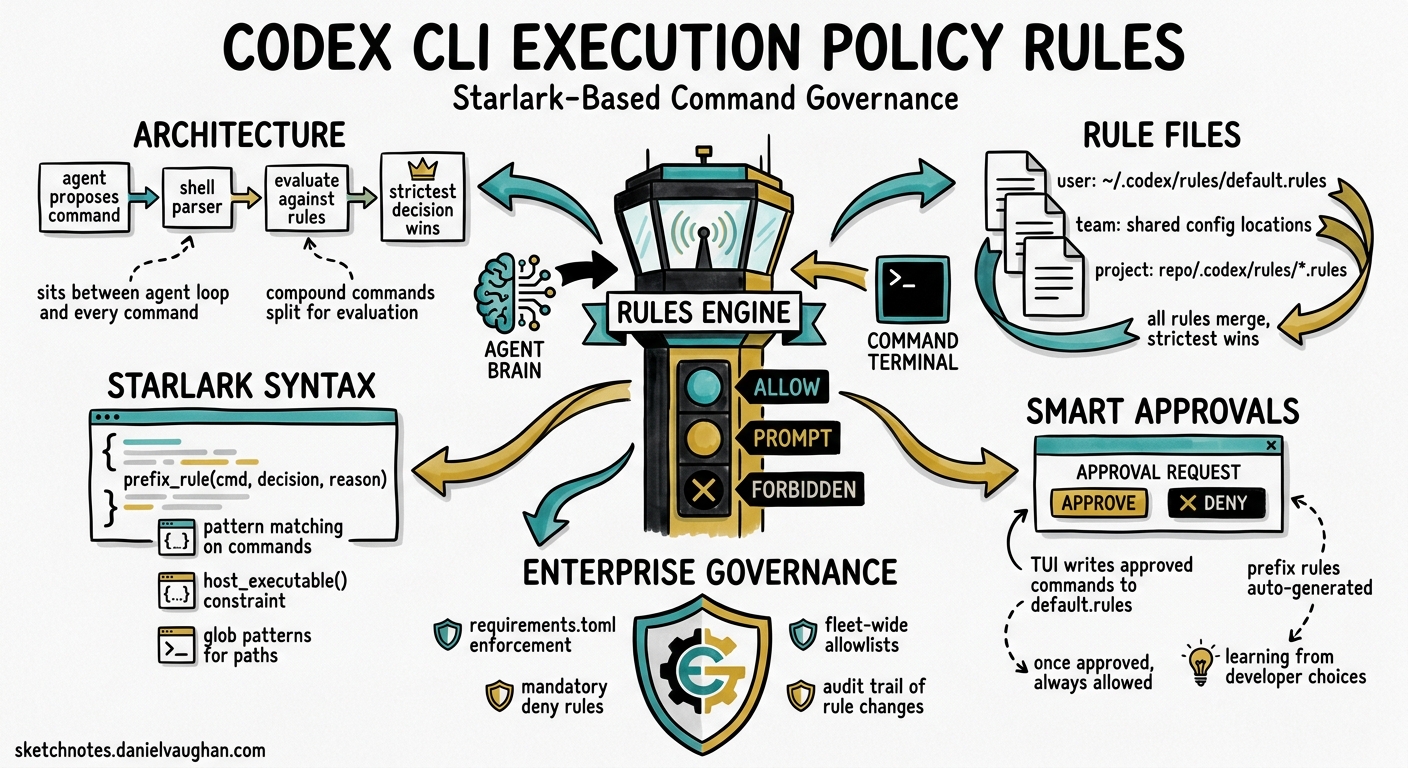
Every time Codex CLI proposes a shell command, something has to decide whether that command runs silently, pauses for approval, or gets blocked outright. The execution policy rules system — built on Starlark .rules files and the codex execpolicy subsystem — is the mechanism that makes that decision. Despite being central to Codex’s security model, the rules engine is under-documented relative to its importance: it sits between the agent loop and every command invocation, and it is the layer enterprise administrators use to enforce governance at scale.
This article covers the full surface: Starlark syntax, pattern matching semantics, shell command parsing, the host_executable() constraint, smart approvals, enterprise enforcement via requirements.toml, and practical rule-set patterns for teams.
Architecture: Where Rules Fit
flowchart TD
    A[Agent proposes command] --> B[Shell parser]
    B -->|Simple linear script| C[Split into individual commands]
    B -->|Complex script| D[Evaluate as single invocation]
    C --> E[Evaluate each against rules]
    D --> E
    E --> F{Strictest decision?}
    F -->|allow| G[Execute in sandbox]
    F -->|prompt| H[Surface approval prompt with justification]
    F -->|forbidden| I[Block with rejection message]
    H -->|User approves| J[Write prefix_rule to default.rules]
    J --> G
The rules engine evaluates after the agent generates a command but before sandbox execution 1. When the agent proposes a compound shell expression like git add . && rm -rf /tmp/cache, Codex’s parser determines whether it can safely split the expression into independent commands for individual evaluation 2.
Rule File Locations and Loading Order
Codex scans rules/ directories under every active configuration layer at startup 1:
| Layer | Path | Notes |
|---|---|---|
| User | ~/.codex/rules/default.rules |
Personal allowlists; TUI writes here |
| Team Config | Locations defined in team config | Shared across the organisation |
| Project | <repo>/.codex/rules/*.rules |
Loads only when the project layer is trusted |
All matching rules merge. Higher-precedence layers do not replace lower-precedence rules — instead, the strictest decision wins across all loaded rules 1.
The prefix_rule() Function
Every rule is a prefix_rule() call written in Starlark 3, a Python-like language designed for safe, side-effect-free evaluation.
Signature
prefix_rule(
    pattern,                # required: list of tokens or token unions
    decision = "allow",     # optional: "allow" | "prompt" | "forbidden"
    justification = "",     # optional: human-readable rationale
    match = [],             # optional: examples that must match
    not_match = [],         # optional: examples that must not match
)
Parameters in Detail
pattern — A non-empty list defining the command prefix to match. Each element is either a literal string or a list of alternatives at that argument position 1:
# Matches: gh pr view, gh pr list
# Does not match: gh pr merge
prefix_rule(
    pattern = ["gh", "pr", ["view", "list"]],
    decision = "allow",
    justification = "Read-only GitHub PR operations are safe",
)
decision — The action when the rule matches. When multiple rules match the same command, Codex applies the most restrictive: forbidden > prompt > allow 1.
justification — Surfaced in approval prompts (for prompt decisions) and rejection messages (for forbidden decisions). Recommended practice: include the why and suggest an alternative 1:
prefix_rule(
    pattern = ["git", "push", "--force"],
    decision = "forbidden",
    justification = "Force-push risks overwriting team history. Use git push --force-with-lease instead.",
)
match / not_match — Validation examples evaluated at rule load time. Think of them as unit tests for your policy 4:
prefix_rule(
    pattern = ["docker", ["build", "run"]],
    decision = "prompt",
    justification = "Container operations need review for resource usage",
    match = [["docker", "build", "."], "docker run nginx"],
    not_match = [["docker", "ps"], "docker images"],
)
If any match example fails to trigger the rule, or any not_match example incorrectly triggers it, Codex reports an error at startup rather than silently loading a broken policy.
Shell Command Parsing
Codex does not naïvely evaluate the raw command string. Its parser applies two strategies 2:
Safe Splitting
When a compound command uses only safe operators (&&, ||, ;, |) with no variable expansion, redirections, environment assignments, or wildcards, Codex splits it into individual commands and evaluates each independently:
# Codex splits this into two evaluations:
# 1. ["git", "add", "."]         → checked against rules
# 2. ["npm", "test"]             → checked against rules
git add . && npm test
Conservative Parsing
Complex shell features prevent splitting. Redirections, command substitutions, control flow, and variable expansion cause the entire invocation to be evaluated as a single ["bash", "-lc", "<full script>"] command 2:
# Cannot split — evaluated as single invocation:
git log --oneline | grep "fix" > fixes.txt
This conservative approach means rules for git alone will not match the above command. Teams relying on complex shell pipelines should write rules that account for the bash -lc wrapper pattern.
The host_executable() Constraint
Beyond prefix_rule(), the rules system provides host_executable() to constrain executable path resolution 4:
host_executable(
    name = "git",
    paths = ["/opt/homebrew/bin/git", "/usr/bin/git"],
)
When defined, basename fallback resolution only occurs for listed paths. Without this entry, Codex resolves any executable matching the basename. This prevents path-injection attacks where a malicious binary shadows a legitimate tool 4.
Testing Rules with codex execpolicy check
Before deploying rules to a team, validate them with the execpolicy check subcommand 1:
# Test a single command against your rules
codex execpolicy check --pretty \
  --rules ~/.codex/rules/default.rules \
  -- gh pr view 7888 --json title,body,comments
The output is JSON showing the strictest decision and all matching rules with their justifications:
{
  "decision": "allow",
  "matches": [
    {
      "matched_prefix": ["gh", "pr", "view"],
      "decision": "allow",
      "justification": "Read-only GitHub PR operations are safe"
    }
  ]
}
Combine multiple rule files with repeated --rules flags. Use the --resolve-host-executables flag to enable basename fallback for absolute paths 4.
Smart Approvals and the TUI Feedback Loop
When smart approvals are enabled (the default), Codex proposes a prefix_rule during escalation requests 1. If you approve a command in the TUI, Codex writes a corresponding rule to ~/.codex/rules/default.rules so the same command pattern is auto-approved in future sessions.
This creates a progressive allowlist: the first time Codex runs cargo test, you approve it. Every subsequent cargo test invocation matches the written rule and executes without interruption. Over time, your default.rules file becomes a curated record of trusted command patterns.
sequenceDiagram
    participant Agent as Codex Agent
    participant Rules as Rules Engine
    participant TUI as TUI
    participant File as default.rules

    Agent->>Rules: Proposes "cargo test"
    Rules->>Rules: No matching rule found
    Rules->>TUI: Escalate with proposed prefix_rule
    TUI->>TUI: User approves
    TUI->>File: Write prefix_rule(pattern=["cargo","test"])
    TUI->>Agent: Proceed with execution
    Note over Agent,File: Next session
    Agent->>Rules: Proposes "cargo test"
    Rules->>Rules: Matches existing rule → allow
    Rules->>Agent: Execute without prompt
Enterprise Enforcement with requirements.toml
For enterprise teams, personal allowlists are insufficient. Administrators enforce restrictive rules through requirements.toml, which constrains what users can override 5:
# requirements.toml — admin-enforced policy
[rules]
# Requirements rules MUST specify decision as "prompt" or "forbidden"
# "allow" is not permitted in requirements — it would weaken security

[[rules.prefix_rules]]
pattern = ["rm", "-rf"]
decision = "forbidden"
justification = "Recursive deletion blocked by organisation policy"

[[rules.prefix_rules]]
pattern = ["curl"]
decision = "prompt"
justification = "Network requests require explicit approval per security policy"
Key constraints on requirements.toml rules 5:
- The
decisionfield is mandatory (unlike regular rules where it defaults to"allow") - Only
"prompt"and"forbidden"decisions are valid —"allow"is prohibited because requirements exist to restrict, not to weaken - Requirements rules merge with regular
.rulesfiles, and the strictest decision still wins
Delivery Mechanisms
Enterprise requirements reach developer machines through three channels, with this precedence order 5:
flowchart LR
    A[Cloud-managed requirements] --> D[Effective policy]
    B[MDM requirements_toml_base64] --> D
    C[System /etc/codex/requirements.toml] --> D
    D --> E[Merged with user .rules]
    E --> F[Strictest decision wins]
Administrators deploy cloud-managed requirements from the Codex Policies page in the admin console, enabling different constraint sets for different groups without distributing device-level files 5.
Practical Rule-Set Patterns
Pattern 1: The Safe Git Workflow
# Allow read-only git operations
prefix_rule(
    pattern = ["git", ["status", "log", "diff", "show", "branch"]],
    decision = "allow",
    justification = "Read-only git operations",
    match = ["git status", "git log --oneline"],
)

# Prompt for mutations
prefix_rule(
    pattern = ["git", ["commit", "merge", "rebase", "cherry-pick"]],
    decision = "prompt",
    justification = "Mutations to git history require review",
)

# Block destructive operations
prefix_rule(
    pattern = ["git", "push", "--force"],
    decision = "forbidden",
    justification = "Use --force-with-lease to prevent overwriting team commits",
)
Pattern 2: Language-Specific Build Tools
# Node.js — allow test and lint, prompt for install
prefix_rule(pattern = ["npm", "test"], decision = "allow")
prefix_rule(pattern = ["npm", "run", "lint"], decision = "allow")
prefix_rule(pattern = ["npm", "install"], decision = "prompt",
    justification = "Package installation modifies node_modules and lockfile")

# Go — allow standard toolchain
prefix_rule(pattern = ["go", ["build", "test", "vet", "fmt"]], decision = "allow")
prefix_rule(pattern = ["go", "install"], decision = "prompt",
    justification = "Installing binaries modifies GOPATH")
Pattern 3: CI Pipeline Lockdown
For codex exec in CI, pair rules with --approval-policy on-request 6:
# ci-policy.rules — loaded via codex exec --rules ci-policy.rules
prefix_rule(pattern = ["make", ["build", "test", "lint"]], decision = "allow")
prefix_rule(pattern = ["docker", "build"], decision = "allow")

# Block everything network-facing
prefix_rule(pattern = ["curl"], decision = "forbidden",
    justification = "CI builds must not make external requests")
prefix_rule(pattern = ["wget"], decision = "forbidden",
    justification = "CI builds must not make external requests")
Pattern 4: Executable Path Pinning
# Pin critical tools to known-good paths
host_executable(
    name = "git",
    paths = ["/usr/bin/git", "/opt/homebrew/bin/git"],
)
host_executable(
    name = "node",
    paths = ["/usr/local/bin/node", "/opt/homebrew/bin/node"],
)
Limitations and Caveats
- Experimental status: The rules system is explicitly labelled experimental and may change in future releases 1. Production deployments should version-control rule files and test against each CLI upgrade.
- No glob or regex in patterns: Pattern elements are literal strings or unions of literals. You cannot write
pattern = ["rm", "-r*"]to match-rf,-r, and-ri— each variant needs explicit enumeration 4. - Complex shell scripts bypass splitting: Any command with redirections, variable expansion, or control flow evaluates as a single
bash -lcinvocation, meaning your granular per-tool rules will not match 2. - No conditional logic: Starlark rules are purely declarative. You cannot write rules that depend on file paths, environment variables, or time of day. ⚠️ There is no documented mechanism for context-aware rule evaluation.
Citations
-
[Rules – Codex OpenAI Developers](https://developers.openai.com/codex/rules) -
[Execution Policy – Codex OpenAI Developers](https://developers.openai.com/codex/exec-policy) -
codex-rs/execpolicy/README.md – openai/codex on GitHub ↩ ↩2 ↩3 ↩4 ↩5
-
[Managed Configuration – Codex OpenAI Developers](https://developers.openai.com/codex/enterprise/managed-configuration) -
[Command Line Options – Codex CLI OpenAI Developers](https://developers.openai.com/codex/cli/reference)