Codex CLI for Zig Development Teams: ZLS MCP Integration, Cross-Compilation Workflows, and Build System Automation
Codex CLI for Zig Development Teams: ZLS MCP Integration, Cross-Compilation Workflows, and Build System Automation
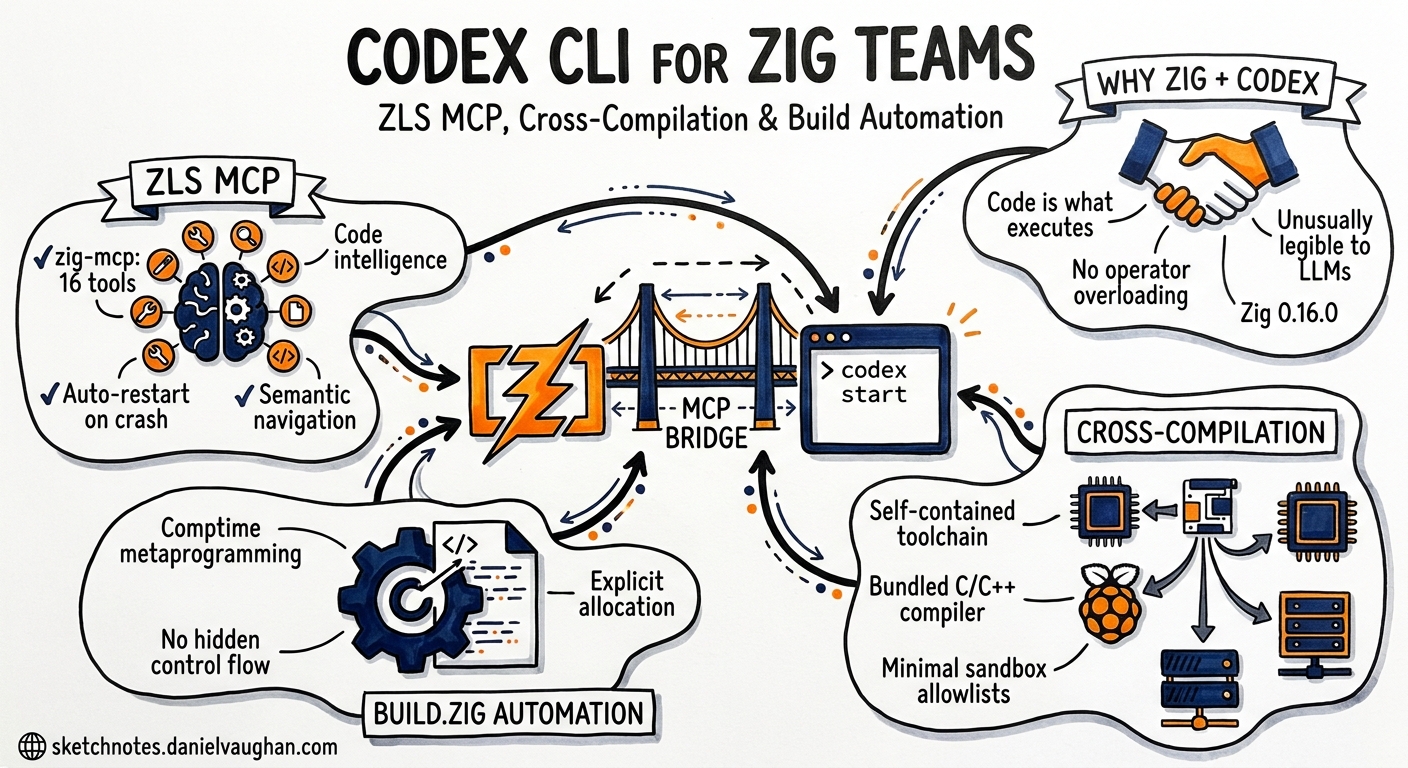
The Zig ecosystem has matured considerably since the language first appeared in the TIOBE top 50 in late 2025. With Zig 0.16.0 shipping in May 2026 — introducing I/O as an Interface and 1,183 commits from 244 contributors1 — the language is increasingly viable for production systems work. Codex CLI, meanwhile, has grown a rich MCP tool ecosystem that makes Zig development substantially more productive. This article covers practical integration patterns for teams using Codex CLI with Zig, from MCP-backed code intelligence through to cross-compilation workflows and build.zig automation.
Why Zig and Codex CLI Pair Well
Zig’s design philosophy — explicit allocation, no hidden control flow, comptime metaprogramming — creates a codebase that is unusually legible to language models2. The language’s avoidance of operator overloading, implicit conversions, and hidden allocators means the code an LLM reads is the code that executes. This contrasts sharply with C++ or Rust, where macros and trait resolution can hide significant complexity from surface-level analysis.
Codex CLI’s sandbox model also aligns well with Zig’s build system. Since zig build is a self-contained toolchain that bundles its own C/C++ cross-compiler, libc implementations, and linker3, a sandboxed Codex session needs minimal filesystem allowlists — no system-wide toolchain paths, no brew-managed dependencies, no pkg-config discovery.
MCP Server Setup: Connecting ZLS to Codex
Two community MCP servers bridge ZLS (the Zig Language Server) to MCP-compatible clients, including Codex CLI.
Option 1: zig-mcp (16 tools)
The nzrsky/zig-mcp server provides the broader toolset, exposing 16 tools across code intelligence, build, and test categories4. It communicates with ZLS over LSP pipes and auto-restarts the server on crashes.
# ~/.codex/config.toml
[mcp_servers.zig]
command = "npx"
args = ["-y", "@nzrsky/zig-mcp", "--workspace", "."]
Key tools include hover, definition, references, completions, diagnostics, format, rename, code_actions, build, test, test_file, ast_check, and zig_version4.
Requirements: Zig 0.15.2+ and ZLS on PATH (or specified via --zls-path)4.
Option 2: mcp-server-zig (8 tools)
The sadopc/mcp-server-zig server offers a leaner set of eight tools — diagnostics, format, hover, definition, references, completions, document symbols, and build5. It wraps ZLS in a Node process and connects via stdio transport.
# ~/.codex/config.toml
[mcp_servers.zig-lite]
command = "npx"
args = ["-y", "mcp-server-zig"]
Both servers require that your ZLS version matches your Zig version. A mismatch produces silent failures or misleading diagnostics5.
Which to Choose
| Criterion | zig-mcp | mcp-server-zig |
|---|---|---|
| Tool count | 16 | 8 |
| Test execution | Yes (test, test_file) |
No |
| ZLS auto-restart | Yes | No |
| Rename / code actions | Yes | No |
| Install weight | Heavier (Zig binary required) | Lighter (Node-only wrapper) |
For teams doing active Zig development, zig-mcp is the better fit. For occasional Zig work within a polyglot codebase, mcp-server-zig keeps the MCP footprint smaller.
AGENTS.md Configuration for Zig Projects
A well-configured AGENTS.md prevents common mistakes when Codex works with Zig code.
# Project: embedded-sensor-hub

## Language and Toolchain
- Zig 0.16.0 with build.zig (not CMake, not Makefile)
- ZLS for language intelligence
- Target: ARM Cortex-M4 (thumb-freestanding-none)

## Build and Test Commands
- Build: `zig build`
- Test: `zig build test`
- Cross-compile: `zig build -Dtarget=thumb-freestanding-none`
- Format check: `zig fmt --check src/`

## Conventions
- No heap allocation in src/hal/ — use fixed buffers and comptime allocation
- All public functions must have doc comments (/// style)
- Error sets must be explicit — never use anyerror
- Use std.testing for tests, not external frameworks
- Prefer comptime validation over runtime assertions where possible

## Constraints
- Do NOT add C dependencies; use Zig's @cImport only for vendor HAL headers
- Do NOT use std.heap.page_allocator in production code
- Maximum function length: 60 lines
The critical entries are the build commands (Zig’s build system is non-standard enough that models frequently guess wrong without explicit guidance) and the allocation constraints. Zig’s explicit allocator-passing pattern is a strength, but models trained primarily on C and Rust code will occasionally introduce std.heap.page_allocator usage where a fixed-buffer allocator is required.
Cross-Compilation Workflows
Zig’s built-in cross-compilation is one of its strongest features — and one where Codex CLI adds genuine value. A single zig build -Dtarget=... flag replaces the entire cross-toolchain dance that C and C++ projects require3.
Pattern: Multi-Target Build Verification
Use codex exec to verify that code compiles cleanly across multiple targets before pushing:
#!/bin/bash
# verify-targets.sh — run via codex exec for structured output
TARGETS=(
  "x86_64-linux-gnu"
  "aarch64-linux-gnu"
  "thumb-freestanding-none"
  "wasm32-wasi"
  "x86_64-macos"
)

for target in "${TARGETS[@]}"; do
  echo "=== Building for $target ==="
  zig build -Dtarget="$target" 2>&1
  echo "Exit code: $?"
done
codex exec "Run verify-targets.sh and report which targets failed, if any. \
Output a JSON summary with target, status, and first error line for each."
This pattern works well in CI pipelines using openai/codex-action@v16, where structured JSON output from --output-schema can drive downstream decisions.
Pattern: Platform-Specific Conditional Compilation Review
Zig uses @import("builtin") for target detection rather than preprocessor macros. When reviewing platform-specific code, prompt Codex with the target context:
Review @src/hal/uart.zig for correctness on thumb-freestanding-none.
Check that all comptime branches in the target switch cover the M4
interrupt vector layout and that volatile pointer casts are aligned.
The explicit nature of Zig’s comptime branching means Codex can follow the control flow without the ambiguity that #ifdef nesting creates in C codebases.
Build System Automation
Zig’s build.zig is a Zig program itself — not a DSL, not YAML, not a Makefile. This is simultaneously powerful and unfamiliar to most models. Codex handles it well when given proper context.
flowchart TD
    A[Developer prompt] --> B[Codex reads build.zig]
    B --> C{Task type}
    C -->|Add dependency| D[Fetch via build.zig.zon]
    C -->|Add target| E[Add build step in build.zig]
    C -->|Configure test| F[Add test step with filter]
    D --> G[zig fetch --save]
    E --> G2[zig build -Dtarget=...]
    F --> G3[zig build test]
    G --> H[Verify build]
    G2 --> H
    G3 --> H
    H --> I[Report results]
Adding Dependencies via build.zig.zon
Zig 0.14+ uses build.zig.zon for package management7. Codex can handle the full workflow:
Add the zap HTTP server (https://github.com/zigzap/zap) as a dependency.
Update build.zig.zon with the correct hash, add the import to build.zig,
and create a minimal src/server.zig that listens on port 8080.
Codex will run zig fetch --save to resolve the package hash, modify build.zig.zon, wire the dependency into the build graph in build.zig, and generate starter code — all within the sandbox.
Test Workflows
Zig’s test runner is built into the compiler. Codex can run targeted tests via the MCP server’s test_file tool or via direct commands:
# Run all tests
zig build test

# Run tests in a specific file
zig test src/protocol/parser.zig

# Run tests matching a name filter
zig build test -- --test-filter "parse_header"
A productive pattern is to ask Codex to write tests first, then implement:
Write tests for a Zig allocator that pools fixed-size 64-byte blocks from a
pre-allocated 4 KiB arena. Test allocation, deallocation, double-free
detection, and pool exhaustion. Place tests in src/pool_allocator.zig
using std.testing. Run them to confirm they fail, then implement the allocator.
Zig-Specific Prompting Patterns
Comptime Code Generation
Zig’s comptime is powerful but unusual. When asking Codex to generate comptime code, be explicit about what should execute at compile time versus runtime:
Generate a comptime function that creates a lookup table mapping ASCII
characters to their hex digit values (0-15 for 0-9, a-f, A-F; 0xff for
invalid). The table should be a [256]u8 array computed entirely at comptime.
Include a runtime decode_hex function that uses the table.
Error Handling Patterns
Zig’s explicit error unions (!) and error sets are a strength that models sometimes bypass. Enforce rigour in your AGENTS.md:
When handling errors in this project:
- Always use named error sets, never anyerror
- Prefer errdefer for cleanup over manual error path management
- Use try for propagation; catch only when the error is genuinely handled
- Log error context with std.log before returning errors
Memory Management Prompts
Zig’s allocator-passing pattern is central to the language. Guide Codex explicitly:
Refactor the JSON parser to accept an std.mem.Allocator parameter
instead of using the global page_allocator. Ensure all allocated
memory is freed in a defer/errdefer block. The caller should be
able to pass std.testing.allocator in tests to detect leaks.
Permission Profile for Zig Projects
With Codex CLI v0.133’s permission profile inheritance8, set up a Zig-specific profile:
# .codex/config.toml
[profiles.zig-dev]
sandbox_mode = "workspace-write"
approval_policy = "on-request"
model = "gpt-5.5"
model_reasoning_effort = "high"

[profiles.zig-dev.permissions]
allow_read = ["src/", "build.zig", "build.zig.zon", "AGENTS.md"]
allow_write = ["src/", "build.zig", "build.zig.zon"]
allow_exec = ["zig", "zls"]
deny_exec = ["curl", "wget", "npm"]
This allows Codex to build, test, and modify Zig source files whilst preventing network access or execution of unrelated toolchains.
Limitations and Caveats
⚠️ Model training data lag: Zig 0.16.0 shipped in May 20261, and GPT-5.5’s training cutoff may not fully cover its API changes. Use the zig-mcp server or @ mention the release notes to inject current documentation.
⚠️ Comptime debugging: When Codex generates comptime code that produces cryptic @compileError messages, the error often originates in a deeply nested comptime call stack. Ask Codex to add @compileLog breadcrumbs rather than guessing at fixes.
⚠️ ZLS version matching: ZLS and Zig versions must match exactly. A Zig 0.16.0 project with ZLS built for 0.15.2 will produce incorrect diagnostics through the MCP server. Pin both versions in your project documentation.
⚠️ Build system complexity: build.zig files for larger projects can be hundreds of lines of Zig code. If the build configuration exceeds Codex’s context budget, use @build.zig to inject it explicitly rather than relying on automatic file discovery.
Citations
-
Zig 0.16.0 Release Notes — Zig 0.16.0 release, May 2026, 1,183 commits from 244 contributors, introducing I/O as an Interface. ↩ ↩2
-
Zig Programming Language 2026: The Alternative to C — Analysis of Zig’s design philosophy and growing adoption in 2026. ↩
-
Zig Cross-Compilation Documentation — Official documentation on Zig’s built-in cross-compilation toolchain. ↩ ↩2
-
zig-mcp — MCP Server for Zig — 16-tool MCP server connecting AI coding assistants to ZLS via LSP, with build and test execution support. ↩ ↩2 ↩3
-
mcp-server-zig — Zig Language Intelligence — 8-tool MCP server wrapping ZLS for diagnostics, formatting, hover, definition, references, completions, symbols, and build. ↩ ↩2
-
Codex GitHub Action — Official
openai/codex-action@v1for CI/CD pipeline integration. ↩ -
Zig 0.14.0 Release Notes — Package Management — build.zig.zon package management with new hash format and metadata. ↩
-
Codex CLI v0.133.0 Release — Permission Profile Inheritance — Permission profiles with list APIs, inheritance, and managed requirements.toml support. ↩