Codex CLI for Database Schema Migrations: Safe Evolution Patterns with Prisma, Drizzle, and MCP
Codex CLI for Database Schema Migrations: Safe Evolution Patterns with Prisma, Drizzle, and MCP
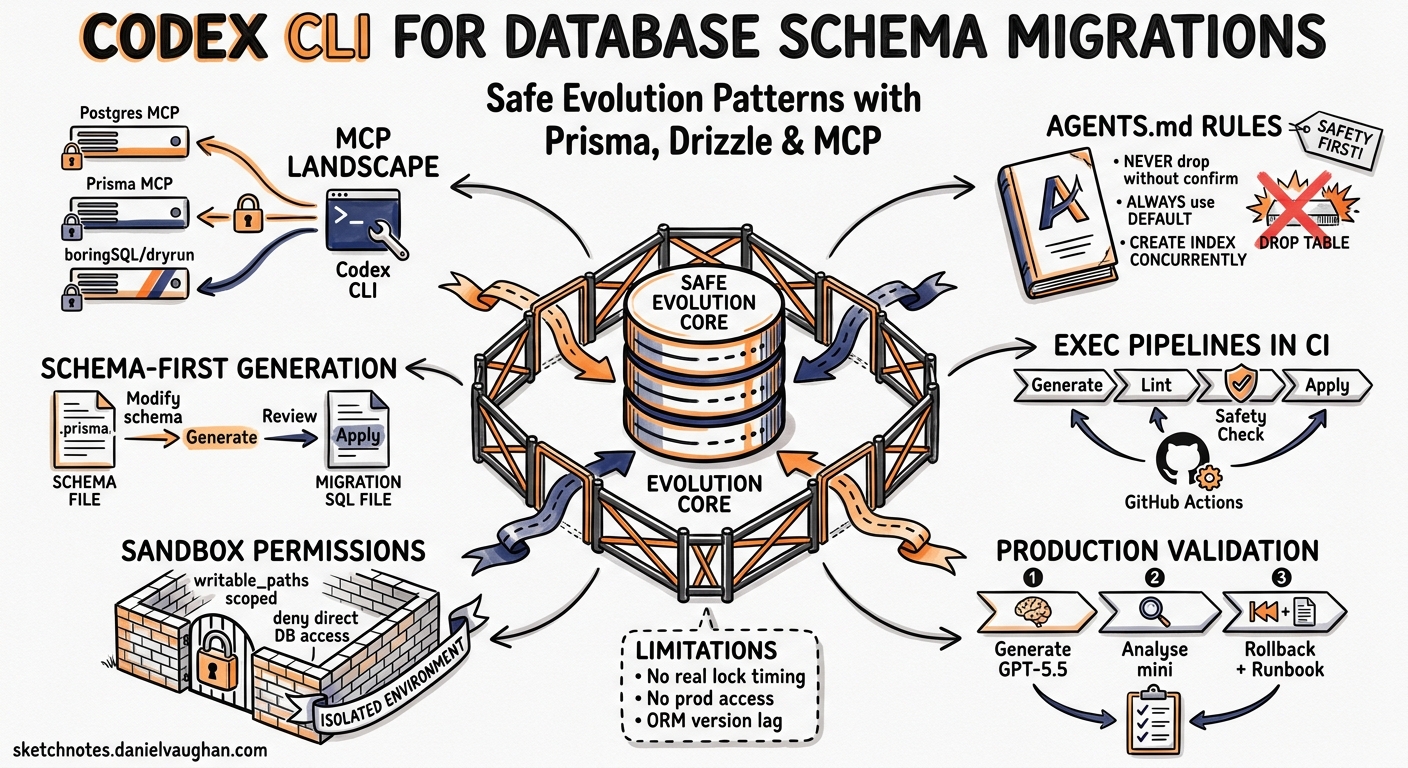
Database schema migrations sit at the intersection of high consequence and low tolerance for error. A botched migration can lock tables, corrupt data, or bring down production. This makes them an ideal candidate for agent-assisted workflows — provided the agent operates within strict safety boundaries. Codex CLI v0.133, with its permission profile inheritance, MCP integration, and exec pipelines, offers exactly that combination: intelligent assistance with enforceable guardrails.
This article walks through practical patterns for using Codex CLI to generate, review, validate, and apply database migrations using Prisma, Drizzle, and raw SQL, backed by MCP servers for live schema inspection and AGENTS.md for encoding your team’s migration conventions.
The Migration MCP Landscape
Three categories of database MCP server are relevant to migration workflows in mid-2026.
Direct Database Servers
PostgreSQL and MySQL MCP servers give Codex read access to live schemas, table structures, index definitions, and query plans. Registration is straightforward 1:
codex mcp add postgres-dev -- \
  npx -y @anthropic/mcp-postgres \
  'postgresql://dev:password@localhost:5432/myapp'
Security note: The original
@modelcontextprotocol/server-postgreswas archived in May 2025 after a SQL injection vulnerability was discovered 2. Use an actively maintained alternative such as@anthropic/mcp-postgres,mcp-postgres-server, or Google’s MCP Toolbox for Databases (GA since April 2026) 3.
ORM Migration Servers
Prisma MCP (built into Prisma CLI v6.6.0+) exposes migrate-status, migrate-dev, and migrate-reset as MCP tools, letting Codex check migration state, generate new migrations, and reset development databases through structured tool calls 4.
Drizzle MCP (defrex/drizzle-mcp) provides schema introspection, migration generation via drizzle-kit generate, and direct push capabilities. It auto-detects drizzle.config.ts from the working directory 5.
Safety Analysis Servers
boringSQL/dryrun offers 16 tools for offline migration safety analysis — lock analysis, table rewrite detection, and schema linting — without touching the database 6. This is particularly valuable for validating migrations before they reach staging.
graph LR
    A[Codex CLI] -->|MCP| B[Postgres MCP]
    A -->|MCP| C[Prisma MCP]
    A -->|MCP| D[Drizzle MCP]
    A -->|MCP| E[boringSQL/dryrun]
    B -->|read-only| F[(Dev Database)]
    C -->|migrate-dev| F
    D -->|generate/push| F
    E -->|offline analysis| G[Migration SQL Files]
AGENTS.md: Encoding Migration Conventions
Database migrations demand stricter conventions than application code. Your AGENTS.md should encode these as non-negotiable rules rather than suggestions.
# Database Migration Rules

## Migration Safety
- NEVER generate migrations that drop columns or tables without explicit confirmation
- ALWAYS use `ALTER TABLE ... ADD COLUMN ... DEFAULT` with a default value
- NEVER use `NOT NULL` without a DEFAULT on existing tables with data
- All index creation MUST use `CONCURRENTLY` on PostgreSQL
- Maximum one schema change per migration file

## Naming Conventions
- Migration names: `YYYYMMDD_HHMMSS_descriptive_snake_case`
- Column names: snake_case, never camelCase
- Index names: `idx_{table}_{column1}_{column2}`
- Foreign keys: `fk_{table}_{referenced_table}`

## Review Requirements
- Every migration MUST include a rollback/down migration
- Large table migrations (>1M rows) MUST include an estimated lock time
- Data migrations MUST be separate from schema migrations

## Build Commands
- `npx prisma migrate dev --name <name>` — generate and apply migration
- `npx prisma migrate status` — check pending migrations
- `npx drizzle-kit generate` — generate migration from schema diff
- `npx drizzle-kit migrate` — apply pending migrations
Subdirectory AGENTS.md files in a monorepo let you scope these rules to your database layer. Place a database-specific file at packages/database/AGENTS.md and it will override root-level conventions when Codex operates within that directory 7.
Pattern 1: Schema-First Migration Generation
The most common workflow: you modify your ORM schema and need a migration file generated.
With Prisma
codex "I've updated the User model in schema.prisma to add an 'avatar_url'
column (optional string, max 512 chars) and a 'last_login_at' timestamp
(optional, defaults to null). Generate the migration, verify it uses
ALTER TABLE ADD COLUMN with appropriate defaults, and check for any
index implications."
With Prisma MCP registered, Codex will:
- Read the current schema via
migrate-statusto understand the baseline - Inspect the live database schema through the Postgres MCP server
- Run
migrate-devto generate the migration - Review the generated SQL against your AGENTS.md safety rules
- Flag any violations (missing defaults, unsafe operations)
With Drizzle
codex "The orders table needs a 'cancelled_at' nullable timestamp and a
partial index on (status, cancelled_at) WHERE cancelled_at IS NOT NULL.
Update the Drizzle schema, generate the migration, and verify the index
uses CREATE INDEX CONCURRENTLY."
Drizzle’s TypeScript-first approach means Codex modifies the schema definition directly, then runs drizzle-kit generate to produce the SQL migration file 8.
Pattern 2: Migration Review with exec Pipelines
Use codex exec for automated migration review in CI, producing structured verdicts:
codex exec \
  --model gpt-5.4-mini \
  --reasoning-effort low \
  "Review the SQL migration file at db/migrations/latest.sql against
   these safety rules:
   1. No DROP COLUMN or DROP TABLE without explicit backup step
   2. All ADD COLUMN on existing tables have DEFAULT values
   3. CREATE INDEX uses CONCURRENTLY for tables >100K rows
   4. No ALTER TYPE on columns with existing data
   5. Estimated lock impact noted in comments

   Output a JSON verdict with: safe (bool), warnings (array),
   blocking_issues (array), estimated_risk (low/medium/high)."
This pattern slots into GitHub Actions alongside your existing migration CI:
- name: Review migration safety
  uses: openai/codex-action@v1
  with:
    model: gpt-5.4-mini
    reasoning_effort: low
    prompt: |
      Review all new SQL files in db/migrations/ against the
      project's migration safety rules in AGENTS.md.
      Output JSON: {safe: bool, issues: [{file, line, severity, message}]}
The gpt-5.4-mini model with reasoning_effort: low keeps costs minimal for what is essentially a structured code review task 9.
Pattern 3: Cross-Referencing Schema and Application Code
Migrations rarely exist in isolation. A column addition typically requires model updates, API changes, and test modifications. Codex’s subagent system handles this naturally:
codex "Add a 'preferences' JSONB column to the users table with a default
of '{}'. This needs:
1. A Prisma migration for the schema change
2. Updated TypeScript types in src/types/user.ts
3. API endpoint updates in src/routes/users.ts to accept preferences
4. Zod validation schema for the preferences object
5. Tests for the new endpoint behaviour

Use a subagent to handle the migration separately from the application
code changes."
graph TD
    A[Main Agent] -->|delegates| B[Migration Subagent]
    A -->|delegates| C[Application Subagent]
    B -->|generates| D[SQL Migration]
    B -->|updates| E[Prisma Schema]
    C -->|updates| F[TypeScript Types]
    C -->|updates| G[API Routes]
    C -->|updates| H[Validation Schemas]
    C -->|creates| I[Tests]
    D -.->|schema change feeds| F
The migration subagent operates with workspace-write permission scoped to the prisma/ directory, whilst the application subagent has broader write access 10.
Pattern 4: Sandbox Configuration for Migration Safety
Permission profiles in v0.133 let you create migration-specific safety boundaries. Define a migration profile that extends your base development profile:
# .codex/profiles/migration.toml
[profile]
extends = "development"
sandbox = "workspace-write"

[permissions]
# Allow writing only to migration directories
writable_paths = [
  "prisma/migrations/",
  "drizzle/migrations/",
  "src/db/migrations/",
  "prisma/schema.prisma",
  "src/db/schema.ts"
]

# Network access for MCP database connections
network_access = true
network_allowed_hosts = ["localhost:5432", "localhost:3306"]

[deny]
# Never allow direct database writes outside MCP
shell_commands = ["psql", "mysql", "mongosh"]
Apply it when working on migrations:
codex --profile migration "Generate a migration to add the audit_log table"
The deny rules prevent Codex from bypassing MCP safety controls by running database clients directly 11. Combined with permission profile inheritance from v0.133, an organisation can enforce these deny rules via requirements.toml whilst teams customise the allowed paths 12.
Pattern 5: Production Migration Validation with exec resume
For high-stakes production migrations, use codex exec resume to build a multi-stage validation pipeline:
# Stage 1: Generate and lint the migration
STAGE1=$(codex exec \
  --model gpt-5.5 \
  "Generate a migration to partition the events table by created_at
   (monthly ranges). Output the SQL." \
  --output-json)

# Stage 2: Safety analysis
STAGE2=$(codex exec resume "$STAGE1" \
  --model gpt-5.4-mini \
  "Analyse this migration for: lock duration estimates, table rewrite
   risk, required maintenance window size, rollback strategy.
   Output structured JSON." \
  --output-json)

# Stage 3: Generate the rollback
codex exec resume "$STAGE2" \
  --model gpt-5.4-mini \
  "Generate the corresponding rollback migration and a runbook
   with pre-flight checks, execution steps, monitoring queries,
   and rollback triggers."
Each stage can use a different model: GPT-5.5 for the complex partitioning logic, GPT-5.4-mini for the cheaper analysis and documentation tasks 13.
Pattern 6: Drift Detection Between Schema and Code
Over time, database schemas and application models drift apart. Use codex exec with both Postgres MCP and filesystem access to detect mismatches:
codex exec \
  --model gpt-5.4-mini \
  "Compare the live database schema (via MCP postgres-dev) against
   the Prisma schema in prisma/schema.prisma. Report:
   1. Columns in DB but not in schema (orphaned)
   2. Columns in schema but not in DB (pending migrations)
   3. Type mismatches between schema and DB
   4. Missing indexes that the schema defines
   Output as JSON with severity ratings."
This is particularly useful after manual database changes or when onboarding a legacy database into an ORM 14.
What Codex Cannot Do (Yet)
A few important limitations to acknowledge:
- No hardware-in-the-loop timing: Codex cannot measure actual lock durations or query execution times. Lock duration estimates are heuristic, based on table size and operation type. ⚠️
- No production access by default: The sandbox correctly prevents direct production database connections. Production migrations should go through your existing deployment pipeline, with Codex generating and reviewing the files.
- ORM version lag: Model training data may lag behind the latest Prisma (v6.x) or Drizzle (v0.40+) APIs. Pin your ORM version in AGENTS.md and include relevant documentation links as context. ⚠️
- Non-determinism: The same migration prompt may produce slightly different SQL across runs. Always review generated migrations before applying 15.
Recommended Stack
| Component | Tool | Purpose |
|---|---|---|
| Schema inspection | Postgres/MySQL MCP | Live database state |
| Migration generation | Prisma MCP or Drizzle MCP | ORM-native migration creation |
| Safety analysis | boringSQL/dryrun | Offline lock and rewrite detection |
| Convention enforcement | AGENTS.md | Team migration rules |
| Permission boundaries | v0.133 permission profiles | Scoped write access |
| CI review | codex exec + GitHub Actions | Automated safety gates |
| Model selection | GPT-5.5 (complex) / GPT-5.4-mini (review) | Cost-optimised routing |
Citations
-
Greycloak, “Creating and using Postgres MCP with Codex,” February 2026. https://greycloak.com/post/2026-02-20-creating-and-using-mcp-postres/ ↩
-
Peliqan, “Postgres MCP — Setup, Servers, and Security Guide,” 2026. https://peliqan.io/blog/postgres-mcp/ ↩
-
Google, “MCP Toolbox for Databases — Introduction,” 2026. https://mcp-toolbox.dev/documentation/introduction/ ↩
-
Prisma, “Prisma MCP Server Documentation,” 2026. https://www.prisma.io/docs/postgres/integrations/mcp-server ↩
-
defrex, “Drizzle MCP — GitHub,” 2025. https://github.com/defrex/drizzle-mcp ↩
-
ChatForest, “Database Migration & Schema Management MCP Servers,” 2026. https://chatforest.com/reviews/database-migration-mcp-servers/ ↩
-
OpenAI, “Custom instructions with AGENTS.md — Codex Developer Docs,” 2026. https://developers.openai.com/codex/guides/agents-md ↩
-
Drizzle Team, “Migrations with Drizzle Kit,” 2026. https://orm.drizzle.team/docs/kit-overview ↩
-
OpenAI, “Codex CLI Features — Non-interactive Mode,” 2026. https://developers.openai.com/codex/cli/features ↩
-
OpenAI, “Codex CLI — Agent Approvals & Security,” 2026. https://developers.openai.com/codex/agent-approvals-security ↩
-
OpenAI, “Codex Permissions Documentation,” 2026. https://developers.openai.com/codex/cli/reference ↩
-
GitHub, “openai/codex releases — rust-v0.133.0,” May 2026. https://github.com/openai/codex/releases ↩
-
OpenAI, “Best Practices — Codex Developer Docs,” 2026. https://developers.openai.com/codex/learn/best-practices ↩
-
Composio, “How to integrate Prisma MCP with Codex,” 2026. https://composio.dev/toolkits/prisma/framework/codex ↩
-
OpenAI, “Codex Changelog — v26.519,” May 2026. https://developers.openai.com/codex/changelog ↩