Codex CLI for Gleam Development: Type-Safe BEAM Agents, LSP-MCP Bridge, and Dual-Target Workflows
Codex CLI for Gleam Development: Type-Safe BEAM Agents, LSP-MCP Bridge, and Dual-Target Workflows
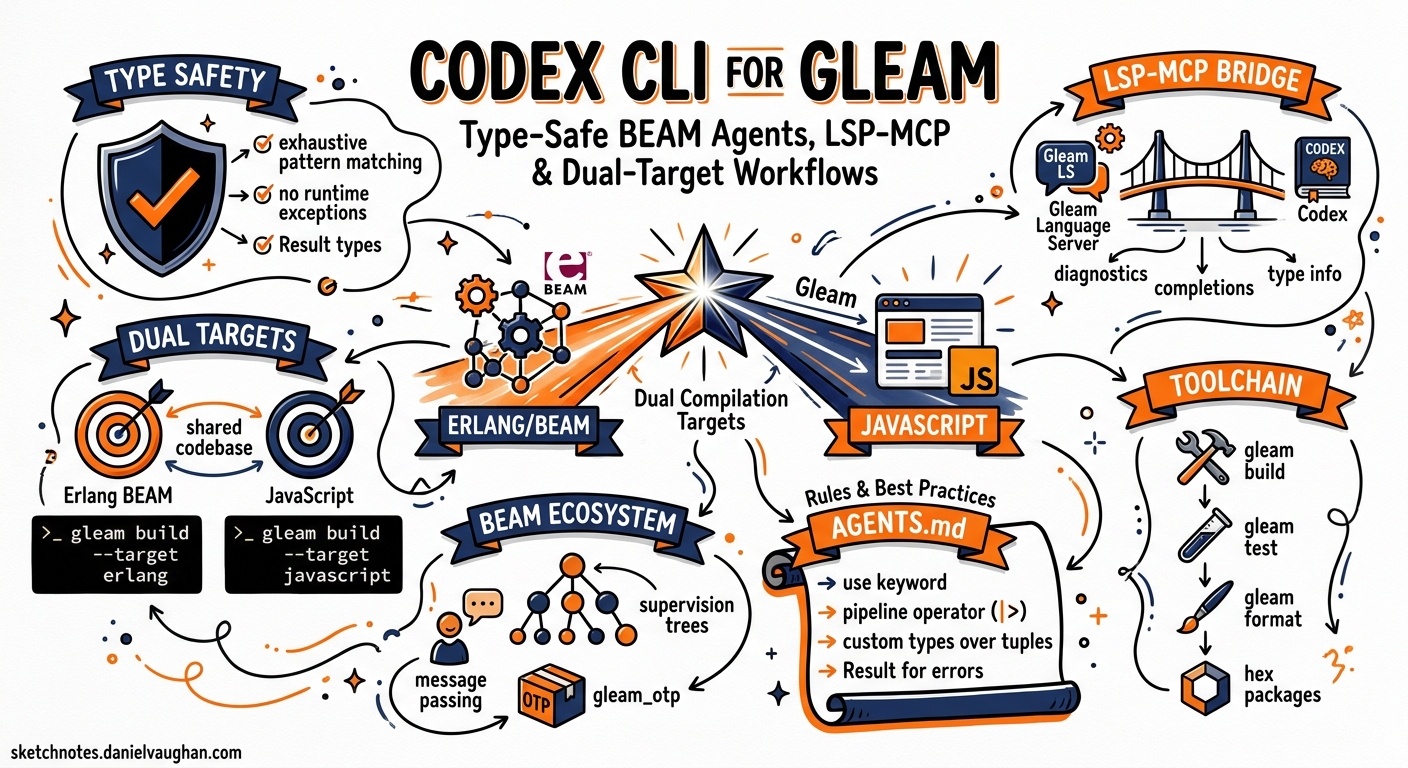
Gleam occupies a distinctive niche in the language ecosystem: a statically-typed, functional language that compiles to both Erlang (for the BEAM VM) and JavaScript (for browsers and edge runtimes) 1. With over 21,400 GitHub stars and a 70% admiration rating in developer surveys, Gleam is no longer a curiosity — it is a production language with a first conference behind it and a v1.16.0 release shipping in April 2026 23. Yet no major AI coding agent ships with Gleam-specific training data or tooling.
This article covers how to configure Codex CLI for effective Gleam development: bridging the Gleam language server via LSP-MCP, writing AGENTS.md conventions for Gleam idioms, handling dual-target compilation, and working around the training data gap that affects every LLM when confronted with a young language.
The Training Data Gap
Every general-purpose LLM — GPT-5.5 included — has substantially less Gleam training data than it has for Erlang, Elixir, or Haskell 4. The practical consequences are predictable:
- The model reaches for Elixir syntax (
def,do/end, pipe operator|>without Gleam’s function-call semantics) when asked to write Gleam. - It invents module names that exist on Hex for Elixir but not for Gleam.
- It defaults to Erlang-style atoms where Gleam uses custom types with constructors.
- It omits exhaustive pattern matching, Gleam’s primary control-flow mechanism.
The fix is not to avoid Codex CLI — it is to supply enough guardrails via AGENTS.md and LSP diagnostics that the model self-corrects within the agent loop rather than spiralling into invalid code.
Bridging the Gleam Language Server via LSP-MCP
Gleam ships its language server inside the gleam binary itself — run gleam lsp and you have a fully compliant LSP server 5. The server provides go-to-definition, find-references, rename, 40+ code actions, exhaustive diagnostics, and document formatting 5. This is unusually rich for a language of Gleam’s age.
To expose these capabilities to Codex CLI, use the LSP-MCP bridge 6. Add the following to ~/.codex/config.toml:
[mcp_servers.gleam-lsp]
command = "npx"
args = ["-y", "lsp-mcp", "--", "gleam", "lsp"]
This spawns the Gleam language server as a child process and translates MCP tool calls into LSP requests 6. Codex CLI gains access to:
| MCP Tool | LSP Method | Use Case |
|---|---|---|
diagnostics |
textDocument/publishDiagnostics |
Catch type errors after each edit |
hover |
textDocument/hover |
Inspect inferred types mid-session |
definition |
textDocument/definition |
Navigate to function source |
references |
textDocument/references |
Find all call sites before renaming |
codeAction |
textDocument/codeAction |
Apply Gleam’s 40+ automated refactorings |
formatting |
textDocument/formatting |
Enforce standard Gleam style |
The diagnostics channel is the critical one. When the model produces code that type-checks, the agent loop continues. When it does not, the diagnostic payload — including Gleam’s famously clear error messages — feeds back into the next turn, and the model corrects itself. This compiler-as-oracle pattern works exceptionally well with Gleam because the type system catches a broad class of errors at compile time 5.
sequenceDiagram
    participant User
    participant Codex as Codex CLI
    participant LSP as Gleam LSP (via MCP)
    participant FS as File System

    User->>Codex: "Add a JSON decoder for the User type"
    Codex->>FS: Write src/user.gleam
    Codex->>LSP: diagnostics(src/user.gleam)
    LSP-->>Codex: Error: missing pattern for variant Admin
    Codex->>FS: Add Admin case to decoder
    Codex->>LSP: diagnostics(src/user.gleam)
    LSP-->>Codex: No errors
    Codex-->>User: Done — all variants handled
AGENTS.md for Gleam Projects
An AGENTS.md file at the repository root prevents the most common LLM mistakes with Gleam. The following template encodes the conventions a competent Gleam developer expects:
# AGENTS.md — Gleam Project Conventions

## Language Rules
- All source files use `.gleam` extension. Never write `.erl` or `.ex` files.
- Use `gleam.toml` for project configuration. Never create `mix.exs` or `rebar.config`.
- Import modules with `import module/name` — no `require`, `use`, or `alias`.
- Gleam has no `if/else`. Use `case` expressions with exhaustive pattern matching.
- Gleam has no exceptions. Use `Result(value, error)` for fallible operations.
- Gleam has no `nil`/`null`. Use `Option(a)` from `gleam/option`.
- Atoms do not exist in Gleam. Use custom types: `type Direction { North South East West }`.
- Strings are UTF-8 binaries. Use `gleam/string` and `gleam/string_tree` — not Erlang `:binary`.
- Pipe operator `|>` pipes into the first argument. `list |> list.map(fn(x) { x + 1 })`.

## Build & Test
- Build: `gleam build`
- Test: `gleam test`
- Format: `gleam format`
- Type check only: `gleam check`
- Add dependency: `gleam add package_name`
- Dependencies come from Hex (hex.pm). Verify packages exist before adding.
- `manifest.toml` is the lock file. Commit it. Never edit it by hand.

## Code Style
- Always add type annotations to public functions.
- Use labelled arguments for functions with more than two parameters.
- Prefer `use` expressions for callback chains (Gleam's monadic sugar).
- Keep modules small. One public type per module where practical.
- Write doc comments with `///` above public functions.
- Run `gleam format` before committing — the formatter is canonical.

## Dual-Target Awareness
- Default target is Erlang. Specify `--target javascript` for JS builds.
- FFI to Erlang uses `@external(erlang, "module", "function")`.
- FFI to JavaScript uses `@external(javascript, "./file.mjs", "function")`.
- Never mix FFI targets in the same module without conditional compilation.
- Test on both targets if the package declares both in `gleam.toml`.

## Dependencies — Verified Gleam Packages
- HTTP: `gleam_http`, `gleam_httpc` (Erlang), `gleam_fetch` (JavaScript)
- JSON: `gleam_json` (decode/encode)
- Erlang stdlib: `gleam_erlang` (process, atom interop)
- OTP: `gleam_otp` (actors, supervisors, tasks)
- Testing: `gleeunit` (default test framework)
- Wisp: `wisp` (web framework)
The dependency verification section is deliberately prescriptive. Without it, the model will gleam add packages that exist only in the Elixir ecosystem — jason, plug, ecto — and produce confusing build errors.
Practical Workflow Patterns
Pattern 1: Type-Driven Feature Development
Gleam’s type system enables a workflow where you define the types first and let the compiler guide the implementation:
codex exec "Read the types in src/domain.gleam, then implement the \
  missing functions in src/handlers.gleam. After each edit, run \
  'gleam check' and fix any type errors before moving on."
Because gleam check runs the full type checker without generating BEAM/JS bytecode, it completes in milliseconds for most projects 7. The model can iterate rapidly: write a function body, check types, fix errors, repeat.
Pattern 2: Dual-Target Library Development
Gleam’s dual compilation target requires testing on both Erlang and JavaScript:
codex exec "Implement the parser module in src/parser.gleam. \
  After implementation, run 'gleam test --target erlang' and \
  'gleam test --target javascript'. Fix any target-specific \
  failures. Do not use FFI — pure Gleam only."
The --target flag ensures the model discovers platform-specific issues early. Common pitfalls include BigInt handling differences, regex support gaps on the JavaScript target, and process-related APIs that only exist on BEAM 1.
Pattern 3: OTP Actor Migration from Elixir
Teams migrating from Elixir to Gleam can use Codex CLI to translate GenServer modules into Gleam’s gleam_otp actor model:
codex exec "Read the Elixir GenServer in legacy/user_cache.ex. \
  Translate it into a Gleam actor using gleam_otp/actor. \
  Preserve the same message types and state shape. \
  Use custom types for messages, not atoms. \
  Run 'gleam check' after each file change."
The AGENTS.md rule about atoms is critical here — without it, the model translates Elixir atoms (:get, :put) literally, which Gleam does not support.
Pattern 4: Hex Package Scaffolding with codex exec
Automate the creation of a publishable Hex package:
codex exec "Create a new Gleam library called 'shimmer' for \
  colour manipulation. Run 'gleam new shimmer --template lib'. \
  Add gleam_json as a dependency. Implement RGB and HSL types \
  with conversion functions. Add type annotations to all public \
  functions. Write tests. Run 'gleam test' and 'gleam format --check'. \
  Generate docs with 'gleam docs build'."
Sandbox Configuration for Gleam
Gleam’s build process needs network access to fetch packages from Hex and compile Erlang/JavaScript targets. Configure the sandbox permissions accordingly:
[profile.gleam]
writable_roots = ["."]
allow_commands = [
  "gleam build",
  "gleam test",
  "gleam check",
  "gleam format",
  "gleam add *",
  "gleam deps *",
  "gleam docs build",
  "gleam run",
  "gleam shell"
]
network_access = true
Network access is required because gleam add and gleam deps download fetch packages from hex.pm 8. Without it, dependency resolution fails silently.
Model Selection for Gleam Tasks
| Task | Recommended Model | Rationale |
|---|---|---|
| Custom type design, actor architecture | GPT-5.5 | Better reasoning about type hierarchies and OTP patterns 4 |
| Implementing function bodies, tests | GPT-5.4-mini | Faster iteration; type checker catches mistakes cheaply 9 |
| Erlang FFI bridges | GPT-5.5 | Requires understanding both Gleam and Erlang calling conventions |
| JavaScript target work | GPT-5.4-mini | Simpler FFI surface; fewer edge cases |
| Elixir-to-Gleam migration | GPT-5.5 | Cross-language translation needs larger context and reasoning |
For most Gleam development, GPT-5.4-mini with the LSP-MCP bridge provides the best cost-to-quality ratio. The type checker acts as a free verifier, making rapid cheap iterations more effective than fewer expensive ones.
Composing MCP Servers
For a complete Gleam development environment, compose the LSP-MCP bridge with a file-system MCP server:
[mcp_servers.gleam-lsp]
command = "npx"
args = ["-y", "lsp-mcp", "--", "gleam", "lsp"]

[mcp_servers.codebase-memory]
command = "npx"
args = ["-y", "codebase-memory-mcp"]
The codebase-memory-mcp server 10 indexes 155 languages — including Gleam — into a persistent knowledge graph, providing semantic search across the codebase without consuming context tokens on full file reads.
Limitations and Known Issues
Training data lag. GPT-5.5’s training data likely includes Gleam up to approximately v1.12–v1.14. Features introduced in v1.15–v1.16 (string concatenation in guards, constant record updates) may produce incorrect code 3. The AGENTS.md and LSP diagnostics compensate, but novel syntax will occasionally require manual correction.
No REPL integration. Gleam provides gleam shell, which drops into an Erlang shell with Gleam modules loaded 7. However, evaluating Gleam expressions directly in the Erlang shell requires compiling modules first. There is no equivalent of Elixir’s iex with inline Gleam expression evaluation. The model cannot use a REPL-driven workflow; it must rely on gleam check and gleam test for feedback.
Hex package hallucination. ⚠️ The model will confidently reference Gleam packages that do not exist on hex.pm. Always verify with gleam add package_name — if the package does not exist, the build tool reports an error immediately 8.
JavaScript target gaps. Several gleam_erlang and gleam_otp packages are BEAM-only. Code that type-checks on the Erlang target may fail to compile for JavaScript 1. Dual-target testing is essential for library authors.
No Gleam-specific MCP server. Unlike Clojure (ClojureMCP), Elixir (ElixirLS-MCP), or Haskell (HLS via LSP-MCP with typed-hole extensions), Gleam has no purpose-built MCP server as of May 2026. The generic LSP-MCP bridge covers diagnostics, navigation, and refactoring but cannot provide Gleam-specific tools like interactive type-hole filling or OTP supervisor tree visualisation.
Citations
-
Gleam Programming Language — Official Website — Dual compilation target documentation, FFI specifications, and language overview. Accessed 2026-05-23. ↩ ↩2 ↩3
-
Gleam Programming Language 2026 — Programming Helper Tech — 21,400+ GitHub stars, 70% admiration rating, first Gleam conference (February 2026). Accessed 2026-05-23. ↩
-
Gleam v1.16.0 Release — GitHub Releases — v1.16.0 released April 24, 2026; changelog including string concatenation in guards, constant record updates. Accessed 2026-05-23. ↩ ↩2
-
OpenAI GPT-5.5 Model Documentation — GPT-5.5 API availability and capabilities. Accessed 2026-05-23. ↩ ↩2
-
Gleam Language Server — Official Documentation — 40+ code actions, diagnostics, go-to-definition, rename, formatting, document symbols, signature help. Accessed 2026-05-23. ↩ ↩2 ↩3
-
LSP-MCP Bridge — Codex LSP Bridge (CesarPetrescu) — Generic LSP-to-MCP bridge enabling any language server to be exposed as MCP tools. Accessed 2026-05-23. ↩ ↩2
-
Gleam Command Line Reference —
gleam check,gleam build,gleam test,gleam shell,gleam formatcommands and flags. Accessed 2026-05-23. ↩ ↩2 -
Gleam Hex.pm Usage Documentation — Dependency management with
gleam add,gleam.tomlconfiguration,manifest.tomllock file. Accessed 2026-05-23. ↩ ↩2 -
OpenAI GPT-5.4-mini Model Documentation — Optimised for latency and cost in high-volume coding workloads. Accessed 2026-05-23. ↩
-
Codebase Memory MCP Server — GitHub (DeusData) — High-performance code intelligence MCP server indexing 155 languages into a persistent knowledge graph. Accessed 2026-05-23. ↩