MCP OAuth Default-On: What v0.164.0's Enterprise Auth Overhaul Means
MCP OAuth Default-On: What v0.164.0’s Enterprise Auth Overhaul Means
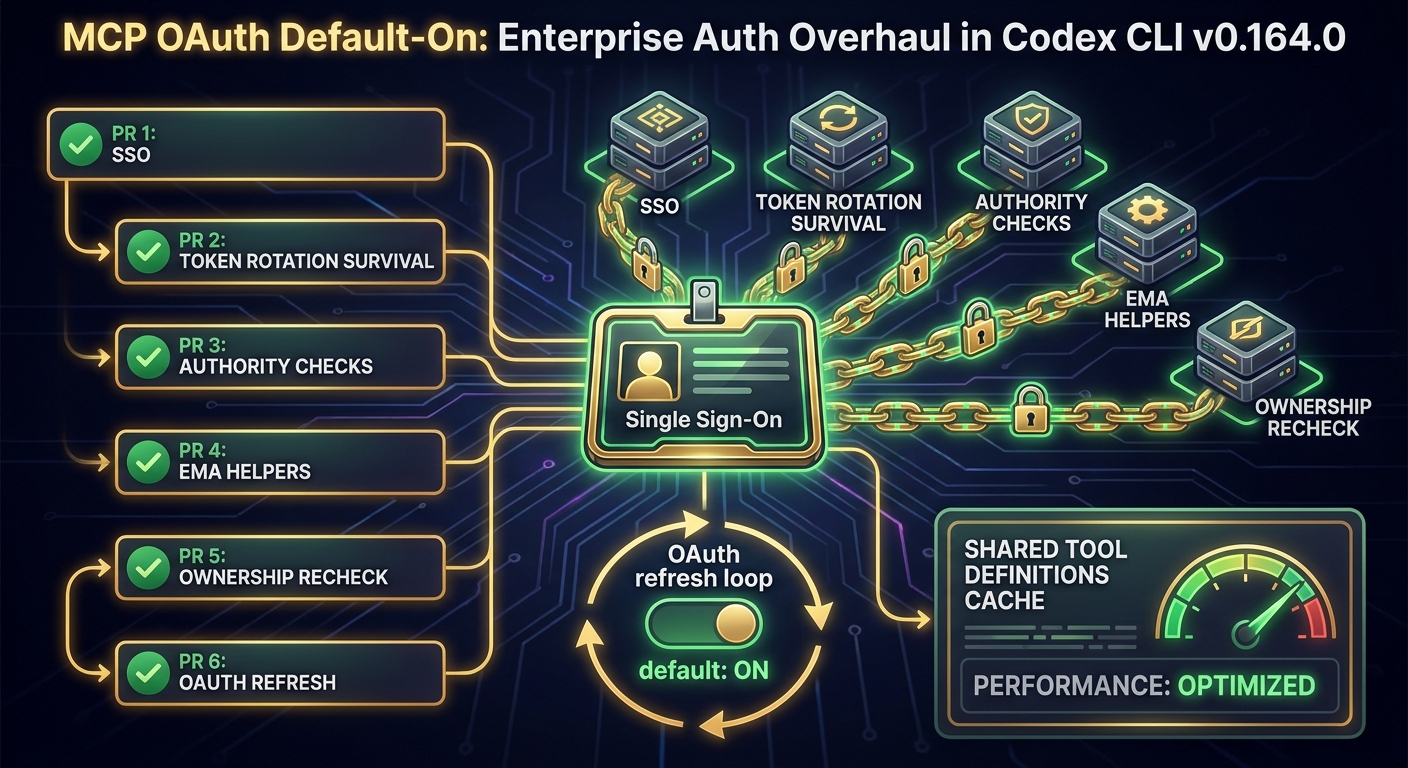
Release track: v0.164.0-alpha.7 (20 October 2026) and alpha.8 (20 October 2026, 22:15 UTC) Stable track: v0.163.0 (current stable, 15 October 2026) Impact: Enterprise MCP deployments, OAuth-protected MCP servers, multi-session tool caching
Between alpha.7 and alpha.8 on 20 October 2026, six pull requests landed in Codex CLI that, taken together, represent the most significant overhaul of enterprise MCP authentication since the protocol was integrated. The headline change — MCP OAuth refresh coordination enabled by default — is the final piece in a much larger rearchitecture of how Codex handles identity when it talks to external tools.
This article explains what changed, why it matters, and what it means for teams deploying Codex CLI against enterprise MCP servers.
The Headline: OAuth Refresh Is Now On by Default
PR #55701, authored by Matthew Zeng and merged at 23:34 UTC on 20 October, flips MCP OAuth refresh coordination from opt-in to on-by-default.
Before this change, Codex CLI would allow MCP OAuth tokens to expire mid-session. When an MCP server’s OAuth token expired, Codex would return an authentication error to the user and require manual re-authentication — either by re-running codex auth or by restarting the session. For short interactive sessions this was merely inconvenient. For long-running agentic workflows, where a task might run for hours and make dozens of MCP tool calls across that time, an expired token would silently fail tool calls, corrupt partial results, or terminate an otherwise healthy task.
With refresh coordination on by default, Codex monitors token expiry windows for each connected MCP server, proactively refreshes tokens before they expire, and retries any tool call that fails due to a token expiry that occurred in the refresh window. The user sees none of this. A task that would previously have failed at the two-hour mark on a server with a two-hour token TTL now completes cleanly.
The Wider Batch: Six PRs, One Architecture
The OAuth refresh default change did not arrive alone. It was the final PR in a six-PR batch authored primarily by jif-oai that landed across alpha.7 and alpha.8. Each PR addresses a distinct point of fragility in enterprise MCP authentication:
1. Reuse Codex Account Grants for Enterprise MCP Auth (PR #55698)
The most strategically significant change in the batch. Enterprise MCP servers typically require separate authentication from the user’s main Codex credentials — users had to manage distinct credentials for each enterprise MCP server they connected to.
PR #55698 introduces account grant reuse: Codex’s existing account credential (the identity established by codex auth) can now be reused to authorise enterprise MCP connections without a separate authentication step. This is effectively single sign-on for enterprise MCP. The practical effect for organisations is significant: onboarding a new developer to a Codex deployment with ten internal MCP servers drops from ten authentication steps to one.
2. Preserve Enterprise MCP Authorisation Across Runtime Refreshes (PR #55696)
Enterprise environments rotate tokens on schedules that have nothing to do with Codex’s session lifecycle. A background token rotation by the identity provider — common in zero-trust networks with short-TTL credentials — would previously invalidate Codex’s enterprise MCP authorisation state, requiring the user to re-authenticate even though their underlying identity had not changed.
PR #55696 decouples enterprise MCP authorisation state from token material: the authorisation grant is preserved across token rotations, and only the token material is refreshed. The user’s MCP sessions survive credential rotation events that would previously have terminated them.
3. Refine Enterprise MCP Auth Errors and Request Authority Checks (PR #55691)
Before this PR, when enterprise MCP authentication failed, the error surface was minimal: Codex would typically report a generic tool call failure without indicating whether the failure was an authentication problem, a permissions problem, or a server-side error.
PR #55691 adds authority checks to every MCP request (verifying that the request is being made by the account that holds the relevant grant) and replaces generic authentication errors with structured error messages that identify the specific failure mode. This is not a feature users will notice in normal operation — it is almost entirely a debugging and operational improvement — but for teams operating MCP server infrastructure, the ability to distinguish “wrong account” from “expired token” from “server-side fault” is material.
4. Account Credential Support for EMA Token Exchange Helpers (PR #55685)
Enterprise MCP Auth (EMA) uses a token exchange pattern: Codex presents a Codex credential to the EMA endpoint, which returns an MCP-scoped token. Prior to this PR, the EMA token exchange helpers only supported a specific credential format. PR #55685 extends the helpers to support account-level credentials, aligning them with the account grant reuse introduced in #55698.
This is plumbing rather than a user-facing change, but without it the account grant reuse would not have worked in all enterprise configurations.
5. Recheck Account Login Ownership for Enterprise MCP (PR #55680)
A correctness fix for a subtle privilege boundary: when a Codex session was transferred to a different account context (for example, in a shared developer environment where multiple users run Codex against the same machine), enterprise MCP grants from the original account could remain accessible to the new session.
PR #55680 adds an ownership recheck on every enterprise MCP grant use, ensuring that only the currently authenticated account can exercise its own grants. This is a security hardening change — the previous behaviour was not intentionally exploitable but represented a privilege boundary gap in shared environments.
6. MCP OAuth Refresh Coordination by Default (PR #55701)
Described in the headline section above.
Performance: Shared MCP Tool Definitions Across Sessions (PR #55724)
The authentication work was joined by a performance improvement from Charlie Marsh (merged 01:44 UTC, 21 October) that addresses MCP startup overhead in multi-session workflows.
Until now, each Codex session independently fetched and parsed the tool definitions from every connected MCP server. For a single session with a handful of MCP tools, this overhead is negligible. For teams running dozens of parallel Codex agents — a pattern increasingly common with multi-agent orchestration — or for workflows that spawn and terminate sessions frequently, the cumulative MCP tool-list fetch overhead was measurable.
PR #55724 introduces a shared cache for prepared MCP tool definitions. When a session connects to an MCP server and fetches its tool definitions, those definitions are stored in a process-level cache keyed by server identity. Subsequent sessions connecting to the same server within the same Codex process reuse the cached definitions and skip the network round-trip.
This matters most in two scenarios:
- CI/CD pipelines where many Codex sessions are spawned in rapid succession against the same set of MCP servers
- Multi-agent orchestration where an orchestrator spawns several specialist agents, each needing access to the same MCP toolset
What This Means in Practice
For individual developers using OAuth-protected MCP servers
If you connect Codex to an MCP server that uses OAuth (GitHub Copilot Workspace, Notion API, Linear, or any custom internal MCP server using standard OAuth 2.0), token expiry mid-task is no longer a failure mode you need to work around. You can start a long-running task, leave it running, and return to a completed result rather than a failed authentication error.
For enterprise teams deploying Codex at scale
Account grant reuse (#55698) is the onboarding improvement your IT team will notice. Previously, connecting each developer’s Codex installation to a set of enterprise MCP servers required per-server credential setup. With v0.164.0, that collapses to a single codex auth step.
The authorisation preservation across token rotations (#55696) is the operational improvement your platform team will notice. Short-TTL credential environments (common in financial services, healthcare, and high-security government deployments) were previously incompatible with long-running Codex agentic tasks. They now work without special configuration.
For MCP server operators
The authority rechecking (#55680, #55691) means your server will receive better-formed, more attributable requests. Error messages from Codex are now sufficiently structured to support server-side logging and anomaly detection.
v0.163.0 Caveats
These changes are in the v0.164.0 alpha track and are not yet in v0.163.0 stable. If your team is on v0.163.0, be aware of three platform regressions reported in the 72 hours after that release:
- Windows 11 26H2: daemon fails to start in some configurations
- Ubuntu 24.04: hang on agent task completion
- macOS: context compaction failure under certain conditions
The workaround for all three is to downgrade to v0.162.1 (npm install -g @openai/codex@0.162.1). These regressions are tracked and expected to be fixed in v0.163.1 or v0.164.0 stable.
Upgrading to the Alpha
If you want the MCP OAuth default-on behaviour today:
npm install -g @openai/codex@0.164.0-alpha.8
codex --version  # should report v0.164.0-alpha.8
Alpha builds are not recommended for production use. Test against your MCP server configuration before deploying to a team.
The Bigger Picture
The six-PR enterprise MCP auth overhaul, combined with OAuth refresh default-on and cross-session tool caching, represents the answer to a question that has sat open since Codex’s MCP integration shipped: Is Codex CLI a tool for individual developers, or can it scale to enterprise deployments?
The answer coming out of v0.164.0 alpha is increasingly yes to the latter. SSO via account grant reuse, credential-rotation resilience, structured authority checking, and shared tool definition caching are exactly the properties that make a tool viable in regulated, security-conscious enterprise environments.
MCP is already the interface standard for agent-to-tool integration. Codex CLI is now building enterprise-grade authentication on top of it.