Bootstrapping AGENTS.md: Scaffold Generation, Override Files and Chain Verification
Bootstrapping AGENTS.md: Scaffold Generation, Override Files and Chain Verification
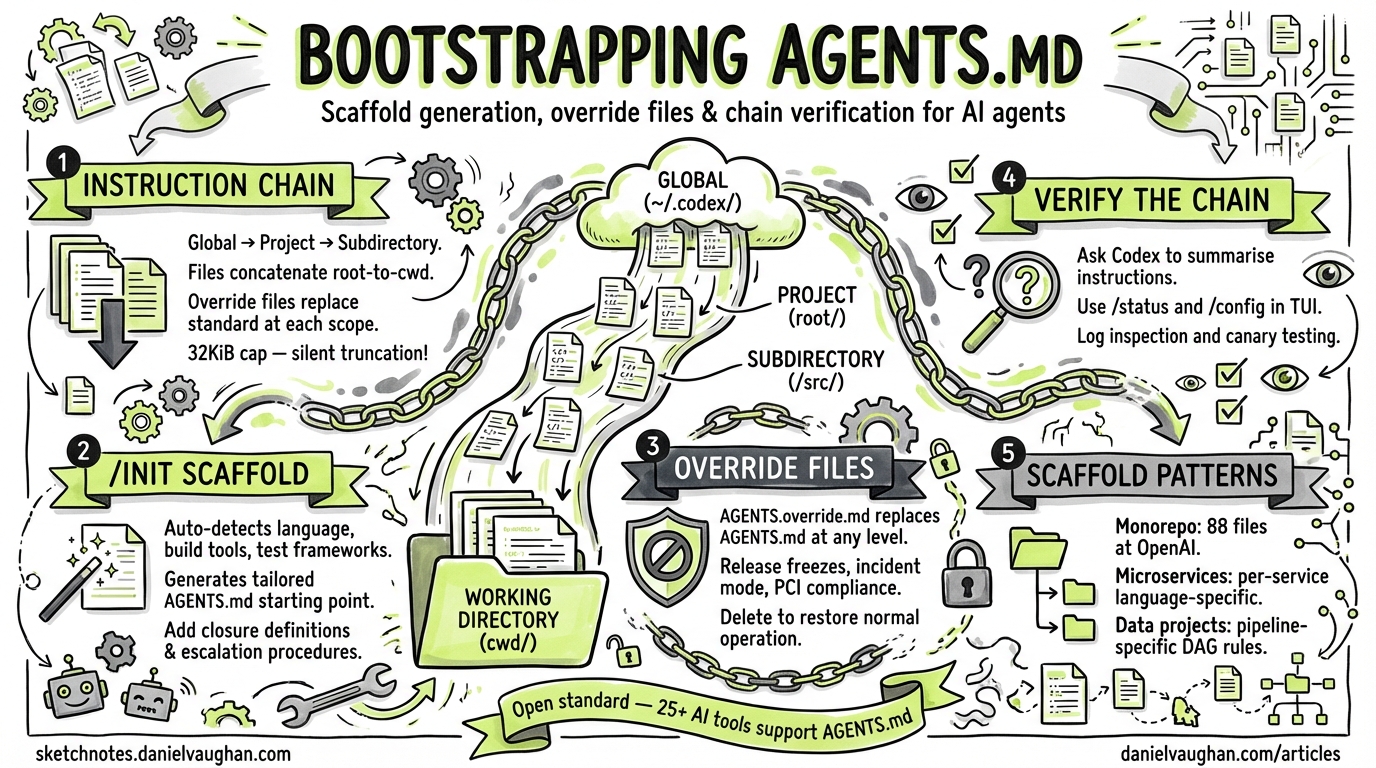
Every Codex CLI session begins by assembling an instruction chain from AGENTS.md files scattered across your directory tree[^1]. Getting this chain right — from initial scaffolding through override layering to verification — determines whether Codex operates as a well-calibrated team member or a loose cannon. This article covers the full lifecycle: generating your first AGENTS.md with /init, layering overrides for operational modes like release freezes, verifying the effective instruction chain, and applying scaffold patterns for monorepos, microservices and data projects.
The Instruction Chain: How Codex Discovers Files
Codex builds its instruction chain once per run (in the TUI, once per launched session)[^1]. The discovery follows a strict precedence hierarchy:
- Global scope —
~/.codex/AGENTS.override.mdif it exists, otherwise~/.codex/AGENTS.md. Only the first non-empty file at this level is used1. - Project scope — Starting at the Git root, Codex walks down to your current working directory. At each level it checks for
AGENTS.override.md, thenAGENTS.md, then any names listed inproject_doc_fallback_filenames1. - Concatenation — Discovered files are joined with blank lines, root-to-current. Files closer to the working directory appear later in the combined prompt, effectively overriding earlier guidance[^1].
flowchart TD
A["~/.codex/AGENTS.override.md<br/>(or AGENTS.md)"] --> B["<git-root>/AGENTS.md"]
B --> C["<git-root>/services/AGENTS.md"]
C --> D["<git-root>/services/payments/<br/>AGENTS.override.md"]
D --> E["Concatenated instruction chain"]
style E fill:#2d6,stroke:#333,color:#fff
Codex skips empty files and stops adding content once the combined size reaches project_doc_max_bytes (32 KiB by default)1. If your instructions are being truncated, you will not receive a warning — the chain is simply capped.
Scaffolding with /init
The /init slash command generates an AGENTS.md scaffold in your current directory[^3]. Run it in the TUI:
/init
Codex analyses your project structure — detecting language, build tools, test frameworks and linting configuration — then produces a tailored scaffold[^3]. A typical output for a Python FastAPI project:
## Build, Test, and Development Commands
- Install deps: `pip install -r requirements.txt`
- Lint: `python3 -m ruff check .` (auto-fix: `--fix`)
- Format: `python3 -m ruff format .`
- Tests: `python3 -m pytest -v`
- Coverage: `python3 -m pytest --cov=app --cov-report=term-missing`

## Coding Style & Naming Conventions
- Python 3.11+. Type hints on all functions.
- Ruff enforced: 88-char lines, double quotes.

## Commit & Pull Request Guidelines
- Conventional Commits: `feat:`, `fix:`, `docs:`, `refactor:`
- Small, focused commits.
- PRs must include: description, test plan, screenshots for UI changes.

## Security
- Never commit secrets. Use `.env` for local config.
- Validate all external API calls with proper error handling.
After generation, review the scaffold carefully. The /init output is a starting point — you will want to add project-specific closure definitions (“done” means tests pass, lint clean, no regressions), escalation procedures for blocking scenarios, and task-organised sections[^4].
What to Include (and What Not To)
Do include:
- Exact build, test, lint and format commands with flags
- Task-organised sections (Coding, Review, Release, Debug)
- Clear closure definitions
- Escalation procedures for blocking scenarios
Do not include:
- Entire style guides pasted verbatim without execution rules
- Ambiguous directives (“be careful”, “optimise where possible”)
- Contradictory priorities
- Prose documentation —
AGENTS.mdis not a README replacement[^4]
Override Files for Operational Modes
AGENTS.override.md at any directory level replaces the standard AGENTS.md at that scope1. This mechanism is designed for temporary operational constraints without requiring you to delete or modify the base file.
Release Freeze
During a release freeze, drop an override at the project root:
<!-- AGENTS.override.md -->
## Release Freeze — Active Until 2026-04-15

- NO new features. Bug fixes only.
- All changes require sign-off from the release manager.
- Do not modify package versions or dependency locks.
- Run the full regression suite before any commit:
  `make test-regression`
Incident Mode
For production incidents, a tighter override:
<!-- AGENTS.override.md -->
## Incident Mode — SEV1 Active

- All changes must be reviewed by on-call engineer.
- Limit scope to the affected service only.
- No refactoring, no dependency updates.
- Rollback is preferred over forward-fix unless root cause is confirmed.
- Log every change in #incident-channel.
Subsystem Overrides
Override files work at any directory depth. A payments service might carry its own AGENTS.override.md enforcing stricter rules — PCI compliance constraints, mandatory security review — while the rest of the monorepo operates under standard guidance2.
To restore normal operation, simply delete or rename the override file. Codex will fall back to the standard AGENTS.md on the next session1.
Configuration Knobs in config.toml
Several config.toml settings control how Codex discovers and processes instruction files:
# Custom fallback filenames — checked after AGENTS.override.md and AGENTS.md
project_doc_fallback_filenames = ["TEAM_GUIDE.md", ".agents.md"]

# Maximum combined instruction chain size (default: 32768 = 32 KiB)
project_doc_max_bytes = 65536    # 64 KiB for larger projects

# Project root detection markers
project_root_markers = [".git"]
The project_doc_fallback_filenames setting is useful for teams migrating from other tools — you might recognise .cursor/rules or CLAUDE.md as fallbacks during transition1. The CODEX_HOME environment variable overrides the default ~/.codex location, which is useful for CI environments or project-specific automation users[^1].
Verifying the Instruction Chain
Codex does not expose the assembled instruction chain directly in the UI. Use these techniques to verify what the agent actually sees:
Method 1: Ask Codex to Summarise
codex --ask-for-approval never "Summarise your current instructions"
This runs a one-shot session where Codex reports the effective instruction chain[^4]. If instructions are missing or truncated, you will see it in the summary.
Method 2: TUI Status Commands
Within the TUI, /status shows the current workspace root and configuration state, while /config prints effective configuration values and their sources[^4].
Method 3: Log Inspection
Session logs under ~/.codex/log/codex-tui.log contain audit trails of loaded instruction sources[^4]. For automated verification in CI:
codex exec --json "List every AGENTS.md file in your instruction chain" \
  | jq -r '.content'
Method 4: Deliberate Testing
Create a canary instruction in a nested AGENTS.md:
## Canary
If asked about the canary, respond: "Canary active at services/payments level."
Then ask Codex about the canary. If the response matches, that file is in the chain.
Scaffold Patterns for Common Architectures
Monorepo Pattern
OpenAI reportedly uses 88 AGENTS.md files across their internal monorepo3, giving per-package instructions where needed. The pattern:
repo/
├── AGENTS.md                    # Global: CI commands, commit conventions, PR template
├── packages/
│   ├── AGENTS.md                # Shared package rules: versioning, publish workflow
│   ├── ui/
│   │   └── AGENTS.md            # React conventions, Storybook commands, a11y rules
│   ├── api/
│   │   └── AGENTS.md            # REST conventions, OpenAPI validation, migration commands
│   └── shared/
│       └── AGENTS.md            # No breaking changes without semver major bump
The root AGENTS.md establishes universal rules. Each package adds specifics. The closest file to the working directory takes precedence3.
Microservices Pattern
For polyglot microservices, each service carries its own AGENTS.md with language-specific tooling:
services/
├── AGENTS.md                    # Cross-service rules: gRPC conventions, proto lint
├── user-service/
│   └── AGENTS.md                # Go: `go test ./...`, `golangci-lint run`
├── billing-service/
│   └── AGENTS.md                # Python: `pytest`, `ruff check`, PCI compliance notes
└── notification-service/
    └── AGENTS.md                # TypeScript: `npm test`, `eslint .`
Data Project Pattern
Data projects benefit from pipeline-specific instructions:
data-platform/
├── AGENTS.md                    # Airflow conventions, data quality standards
├── pipelines/
│   └── AGENTS.md                # DAG testing: `pytest tests/dags/`, no production credentials
├── models/
│   └── AGENTS.md                # dbt: `dbt test`, `dbt docs generate`, naming conventions
└── notebooks/
    └── AGENTS.md                # Exploratory only — never deploy from notebooks
Cross-Tool Compatibility
AGENTS.md is not a Codex-only format. It is an open standard governed by the Agentic AI Foundation under the Linux Foundation4, supported by over 25 AI coding agents including Claude Code, Cursor, GitHub Copilot, Devin, Amp, Jules, Gemini CLI and others4. A well-structured AGENTS.md is a write-once investment that works across your entire tool chain.
Common Pitfalls
- Exceeding
project_doc_max_bytes— Instructions are silently truncated. If your monorepo scaffold exceeds 32 KiB combined, raise the limit or split instructions into more granular directory-level files. - Stale overrides — A forgotten
AGENTS.override.mdfrom last month’s incident will continue suppressing your base instructions. Treat overrides as temporary and remove them when the operational mode ends. - No restart after changes — Codex loads instructions once per session. Editing
AGENTS.mdmid-session has no effect; restart the TUI or start a newcodex execrun[^1]. - Contradictory layering — If a subdirectory
AGENTS.mdcontradicts the root, the subdirectory wins by position (it appears later in the chain). Be intentional about which rules are meant to be overridable.
Citations
| [^1]: [Custom instructions with AGENTS.md – Codex | OpenAI Developers](https://developers.openai.com/codex/guides/agents-md) |
| [^3]: [Slash commands in Codex CLI | OpenAI Developers](https://developers.openai.com/codex/cli/slash-commands) |
| [^4]: [Shipyard | Codex CLI Cheatsheet: config, commands, AGENTS.md, + best practices](https://shipyard.build/blog/codex-cli-cheat-sheet/) |