Codex CLI Configuration Complete Guide: Hierarchy, Profiles, and Trust
Codex CLI Configuration Complete Guide: Hierarchy, Profiles, and Trust
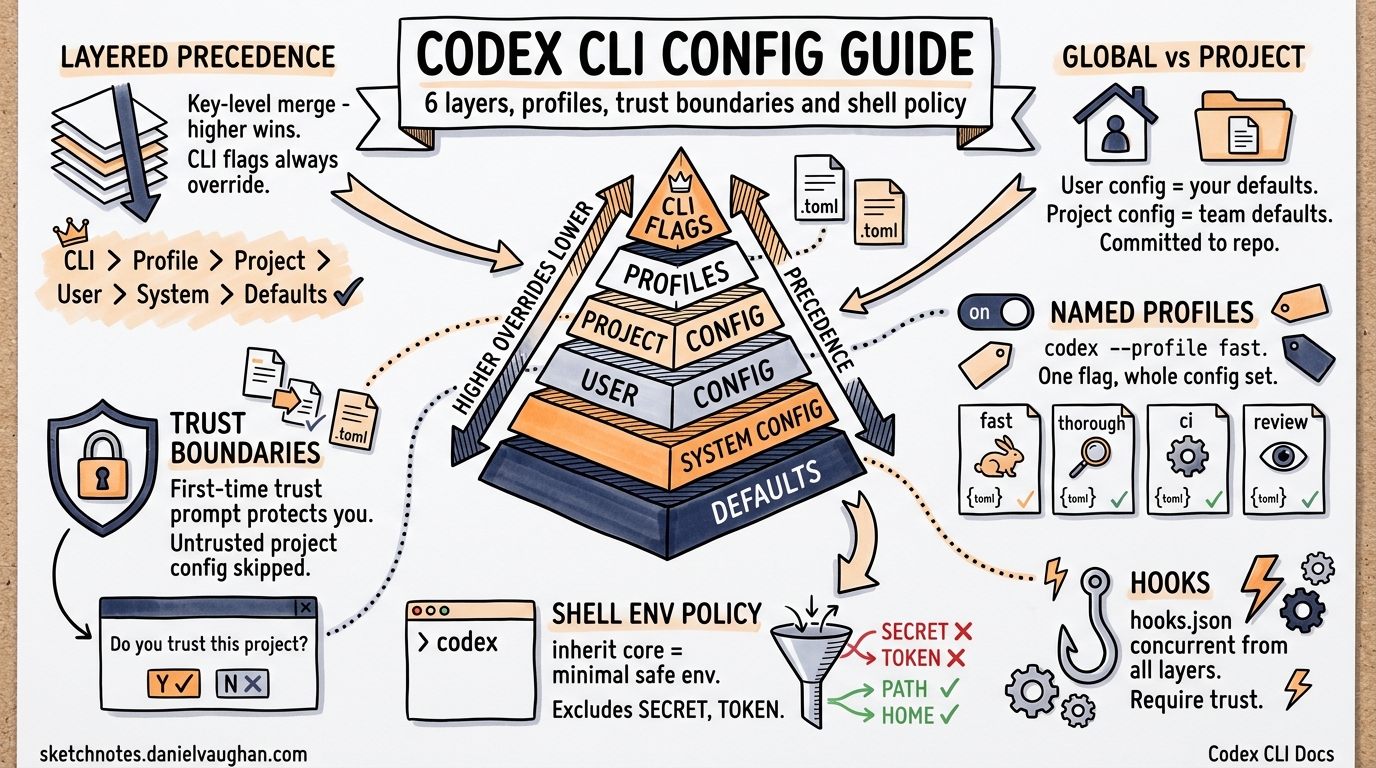
Codex CLI uses a layered configuration system where settings from multiple sources merge together with clear precedence rules. This guide covers the complete configuration model: the 6-layer resolution chain, global vs. project settings, named profiles, trust boundaries, shell environment policy, and hooks.
The 6-Layer Resolution Chain
Codex CLI resolves configuration by merging up to six layers. Higher-precedence layers override lower ones. When two layers set the same key, the higher-precedence value wins.
flowchart TD
    A["1. CLI Flags ★ highest priority<br/>(--model, -c)"] -->|overrides| B["2. Profiles<br/>(--profile NAME)"]
    B -->|overrides| C["3. Project Config<br/>(.codex/ — closest to cwd wins)"]
    C -->|overrides| D["4. User Config<br/>(~/.codex/config.toml)"]
    D -->|overrides| E["5. System Config<br/>(managed_config.toml / MDM)"]
    E -->|overrides| F["6. Built-in Defaults ★ lowest priority"]
Layer Details
| Layer | Precedence | Source | Writable |
|---|---|---|---|
| CLI Flags | 30 (highest) | -c key=value, --model, --approval-mode, etc. |
N/A (session-only) |
| Profiles | Applied on top of user config | [profile.NAME] section in config.toml |
Yes |
| Project Config | 25 | .codex/config.toml in the repo (closest to cwd) |
Yes (committed to repo) |
| User Config | 20 | ~/.codex/config.toml |
Yes |
| System Config | 10 | managed_config.toml or MDM (macOS) |
Admin only |
| Built-in Defaults | 0 (lowest) | Compiled into the binary | No |
Merge Behavior
Configuration merging is key-level. If the user config sets model = "gpt-4.1" and the project config sets model = "o3", the project config wins (precedence 25 > 20). But if the user config sets temperature = 0.7 and the project config does not mention temperature, the user config value carries through.
CLI flags (-c) always win. This means codex --model o3 overrides everything regardless of what the project or user config specifies.
Monorepo Layering
In a monorepo, multiple .codex/config.toml files can exist at different directory levels. The file closest to the current working directory takes precedence:
my-monorepo/
  .codex/config.toml              # model = "gpt-4.1"
  services/
    api/
      .codex/config.toml          # model = "o3", approval_policy = "on-failure"
    worker/
      .codex/config.toml          # approval_policy = "unless-trusted"
When running from services/api/, the project config at services/api/.codex/config.toml is the closest match. Its settings override those in the root .codex/config.toml. This enables different models, sandbox modes, or approval policies per service in a monorepo.
Global vs. Project Settings
User Config (~/.codex/config.toml)
Your personal configuration lives at ~/.codex/config.toml (or $CODEX_HOME/config.toml if CODEX_HOME is set). This file sets your defaults across all projects:
# ~/.codex/config.toml
model = "gpt-4.1"
approval_policy = "unless-trusted"
sandbox_mode = "workspace-write"
model_reasoning_effort = "medium"

[shell_environment_policy]
inherit = "core"
This file is writable by you and lives outside any repository.
Project Config (.codex/config.toml)
Project-level configuration lives in .codex/config.toml at the repository root (or any ancestor of the cwd). This file is committed to version control and shared with the team:
# .codex/config.toml
model = "o3"
sandbox_mode = "workspace-write"
approval_policy = "on-failure"

[shell_environment_policy]
inherit = "core"

[shell_environment_policy.set]
CI = "false"
NODE_ENV = "development"
Project config overrides user config for the same keys. This ensures team-wide consistency: everyone working in the repo uses the same model and sandbox settings by default.
System Config (managed_config.toml)
Administrators can deploy a system-wide config at the managed config path. On macOS, this can also be delivered via MDM (Mobile Device Management). System config sets organization-wide baselines – for example, requiring a minimum sandbox level or restricting which models are available.
System config has the lowest file-based precedence (below both user and project config), but the companion requirements.toml mechanism can enforce hard constraints that override all other layers.
Profiles
The Problem Profiles Solve
Without profiles, switching between configurations requires editing config.toml or maintaining wrapper scripts with environment variables, multiple config files, and hardcoded paths. This is error-prone and tedious.
Profiles provide named configuration sets that activate with a single flag: codex --profile NAME.
Defining Profiles
Profiles are defined in config.toml using [profile.NAME] sections:
# ~/.codex/config.toml

# Default settings (used when no profile is specified)
model = "gpt-4.1"
model_reasoning_effort = "medium"

# Fast profile: cheap and fast for simple tasks
[profile.fast]
model = "gpt-3.5-turbo"
model_reasoning_effort = "low"

# Thorough profile: maximum capability for complex tasks
[profile.thorough]
model = "o3"
model_reasoning_effort = "high"

# Review profile: cross-model review with high reasoning
[profile.review]
model = "gpt-4.1"
model_reasoning_effort = "high"

# CI profile: optimized for non-interactive pipeline use
[profile.ci]
model = "gpt-3.5-turbo"
approval_policy = "on-failure"
sandbox_mode = "workspace-write"

# Deep review profile with nested model and reasoning overrides
[profile.deep_review]
model = "gpt-4.1"

[profile.deep_review.reasoning]
model_reasoning_effort = "high"
depth = "detailed"
Activating Profiles
# Use the fast profile
codex --profile fast "Fix the typo in README.md"

# Use the thorough profile for complex analysis
codex --profile thorough "Refactor the authentication module"

# CI pipeline usage
codex --profile ci "Run the full test suite and fix failures"
Profile-Scoped Keys
Every key available at the top level of config.toml can be set inside a profile. The full list of profile-scoped settings includes:
| Key | Type | Description |
|---|---|---|
model |
string | Model identifier |
model_provider |
string | Provider name from model_providers map |
service_tier |
string | Service tier selection |
approval_policy |
string | "on-request", "unless-trusted", "on-failure", "never" |
sandbox_mode |
string | "workspace-read", "workspace-write" |
model_reasoning_effort |
string | "low", "medium", "high", "none" |
plan_mode_reasoning_effort |
string | Reasoning effort override for Plan mode |
model_reasoning_summary |
string | Reasoning summary mode |
model_verbosity |
string | Output verbosity |
personality |
string | Personality preset |
web_search |
string | Web search mode |
model_instructions_file |
path | Path to custom instructions file |
include_apply_patch_tool |
bool | Enable/disable apply_patch tool |
tools_view_image |
bool | Enable/disable image viewing |
Feature Flags per Profile
Profiles can toggle feature flags through the [profile.NAME.features] table:
[profile.experimental]
model = "o3"

[profile.experimental.features]
multi_agent_v2 = true
Precedence with Profiles
When a profile is active, its settings merge between the project config layer and CLI flags:
CLI flags > Profile > Project config > User config > System config > Defaults
A profile overrides both user and project config for the same keys but is still overridden by CLI flags.
Practical Profile Patterns
CI Pipeline: Automated testing with strict settings and reproducible builds.
[profile.ci]
model = "gpt-3.5-turbo"
approval_policy = "on-failure"
sandbox_mode = "workspace-write"
Cross-Model Review: Compare outputs from different models on the same task.
[profile.review_gpt4]
model = "gpt-4.1"
model_reasoning_effort = "high"

[profile.review_claude]
model_provider = "anthropic"
model = "claude-sonnet-4-20250514"
Cost-Tiered: Budget-friendly profiles for development, high-power for production.
[profile.dev]
model = "gpt-3.5-turbo"
model_reasoning_effort = "low"

[profile.prod]
model = "o3"
model_reasoning_effort = "high"
Project-Scoped: Different profiles for different codebases or teams.
[profile.frontend]
model = "gpt-4.1"
model_instructions_file = "/path/to/frontend-instructions.md"

[profile.backend]
model = "o3"
model_instructions_file = "/path/to/backend-instructions.md"
Trust Boundaries
How Project Trust Works
When Codex CLI encounters a .codex/config.toml in a repository for the first time, it prompts:
Do you trust this project configuration? (Yes/No)
This decision is stored in the user config under [projects]:
# ~/.codex/config.toml (auto-managed)
[projects."/home/user/repos/my-project"]
trust_level = "trusted"
Trust Decisions
| Trust Level | Project Config Loaded? | Behavior |
|---|---|---|
trusted |
Yes | Full project config merges into the resolution chain |
untrusted |
No | Project config is skipped; only user defaults apply |
| Not yet decided | Prompt shown | First-time trust prompt appears on session start |
Why Trust Matters
Project config can set:
- Which model to use (cost implications)
- Sandbox mode (security implications)
- Approval policy (autonomy implications)
- Shell environment variables (security implications)
A malicious .codex/config.toml in a cloned repository could override your sandbox to a less restrictive mode or set environment variables that leak credentials. The trust boundary prevents untrusted project configs from silently overriding your settings.
Worktree Trust Inheritance
When working in a git worktree, Codex resolves the primary repository working directory and checks whether that root is trusted. If the main project is trusted, all its worktrees inherit that trust decision. This prevents repeated trust prompts when creating worktrees for parallel development.
Monorepo Trust
In a monorepo with multiple .codex/config.toml files, the trust decision applies to the repository root. If the root is trusted, all nested .codex/ directories within the repo are also trusted.
Shell Environment Policy
Purpose
The shell_environment_policy controls which environment variables are visible to shell commands executed by the agent. This prevents accidental credential leakage from your shell environment into agent-spawned subprocesses.
Configuration
[shell_environment_policy]
# Starting point: "core" or "all"
inherit = "core"

# Opt out of default secret filtering
ignore_default_excludes = false

# Additional patterns to exclude (regex)
exclude = ["^AWS_", "^AZURE_"]

# Patterns to include (allowlist, applied after exclude)
include_only = ["^PATH$", "^HOME$", "^NODE_"]

# Explicit variable overrides
[shell_environment_policy.set]
CI = "false"
NODE_ENV = "development"
MY_TEAM = "codex"
Resolution Steps
The shell environment is built in this order:
- Start with
inheritbase:core– only platform-essential variables:HOME,LOGNAME,PATH,SHELL,USER(and equivalents on the platform)all– full environment from the parent process
- Apply default excludes (unless
ignore_default_excludes = true):- Filters out variables matching
*KEY*,*SECRET*,*TOKEN*
- Filters out variables matching
- Apply custom
excludepatterns (if specified):- Regex-based filtering of variable names
- Insert
setentries:- Explicit key-value pairs always appear in the final environment
- Apply
include_onlypatterns (if specified):- Final allowlist filter
Recommended Settings
The recommended default for production use:
[shell_environment_policy]
inherit = "core"
This gives the agent the minimum environment needed to run tools (PATH, HOME, etc.) while keeping secrets, API keys, and credentials out of subprocess environments. The set table can explicitly provide any additional variables the project needs.
Hooks
How Hooks Work
Codex CLI supports hooks defined in hooks.json files. Hooks from all configuration layers (project, user, system) run concurrently, unlike regular config keys where higher precedence overrides lower.
Hook Locations
~/.codex/hooks.json               # User-level hooks
.codex/hooks.json                  # Project-level hooks (committed to repo)
Both files are loaded and all hooks run together. This means a project can add project-specific hooks without removing user-level hooks.
Trust and Hooks
Hooks require config key trust. A project-level hooks.json only loads if the project is trusted.
Note: Hooks are experimental as of v0.121. The hook system’s behavior may change in future releases.
Configuration Reference
File Locations
| File | Purpose | Location |
|---|---|---|
config.toml |
Main configuration | ~/.codex/config.toml (user) or .codex/config.toml (project) |
hooks.json |
Event hooks | ~/.codex/hooks.json or .codex/hooks.json |
instructions.md |
Custom system prompt | ~/.codex/instructions.md or .codex/instructions.md |
agents/*.md |
Agent role definitions | .codex/agents/ |
config.schema.json |
JSON Schema for config.toml | codex-rs/core/config.schema.json |
Key Configuration Keys
# Model selection
model = "gpt-4.1"
model_provider = "openai"
service_tier = "default"

# Behavior
approval_policy = "unless-trusted"    # "on-request" | "unless-trusted" | "on-failure" | "never"
sandbox_mode = "workspace-write"      # "workspace-read" | "workspace-write"

# Reasoning
model_reasoning_effort = "medium"     # "none" | "low" | "medium" | "high"
plan_mode_reasoning_effort = "medium" # Override for Plan mode specifically
model_reasoning_summary = "auto"

# Multi-agent
agent_max_depth = 3

# Environment
[shell_environment_policy]
inherit = "core"

[shell_environment_policy.set]
CI = "false"

# Profiles
[profile.NAME]
model = "..."
# ... any top-level key

# MCP servers
[mcp_servers.NAME]
command = "server-command"
supports_parallel_tool_calls = false

[mcp_servers.NAME.tools.TOOL]
approval_mode = "approve"

# Notification hook
[notify]
command = ["notify-send", "Codex", "Turn complete"]

# Projects (auto-managed)
[projects."/path/to/repo"]
trust_level = "trusted"
CLI Override Syntax
Any config key can be overridden on the command line with -c:
codex -c model=o3 -c "shell_environment_policy.inherit=all" "Do the thing"
Multiple -c flags are supported. They all merge into the CLI Flags layer (highest precedence).
Environment Variables
| Variable | Purpose |
|---|---|
CODEX_HOME |
Override default config directory (default: ~/.codex) |
CODEX_SQLITE_HOME |
Override SQLite state directory |
CODEX_CA_CERTIFICATE |
Custom CA bundle path (PEM) |
SSL_CERT_FILE |
Fallback CA bundle (if CODEX_CA_CERTIFICATE is unset) |
Summary
Codex CLI’s configuration system is designed around two principles: layered precedence (so the most specific context always wins) and trust boundaries (so untrusted code cannot silently change your settings).
The six layers – built-in defaults, system config, user config, project config, profiles, and CLI flags – provide flexibility from organization-wide policies down to per-command overrides. Profiles eliminate configuration juggling by packaging related settings under a single --profile flag. Trust boundaries ensure that project-scoped config only applies when you explicitly approve it. And shell_environment_policy gives fine-grained control over what secrets reach agent subprocesses.