Mastering Context Compaction in Codex CLI: Tuning Auto-Compact for Long-Running Sessions
Mastering Context Compaction in Codex CLI: Tuning Auto-Compact for Long-Running Sessions
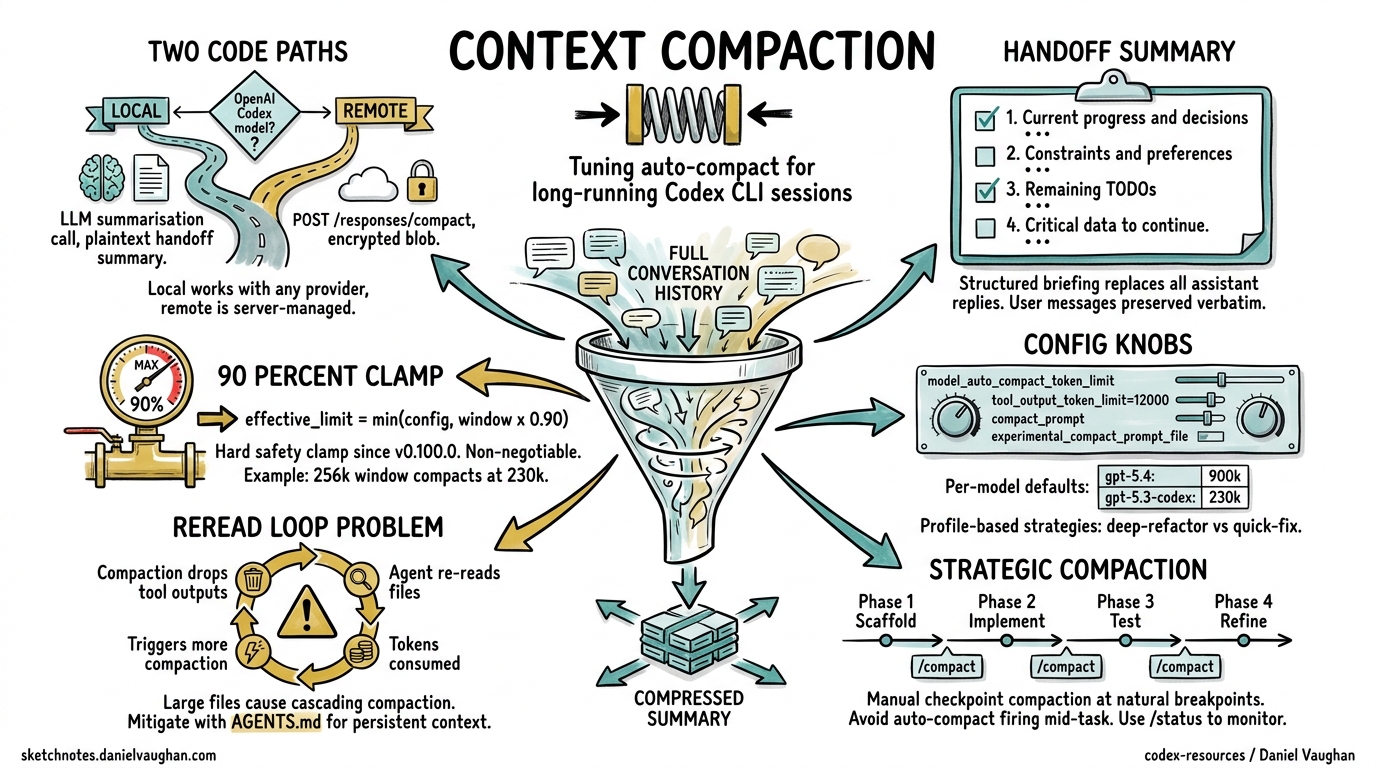
Context compaction is the mechanism that lets Codex CLI sessions run for hours — even up to seven hours on complex tasks1 — without hitting context window limits. Yet most developers leave compaction on its defaults and wonder why the agent “forgets” critical decisions mid-refactor. This article covers the compaction pipeline end-to-end: how it works internally, every configuration knob available, custom compaction prompts, and battle-tested strategies for keeping long sessions productive.
How Context Compaction Works
When a Codex CLI session accumulates enough conversation history to approach the model’s context window, compaction replaces the full history with a compressed “handoff summary” that preserves essential state while freeing tokens for new work2.
The Two Code Paths
Codex CLI implements compaction via two distinct paths, selected automatically based on the active model3:
-
Local path (
compact.rs): The client calls an LLM to generate a plaintext summary. This path works with any model provider — Azure, Vercel, Ollama, or any OpenAI-compatible endpoint3. -
Remote path (
compact_remote.rs): For OpenAI’s own Codex models, the client calls thePOST /responses/compactAPI endpoint, which returns an opaque encrypted blob rather than readable text. The server manages encryption keys; the client simply passes the blob into the nextresponses.create()call4.
flowchart TD
    A[Token count exceeds threshold] --> B{OpenAI Codex model?}
    B -->|Yes| C[Remote path: POST /responses/compact]
    B -->|No| D[Local path: LLM summarisation call]
    C --> E[Encrypted compaction blob]
    D --> F[Plaintext handoff summary]
    E --> G[Append to next request]
    F --> G
    G --> H{Sufficient space freed?}
    H -->|Yes| I[Continue session]
    H -->|No| J[Head trimming fallback]
    J --> I
The Handoff Summary Structure
For the local path, Codex generates a structured briefing containing four components3:
- Current progress and key decisions — what has been accomplished and why
- Important constraints and user preferences — coding standards, tooling choices, architectural boundaries
- Remaining TODOs — the work queue going forward
- Critical data needed to continue — file paths, variable names, API endpoints, and other specifics
The summary replaces all assistant replies and tool outputs whilst preserving user messages verbatim3. If compaction alone doesn’t free enough space, Codex falls back to head trimming — chopping the earliest messages until the conversation fits2.
The 90% Safety Clamp
Since v0.100.0, Codex enforces a hard clamp: the effective auto-compact limit cannot exceed 90% of the context window5. The formula is:
effective_limit = min(user_config_limit, context_window × 0.90)
This was introduced after “too many backend errors where compaction fails due to overflows”5. The practical implication: even if you set model_auto_compact_token_limit to 250,000 on a 256k context window, compaction will trigger at 230,400 tokens.
Configuration Reference
All compaction-related settings live in ~/.codex/config.toml (or a project-level .codex/config.toml)6:
# Context window size in tokens (unset = model default)
model_context_window = 128000

# Token threshold triggering auto-compaction (unset = model default)
model_auto_compact_token_limit = 100000

# Max tokens stored per tool/function output in history
tool_output_token_limit = 12000

# Inline override for the compaction prompt
compact_prompt = ""

# Load compaction prompt from a file (experimental)
experimental_compact_prompt_file = "/path/to/compact_prompt.txt"
Per-Model Defaults
When model_auto_compact_token_limit is unset, Codex uses model-specific defaults7:
| Model | Context Window | Default Compact Threshold |
|---|---|---|
| gpt-5.4 | 1,000,000 | ~900,000 (90% clamp) |
| gpt-5.4-mini | 1,000,000 | ~900,000 |
| gpt-5.3-codex | 256,000 | ~230,400 |
| gpt-5.3-codex-spark | 128,000 | ~115,200 |
| gpt-5.2 (legacy) | 256,000 | ~230,400 |
⚠️ Exact default thresholds are not published by OpenAI; the values above are derived from the 90% clamp formula applied to known context windows.
Profile-Based Compaction Strategies
Use profiles to switch compaction behaviour per task type6:
# Default: aggressive compaction for quick tasks
model_auto_compact_token_limit = 64000

[profile.deep-refactor]
model = "gpt-5.4"
model_context_window = 1000000
model_auto_compact_token_limit = 800000
reasoning_effort = "high"

[profile.quick-fix]
model = "gpt-5.4-mini"
model_auto_compact_token_limit = 50000
reasoning_effort = "low"
Activate with codex --profile deep-refactor.
Custom Compaction Prompts
The default compaction prompt works well for general coding tasks, but you can override it for domain-specific work. A good custom prompt should instruct the model to preserve the details that matter most for your project8.
Writing an Effective Compact Prompt
Create a file at ~/.codex/compact_prompt.txt:
Create a detailed summary for continuing this coding session. Include:

1. COMPLETED WORK: Tasks finished, with file paths and function names
2. CURRENT STATE: Files modified, their current status, any failing tests
3. IN PROGRESS: What is actively being worked on right now
4. NEXT STEPS: Clear, ordered actions to take next
5. CONSTRAINTS: User preferences, project requirements, key architectural decisions
6. CRITICAL CONTEXT: Database schema details, API contracts, environment-specific configuration
7. TEST STATUS: Which tests pass, which fail, what coverage looks like

Be concise but preserve enough specificity that work can continue seamlessly.
Do NOT summarise test output — quote exact assertion failures.
Do NOT drop file paths — use absolute paths throughout.
Then reference it in config.toml:
experimental_compact_prompt_file = "~/.codex/compact_prompt.txt"
Alternatively, for a quick inline override:
compact_prompt = "Summarise this session preserving all file paths, test results, and architectural decisions. Quote exact error messages."
Domain-Specific Prompt Examples
For infrastructure-as-code projects where losing resource identifiers is catastrophic:
Preserve ALL: resource ARNs, Terraform state references, module paths,
variable bindings, and plan output diffs. Summarise prose discussions
but never abbreviate infrastructure identifiers.
For database migration work:
Preserve: migration version numbers, schema DDL statements, column types,
index definitions, and any rollback procedures discussed. Summarise
general discussion but keep all SQL verbatim.
The /compact Slash Command
Beyond auto-compaction, you can trigger compaction manually at any point during a session9:
/compact
Codex will ask for confirmation before summarising. This is valuable when you know you’re about to shift focus — compact the refactoring context before starting on a new feature within the same session.
Use /status to monitor your current context consumption9. The output shows remaining context capacity, helping you decide when a manual compact is worthwhile.
Strategic Manual Compaction
The most effective pattern for long sessions is checkpoint compaction: manually compact at natural breakpoints rather than waiting for auto-compact to trigger mid-task1.
flowchart LR
    A[Phase 1: Scaffold] -->|"/compact"| B[Phase 2: Implement]
    B -->|"/compact"| C[Phase 3: Test]
    C -->|"/compact"| D[Phase 4: Refine]
    D --> E[Session complete]
This avoids the worst failure mode: auto-compaction firing whilst the agent is mid-way through a complex multi-file change, causing it to lose track of which files still need updating10.
The Compaction-Reread Loop Problem
Compaction drops all tool outputs from history10. This means after compaction, the agent no longer has the contents of files it previously read. The next time it needs that information, it re-reads the files — consuming tokens that may trigger another compaction sooner, creating a cascading loop.
A user reported this pattern in issue #16812: apparent doubling of compaction frequency turned out to be driven by large files (93 KB analysis + 58 KB plan + 610 KB OpenAPI spec) that had to be re-read after every compaction10.
Mitigation Strategies
-
Reduce
tool_output_token_limit: Smaller tool outputs mean less is lost per compaction, but also less context preserved. Find the balance for your project:tool_output_token_limit = 8000 # tighter than default 12000 -
Use AGENTS.md for persistent context: Critical information that must survive compaction belongs in AGENTS.md, not in conversation history11. The agent re-reads AGENTS.md at session start and after compaction:
<!-- AGENTS.md --> ## Architecture - API gateway: src/gateway/ - All endpoints return JSON with { data, error, meta } envelope - Database: PostgreSQL 16, migrations in db/migrations/ -
Compact before large file reads: If you’re about to ingest a massive spec file, compact first so the summary is lean and the spec gets maximum context space.
-
Split sessions for truly independent tasks: If task A and task B share no context, use separate sessions (
/new) rather than compacting between them.
Compaction Across Tools: How Codex Compares
Understanding Codex’s approach relative to alternatives helps you reason about its trade-offs2:
graph TB
    subgraph "Codex CLI"
        CX1[Single-layer handoff summary]
        CX2[Physical deletion of history]
        CX3[LLM call always required]
    end
    subgraph "Claude Code"
        CC1[Three-tier: trim → cache → summarise]
        CC2[Placeholder replacement]
        CC3[LLM call only as last resort]
    end
    subgraph "OpenCode"
        OC1[Two-step: mark → summarise]
        OC2[Non-physical timestamped marking]
        OC3[Data preserved for rollback]
    end
| Dimension | Codex CLI | Claude Code | OpenCode |
|---|---|---|---|
| Layers | 1 (summarise) | 3 (trim → cache → summarise) | 2 (prune → summarise) |
| LLM cost per compaction | Always | Only at layer 3 | Only at step 2 |
| Deletion model | Physical | Placeholders | Timestamped marks |
| Reversibility | Irreversible | Irreversible | Data preserved |
| Recent message preservation | ~20k tokens | Last 2 user turns | Last 40k tokens |
Codex’s single-layer approach is simpler and works well with OpenAI’s server-side encrypted compaction, but means every compaction event incurs an LLM call (or API call for the remote path)2. Claude Code’s three-tier system defers the expensive LLM call, trimming tool outputs first at zero cost2.
Server-Side Compaction for SDK Users
If you’re building on the Codex Python SDK (codex_app_server), you can leverage the Responses API’s built-in compaction directly4:
import openai

client = openai.Client()

response = client.responses.create(
    model="gpt-5.4",
    input=conversation_items,
    context_management={
        "compact_threshold": 100000
    }
)

# The response may include a compaction item — carry it forward
next_input = conversation_items + response.output
# Drop items before the most recent compaction item for efficiency
The compact_threshold parameter tells the server to auto-compact within the same streaming response when the rendered token count exceeds the threshold4. For explicit control, call the standalone endpoint:
compact_result = client.responses.compact(
    model="gpt-5.4",
    input=conversation_items
)
# compact_result.output is the canonical next context window
# Do NOT prune it further
Practical Tuning Recommendations
After working through compaction behaviour across dozens of sessions, these patterns consistently deliver the best results:
For Short Tasks (< 30 minutes)
Leave defaults. Auto-compaction rarely triggers within a 128k context window for focused work.
For Medium Tasks (1–3 hours)
model = "gpt-5.3-codex"
model_auto_compact_token_limit = 200000
tool_output_token_limit = 10000
Manual /compact at each major phase transition.
For Marathon Sessions (3+ hours)
model = "gpt-5.4"
model_context_window = 1000000
model_auto_compact_token_limit = 750000
compact_prompt = "Preserve all file paths, test results, and TODO items verbatim."
Use GPT-5.4’s million-token window to push compaction as late as possible. Combine with checkpoint compaction at natural breakpoints.
For CI/CD Pipelines
[profile.ci]
model_auto_compact_token_limit = 80000
tool_output_token_limit = 6000
Tighter limits keep pipeline costs predictable. Pair with codex exec --session-resume for multi-stage pipelines where each stage compacts independently.
Known Limitations
- Compaction is irreversible in Codex CLI. Once history is summarised, the original messages cannot be recovered2. Use
/forkbefore compaction if you may need to branch back. - Long conversations with multiple compactions degrade accuracy. OpenAI explicitly warns that “long conversations and multiple compactions can cause the model to be less accurate”7.
- The 90% clamp is non-negotiable. There is no configuration to override it5. If you need the absolute maximum context before compaction, you must choose a model with a larger context window.
- No selective preservation. You cannot tell compaction to keep specific tool outputs whilst dropping others. The feature request in issue #16839 tracks this gap10.
experimental_compact_prompt_filemay change. As the name suggests, this configuration key is experimental and may be renamed or removed6.
Citations
-
Codex CLI Features — Long-Running Sessions — OpenAI developer documentation, accessed April 2026. ↩ ↩2
-
Shedding Heavy Memories: Context Compaction in Codex, Claude Code, and OpenCode — Justin3go, April 9, 2026. ↩ ↩2 ↩3 ↩4 ↩5 ↩6
-
Context Compaction Research: Claude Code, Codex CLI, OpenCode, Amp — Mario Zechner (badlogic), GitHub Gist, 2026. ↩ ↩2 ↩3 ↩4
-
Compaction — OpenAI API Documentation — OpenAI, accessed April 2026. ↩ ↩2 ↩3
-
v0.100.0 removed a critical user capability: hard 90% clamp nullifies user-defined compaction threshold — Issue #11805 — openai/codex, GitHub. ↩ ↩2 ↩3
-
Sample Configuration — Codex Developer Documentation — OpenAI, accessed April 2026. ↩ ↩2 ↩3
-
Context Compaction Research Gist — Per-Model Thresholds — Mario Zechner, 2026. Thresholds vary by model; 180k–244k range documented. ↩ ↩2
-
Codex Prompting Guide — Custom Compaction — OpenAI Cookbook, 2026. ↩
-
Slash Commands in Codex CLI — OpenAI developer documentation, accessed April 2026. ↩ ↩2
-
Context compaction regression in CLI v0.118 — Issue #16812 — openai/codex, GitHub. Closed as not-a-bug; revealed compaction-reread loop pattern. ↩ ↩2 ↩3 ↩4
-
Custom Instructions with AGENTS.md — OpenAI developer documentation, accessed April 2026. ↩