Execution Policy Rules in Codex CLI: Starlark-Based Command Governance for Teams
Execution Policy Rules in Codex CLI: Starlark-Based Command Governance for Teams
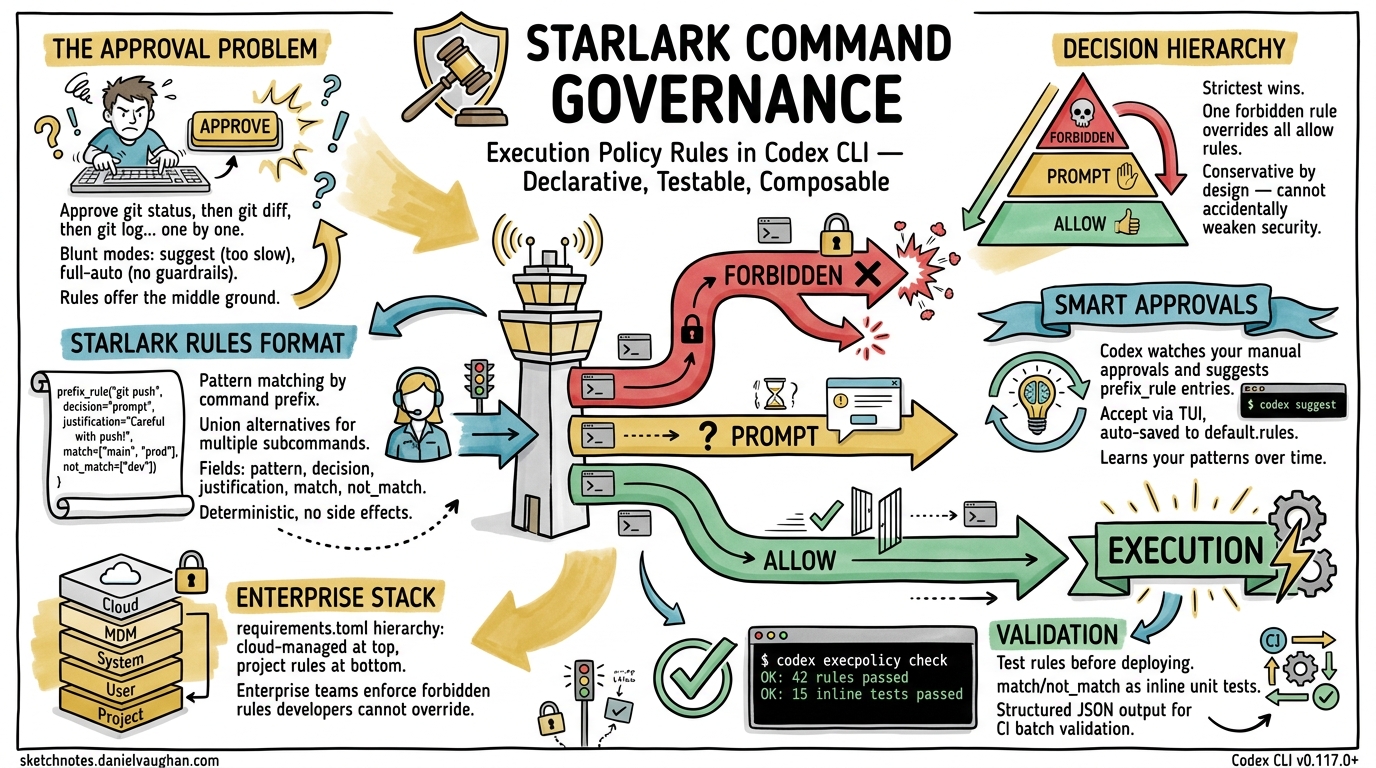
Every senior developer running Codex CLI has felt the friction: approve git status, then approve git diff, then approve git log — each individually, each session. The built-in approval modes (suggest, auto-edit, full-auto) are blunt instruments. You either approve everything or you approve everything manually. The execution policy rules system, powered by Starlark and shipping since v0.117.0, offers the middle ground: declarative, testable, composable command governance that scales from solo developers to enterprise organisations1.
This article covers the rules format in depth, shows how to build a practical ruleset, explains the interaction with smart approvals and the TUI, and demonstrates the codex execpolicy check validation workflow.
Why Approval Modes Aren’t Enough
Codex CLI’s three approval modes map to coarse trust levels2:
| Mode | What It Does | The Problem |
|---|---|---|
suggest |
Agent proposes, you approve everything | Too slow for iterative work |
auto-edit |
File edits auto-applied, commands still prompt | Commands still interrupt flow |
full-auto |
Everything runs without prompting | No guardrails at all |
The approval system records exact command strings. Approving git add src/main.rs does not cover git add src/lib.rs — you must approve again3. For any non-trivial session, this creates dozens of interruptions. Rules solve this by matching command prefixes rather than exact strings.
The .rules File Format
Rules files use Starlark, a deterministic, side-effect-free subset of Python originally designed by Google for Bazel build configuration4. Codex chose Starlark because it can be safely evaluated without sandboxing concerns — there is no file I/O, no network access, and no mutable global state5.
File Location and Discovery
Codex scans rules/ directories under every Team Config location at startup1:
~/.codex/rules/default.rules      # User-level (auto-updated by TUI)
~/.codex/rules/custom.rules       # User-level (manual)
.codex/rules/project.rules        # Project-level
/etc/codex/rules/org.rules        # System-level (enterprise)
All *.rules files found across these locations are loaded and merged. When multiple rules match the same command, the most restrictive decision wins1.
The prefix_rule() Function
Every rule is a call to prefix_rule() with a pattern and optional metadata:
prefix_rule(
    pattern = ["git", "status"],
    decision = "allow",
    justification = "Read-only Git operation, safe to auto-approve",
    match = [
        ["git", "status"],
        ["git", "status", "--porcelain"],
    ],
    not_match = [
        ["git", "push"],
    ],
)
The fields break down as follows16:
| Field | Required | Description |
|---|---|---|
pattern |
Yes | Non-empty list defining the command prefix to match |
decision |
No | "allow" (default), "prompt", or "forbidden" |
justification |
No | Human-readable reason, surfaced in TUI prompts |
match |
No | Example commands that should match (validated at load time) |
not_match |
No | Example commands that should not match (validated at load time) |
Pattern Matching Mechanics
Each element in pattern can be either a literal string or a list of alternatives (a union). Matching is positional and prefix-based — once all pattern elements match, any trailing arguments are ignored1.
# Matches: git status, git diff, git log, git diff --staged, etc.
prefix_rule(
    pattern = ["git", ["status", "diff", "log"]],
    decision = "allow",
)

# Matches: npm test, npm run test, npm run lint
prefix_rule(
    pattern = ["npm", ["test", "run"]],
    decision = "allow",
)
The Decision Hierarchy
When multiple rules match, Codex applies strict severity ordering16:
forbidden > prompt > allow
This means a single forbidden rule overrides any number of allow rules matching the same command. The design is deliberately conservative — you cannot accidentally weaken security by adding a permissive rule.
flowchart TD
    A[Command requested by agent] --> B{Any rules match?}
    B -->|No| C[Fall back to approval_policy mode]
    B -->|Yes| D{Collect all matching decisions}
    D --> E{Strictest decision?}
    E -->|allow| F[Execute without prompting]
    E -->|prompt| G[Show approval dialog with justification]
    E -->|forbidden| H[Reject with justification message]
Shell Command Parsing
Codex handles shell wrappers (bash -lc, zsh -c, sh -c) with a two-tier parser1:
Safe scripts — plain commands joined by &&, ||, ;, or | — are split into individual commands. Each is evaluated against rules independently.
Complex scripts — those containing redirection, variable substitution, wildcards, subshells, or control flow — are treated as single invocations. The entire script string becomes the “command” matched against patterns.
This distinction matters. A rule allowing ["cargo", "test"] will match inside bash -lc "cargo test && cargo clippy" (safe script, split into two commands). But it will not match inside bash -lc "cargo test > output.log 2>&1" (complex script, treated as one opaque invocation).
Building a Practical Ruleset
Here is a production-grade ruleset for a Rust project, covering the most common approval friction points:
# --- Read-only operations: always allow ---

prefix_rule(
    pattern = ["git", ["status", "diff", "log", "show", "branch", "remote", "stash"]],
    decision = "allow",
    justification = "Read-only Git operations",
)

prefix_rule(
    pattern = ["cargo", ["check", "clippy", "test", "bench", "doc", "tree", "metadata"]],
    decision = "allow",
    justification = "Read-only Cargo operations (no writes to target/)",
)

prefix_rule(
    pattern = ["cat"],
    decision = "allow",
    justification = "File reading only",
)

prefix_rule(
    pattern = [["ls", "find", "wc", "head", "tail", "grep", "rg"]],
    decision = "allow",
    justification = "Standard Unix read-only utilities",
)

# --- Write operations: prompt for confirmation ---

prefix_rule(
    pattern = ["git", ["add", "commit", "merge", "rebase"]],
    decision = "prompt",
    justification = "Git writes — review before allowing",
)

prefix_rule(
    pattern = ["cargo", ["build", "install", "publish"]],
    decision = "prompt",
    justification = "Cargo operations that write artefacts or publish crates",
)

# --- Dangerous operations: forbidden ---

prefix_rule(
    pattern = ["git", ["push", "force-push"]],
    decision = "forbidden",
    justification = "No automated pushes — humans push to remote",
    match = [["git", "push", "origin", "main"]],
    not_match = [["git", "status"]],
)

prefix_rule(
    pattern = ["rm", "-rf"],
    decision = "forbidden",
    justification = "Recursive force-delete blocked",
)

prefix_rule(
    pattern = [["curl", "wget"]],
    decision = "forbidden",
    justification = "Network access blocked — use sandbox network policy instead",
)
The host_executable() Guard
When the agent invokes a command by absolute path (e.g., /opt/homebrew/bin/git), Codex can fall back to basename matching — but only if allowed by a host_executable() declaration6:
host_executable(
    name = "git",
    paths = [
        "/opt/homebrew/bin/git",
        "/usr/bin/git",
        "/usr/local/bin/git",
    ],
)
Without this declaration, basename fallback is unrestricted. With it, only the listed absolute paths are permitted to resolve as git. This prevents path-confusion attacks where a malicious repository ships a ./git wrapper that would otherwise match your ["git", ...] rules6.
To enable this behaviour, pass --resolve-host-executables to the check command:
codex execpolicy check \
  --resolve-host-executables \
  --rules ~/.codex/rules/project.rules \
  -- /opt/homebrew/bin/git status
Validating Rules with codex execpolicy check
The codex execpolicy check subcommand evaluates a command against one or more rule files and emits structured JSON16:
codex execpolicy check \
  --pretty \
  --rules ~/.codex/rules/default.rules \
  --rules .codex/rules/project.rules \
  -- gh pr view 7888 --json title,body,comments
Output:
{
  "effectiveDecision": "allow",
  "matchedRules": [
    {
      "pattern": ["gh", "pr", ["view", "list"]],
      "decision": "allow",
      "justification": "Read-only GitHub CLI operations"
    }
  ]
}
When no rules match, matchedRules is empty and no effectiveDecision is included — meaning the command falls through to the session’s approval_policy mode6.
Inline Test Assertions
The match and not_match fields serve as load-time unit tests. If a match example does not trigger the rule, or a not_match example does trigger it, Codex rejects the file at startup with a clear error1. Think of them as property-based assertions for your security policy:
prefix_rule(
    pattern = ["docker", ["build", "run"]],
    decision = "prompt",
    match = [
        ["docker", "build", "."],
        ["docker", "run", "--rm", "alpine"],
    ],
    not_match = [
        ["docker", "push", "registry.example.com/app"],
        ["docker", "system", "prune"],
    ],
)
Smart Approvals and Automatic Rule Generation
When smart approvals are enabled (the default), Codex observes your manual approval patterns and may suggest prefix_rule entries during escalation requests1. The flow works as follows:
sequenceDiagram
    participant Agent
    participant Codex as Codex TUI
    participant User

    Agent->>Codex: Request: cargo test --features nightly
    Codex->>User: Approval prompt + suggested rule
    Note over Codex,User: prefix_rule(pattern=["cargo","test"],<br/>decision="allow")
    User->>Codex: Accept rule
    Codex->>Codex: Write to ~/.codex/rules/default.rules
    Note over Codex: Future "cargo test *" auto-approved
When you accept a suggested rule via the TUI, Codex writes it to ~/.codex/rules/default.rules1. This file is auto-managed — for custom rules that should persist across sessions and be version-controlled, create a separate file such as ~/.codex/rules/custom.rules or commit .codex/rules/project.rules to your repository3.
Integration with approval_policy and requirements.toml
Rules interact with the broader approval system at two levels:
Config-level: approval_policy.granular.rules
The approval_policy.granular.rules config key controls whether prompt decisions from rules surface as interactive TUI prompts or are auto-rejected7:
[approval_policy.granular]
rules = "prompt"          # Show prompts for "prompt" decisions (default)
# rules = "auto-reject"   # Silently reject "prompt" decisions
# rules = "auto-approve"  # Auto-approve "prompt" decisions
Enterprise enforcement: requirements.toml
Administrators can enforce rules system-wide via requirements.toml, deployed through cloud-managed policies (ChatGPT Business/Enterprise), macOS MDM (com.openai.codex:requirements_toml_base64), or the system path (/etc/codex/requirements.toml)8. This hierarchy ensures enterprise security teams can mandate forbidden rules that individual developers cannot override:
Cloud-managed requirements (highest priority)
  └── macOS MDM preferences
        └── System requirements.toml (/etc/codex/)
              └── User rules (~/.codex/rules/)
                    └── Project rules (.codex/rules/)
Comparison with Claude Code Permissions
Claude Code takes a different approach: its allowedTools and disallowedTools arrays in .claude/settings.json operate at the tool level rather than the command level9. You can allow or deny the Bash tool entirely, or use Bash(git status:*) glob patterns. Codex’s Starlark-based rules offer finer granularity — matching on argument position and supporting union alternatives — but at the cost of a steeper learning curve.
| Capability | Codex CLI Rules | Claude Code Permissions |
|---|---|---|
| Matching granularity | Argument-position prefix | Tool-level glob |
| Policy language | Starlark (testable) | JSON arrays |
| Inline tests | match/not_match assertions |
None |
| Severity hierarchy | forbidden > prompt > allow |
Allow/deny binary |
| Auto-suggestion | Smart approvals generate rules | Manual configuration |
| Enterprise enforcement | requirements.toml stack |
.claude/settings.json |
| CLI validation tool | codex execpolicy check |
None |
Practical Recommendations
-
Separate auto-generated from manual rules. Let
default.rulesbe managed by smart approvals. Put deliberate policy incustom.rulesorproject.rules. -
Version-control project rules. Commit
.codex/rules/project.rulesalongsideAGENTS.md. New team members inherit the same command governance on clone. -
Use
match/not_matchliberally. They cost nothing at runtime and catch pattern mistakes at startup. Treat them as unit tests for your security policy. -
Start with
prompt, promote toallow. Begin withdecision = "prompt"for new command families. Once you trust the pattern, switch to"allow". Never start with"allow"for write operations. -
Test before deploying. Run
codex execpolicy checkagainst your ruleset with representative commands before committing. Pipe the JSON output throughjqfor batch validation in CI. -
Guard absolute paths. If your team uses Homebrew, Nix, or custom toolchains, add
host_executable()declarations for critical binaries to prevent path-confusion.
Known Limitations
- Rules are experimental. The documentation notes that the format may change1. Pin to a Codex CLI version in CI if stability matters. ⚠️
- Complex shell scripts bypass splitting. Any script with redirection, variables, or control flow is matched as a single opaque string, which limits rule precision.
- No regex support. Patterns are literal prefix matches with union alternatives. You cannot write
pattern = ["git", "commit", "-m", ".*"]— the trailing argument is simply ignored by prefix matching. - No deny-by-default mode. If no rule matches, Codex falls back to the session’s
approval_policy. There is no way to mandate that every command must match a rule. ⚠️
Citations
-
OpenAI, “Rules – Codex OpenAI Developers,” https://developers.openai.com/codex/rules, accessed April 2026. -
OpenAI, “Agent approvals & security – Codex OpenAI Developers,” https://developers.openai.com/codex/agent-approvals-security, accessed April 2026. -
Yorifuji, “Understanding Codex Execution Policy Rules for Secure and Efficient Use,” Zenn, https://zenn.dev/yorifuji/articles/3d44ca14ad6b3e, accessed April 2026. ↩ ↩2
-
Google, “Starlark Language Specification,” https://github.com/bazelbuild/starlark/blob/master/spec.md, accessed April 2026. ↩
-
OpenAI, “Allow user to create rules with improved Starlark support,” GitHub Issue #15214, https://github.com/openai/codex/issues/15214, accessed April 2026. ↩
-
OpenAI, “codex-rs/execpolicy/README.md,” GitHub, https://github.com/openai/codex/blob/main/codex-rs/execpolicy/README.md, accessed April 2026. ↩ ↩2 ↩3 ↩4 ↩5 ↩6
-
OpenAI, “Configuration Reference – Codex OpenAI Developers,” https://developers.openai.com/codex/config-reference, accessed April 2026. -
OpenAI, “Managed configuration – Codex OpenAI Developers,” https://developers.openai.com/codex/enterprise/managed-configuration, accessed April 2026. -
Anthropic, “Claude Code Permissions,” https://docs.anthropic.com/en/docs/claude-code/security, accessed April 2026. ↩