The Node.js-Free Codex CLI: Rust Binary Installer and Enterprise Deployment
The Node.js-Free Codex CLI: Rust Binary Installer and Enterprise Deployment
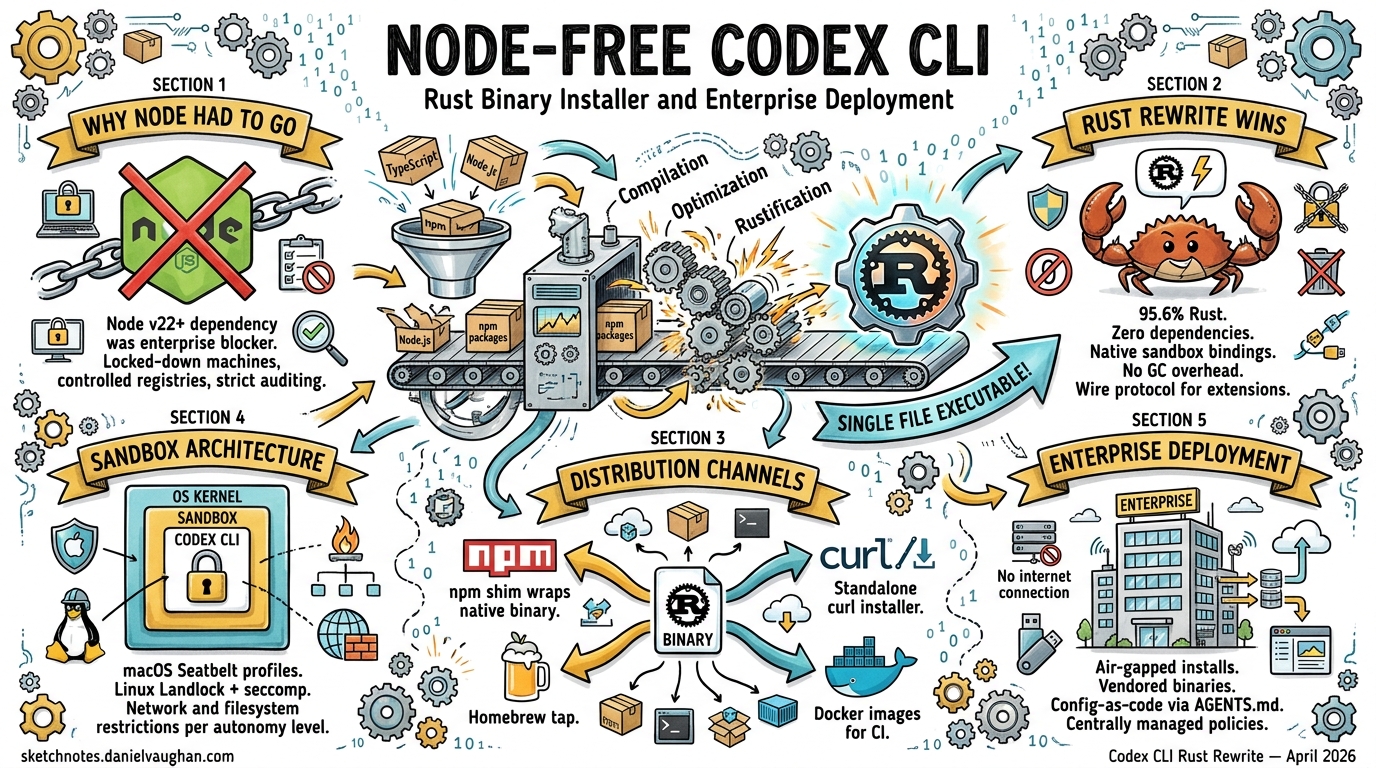
In May 2025, OpenAI announced the rewrite of Codex CLI from TypeScript to Rust1. By early 2026, the Rust implementation became the default experience, eliminating the Node.js v22+ runtime dependency that had been a persistent friction point for adoption2. Today, with 95.6% of the codebase in Rust and releases averaging nearly two per day3, Codex CLI is a standalone native binary distributed through multiple channels — each with distinct trade-offs for enterprise teams.
This article examines the binary distribution architecture, installation channels, sandboxing infrastructure, and enterprise deployment strategies that the Rust rewrite enables.
Why Node.js Had to Go
The original TypeScript implementation used the ink React-based terminal UI framework, which mandated a Node.js v22+ runtime2. For individual developers, this was a minor inconvenience. For enterprise environments with locked-down machines, controlled package registries, and strict dependency auditing requirements, it was a blocker.
The Rust rewrite addressed four core motivations2:
- Zero-dependency installation — no runtime requirement beyond the OS itself
- Native security bindings — direct access to macOS Seatbelt and Linux Landlock/seccomp
- Performance — no garbage collection overhead, lower memory consumption
- Extensibility — a wire protocol enabling multi-language agent extensions
Binary Distribution Architecture
The npm package still exists (@openai/codex), but the binary it delivers is fundamentally different from the old TypeScript bundle. The codex-cli/bin/codex.js wrapper is now a thin Node.js shim that detects the host platform and architecture, then spawns the correct native binary from a vendor/ directory4.
flowchart LR
    A[npm install -g @openai/codex] --> B[codex.js wrapper]
    B --> C{Detect OS/Arch}
    C -->|macOS ARM64| D["@openai/codex-darwin-arm64"]
    C -->|macOS x86_64| E["@openai/codex-darwin-x64"]
    C -->|Linux x86_64| F["@openai/codex-linux-x64"]
    C -->|Linux ARM64| G["@openai/codex-linux-arm64"]
    D & E & F & G --> H[Native Rust Binary]
The wrapper uses asynchronous spawn to forward signals like SIGINT correctly to the native process4. The build pipeline (codex-cli/scripts/build_npm_package.py) hydrates the vendor/ directory with pre-compiled binaries for each target, including bundled tools like rg (ripgrep) and, on Windows, codex-command-runner4.
Platform Support Matrix
| Platform | Architecture | Binary Type | Notes |
|---|---|---|---|
| macOS 12+ | ARM64, x86_64 | Native Mach-O | Seatbelt sandboxing via /usr/bin/sandbox-exec5 |
| Ubuntu 20.04+/Debian 10+ | x86_64, ARM64 | Statically-linked musl | Maximum portability across distributions4 |
| Windows 11 | x86_64, ARM64 | WSL2 recommended | Native sandbox with restricted tokens6 |
The musl-linked Linux builds deserve particular attention for enterprise deployments — they carry zero shared library dependencies, making them suitable for minimal container images and air-gapped environments.
Installation Channels
Homebrew (Recommended for macOS/Linux)
brew install --cask codex
This installs the pre-built binary directly with no Node.js dependency7. Upgrades follow the standard brew upgrade mechanism. For teams already using Homebrew in their developer environment provisioning, this is the lowest-friction path.
npm (Cross-Platform)
npm i -g @openai/codex
Despite using npm as the delivery mechanism, the installed binary is native Rust — Node.js is only needed for the thin wrapper shim4. The latest stable release series is v0.121.0 as of mid-April 20268.
GitHub Releases (Direct Download)
# Download the latest release for your platform
curl -L https://github.com/openai/codex/releases/latest/download/codex-linux-x64.tar.gz | tar xz
sudo mv codex /usr/local/bin/
Each release (tagged as rust-vX.X.X) publishes approximately 93 assets covering all supported platforms8. This channel is ideal for air-gapped deployments where package managers are unavailable.
DotSlash (Team Version Pinning)
This is where enterprise deployment gets interesting. DotSlash enables project-specific version pinning through a lightweight configuration file committed to source control9.
# Commit a single lightweight file to your repo
# All contributors get the same Codex version regardless of platform
cp codex .dotslash/codex
git add .dotslash/codex
The DotSlash configuration references hashes from .github/dotslash-config.json to verify binary integrity across platforms4. When a developer runs the pinned codex command, DotSlash fetches the correct platform-specific binary, verifies its hash, and caches it locally.
flowchart TD
    A[Developer runs ./codex] --> B[DotSlash reads config]
    B --> C{Binary cached?}
    C -->|Yes| D[Launch cached binary]
    C -->|No| E[Download platform binary]
    E --> F[Verify SHA hash]
    F --> G[Cache locally]
    G --> D
This approach ensures deterministic tooling across a team without requiring every developer to manage their own installation.
The Cargo Workspace Architecture
The codex-rs directory contains a Cargo workspace with 69 member crates10, organised into functional groups:
| Crate | Purpose |
|---|---|
codex-core |
Business logic, reusable library for Rust/native applications |
codex-tui |
Full-screen terminal interface built on Ratatui |
codex-exec |
Headless CLI for non-interactive automation and CI |
codex-cli |
Multitool unifying TUI and exec through subcommands |
install-context |
⚠️ Installation context detection (limited public documentation) |
The install-context crate appears to handle detection of how Codex was installed (npm, Homebrew, direct binary, DotSlash), which influences upgrade prompts and telemetry. Documentation on this crate remains sparse as of April 2026.
All crate names follow the codex- prefix convention, and the workspace is designed to be built from the top-level codex-rs directory to keep shared configuration, features, and build scripts aligned6.
Sandbox Architecture for Enterprise
The Rust rewrite’s most significant enterprise benefit is kernel-level sandboxing — not container-based isolation, but direct OS security framework integration5:
flowchart TD
    A[codex --sandbox read-only] --> B{Detect OS}
    B -->|macOS| C["Seatbelt via /usr/bin/sandbox-exec"]
    B -->|Linux| D["Landlock + seccomp filters"]
    B -->|Windows| E["Restricted process tokens"]
    C & D & E --> F[Sandboxed process tree]
    F --> G["All child processes inherit restrictions"]
Three sandbox policies are available via the --sandbox flag6:
read-only(default) — restricts filesystem write accessworkspace-write— permits writing within the workspace directory whilst blocking network accessdanger-full-access— disables sandboxing entirely
Critically, sandbox policies apply to the entire process tree spawned by the agent5. This means any shell commands, subprocesses, or tools invoked by Codex inherit the same restrictions — a significant improvement over application-level sandboxing.
Enterprise Deployment Patterns
Corporate Proxy Support
Recent releases added custom CA certificate support for corporate proxies11, addressing a common enterprise blocker. Teams behind TLS-inspecting proxies can now configure Codex to trust their corporate root certificates.
Hooks for Policy Enforcement
The hooks system enables teams to intercept or augment prompts, opening the door to audit logging, policy enforcement, and automated context injection11:
# .codex/config.toml
[hooks]
user_prompt = "/usr/local/bin/corporate-policy-check"
CI/CD Integration
The codex-exec crate provides a headless binary purpose-built for non-interactive automation6. Combined with the workspace-write sandbox policy and musl-linked binaries, this enables secure CI pipeline integration without containerisation overhead.
Authentication
Codex CLI supports authentication via ChatGPT Plus, Pro, Business, Edu, and Enterprise plans, as well as direct API key usage12. Enterprise SSO integration flows through the existing OpenAI organisational account infrastructure.
Migration from npm-Based Installations
For teams currently running the npm-installed version, migration is straightforward:
# Remove the npm installation
npm uninstall -g @openai/codex

# Install via Homebrew (recommended)
brew install --cask codex

# Or download directly
curl -L https://github.com/openai/codex/releases/latest/download/codex-$(uname -s | tr '[:upper:]' '[:lower:]')-$(uname -m).tar.gz | tar xz
Configuration files in ~/.codex/ are fully compatible — the Rust binary reads the same config.toml and respects the same RUST_LOG environment variable for debugging6.
Conclusion
The Node.js-free Codex CLI represents more than a language rewrite. The combination of zero-dependency binaries, kernel-level sandboxing, DotSlash version pinning, and enterprise hooks transforms Codex from a developer productivity tool into an enterprise-deployable agent platform. With 3 million weekly users as of April 20263 and nearly all Fortune 100 companies already on OpenAI infrastructure, the Rust binary installer removes the last significant barrier to standardised enterprise adoption.
Citations
-
OpenAI Rewrites Codex CLI in Rust, Saying Goodbye to Node.js ↩
-
[DeepWiki — Installation and Setup openai/codex](https://deepwiki.com/openai/codex/1.1-installation-and-setup) -
OpenAI Codex CLI ships v0.116.0 with Enterprise Features — Augment Code ↩ ↩2
-
[CLI — Codex OpenAI Developers](https://developers.openai.com/codex/cli)