Codex Built-In Memory Deep Dive: How the Two-Phase Pipeline Turns Sessions into Institutional Knowledge
Codex Built-In Memory Deep Dive: How the Two-Phase Pipeline Turns Sessions into Institutional Knowledge
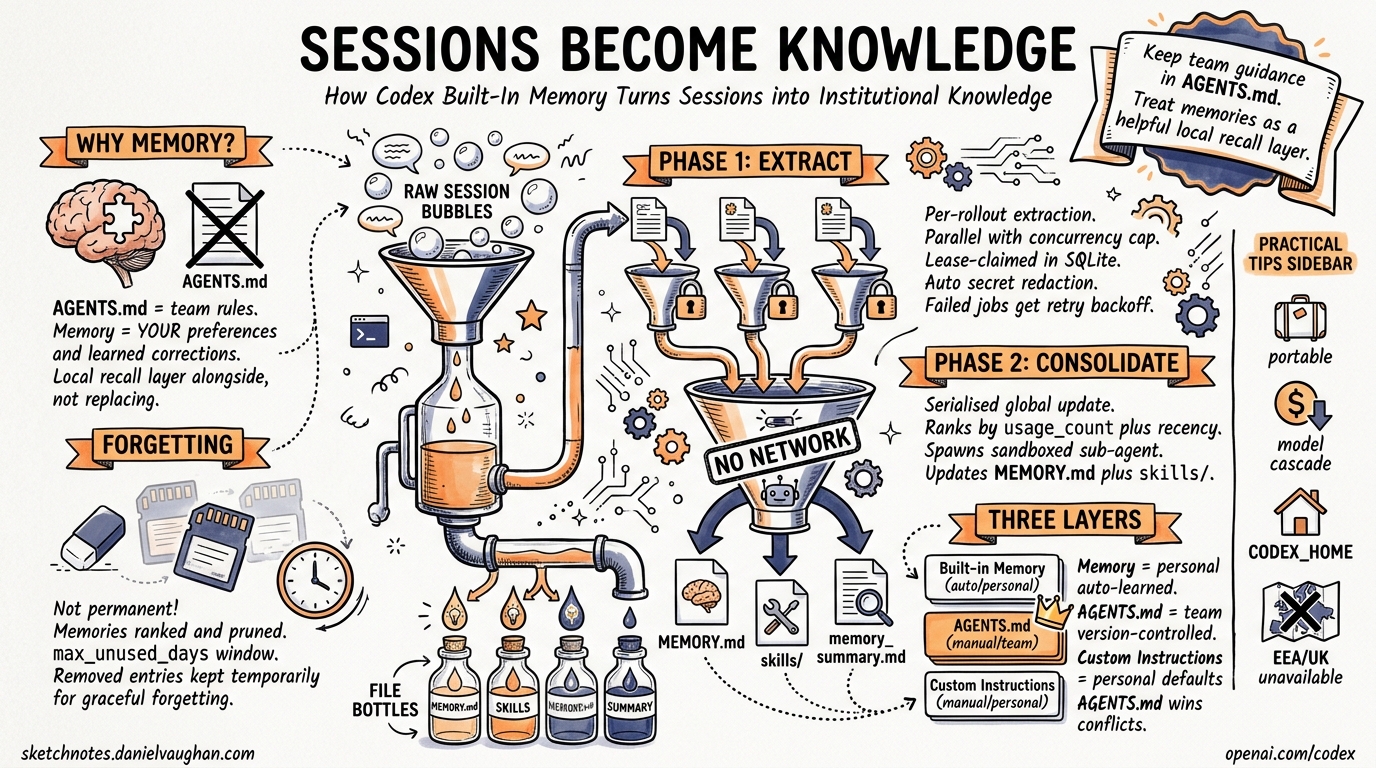
Codex CLI shipped a built-in memory preview on 16 April 2026 as part of the major “Codex for (almost) everything” update1. Unlike project-scoped AGENTS.md files or third-party solutions like MemPalace, this is a first-party, local-first memory system baked directly into the Rust core2. It extracts useful context from completed sessions, consolidates it into on-disk artefacts, and injects those memories into future threads — so the agent progressively learns your preferences, conventions, and pitfalls without you repeating yourself.
This article dissects the architecture, configuration surface, privacy model, and practical usage patterns.
Why Not Just AGENTS.md?
AGENTS.md is the right tool for team-level, version-controlled project rules — coding standards, test commands, deployment conventions3. But it has two blind spots:
- Personal preferences — your preferred review style, verbosity, formatting quirks — don’t belong in a shared repo file.
- Learned corrections — when you tell Codex “don’t use
unwrap()in production code” mid-session, that correction dies with the thread.
Built-in memory fills both gaps. It operates as a local recall layer that sits alongside AGENTS.md, not as a replacement4. The official documentation is explicit: “Keep required team guidance in AGENTS.md or checked-in documentation. Treat memories as a helpful local recall layer.”4
Architecture: The Two-Phase Pipeline
The memory system is implemented in the codex-memory crate2 and runs asynchronously at session startup. It only triggers for non-ephemeral, non-sub-agent sessions with the feature enabled and a state database available2.
flowchart TD
    A[Session Starts] --> B{Eligible?}
    B -->|No: ephemeral / sub-agent / disabled| C[Skip]
    B -->|Yes| D[Phase 1: Rollout Extraction]
    D --> E[Claim rollouts from SQLite state DB]
    E --> F[Filter to memory-relevant items]
    F --> G[Parallel model calls — concurrency-capped]
    G --> H[Secret redaction]
    H --> I[Store stage-1 outputs in DB]
    I --> J[Phase 2: Global Consolidation]
    J --> K[Claim single global job — serialised]
    K --> L[Load bounded stage-1 outputs]
    L --> M[Sync raw_memories.md + rollout_summaries/]
    M --> N[Spawn consolidation sub-agent]
    N --> O[Update MEMORY.md + memory_summary.md + skills/]
    O --> P[Prune stale artefacts]
Phase 1: Rollout Extraction
Phase 1 processes individual completed sessions (“rollouts”) into structured memory records2. Eligible rollouts must be:
- from interactive session sources
- within the configured age window
- idle long enough (to avoid summarising active sessions)
- not already claimed by another worker
Each rollout is sent to a model that produces structured output containing a detailed raw_memory, a compact rollout_summary, and an optional rollout_slug2. Extraction jobs run in parallel with a fixed concurrency cap, and each is lease-claimed in the SQLite state database to prevent duplicate work across concurrent startups2.
Failed jobs are marked with retry backoff rather than hot-looping — a resilience pattern that prevents runaway model calls on transient failures2.
Phase 2: Global Consolidation
Phase 2 is serialised — only one consolidation runs at a time2. It:
- Loads a bounded set of stage-1 outputs, ranked by
usage_countthen by recency - Filters out memories whose
last_usageexceeds themax_unused_dayswindow - Computes a diff against the previous successful consolidation (
added,retained,removed) - Syncs filesystem artefacts:
raw_memories.mdand individual files underrollout_summaries/ - Spawns an internal consolidation sub-agent with no approvals, no network, and local write access only
- The sub-agent updates
MEMORY.md,memory_summary.md, and learnedskills/
The separation into two phases is deliberate: Phase 1 scales horizontally across many rollouts, while Phase 2 serialises the global state update to maintain consistency2.
The Forgetting Mechanism
Memories aren’t permanent. The consolidation diff surfaces removed entries — rollouts that were previously selected but have dropped out of the current top-N ranking2. During consolidation, evidence for removed threads is kept temporarily available (the union of current and previous selections) so the sub-agent can make informed forgetting decisions2. This prevents abrupt context loss while still allowing the memory set to evolve.
On-Disk Layout
All memory artefacts live under ~/.codex/memories/ (or $CODEX_HOME/memories/)4:
~/.codex/memories/
├── MEMORY.md                          # Consolidated high-level memory
├── memory_summary.md                  # Compact summary for injection
├── raw_memories.md                    # Merged raw extractions (latest first)
├── rollout_summaries/
│   ├── 2026-04-15-refactor-auth.md    # Per-rollout summary
│   └── 2026-04-16-fix-ci-pipeline.md
├── skills/                            # Learned procedural memories
└── memories_extensions/               # Plugin-contributed memories
    └── <extension>/
        ├── instructions.md
        └── resources/
The MEMORY.md file is the primary injection point — its contents are included in the system prompt of future sessions when use_memories is enabled4.
Configuration
Enable the feature and tune its behaviour in ~/.codex/config.toml:
[features]
memories = true

[memories]
# Control the two sides independently
generate_memories = true    # Extract memories from new sessions
use_memories = true         # Inject memories into future sessions

# Override models for cost/speed tuning
extract_model = "gpt-5.2-codex"         # Cheaper model for extraction
consolidation_model = "gpt-5.3-codex"   # More capable model for consolidation
The model overrides are particularly useful for cost management5. Extraction runs per-rollout (potentially many calls), so a cheaper model makes sense. Consolidation runs once and needs to reason over the full memory set, so a more capable model pays for itself.
Per-Thread Control
The /memories TUI command lets you control memory behaviour within a session4:
- Toggle whether the current thread contributes to future memories
- Review what memories are being injected into the current session
- Force a memory refresh
Privacy and Security Model
The memory system applies automatic secret redaction to all generated memory fields before storing them in the state database2. However, the official guidance is clear: “Don’t store secrets in memories” and “review memory files before sharing directories”4.
Regional Restrictions
Memories are unavailable in the European Economic Area (EEA), the United Kingdom, and Switzerland at launch4. This is a regulatory compliance decision — the feature processes session content through models to generate memories, which intersects with GDPR data processing requirements6.
For teams with developers across regions, this means memory behaviour will differ by developer location. AGENTS.md remains the correct mechanism for anything that must apply universally.
What Gets Stored Locally
All memory artefacts are local files and SQLite records under ~/.codex/24. No memory content is uploaded to OpenAI’s servers beyond the model calls required for extraction and consolidation. The consolidation sub-agent runs with no network access2.
Memory vs AGENTS.md vs Custom Instructions
Understanding the three persistent context layers prevents duplication and misconfiguration:
flowchart LR
    subgraph "Scope: Global (per developer)"
        A[Built-in Memory<br/>~/.codex/memories/]
        B[Custom Instructions<br/>Settings → Personalisation]
    end
    subgraph "Scope: Per Repository (per team)"
        C[AGENTS.md<br/>checked into repo]
    end
    A -->|"Auto-generated<br/>from sessions"| D[Session Context]
    B -->|"Maps to personal<br/>AGENTS.md"| D
    C -->|"Loaded from<br/>working directory"| D
| Aspect | Built-in Memory | AGENTS.md | Custom Instructions |
|---|---|---|---|
| Scope | Per-developer, global | Per-repo, team-shared | Per-developer, global |
| Source | Auto-extracted from sessions | Manually authored | Manually authored |
| Version controlled | No (local only) | Yes (committed to repo) | No (app settings) |
| Survives compaction | Yes (injected at start) | Yes (re-read after compact) | Yes (system prompt) |
| Cross-tool | Codex only | AAIF standard — Codex, Claude Code, Cursor3 | Codex only |
| Best for | Learned preferences, corrections | Team rules, project conventions | Personal defaults |
Practical Patterns
Pattern 1: Bootstrap a New Machine
Memory files are portable. Copy ~/.codex/memories/ to a new machine and your preferences, learned conventions, and accumulated corrections transfer immediately — no re-training required.
Pattern 2: Model Cascade for Cost Control
Use a cheap model for Phase 1 extraction (runs per-rollout) and a capable model for Phase 2 consolidation (runs once):
[memories]
extract_model = "o4-mini"
consolidation_model = "gpt-5.3-codex"
This can reduce memory pipeline costs by 60–80% compared to using the default model for both phases. ⚠️ Exact savings depend on rollout volume and model pricing at time of use.
Pattern 3: Memory Hygiene Automation
Periodically review ~/.codex/memories/MEMORY.md for:
- Stale preferences you’ve changed your mind about
- Incorrectly generalised patterns from one-off sessions
- Any residual secrets that escaped redaction
# Quick audit — what does Codex remember about you?
cat ~/.codex/memories/MEMORY.md

# Nuclear option — reset all memories
rm -rf ~/.codex/memories/
Pattern 4: Separate Work and Personal Contexts
Use CODEX_HOME to maintain separate memory stores:
# Work context
CODEX_HOME=~/.codex-work codex

# Personal projects
CODEX_HOME=~/.codex-personal codex
Each home directory maintains its own memory pipeline, state database, and consolidated artefacts.
Pattern 5: Memory-Aware AGENTS.md
Reference the memory system in your AGENTS.md to prevent conflicts:
## Context Layers
- Team rules: this file (AGENTS.md)
- Personal preferences: developer's built-in memory (do not duplicate here)
- If memory contradicts this file, this file wins
Limitations and Caveats
- Not available in EEA/UK/Switzerland — regulatory restriction at launch4
- No cross-tool portability — memories are Codex-only; for cross-tool memory, see MemPalace7 or similar MCP-based solutions
- No manual memory injection — you cannot directly write to the memory pipeline; it only learns from sessions
- Ephemeral and sub-agent sessions are excluded —
codex exec --ephemeralcalls do not contribute memories2 - Background processing — memories update asynchronously, not immediately after a session ends4
- Secret redaction is best-effort — review files before sharing
~/.codex/directories4
What This Means for Enterprise Teams
For enterprise deployments, the memory system creates a tension: individual developer memories improve productivity, but they’re invisible to the team and ungoverned. The practical approach:
- Enforce team rules in
AGENTS.md— these are version-controlled and auditable - Use memories for personal acceleration — review style, verbosity, preferred patterns
- Set
generate_memories = falsein governed profiles if compliance requires it - Audit periodically —
~/.codex/memories/is plain Markdown, trivially reviewable
The permission profiles system8 can enforce memory settings per repository through governed repo mode, ensuring sensitive codebases don’t accumulate developer-specific memory artefacts.
Citations
-
OpenAI, “Codex for (almost) everything”, 17 April 2026 — https://openai.com/index/codex-for-almost-everything/ ↩
-
OpenAI,
codex-rs/core/src/memories/README.md(main branch) — https://github.com/openai/codex/blob/main/codex-rs/core/src/memories/README.md ↩ ↩2 ↩3 ↩4 ↩5 ↩6 ↩7 ↩8 ↩9 ↩10 ↩11 ↩12 ↩13 ↩14 ↩15 -
AAIF, “AGENTS.md Specification”, donated to Linux Foundation December 2025 — https://developers.openai.com/codex/guides/agents-md ↩ ↩2
-
OpenAI, “Memories — Codex OpenAI Developers” — https://developers.openai.com/codex/memories -
OpenAI, “Configuration Reference — Codex OpenAI Developers” — https://developers.openai.com/codex/config-reference -
gHacks, “OpenAI Updates Codex With Computer Use, In-App Browser, Memory, and 90-Plus New Plugins”, 17 April 2026 — https://www.ghacks.net/2026/04/17/openai-updates-codex-with-computer-use-in-app-browser-memory-and-90-plus-new-plugins/ ↩
-
MemPalace Cloud Plugin — https://mempalace.cloud ↩
-
OpenAI, Codex permission profiles PRs #18285–#18288 — https://github.com/openai/codex/releases ↩